


الوصف
FREEZEBOT – KEYBOARD MANUAL TRADING
OVERVIEW
FreezeBot is a cTrader cBot that turns the keyboard into a full trading control
panel for manual trading. Using configurable hotkeys, the trader opens BUY or
SELL market orders, closes 50% or all positions — all with a single keystroke.
The bot autonomously handles the logic for opposite-direction pending stop
orders and applies a stop loss as soon as two positions are open in the same
direction. A real-time graphical dashboard on the chart displays current
positions, pending orders and net profit at every tick.
MAIN FEATURES
1. Keyboard order entry (BUY / SELL)
Pressing the configured BUY key (default: B) or SELL key (default: S)
immediately executes a market order on the current symbol with the set lot
size. Before opening in the new direction, the bot automatically closes all
open positions in the opposite direction.
2. Automatic hedge pending order
When the first position is opened in a direction, the bot automatically
places a Stop order in the opposite direction at a configurable distance in
pips (parameter "Range Stop"). This order acts as a hedge in case price
reverses.
- After BUY → creates a Sell Stop below the Bid
- After SELL → creates a Buy Stop above the Ask
3. Automatic stop loss from the second position
When 2 or more positions are open in the same direction, the bot applies a
stop loss to all open positions, calculated in pips (parameter "StopLoss
after 2 positions") from the entry price of the most recently opened
position. Pending orders in the opposite direction are cancelled at the
same time.
4. Pending order cleanup on position close
When all positions of one type (BUY or SELL) are closed, the bot
automatically cancels any remaining pending orders in the opposite direction,
keeping the account free from orphan orders.
5. Close 50% of positions (key C)
Pressing the configured key (default: C) closes half the volume of each
open position. If the remaining volume would fall below the broker's minimum
allowed volume, the operation is skipped and a warning is printed to the log.
6. Close all (key X)
Pressing the configured key (default: X) immediately closes all open
positions and cancels all associated pending orders, zeroing out the full
exposure on the symbol.
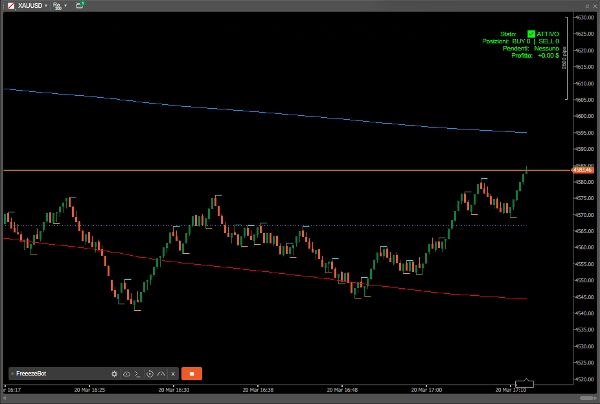
7. Real-time graphical dashboard
A panel displayed in the top-right corner of the chart is refreshed on every
tick and shows:
- Bot status (ACTIVE)
- Number of open BUY and SELL positions
- List of pending orders with their target prices
- Total current net profit (green if positive, orange if negative)
CONFIGURABLE PARAMETERS
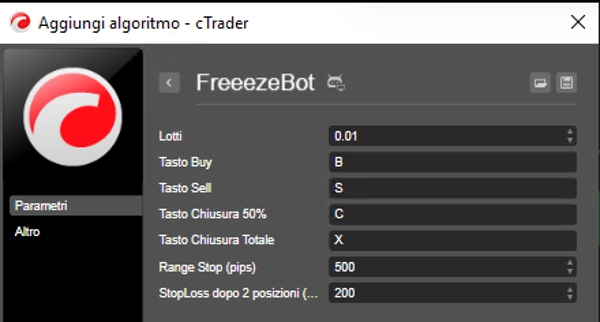
- Lots → Size of each order (default: 0.01)
- Buy Key → Hotkey to open BUY (default: B)
- Sell Key → Hotkey to open SELL (default: S)
- Close 50% Key → Hotkey to close half volume (default: C)
- Close All Key → Hotkey to close everything (default: X)
- Range Stop (pips) → Distance of the hedge Stop order (default: 500)
- StopLoss after 2 positions (pips) → SL applied from the second position
onward (default: 200)
TYPICAL USE CASES
- Discretionary traders operating in scalping or day trading who want to speed
up order execution without using the graphical trading panel.
- Range trading strategies where a main position is managed alongside a fixed-
distance hedge order in the opposite direction.
- Two-position risk management: the bot automatically applies a stop loss as
soon as a second trade is accumulated in the same direction.
TECHNICAL NOTES
FreezeBot is compatible with cTrader (version 4.0 and above). Requires access
rights set to "None". All orders and positions managed by the bot are labelled
"FreezeBot" to ensure isolation from other bots or manual trades on the same
account.
الملخص
مناقشة
تقييمات العملاء
الأسئلة الشائعة















السعر