설명
핫키 트레이더 + 자동 TP/SL
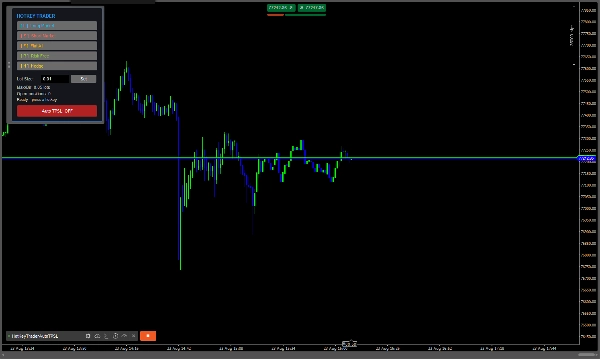
핫키 트레이더 + 자동 TP/SL는 차트에서 직접 즉시 롱, 숏, 플랫, 무위험 및 헤지 동작을 원하는 트레이더를 위해 설계된 빠른 수동 거래 cBot입니다.
또한 자동 TP/SL 관리자가 포함되어 있으며, 핍, 금액 또는 계좌 잔액의 %에 따라 유연한 크기 조절이 가능하며, 거래가 유리하게 움직일 때 이익을 보호하는 선택적 SL 커버 기능도 제공합니다.
거래 패널은 완전히 이동 가능하며, 모든 주요 거래 동작은 사용자 지정 가능한 키보드 핫키를 사용하여 실행할 수 있습니다.
주요 기능
- ⚡ 롱 / 숏 — 시장 거래를 즉시 엽니다.
- 🛑 모두 플랫 — 현재 심볼의 모든 열린 포지션을 닫습니다.
- 🔒 무위험 — 수익성 있는 포지션의 손절매를 진입 가격으로 이동합니다.
- 🔄 헤지 — 현재 순 노출을 중화하기 위해 자동으로 반대 포지션을 엽니다.
- 🎯 자동 TP/SL — 포지션에 자동으로 TP와 SL을 적용합니다.
- 🛡️ SL 커버 — 지정된 가격 이동 후 손절매를 이익 구간으로 자동 이동합니다.
- 📊 포지션 또는 거래 모드 — 그룹의 평균 진입 가격을 기준으로 공유 TP/SL을 사용하거나 각 포지션별 개별 TP/SL을 사용합니다.
- 🎹 사용자 지정 핫키 — 모든 거래 동작에 대해 원하는 키를 선택할 수 있습니다.
- 🖱️ 이동 가능한 거래 패널 — 차트 어디든 패널을 드래그할 수 있습니다.
입력 설정
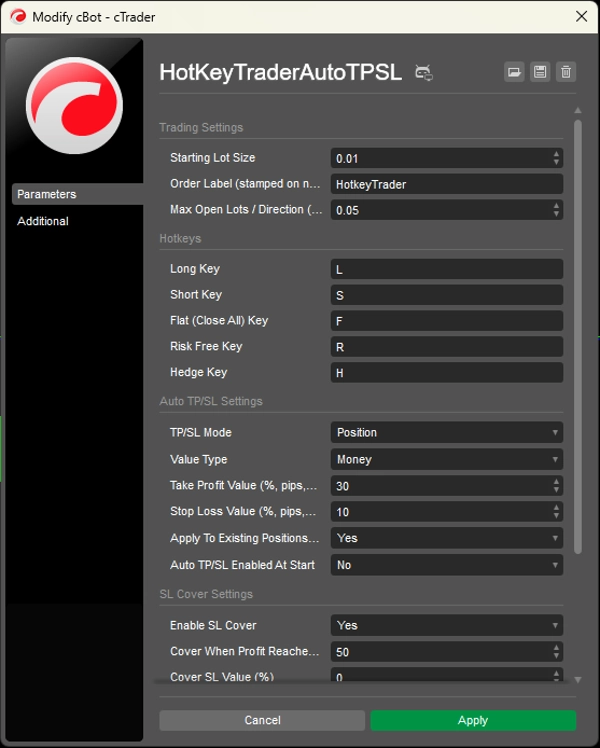
거래 설정
시작 로트 크기
롱 또는 숏을 누를 때 기본으로 사용되는 로트 크기입니다.
주문 라벨
핫키 패널을 통해 열린 포지션에 할당되는 라벨입니다. 이는 자동 TP/SL 시스템이 관리할 포지션을 식별하는 데도 유용합니다.
최대 오픈 로트 / 방향
한 방향에서 허용되는 최대 순 노출입니다.
핫키
롱 키
매수 포지션을 열기 위해 사용하는 키보드 키입니다.
기본값: L
숏 키
매도 포지션을 열기 위해 사용하는 키보드 키입니다.
기본값: S
플랫 (모두 닫기) 키
현재 심볼의 모든 열린 포지션을 닫습니다.
기본값: F
무위험 키
수익성 있는 포지션의 손절매를 진입 가격으로 이동합니다.
기본값: R
헤지 키
현재 순 노출과 동일한 반대 거래를 열어 포지션을 중화합니다.
기본값: H
자동 TP/SL 설정
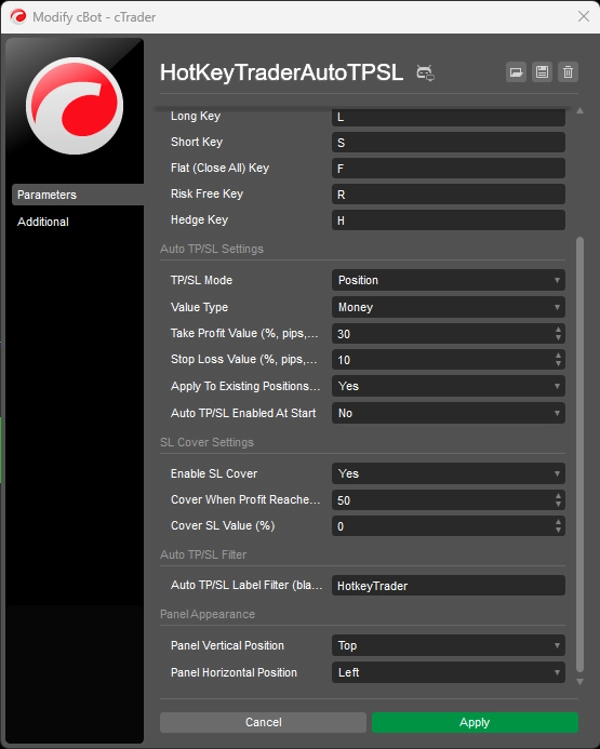
TP/SL 모드
- 포지션 — 심볼과 방향별로 포지션을 그룹화하고 가중 평균 진입 가격을 사용하여 공유 TP/SL을 계산합니다.
- 거래 — 각 개별 포지션에 대해 별도로 TP/SL을 계산합니다.
값 유형
TP 및 SL 거리를 계산하는 방식을 선택하세요:
- 백분율 — 계좌 잔액의 백분율 기준입니다.
- 핍 — 고정된 핍 거리입니다.
- 금액 — 계좌 통화로 고정된 금액입니다.
이익 실현 값
선택한 값 유형에 따라 TP 목표를 설정합니다.
예시:
30핍으로 설정 시 = 30 핍30금액으로 설정 시 = 30 계좌 통화 단위30백분율로 설정 시 = 계좌 잔액의 30%
손절매 값
선택한 값 유형에 따라 SL 거리를 설정합니다.
시작 시 기존 포지션에 적용
활성화하면 cBot 시작 시 기존 포지션에 자동 TP/SL 설정을 적용합니다.
시작 시 자동 TP/SL 활성화
cBot 실행 시 자동 TP/SL 엔진이 켜짐 또는 꺼짐 상태로 시작할지 결정합니다.
SL 커버 설정
SL 커버 활성화
거래가 필요한 이익 수준에 도달하면 손절매를 자동으로 이동시킵니다.
이익 도달 시 커버 (%)
SL 커버가 활성화되기 전에 진입 가격에서 필요한 가격 이동의 백분율입니다.
커버 SL 값 (%)
새 손절매가 진입 가격에 대해 어디에 위치하는지 정의합니다.
0= SL이 진입 가격으로 이동 (손익분기점)- 양수 값 = SL이 이익 구간으로 이동
자동 TP/SL 필터
자동 TP/SL 라벨 필터
자동 TP/SL 엔진이 관리할 포지션을 제어합니다.
- 예:
HotkeyTrader라벨을 입력하면 해당 라벨이 붙은 포지션만 관리됩니다. - 빈칸으로 두면 → 모든 심볼의 모든 열린 포지션을 관리할 수 있습니다.
패널 외관
패널 세로 위치
거래 패널의 초기 세로 위치를 설정합니다.
패널 가로 위치
거래 패널의 초기 가로 위치를 설정합니다.
패널은 이후에 차트 어디든 드래그하여 이동할 수 있습니다.
중요 참고 사항
자동 TP/SL 계산에서 금액 및 백분율 값은 심볼의 틱 값과 틱 크기를 사용하여 가격 거리로 변환됩니다. 이 계산은 브로커마다 틱 값 정규화가 다를 수 있으므로, 코드는 먼저 데모 계좌에서 테스트할 것을 권장합니다. 핍 기반 TP/SL은 이러한 의존성이 없습니다.
요약
Key features include an automatic TP/SL manager with flexible sizing options based on pips, monetary value, or percentage of account balance. The bot offers two TP/SL modes: Position mode, which groups positions by symbol and direction for shared TP/SL based on weighted-average entry price, and Transaction mode, which applies TP/SL individually per position. An optional SL Cover feature automatically moves the stop loss into profit after a specified price movement.
Input settings allow configuration of starting lot size, order labels for position management, maximum net exposure per direction, and hotkey assignments. The panel’s initial position on the chart can be set and then adjusted by dragging. For monetary and percentage TP/SL calculations, the bot converts targets into price distances using symbol tick values, with pip-based calculations independent of broker variations.
상담
고객 리뷰
5 | 50 % | |
4 | 50 % | |
3 | 0 % | |
2 | 0 % | |
1 | 0 % |