Açıklama
AI Trading and Advisory Assistant, canlı piyasa verilerini analiz etmek, ticaret tavsiyesi sağlamak veya işlemleri otomatik olarak gerçekleştirmek için makine öğrenimi ve mevcut büyük dil modellerini (LLM'ler) kullanan bir cTrader cBot'tur.
En son sürüm, OpenRouter, NVIDIA ve Router9 üzerinden bağlantı kurar. Bu sağlayıcılar, OpenAI/ChatGPT, Anthropic Claude, Google Gemini, DeepSeek, Meta, Mistral, Qwen, Kimi ve diğer sağlayıcıların modelleri dahil olmak üzere, tek bir OpenAI uyumlu API aracılığıyla birçok model ailesine erişim sağlar. Bu, seçilen sağlayıcının listelediği ve sohbet-tamamlamalarına uyumlu model kimliği sunduğu durumlarda Anthropic Claude Fable 5, ChatGPT 5.6 Sol, Qwen 3.8 ve Kimi K3 gibi yeni nesil modelleri içerir.
Model kullanılabilirliği, isimler, fiyatlandırma, bağlam sınırları ve ücretsiz erişim değişebilir. Her zaman seçilen sağlayıcının güncel model kataloğundan tam model kimliğini kopyalayın.
TraderAI Nasıl Çalışır
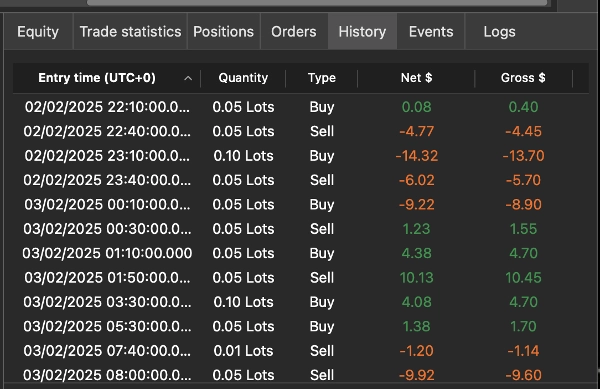
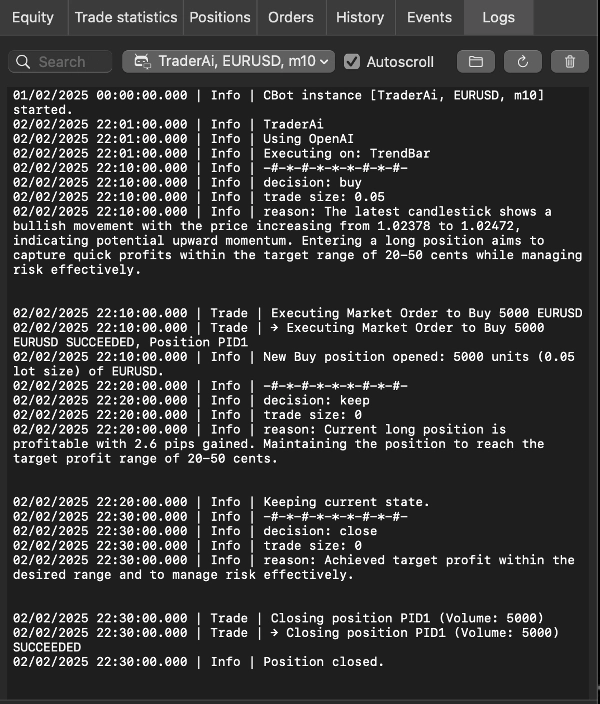
TraderAI, seçilen piyasa verilerini gerçek zamanlı olarak tercih ettiğiniz AI modeline gönderir. Model, özel isteminizi takip eder ve ya tavsiye ya da yapılandırılmış ticaret işlemleri döner. Bu, piyasa verilerini manuel olarak kopyalama veya her kararı kendiniz uygulama ihtiyacını ortadan kaldırır.
AI, fiyat hareketi, mum grafikler, tick verisi, piyasa derinliği, grafik göstergeleri, açık pozisyonlar ve son karar geçmişini kullanarak trendleri tanımlayabilir ve olası işlemleri değerlendirebilir. AI çıktısı hatalı olabilir; her stratejiyi gerçek fonlarla kullanmadan önce demo hesapta test edin.
İki Çalışma Modu
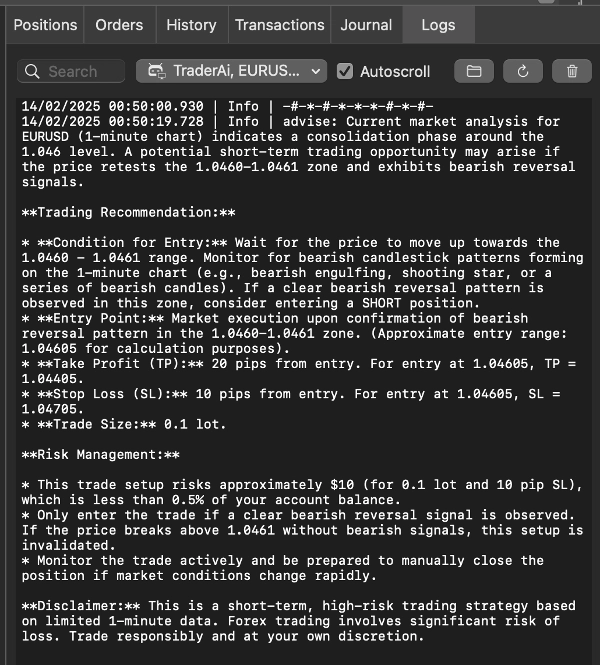
Danışman modu, sağlanan piyasa durumunu analiz eder ve tavsiye gösterir. Ticaret yapma kararı size aittir.
Trader modu, modelin seçilen ticaret hesabında pozisyon açmasına, kapatmasına veya değiştirmesine izin verir. Dahili yürütme sınırları, model işlemlerini hesaba ulaşmadan önce doğrular.
Desteklenen AI Sağlayıcıları
OpenRouter
OpenRouter, tek bir API anahtarı ve model adlandırma şeması aracılığıyla birçok ticari ve açık modele erişim sağlar.
Model kataloğu: openrouter.ai/models
Varsayılan model kimliği: openai/gpt-oss-20b:free
Genellikle yayıncı/model-adı formatında tam katalog kimliğini girin.
NVIDIA
NVIDIA, desteklenen metin üretimi ve akıl yürütme modelleri için barındırılan NVIDIA NIM uç noktaları sağlar.
Model kataloğu: build.nvidia.com/models
Ücretsiz Uç Nokta veya başka bir barındırılan API uç noktası olan bir model seçin.
Model sayfasını açın ve tam API model kimliğini kopyalayın. Her katalog girdisi sohbet modeli değildir; resim, ses, gömme ve yalnızca indirilebilir modeller bu cBot için uygun değildir.
Router9
Router9, desteklenen modelleri birden fazla üst sağlayıcıdan tek bir uç nokta üzerinden yönlendirir.
Model kataloğu: router9.com/models
Katalogdaki Model Kimliği sütununda gösterilen tam değeri girin.
Katalog, mevcut modelleri, üst sağlayıcıları, bağlam sınırlarını, fiyatları ve ücretsiz katman kullanılabilirliğini belirtir.
cBot Parametreleri
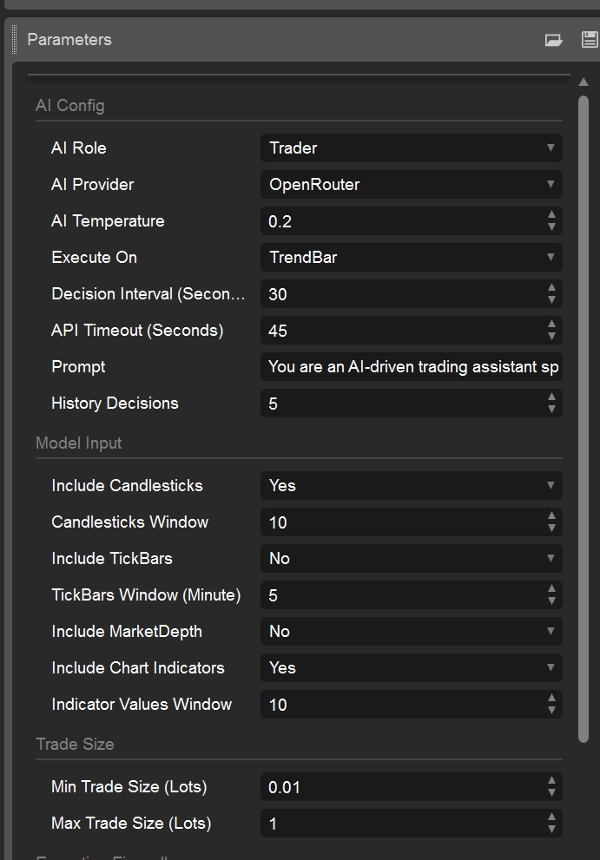
AI Yapılandırması
AI Rolü — Danışman veya Trader seçin.
AI Sağlayıcı — OpenRouter, Nvidia veya Router9 seçin.
AI Sıcaklığı — Yanıt varyasyonunu kontrol eder. Varsayılan 0.2'dir.
- 0.1–0.3: daha tutarlı ve muhafazakar
- 0.4–0.7: dengeli
- 0.8–1.0: daha çeşitli ve yaratıcı
Daha düşük değerler genellikle tekrarlanabilir ticaret kararları için daha iyidir. Bazı sağlayıcılar veya akıl yürütme modelleri sıcaklığı görmezden gelebilir veya kısıtlayabilir.
Yürütme Zamanı - cBot yeni bir karar istediğinde seçin:
TrendBar: yeni bir grafik-zaman dilimi çubuğu mevcut olduğunda
TickBar: gelen tick etkinliğinden, karar aralığına tabi
Karar Aralığı (Saniye) - AI istekleri arasındaki minimum süre. Varsayılan 30'dur. Daha büyük bir değer API kullanımını azaltır ve sağlayıcı oran sınırlarını aşmayı önlemeye yardımcı olur.
API Zaman Aşımı (Saniye) - Sağlayıcı yanıtı için maksimum bekleme süresi. Varsayılan 45 saniyedir.
Geçmiş Kararlar - Modele sağlanan son karar sayısı, 0 ile 20 arasında. Varsayılan 5'tir.
İstem - Modelden beklenen strateji, kısıtlamalar ve davranışı tanımlar. İstemleri demo ortamında oluşturun ve doğrulayın. İstem, cBot'un yürütme güvenlik duvarını geçersiz kılmaz.
Sağlayıcı Yapılandırması
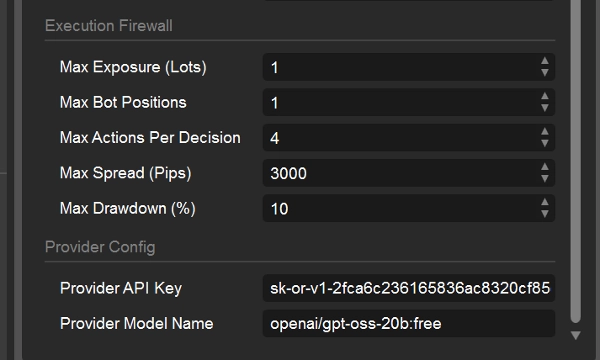
Sağlayıcı API Anahtarı - AI Sağlayıcı altında seçilen sağlayıcı tarafından verilen API anahtarını girin.
Sağlayıcı Model Adı - Sağlayıcının tam model kimliğini girin. Model kimlikleri büyük/küçük harf duyarlıdır ve sağlayıcıya özeldir. Seçilen sağlayıcının kataloğunda API model kimliği olarak görünmeyen bir ChatGPT ürünü veya abonelik adı girmeyin.
Örnek OpenRouter kurulumu
AI Sağlayıcı: OpenRouter
Sağlayıcı Model Adı: moonshotai/kimi-k3 veya anthropic/claude-fable-5 veya nvidia/nemotron-3-ultra-550b-a55b:free
Sağlayıcı API Anahtarı: OpenRouter API anahtarınız
Sağlayıcı değiştirirken hem API anahtarını hem de model kimliğini değiştirin. Eski bir TraderAI sürümünden doğrudan OpenAI, Gemini, Anthropic veya DeepSeek anahtarı, seçilen yönlendirme sağlayıcısı açıkça bu anahtarın kullanımını desteklemedikçe geçerli değildir.
Model Girdisi:
Mumları Dahil Et - Model girdisine grafik mum çubuğu verilerini dahil edin.
Mumlar Penceresi - Dahil edilecek son mum sayısı.
TickBarları Dahil Et - Son teklif/sorma tick verilerini dahil edin.
TickBarlar Penceresi (Dakika) - Dahil edilecek tick geçmişi dakikası sayısı.
Piyasa Derinliğini Dahil Et - Mevcut piyasa derinliği anlık görüntüsünü dahil edin. Piyasa derinliği geriye dönük test sırasında mevcut olmayabilir.
Grafik Göstergelerini Dahil Et - Grafiğe eklenmiş desteklenen göstergeleri dahil edin.
Gösterge Değerleri Penceresi - Her grafik göstergesi için dahil edilecek son değer sayısı, 1 ile 100 arasında.
Daha büyük giriş pencereleri daha fazla token tüketir ve gecikme ile maliyeti artırabilir. Bazı zaman dilimi ve geriye dönük test veri kaynağı kombinasyonları tick veya derinlik verisi sağlamayabilir.
İşlem Büyüklüğü
Min İşlem Büyüklüğü (Lot) - AI'nın talep edebileceği en küçük işlem büyüklüğü.
Max İşlem Büyüklüğü (Lot) - AI'nın talep edebileceği en büyük işlem büyüklüğü.
Yürütme Güvenlik Duvarı
Bu sınırlar Trader modunda geçerlidir ve AI tarafından oluşturulan işlemleri kısıtlamaya yardımcı olur:
Maksimum Maruziyet (Lot) - cBot'un oluşturabileceği maksimum toplam maruziyet.
Maksimum Bot Pozisyonları - cBot tarafından yönetilen maksimum pozisyon sayısı.
Karar Başına Maksimum İşlem - Bir AI yanıtından kabul edilen maksimum açma, kapama veya değiştirme işlemi sayısı.
Maksimum Spread (Pip) - Mevcut spread yapılandırılan değeri aşarsa yeni girişleri engeller.
Maksimum Zarar Limiti (%) - Yapılandırılan zarar limiti ulaşıldığında ek riski engeller.
Bu kontroller riski azaltır ancak zararları, sağlayıcı hatalarını, gecikmeyi, kaymayı veya yanlış model çıktısını ortadan kaldıramaz.
Kendi Anahtarınızı Getirin (BYOK)
TraderAI sağlayıcı erişimini paketlemez. Tercih ettiğiniz sağlayıcıda hesap oluşturun, bir API anahtarı alın ve gerekirse o hesabı fonlayın veya yapılandırın:
- OpenRouter: https://openrouter.ai/
- NVIDIA Build: https://build.nvidia.com/
- Router9: https://www.router9.com/
API anahtarınızı asla paylaşmayın veya ekran görüntülerinde, genel kaynak kodunda ya da destek mesajlarında bulundurmayın. Sağlayıcı kullanım ücretleri ve sınırları sağlayıcı tarafından kontrol edilir, TraderAI tarafından değil.
Model Seçimi
Ticaret veya danışmanlık kullanımı için, metin sohbet tamamlamalarını destekleyen, yapılandırılmış talimatları güvenilir şekilde takip eden ve seçilen piyasa veri pencereleriniz için yeterli bağlama sahip bir model seçin. Gecikme ve maliyeti demo hesapta karşılaştırın. Daha büyük veya akıl yürütmeye odaklı bir model otomatik olarak daha iyi bir ticaret modeli değildir.
Desteklenen sağlayıcılar aracılığıyla mevcut olabilecek model ailelerine örnekler şunlardır:
- Anthropic: Claude Fable 5
- OpenAI/ChatGPT: ChatGPT 5.6 Sol
- Alibaba Qwen: Qwen 3.8
- Moonshot AI: Kimi K3
Bunlar gösterim adlarıdır, garantili API tanımlayıcıları değildir. Sağlayıcı kataloğundan tam model kimliğini kopyalayın—örneğin, bir sağlayıcı bir organizasyon öneki ekleyebilir, küçük harf kullanabilir veya sürümlü bir son ek yayınlayabilir. Seçilen sağlayıcının kataloğunda bir model yoksa, o sağlayıcı üzerinden henüz kullanılamaz.
Güncel liste için bu canlı katalogları kullanın:
NVIDIA: build.nvidia.com/models
OpenRouter: openrouter.ai/models
Router9: www.router9.com/models
Önemli Uyarı
TraderAI teknik bir araçtır, finansal tavsiye veya performans garantisi değildir. AI tarafından oluşturulan analizler ve işlemler yanlış olabilir ve önemli kayıplara yol açabilir. Demo hesapta test edin, muhafazakar sınırlar kullanın, cBot'u izleyin ve otomatik ticaretin yargı alanınızda ve brokeriniz tarafından izinli olduğundan emin olun.
Özet
The product supports two operational modes:
1. **Trader Mode**: Executes trades automatically on the user’s selected trading account based on custom prompts.
2. **Advisor Mode**: Provides trading advice based on market analysis, leaving trade execution to the user.
Users can customize prompts to tailor AI behavior according to their trading strategies. The system supports multiple AI models, including the latest OpenAI models (e.g., GPT-4 variants), all Gemini models, DeepSeek chat and reasoner models, and Claude models, with Grok and Mistral models planned for future integration.
Key configurable parameters include AI role, model selection, reasoning activation, AI temperature (controlling creativity vs. determinism), maximum token usage, execution timing (market trend bars or tick bars), and market data inputs such as candlesticks, tickers, and market depth. Trade size limits can also be set.
Access to AI models requires user-provided API keys. Sample prompts demonstrate strategies for high-frequency trading, momentum-based trading, and statistical arbitrage across forex, commodities, crypto, and equity markets.
Tartışma
Müşteri değerlendirmeleri
5 | 33 % | |
4 | 67 % | |
3 | 0 % | |
2 | 0 % | |
1 | 0 % |