
Penerangan
Papan Pemuka Cabaran – Rakan Prop Firm Anda
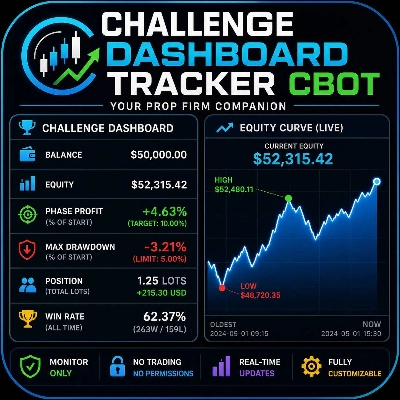
Sentiasa pantau penilaian cabaran anda tanpa perlu meninggalkan carta. Papan Pemuka Cabaran adalah panel pemantauan masa nyata yang tidak mengganggu yang terletak terus pada carta cTrader anda, memberikan anda akses segera kepada setiap metrik yang penting untuk lulus fasa penilaian prop firm – sasaran keuntungan, penurunan maksimum, kadar kemenangan, dan pendedahan posisi semasa.
Ciri Utama
- Metrik Cabaran Masa Nyata
Lihat ekuiti semasa anda, baki, keuntungan fasa (sebagai % daripada baki permulaan anda), dan penurunan maksimum dalam satu pandangan. Sasaran keuntungan yang boleh dikonfigurasi dan had penurunan maksimum membolehkan papan pemuka menyesuaikan diri dengan peraturan mana-mana prop firm dengan segera.
- Amaran Pelanggaran Pintar
Nilai Max DD secara automatik bertukar merah sebaik sahaja penurunan anda melebihi had yang ditetapkan. Keuntungan Fasa bertukar hijau apabila sasaran keuntungan anda dicapai. Tiada lagi pemeriksaan manual – papan pemuka memberitahu anda bila anda selamat dan bila anda dalam bahaya.
- Kesedaran Dagangan Terpadu
Bar “Posisi” khusus memaparkan jumlah lot dan P&L belum direalisasi bagi semua dagangan yang sedang dibuka. Ketahui pendedahan anda tanpa membuka panel pemerhati dagangan.
- Lengkung Ekuiti Mini Masa Nyata
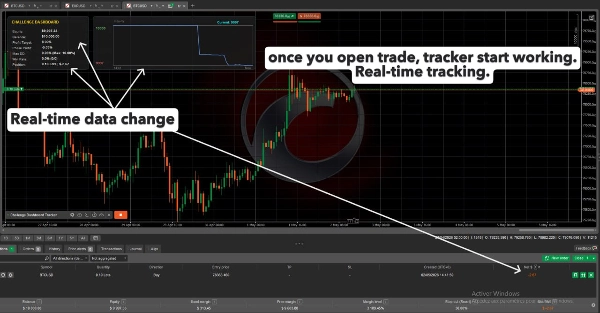
Panel carta yang berasingan dan bergaya cantik terletak di sebelah kanan papan pemuka utama, melukis garis ekuiti masa nyata. Ia termasuk penanda tinggi/rendah, nilai ekuiti semasa di atas, dan rujukan masa (titik tertua + “Sekarang”) supaya anda boleh menjejaki prestasi akaun anda secara visual sepanjang sesi.
- Kadar Kemenangan Berterusan
Kadar kemenangan dikira daripada semua dagangan sejarah pada akaun – ia tidak pernah diset semula apabila anda memulakan semula bot. Dengan cara itu anda boleh memantau konsistensi anda sepanjang cabaran, bukan hanya sesi semasa.
- Lapisan Tidak Interaktif
Kedua-dua panel adalah sepenuhnya tidak interaktif. Semua klik, seretan, dan tatalan melewati ke carta di belakang, jadi anda boleh zum, leret, dan melukis tanpa secara tidak sengaja menggerakkan papan pemuka.
- Boleh Disesuaikan Sepenuhnya
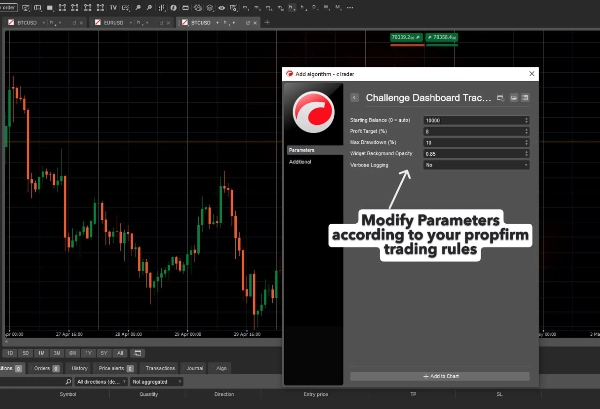
Laraskan baki permulaan (atau biarkan pada sifar untuk menggunakan baki akaun semasa), tetapkan sasaran keuntungan dan peratusan penurunan maksimum anda sendiri, dan kawal kelegapan latar belakang panel untuk menyesuaikan kecerahan carta anda.
- Sentuhan Sifar, Risiko Sifar
- Bot tidak berdagang, tidak mengubah pesanan, dan tidak memerlukan sebarang kebenaran berbahaya (AccessRights.None). Ia hanya membaca data akaun dan memaparkannya. Selamat digunakan pada mana-mana akaun penilaian.
Cara Menggunakan
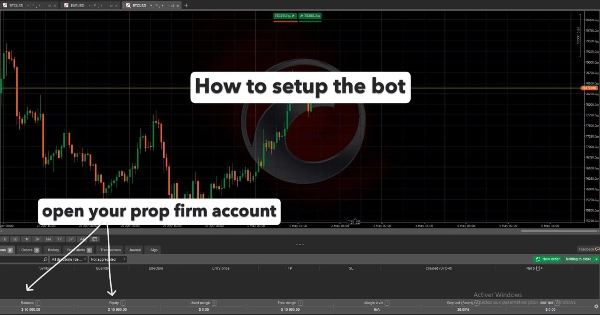
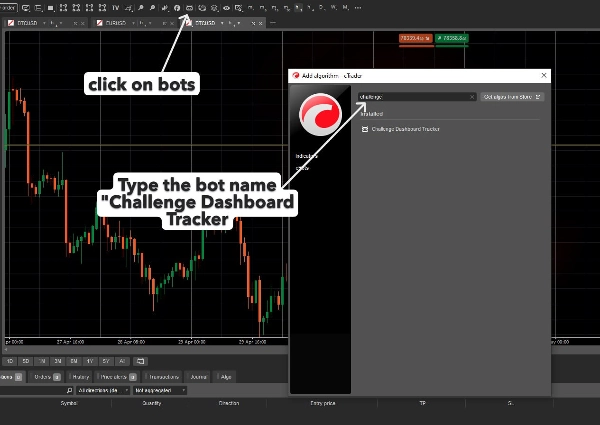
- Pasangkan cBot ke mana-mana carta (mana-mana simbol, mana-mana jangka masa).
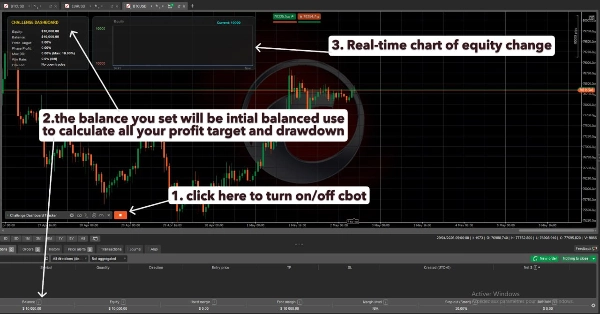
- Masukkan parameter cabaran anda dalam panel tetapan: Baki Permulaan (biarkan 0 untuk pengesanan automatik) / Sasaran Keuntungan % / Penurunan Maksimum %.
- Papan pemuka muncul dengan serta-merta di kiri atas carta anda.
- Berdagang seperti biasa – metrik dikemas kini pada setiap tick.
Siapa Yang Sesuai?
Pedagang yang menyertai mana-mana cabaran prop firm (contohnya, FTMO, The Funded Trader, dll.) yang mahukan peringatan visual berterusan tentang kedudukan mereka berbanding peraturan cabaran. Ia juga sangat sesuai untuk sesiapa yang mahukan pemantau ekuiti yang bersih dan minimal tanpa tetingkap tambahan atau alat luaran.
Keperluan
cTrader Desktop (mana-mana versi yang menyokong .NET cBots)
Tiada kebenaran dagangan diperlukan – berfungsi pada akaun demo dan langsung sama.
Penafian Penting
- cBot ini hanyalah alat pemantauan. Ia tidak melaksanakan dagangan, mengurus risiko, atau menjamin kelulusan cabaran. Sentiasa sahkan peraturan cabaran anda dengan penyedia prop firm anda dan gunakan papan pemuka sebagai rujukan kedua.
Ringkasan
Key functionalities include intelligent alerts that visually indicate when drawdown limits are breached or profit targets are met, a live mini equity curve chart displaying real-time account performance with high/low markers, and a position summary showing total lots and unrealized P&L of open trades. The win rate metric persists across sessions, reflecting all historical trades on the account.
The tool requires no trading permissions, does not execute trades or modify orders, and operates safely on demo or live accounts. Users can customize starting balance, profit target, drawdown thresholds, and panel opacity. It supports any symbol and timeframe within cTrader Desktop and is intended as a visual aid to help traders stay aligned with prop firm challenge requirements without leaving their trading charts.