Penerangan
Peraturan Cabaran Guard memantau keseluruhan akaun cTrader anda dan menguatkuasakan peraturan risiko cabaran prop-firm atau akaun dibiayai, supaya satu dagangan buruk, posisi yang terlupa atau dagangan dendam tidak mengakhiri penilaian anda.
Ia adalah alat pengurusan risiko, bukan strategi dagangan: ia tidak pernah membuka dagangan dan tidak memberikan isyarat. Lampirkannya pada mana-mana carta. Ia memantau setiap posisi dan pesanan tertunda pada akaun (manual, mudah alih, web dan cBot lain) pada setiap simbol.
Apa yang ia kuatkuasakan
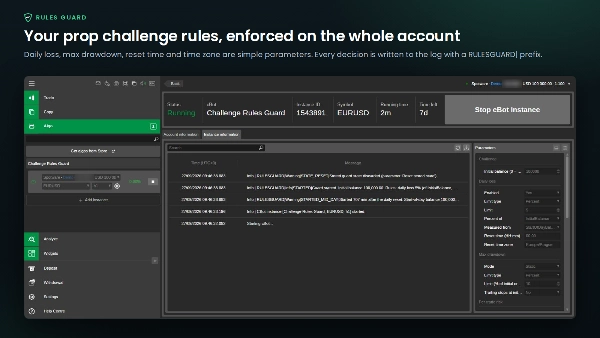
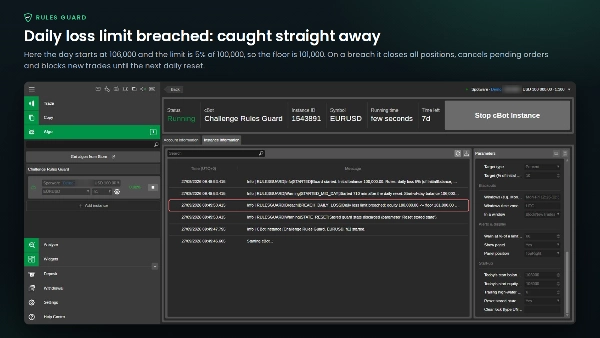
- Had kerugian harian: peratus (daripada baki awal atau nilai permulaan hari) atau jumlah tetap, diukur berdasarkan ekuiti dari baki permulaan hari, ekuiti atau yang lebih tinggi antara kedua-duanya. Masa reset dan zon masa boleh dikonfigurasikan (contohnya 00:00 Europe/Prague atau 17:00 America/New_York), dan perubahan waktu musim panas diuruskan.
- Tarikan maksimum: statik (daripada baki awal) atau mengikut jejak (tanda aras ekuiti tertinggi, tanda aras baki tertutup tertinggi atau baki akhir hari), pilihan untuk berhenti pada baki awal.
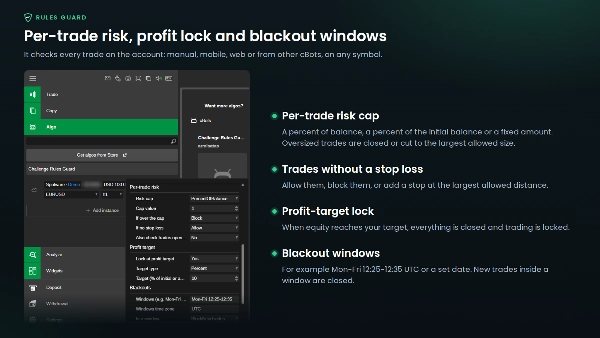
- Had risiko setiap dagangan: peratus baki, peratus baki awal atau jumlah tetap. Dagangan yang melebihi saiz dibenarkan akan ditutup atau dikurangkan kepada jumlah terbesar yang dibenarkan. Dagangan tanpa stop loss boleh dibenarkan, disekat atau diberikan stop pada jarak maksimum yang dibenarkan.
- Kunci sasaran keuntungan: apabila ekuiti mencapai sasaran anda, semuanya ditutup dan dagangan dikunci, supaya anda tidak mengembalikan hasil tersebut.
- Tetingkap blackout: contohnya "Isn-Jum 14:25-14:40; Jum 20:00-24:00" atau tarikh tertentu. Dagangan baru dalam tetingkap ditutup; pilihan untuk menutup semuanya apabila tetingkap bermula.
Apabila berlaku pelanggaran, ia menutup setiap posisi, membatalkan setiap pesanan tertunda dan terus menyekat: mana-mana dagangan baru ditutup serta-merta sehingga reset harian berikutnya (kerugian harian) atau sehingga anda membersihkan kunci itu sendiri (tarikan maksimum, sasaran keuntungan). Amaran muncul apabila sebahagian had digunakan (80% secara lalai).
Panel pada carta menunjukkan ekuiti, kerugian hari ini berbanding had dan ruang yang tinggal, reset seterusnya dalam zon masa firma anda, lantai tarikan, sasaran, had risiko dan blackout seterusnya. Setiap keputusan ditulis ke log cBot dengan awalan RULESGUARD|.
Baik untuk diketahui
- Ia tidak boleh menghentikan pesanan daripada dihantar. Ia menutup atau membatalkan pendedahan baru sebaik sahaja dagangan muncul, dan dagangan itu masih membayar spread dan komisen.
- Ia hanya melindungi semasa ia berjalan: cTrader dibuka dengan cBot dimulakan. Ia tidak menggantikan pemeriksaan firma anda sendiri.
- Jurang, slippage dan putus sambungan boleh menyebabkan kerugian melebihi had sebelum penutupan selesai. Simpan penampan, contohnya 4.5% untuk peraturan 5%.
- Tetingkap blackout adalah masa anda masuk. Tiada kalendar berita automatik.
- Jalankan satu contoh setiap akaun. Tetapkan setiap nilai mengikut peraturan firma anda sendiri; papan pemuka firma anda sentiasa berkuasa.
Simbol dan jangka masa: mana-mana. Saiz akaun dan leverage: mana-mana. Jumlah adalah dalam mata wang akaun anda.
Ia tidak menjamin lulus mana-mana penilaian, tidak menjana keuntungan dan tidak berafiliasi dengan mana-mana firma prop.
Perdagangan melibatkan risiko. Prestasi lalu tidak menjamin keputusan masa depan.
Ringkasan
- Daily loss limits configurable as a percentage or fixed amount, reset by customizable time and timezone settings.
- Maximum drawdown limits, either static or trailing, based on equity or balance high-water marks.
- Per-trade risk caps that restrict trade size and enforce stop-loss rules.
- Profit-target lock that closes all positions and blocks further trading once a profit goal is reached.
- Blackout windows during which new trades are closed or all positions can be closed automatically.
Upon breaching any limit, the cBot closes all positions and cancels pending orders, blocking new trades until reset or manual unlock. An on-chart panel displays real-time equity, loss status, drawdown floors, risk caps, profit targets, and blackout schedules. All actions are logged with a specific prefix for traceability.
The cBot operates only while running in cTrader and does not prevent order submissions but closes trades immediately after execution. It supports any account size, leverage, and currency. This tool assists in maintaining compliance with risk rules during evaluations but does not guarantee passing or generate profits.