Descripción
[IMPORTANTE: SI HAY MÁS DE 6 OPERACIONES SEGUIDAS SIN GANANCIAS (18 POSICIONES NEGATIVAS), POR FAVOR CONTÁCTEME Y DEJE DE OPERAR CON EL ALGORITMO, YA QUE ESO SIGNIFICARÍA QUE LA ESTRUCTURA DEL MERCADO HA CAMBIADO. INTENTARÉ CREAR UNA VERSIÓN ACTUALIZADA QUE SE ADAPTE A LA ESTRUCTURA ACTUAL DEL MERCADO LO ANTES POSIBLE]
A partir de enero de 2026, el algoritmo sigue siendo muy rentable
Mean Reversion NAS100 es un sofisticado bot de trading algorítmico para cTrader diseñado específicamente para el índice NAS100 (Nasdaq-100) en marcos temporales de 30 minutos. La estrategia identifica condiciones de sobrecompra y sobreventa usando una Media Móvil Exponencial (EMA) de 200 períodos y entra en operaciones cuando las mechas del precio tocan la media móvil, un clásico setup de reversión a la media con mejoras modernas.
Cómo Funciona
El bot opera en tres fases:
Fase 1: Confirmación de Tendencia
El algoritmo espera que 24 barras consecutivas de 30 minutos cierren por encima o por debajo de la EMA 200, estableciendo un sesgo de tendencia confirmado. Este filtro elimina entradas falsas en mercados laterales y volátiles.
Fase 2: Entrada en Primer Toque
Una vez confirmada la tendencia, el bot entra en una operación cuando las mechas del precio tocan la EMA 200, apostando por una reversión inmediata. Esta regla de "solo primer toque" asegura reversiónes de alta probabilidad tras la confirmación de tendencia.
Fase 3: Gestión de Múltiples Posiciones
Cada entrada abre simultáneamente tres posiciones con diferentes objetivos de toma de ganancias:
- Posición 1 (TP1): Cierra en un objetivo de ganancia fijo para obtener ganancias consistentes de scalping
- Posición 2 (TP2): Apunta al máximo/mínimo oscilante más reciente para capturar ganancias extendidas
- Posición 3 (TP3): Usa el nivel oscilante + un offset como posición runner con gestión dinámica del stop-loss
Los stop losses se calculan inteligentemente usando ATR (Rango Verdadero Promedio) con mínimos dependientes de la dirección, asegurando una gestión óptima del riesgo en diferentes regímenes de volatilidad del mercado.
Métricas de Rendimiento Comprobadas
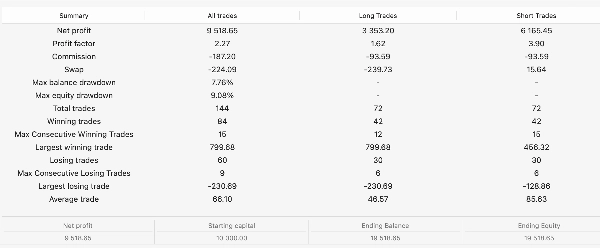
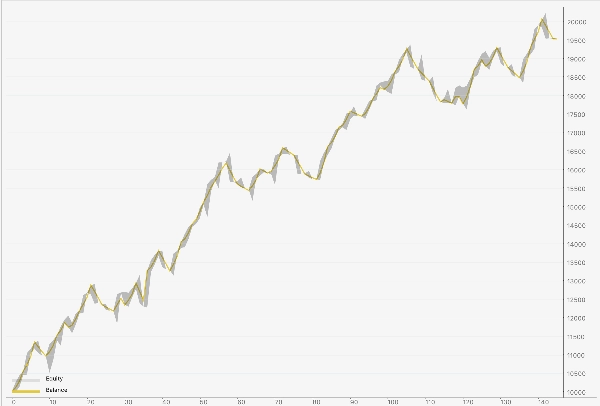
Resultados de Backtest de 1 Año (NAS100 M30):
- Operaciones Totales: 147
- Tasa de Éxito: 57.1% (84 ganadoras, 63 perdedoras)
- Factor de Ganancia: 2.23 (excelente para reversión a la media)
- Ganancia Neta: 112%
- Máxima Pérdida: 11.72%
- Máximas Pérdidas Consecutivas: 9
- Máximas Ganancias Consecutivas: 15
Ventaja Direccional:
- Operaciones Largas (COMPRA): 1.63 factor de ganancia, +$3,960 de beneficio
- Operaciones Cortas (VENTA): 3.64 factor de ganancia, +$7,063 de beneficio
Características Clave
Lógica de Entrada con Doble Filtro
- Confirmación de tendencia con EMA 200 (evita mercados volátiles)
- Alineación en marco temporal superior de EMA 2 horas (confirma dirección)
- Regla de solo primer toque (elimina falsas reversiónes)
Stop Loss Dependientes de la Dirección
- Operaciones largas: mínimo 200 pips para correcta reversión a la media
- Operaciones cortas: mínimo 50 pips para reversiónes más rápidas
- Multiplicador ATR para ajuste dinámico de volatilidad
Estrategia de Tres Posiciones
- Captura ganancias rápidas de scalping (Posición 1)
- Se extiende hacia objetivos oscilantes (Posición 2)
- Gestiona runner con lógica inteligente SL3 (Posición 3)
Gestión de Riesgos
- Entradas alternadas de compra/venta (previene sesgo direccional)
- Stop-loss adaptativo previene pérdidas catastróficas
- Bloqueo de posiciones previene operaciones superpuestas
- Tamaño de lote flexible desde 0.01 hasta 999 lotes
Bajo Impacto en el Margen
- Escalable desde 0.3 lotes (0.1*3 - ultra conservador) hasta más de 100 lotes (agresivo)
- Comisión mínima gracias a tamaño de posición optimizado
- Adecuado para todos los tamaños de cuenta
¿Quién Debería Usar Este Bot?
Ideal para:
- Traders con cuentas de $1000+ que buscan retornos consistentes y de bajo riesgo
- Traders algorítmicos que quieren una estrategia probada y backtesteada
- Traders swing cansados de vigilar manualmente los gráficos
- Traders institucionales que necesitan diversificación frente a bots seguidores de tendencia
No es ideal para:
- Scalpers (el marco temporal es de 30 min, no 1 min)
- Cuentas menores a $500 (la eficiencia del margen importa, pero actualmente el margen más bajo es aproximadamente $330 para 0.1 (0.3 para posiciones activas) lotes para poder operar con margen completo y apalancamiento 1:20)
GUÍA DE REFERENCIA DE PARÁMETROS
A continuación se explica detalladamente cada parámetro que puede ajustar. Los valores predeterminados de fábrica están optimizados para NAS100, pero se puede personalizar.
PARÁMETROS BÁSICOS DE TRADING
Marco Temporal de Señal
Predeterminado: Minute30
Opciones: Minute1, Minute5, Minute15, Minute30, Hour1, Hour2, etc.
Qué hace: El marco temporal en el que el bot analiza la acción del precio y entra en operaciones. El marco de 30 minutos ofrece un equilibrio entre trading swing (menos ruido) y capacidad de respuesta intradía.
Cómo ajustar:
- Más pequeño (M5, M15): Más operaciones, mayor tasa de éxito pero ganancias promedio menores
- Más grande (H1, H2): Menos operaciones, ganancias/pérdidas mayores, más capital intensivo
Recomendación: Mantener en M30 para NAS100.
Periodo EMA
Predeterminado: 200
Rango: 1-1000
Recomendado: 100-300
Qué hace: La longitud de la Media Móvil Exponencial usada para identificar tendencias. Una EMA de 200 períodos es el estándar en la industria para trading swing; filtra el ruido a corto plazo mientras captura reversiónes a largo plazo.
Cómo ajustar:
- Más bajo (50-100): Entradas más sensibles, mayor tasa de éxito pero más señales falsas
- Más alto (300-500): Menos entradas, mayor calidad pero podría perder reversiónes
Recomendación: 200 es óptimo para reversión a la media en M30.
Barras de Confirmación (cierres de señal)
Predeterminado: 24
Rango: 1-100
Recomendado: 18-30
Qué hace: Número de barras consecutivas que deben cerrar por encima/debajo de la EMA antes de que una tendencia sea "confirmada". Con 24 barras en M30, esto representa 12 horas de sesgo direccional consistente, una señal fuerte de que la tendencia ha cambiado.
Cómo ajustar:
- Más bajo (8-12): Señales de entrada más rápidas, más operaciones, más falsas reversiónes
- Más alto (30-50): Entradas más lentas, mejor calidad, menos oportunidades
Recomendación: 24 está bien equilibrado; aumente a 30 para un filtrado más estricto.
PARÁMETROS DE TOMA DE GANANCIAS
TP1 (pips, 1:1)
Predeterminado: 200
Rango: 50-500
Recomendado: 150-250
Qué hace: El objetivo de ganancia fijo para la Posición 1 (tu posición de scalping). Esta posición suele cerrarse primero y representa tu ganancia "central". 200 pips en NAS100 = aproximadamente $200 por 1 lote.
Cómo ajustar:
- Más bajo (100 pips): Cierra más rápido, mayor tasa de éxito, menor ganancia promedio por operación
- Más alto (300 pips): Toma más tiempo en alcanzarse, menor tasa de éxito, ganancia promedio mayor
Recomendación: 200 pips equilibra velocidad y recompensa.
Offset TP3 Desde Oscilación (pips)
Predeterminado: 200
Rango: 50-500
Qué hace: La Posición 3 (el runner) apunta al máximo/mínimo oscilante más reciente MÁS este offset. Por ejemplo, si el oscilante está en 21,000 y el offset es 200 pips, TP3 = 21,200 para una operación larga.
Cómo ajustar:
- Más bajo (50-100 pips): Más fácil de alcanzar, la Posición 3 se activa más a menudo
- Más alto (300-500 pips): Más difícil de alcanzar, pero mayor recompensa cuando se logra
Recomendación: 200 pips; reduzca a 100 si su cuenta prefiere más activaciones frecuentes.
Break-even Plus (pips)
Predeterminado: 1
Rango: 0-50
Qué hace: Después de que la Posición 1 cierre (TP1 alcanzado), el stop loss de la Posición 3 se mueve desde su stop inicial a "break-even MÁS esta cantidad de pips". Esto asegura ganancias mientras mantiene viva la posición runner.
Cómo ajustar:
- 0 pips: Mueve el SL al precio exacto de entrada (arriesgado; la siguiente barra podría detenerlo)
- 5 pips: Buffer seguro, asegura aproximadamente $50 de ganancia garantizada por lote
Recomendación: Mantener en 1-2 pips.
PARÁMETROS DE STOP LOSS
Stop Loss de Reserva (pips)
Predeterminado: 200
Rango: 50-500
Qué hace: Si el cálculo del ATR falla o no está disponible, el bot usa este stop-loss fijo en su lugar. Esto es una red de seguridad.
Cómo ajustar: Ajuste según su valor promedio de ATR; 200 pips es seguro para la mayoría de condiciones del NAS100.
Recomendación: Mantener en 200.
Usar Stop Loss ATR
Predeterminado: true (habilitado)
Opciones: true / false
Qué hace: Habilita stop losses inteligentes ajustados a la volatilidad basados en el Rango Verdadero Promedio. Cuando está activado, los stops son más ajustados en mercados tranquilos y más amplios en mercados volátiles.
Cómo ajustar:
- true: Stops adaptativos, mejor gestión del riesgo ✅
- false: Usa stops fijos de reserva, menos sofisticado
Recomendación: Siempre mantener TRUE.
Periodo ATR
Predeterminado: 14
Rango: 7-28
Qué hace: Número de barras usadas para calcular la volatilidad del Rango Verdadero Promedio. Un ATR de 14 períodos es el estándar de la industria.
Cómo ajustar:
- Más bajo (7-10): Más sensible a la volatilidad reciente, stops más ajustados
- Más alto (20-28): Estimación de volatilidad más suave, stops más amplios
Recomendación: 14 es óptimo.
Multiplicador ATR para SL
Predeterminado: 1.5
Rango: 0.5-3.0
Qué hace: Multiplica el valor ATR para crear la distancia de su stop-loss. Multiplicador más alto = stops más amplios.
Fórmula: Stop Loss = (ATR × Multiplicador) + mínimo dependiente de la dirección
Ejemplo: Si ATR = 150 pips y multiplicador = 1.5, SL base = 225 pips (antes de aplicar mínimo)
Cómo ajustar:
- 1.0: Stops ajustados, más whipsaws pero salida más rápida de perdedores
- 1.5: Equilibrado (predeterminado de fábrica)
- 2.0+: Stops muy amplios, más deslizamiento pero menos salidas falsas
Recomendación: 1.5 es óptimo para la volatilidad del NAS100.
SL ATR Mínimo LARGO (pips)
Predeterminado: 200
Rango: 50-400
Qué hace: El stop loss MÍNIMO para operaciones de COMPRA (largas), independientemente del cálculo ATR. Esto asegura que las operaciones largas tengan suficiente espacio para las mechas de reversión a la media.
Por qué es diferente de las cortas: Las entradas largas de reversión a la media a menudo sufren mechas de más de 100 pips antes de recuperarse. Un stop de 50 pips era demasiado ajustado; 200 pips permite una reversión adecuada.
Cómo ajustar:
- 150 pips: Más ajustado para gestión agresiva del riesgo
- 200 pips: Equilibrado (predeterminado de fábrica, probado como óptimo)
- 250 pips: Más suelto para cuentas con más margen
Recomendación: Mantener en 200 (esta configuración fija la rentabilidad de sus operaciones largas).
SL ATR Mínimo CORTO (pips)
Predeterminado: 50
Rango: 20-150
Qué hace: El stop loss MÍNIMO para operaciones de VENTA (cortas). Las cortas revierten más rápido y no necesitan tanto espacio.
Por qué es diferente de las largas: Las reversiónes cortas suelen ocurrir rápidamente; un stop de 50 pips las captura eficientemente sin esperar movimientos grandes.
Cómo ajustar:
- 30 pips: Muy ajustado, alta frecuencia de salidas
- 50 pips: Equilibrado (predeterminado de fábrica, probado como óptimo)
- 75 pips: Más suelto para scalpers que quieren menos stops
Recomendación: Mantener en 50 (esta combinación con 200 para largos es la CLAVE para su mejora de ganancia del +77%).
SL ATR Máximo (pips)
Predeterminado: 500
Rango: 200-1000
Qué hace: La distancia MÁXIMA del stop-loss, incluso si el ATR calcula un valor mayor. Previene stops excesivamente amplios durante volatilidad extrema.
Cómo ajustar:
- Más bajo (300): Nunca arriesgar más de 300 pips, bueno para cuentas pequeñas
- Más alto (700): Permite stops más amplios durante eventos Cisne Negro
Recomendación: 500 es seguro; aumente a 600 si usa apalancamiento o cuentas grandes.
PARÁMETROS DE DETECCIÓN DE OSCILACIONES/PIVOTES
Fuerza del Pivote (barras)
Predeterminado: 2
Rango: 1-5
Qué hace: Número de barras a cada lado que deben ser más bajas/más altas para confirmar un pivote oscilante. Un ajuste de 2 significa: 2 barras abajo, luego un máximo, luego 2 barras abajo.
Visual:
texto
Configuración = 2:
Bajo, Bajo, ALTO, Bajo, Bajo ← Confirma como máximo oscilante
Configuración = 3:
Bajo, Bajo, Bajo, ALTO, Bajo, Bajo, Bajo ← Confirmación más estricta
Cómo ajustar:
- 1: Muy sensible, encuentra todos los pivotes locales (podría ser ruido)
- 2-3: Equilibrado (predeterminado de fábrica)
- 4-5: Solo oscilaciones fuertes y obvias
Recomendación: 2 está bien; aumente a 3 si recibe oscilaciones falsas.
Barras de Búsqueda de Pivote
Predeterminado: 300
Rango: 20-1000
Qué hace: Cuántas barras hacia atrás mirar al buscar oscilaciones recientes. 300 barras = ~150 horas de historial en marco temporal M30.
Cómo ajustar:
- Más bajo (100-150): Solo usa oscilaciones muy recientes, bueno para mercados en tendencia
- Más alto (300-500): Usa historial más largo, captura soportes/resistencias más establecidos
Recomendación: 300 para NAS100.
Distancia Mínima al Objetivo (pips)
Predeterminado: 5
Rango: 0-20
Qué hace: Distancia mínima entre la entrada y la toma de ganancias. Si el objetivo oscilante está demasiado cerca (< 5 pips), el bot lo rechaza y usa TP1 de reserva en su lugar.
Cómo ajustar:
- 0: Acepta cualquier objetivo oscilante, incluso si está muy cerca
- 10: Más estricto, asegura que los objetivos tengan distancia significativa
Recomendación: 5 pips (el spread típico del pip en NAS100 es 2-3 pips).
PARÁMETROS DE FILTRO DE MARCO TEMPORAL SUPERIOR
Usar Filtro de TF Superior
Predeterminado: true (habilitado)
Opciones: true / false
Qué hace: Habilita una confirmación secundaria de tendencia en un marco temporal más largo (predeterminado: gráfico de 2 horas). Solo entra en operaciones de COMPRA si el TF 2H está por encima de la EMA 50; solo entra en operaciones de VENTA si el TF 2H está por debajo de la EMA 50.
Impacto:
- true: Elimina entradas contra tendencia, mejora la rentabilidad de operaciones largas ✅
- false: Permite entradas en cualquier dirección (más operaciones, menor calidad)
Recomendación: Siempre TRUE. Este filtro es crucial para su 1.63 factor de ganancia en largos.
TF Superior
Predeterminado: Hour2
Opciones: Hour1, Hour2, Hour4, Daily
Qué hace: El marco temporal más largo usado para la confirmación secundaria. 2 horas es un buen equilibrio para entradas de 30 minutos (8 veces el marco temporal).
Cómo ajustar:
- Hour1: Confirmación más estricta, más rápida para alinear
- Hour2: Equilibrado, probado como óptimo
- Hour4: Confirmación más laxa, menos señales falsas
Recomendación: Hour2 (el punto ideal).
Periodo EMA TF Superior
Predeterminado: 50
Rango: 20-200
Qué hace: El período de la media móvil en el marco temporal superior. La EMA de 50 períodos en el gráfico de 2 horas filtra el ruido muy corto plazo mientras mantiene la capacidad de respuesta.
Cómo ajustar:
- 20-30: Más entradas, más rápido para alinear
- 50: Equilibrado (predeterminado de fábrica)
- 100+: Menos entradas, confirmación de sesgo más fuerte
Recomendación: 50 es óptimo.
PARÁMETROS DE EJECUCIÓN DE OPERACIONES
Volumen (lotes)
Predeterminado: 0.1
Rango: 0.1–999.99
Paso: 0.1
Qué hace: Tamaño de posición por entrada. Cada entrada abre 3 posiciones de este tamaño. Exposición total = Volumen × 3.
Ejemplos:
- 0.1 lotes: 0.3 exposición total (bueno para cuentas de $500+)
- 1.0 lotes: 3.0 exposición total (para traders experimentados)
- 10 lotes: 30 exposición total (profesional/institucional)
Cómo calcular el tamaño apropiado:
Riesgo por operación = (pips SL × tamaño de lote) × valor por pip
Ejemplo: 200 pips × 0.1 lotes × $1/pip = $20 de riesgo por operación
Para riesgo del 1% de la cuenta: $20 = 1% de una cuenta de $2000
Recomendación: Comience con 0.1-0.5 lotes; aumente después de 30+ operaciones consecutivas rentables.
Bloquear Si Hay Posiciones Abiertas
Predeterminado: true (habilitado)
Opciones: true / false
Qué hace: Evita nuevas entradas mientras cualquier posición existente esté abierta. Asegura que nunca se superpongan operaciones.
Cómo ajustar:
- true: Una operación a la vez, gestión más simple ✅
- false: Permite múltiples operaciones concurrentes
Recomendación: Siempre TRUE para una gestión de posiciones más segura.
Etiqueta
Predeterminado: "EMA200_FirstTouch_Alt"
Qué hace: Identificador interno para todas las posiciones del bot. Permite múltiples instancias del bot en la misma cuenta sin interferencias.
Cómo ajustar: Cambiar solo si ejecuta múltiples bots; cada uno necesita una etiqueta única.
Recomendación: Mantener el predeterminado a menos que ejecute múltiples instancias.
REQUISITOS TÉCNICOS
- Plataforma: cTrader (Spotware)
- Broker: Cualquier broker compatible con cTrader (ICmarkets, Pepperstone, FXCM, etc.)
- Capital: Mínimo $330 (recomendado $1000+)
- Apalancamiento: 1:20 estándar (ajuste tamaño de posición en consecuencia)
SOPORTE Y PERSONALIZACIÓN
Cada parámetro puede ajustarse en tiempo real sin recompilar. Pruebe sus configuraciones en una cuenta demo durante al menos 50 operaciones antes de operar en vivo.
Para modificaciones personalizadas (filtros adicionales, símbolos diferentes, reglas de gestión de riesgo), contácteme
DESCARGO DE RESPONSABILIDAD
El rendimiento pasado no es indicativo de resultados futuros. Este bot fue probado con datos históricos desde 2025. Los resultados en el mundo real pueden variar debido a:
- Deslizamientos y latencia
- Cambios en el régimen del mercado
- Calidad de ejecución del broker
- Requisitos de apalancamiento y margen
Opere bajo su propio riesgo. Comience con poco, pruebe a fondo y nunca arriesgue más de lo que pueda permitirse perder.
Resumen
Trades open three simultaneous positions with distinct take-profit targets: a scalp profit, a swing high/low target, and a runner position with dynamic stop-loss management using Average True Range (ATR) volatility adjustments. Stop losses are direction-dependent, with minimum distances set for long and short trades to optimize risk management.
Key features include dual-filter entry logic with higher timeframe EMA alignment, adaptive ATR-based stop losses, position blocking to prevent overlapping trades, and flexible lot sizing from 0.01 to 999 lots. The bot is suitable for accounts with at least $330 margin (recommended $1000+) and standard 1:20 leverage.
Backtested results show a 57% win rate, 2.23 profit factor, 112% net profit, and maximum drawdown around 12%. It is intended for swing and algorithmic traders seeking consistent returns on NAS100, not for scalpers or very small accounts. Parameters are customizable in real-time without recompilation.
Conversación
Valoraciones de clientes
5 | 25 % | |
4 | 25 % | |
3 | 50 % | |
2 | 0 % | |
1 | 0 % |