説明
<!DOCTYPE html> <html lang="ar" dir="rtl"> <head> <meta charset="UTF-8"> <meta name="viewport" content="width=device-width, initial-scale=1.0"> <title>取引のためのAIエージェント</title> <style> * { margin: 0; padding: 0; box-sizing: border-box; } body { font-family: 'Arial', sans-serif; background: linear-gradient(135deg, #1e3c72 0%, #2a5298 100%); color: white; min-height: 100vh; padding: 20px; } .container { max-width: 1200px; margin: 0 auto; background: rgba(255, 255, 255, 0.1); backdrop-filter: blur(10px); border-radius: 20px; padding: 30px; box-shadow: 0 20px 40px rgba(0, 0, 0, 0.3); } .header { text-align: center; margin-bottom: 30px; border-bottom: 2px solid rgba(255, 255, 255, 0.2); padding-bottom: 20px; } .header h1 { font-size: 2.5em; margin-bottom: 10px; text-shadow: 2px 2px 4px rgba(0, 0, 0, 0.5); } .status-bar { display: flex; justify-content: space-around; margin-bottom: 30px; flex-wrap: wrap; } .status-item { background: rgba(255, 255, 255, 0.15); padding: 15px; border-radius: 10px; min-width: 150px; text-align: center; margin: 5px; border: 1px solid rgba(255, 255, 255, 0.2); } .status-item h3 { margin-bottom: 5px; font-size: 0.9em; opacity: 0.8; } .status-value { font-size: 1.2em; font-weight: bold; } .controls { display: grid; grid-template-columns: repeat(auto-fit, minmax(300px, 1fr)); gap: 20px; margin-bottom: 30px; } .control-panel { background: rgba(255, 255, 255, 0.1); padding: 20px; border-radius: 15px; border: 1px solid rgba(255, 255, 255, 0.2); } .control-panel h3 { margin-bottom: 15px; color: #FFD700; font-size: 1.1em; } .form-group { margin-bottom: 15px; } .form-group label { display: block; margin-bottom: 5px; font-size: 0.9em; opacity: 0.9; } .form-group input, .form-group select { width: 100%; padding: 10px; border: none; border-radius: 8px; background: rgba(255, 255, 255, 0.15); color: white; font-size: 0.9em; } .form-group input::placeholder { color: rgba(255, 255, 255, 0.7); } .btn { padding: 12px 25px; border: none; border-radius: 8px; cursor: pointer; font-size: 1em; font-weight: bold; transition: all 0.3s ease; margin: 5px; } .btn-primary { background: linear-gradient(45deg, #00c853, #00e676); color: white; } .btn-danger { background: linear-gradient(45deg, #f44336, #ff5722); color: white; } .btn-warning { background: linear-gradient(45deg, #ff9800, #ffc107); color: white; } .btn:hover { transform: translateY(-2px); box-shadow: 0 5px 15px rgba(0, 0, 0, 0.3); } .trading-log { background: rgba(0, 0, 0, 0.3); border-radius: 15px; padding: 20px; margin-top: 20px; max-height: 300px; overflow-y: auto; border: 1px solid rgba(255, 255, 255, 0.2); } .log-entry { padding: 10px; border-bottom: 1px solid rgba(255, 255, 255, 0.1); margin-bottom: 10px; border-radius: 8px; } .log-entry.success { background: rgba(76, 175, 80, 0.2); border-left: 4px solid #4CAF50; } .log-entry.error { background: rgba(244, 67, 54, 0.2); border-left: 4px solid #f44336; } .log-entry.info { background: rgba(33, 150, 243, 0.2); border-left: 4px solid #2196F3; } .chart-container { background: rgba(255, 255, 255, 0.1); border-radius: 15px; padding: 20px; margin-top: 20px; text-align: center; border: 1px solid rgba(255, 255, 255, 0.2); } .indicator { display: inline-block; width: 10px; height: 10px; border-radius: 50%; margin-left: 5px; } .indicator.active { background: #4CAF50; animation: pulse 2s infinite; } .indicator.inactive { background: #f44336; } @keyframes pulse { 0% { transform: scale(1); } 50% { transform: scale(1.2); } 100% { transform: scale(1); } } .progress-bar { width: 100%; height: 8px; background: rgba(255, 255, 255, 0.2); border-radius: 4px; overflow: hidden; margin-top: 10px; } .progress-fill { height: 100%; background: linear-gradient(90deg, #00c853, #00e676); width: 0%; transition: width 0.3s ease; } @media (max-width: 768px) { .controls { grid-template-columns: 1fr; } .status-bar { flex-direction: column; align-items: center; } .container { padding: 20px; } } </style> </head> <body> <div class="container"> <div class="header"> <h1>🤖 取引のためのAIエージェント</h1> <p>高度なFX自動取引システム</p> </div> <div class="status-bar"> <div class="status-item"> <h3>システムステータス</h3> <div class="status-value"> <span id="system-status">停止中</span> <span class="indicator inactive" id="system-indicator"></span> </div> </div> <div class="status-item"> <h3>利益/損失</h3> <div class="status-value" id="pnl">$0.00</div> </div> <div class="status-item"> <h3>取引回数</h3> <div class="status-value" id="trades-count">0</div> </div> <div class="status-item"> <h3>成功率</h3> <div class="status-value" id="success-rate">0%</div> </div> </div> <div class="controls"> <div class="control-panel"> <h3>⚙️ 取引設定</h3> <div class="form-group"> <label>通貨ペア</label> <select id="currency-pair"> <option value="EURUSD">EUR/USD</option> <option value="GBPUSD">GBP/USD</option> <option value="USDJPY">USD/JPY</option> <option value="USDCHF">USD/CHF</option> <option value="AUDUSD">AUD/USD</option> </select> </div> <div class="form-group"> <label>取引量(ロット)</label> <input type="number" id="lot-size" value="0.01" min="0.01" max="10" step="0.01"> </div> <div class="form-group"> <label>取引戦略</label> <select id="strategy"> <option value="scalping">スキャルピング</option> <option value="swing">スイングトレード</option> <option value="trend">トレンドフォロー</option> <option value="reversal">リバーサル</option> </select> </div> </div> <div class="control-panel"> <h3>🛡️ リスク管理</h3> <div class="form-group"> <label>ストップロス(ポイント)</label> <input type="number" id="stop-loss" value="20" min="5" max="500"> </div> <div class="form-group"> <label>テイクプロフィット(ポイント)</label> <input type="number" id="take-profit" value="30" min="10" max="1000"> </div> <div class="form-group"> <label>最大リスク(%)</label> <input type="number" id="max-risk" value="2" min="0.5" max="10" step="0.1"> </div> </div> <div class="control-panel"> <h3>📊 テクニカル指標</h3> <div class="form-group"> <label> <input type="checkbox" id="use-ma" checked> 移動平均線を使用 </label> </div> <div class="form-group"> <label> <input type="checkbox" id="use-rsi" checked> RSIを使用 </label> </div> <div class="form-group"> <label> <input type="checkbox" id="use-macd"> MACDを使用 </label> </div> <div class="form-group"> <label> <input type="checkbox" id="use-bollinger"> ボリンジャーバンドを使用 </label> </div> </div> </div> <div style="text-align: center; margin: 20px 0;"> <button class="btn btn-primary" onclick="startTrading()">🚀 取引開始</button> <button class="btn btn-danger" onclick="stopTrading()">⏹️ 取引停止</button> <button class="btn btn-warning" onclick="pauseTrading()">⏸️ 一時停止</button> <button class="btn btn-warning" onclick="resetSystem()">🔄 リセット</button> </div> <div class="chart-container"> <h3>📈 パフォーマンス監視</h3> <p>リアルタイムパフォーマンス分析</p> <div class="progress-bar"> <div class="progress-fill" id="performance-progress"></div> </div> <p style="margin-top: 10px; font-size: 0.9em; opacity: 0.8;"> 最終更新: <span id="last-update">--</span> </p> </div> <div class="trading-log"> <h3>📋 取引ログ</h3> <div id="log-container"> <div class="log-entry info"> <strong>情報:</strong> システムは取引準備完了です。「取引開始」を押してください。 </div> </div> </div> </div> <script> // システム変数 let isTrading = false; let isPaused = false; let tradingInterval; let totalTrades = 0; let successfulTrades = 0; let currentPnL = 0; let marketData = {}; // ステータス更新 function updateSystemStatus(status, isActive) { const statusEl = document.getElementById('system-status'); const indicatorEl = document.getElementById('system-indicator'); statusEl.textContent = status; indicatorEl.className = `indicator ${isActive ? 'active' : 'inactive'}`; } // 統計更新 function updateStats() { document.getElementById('trades-count').textContent = totalTrades; document.getElementById('success-rate').textContent = totalTrades > 0 ? Math.round((successfulTrades / totalTrades) * 100) + '%' : '0%'; document.getElementById('pnl').textContent = (currentPnL >= 0 ? '+' : '') + '$' + currentPnL.toFixed(2); document.getElementById('pnl').style.color = currentPnL >= 0 ? '#4CAF50' : '#f44336'; } // ログ追加 function addLogEntry(message, type = 'info') { const logContainer = document.getElementById('log-container'); const entry = document.createElement('div'); entry.className = `log-entry ${type}`; const timestamp = new Date().toLocaleTimeString('ar-SA'); entry.innerHTML = `<strong>${timestamp}:</strong> ${message}`; logContainer.insertBefore(entry, logContainer.firstChild); // 最新50件のみ保持 if (logContainer.children.length > 50) { logContainer.removeChild(logContainer.lastChild); } } // 市場データ生成 function generateMarketData() { const pairs = ['EURUSD', 'GBPUSD', 'USDJPY', 'USDCHF', 'AUDUSD']; pairs.forEach(pair => { marketData[pair] = { price: Math.random() * 2 + 1, change: (Math.random() - 0.5) * 0.01, volume: Math.floor(Math.random() * 1000000), rsi: Math.floor(Math.random() * 100), ma: Math.random() * 2 + 1 }; }); } // シグナル分析 function analyzeSignals() { const pair = document.getElementById('currency-pair').value; const strategy = document.getElementById('strategy').value; const useMA = document.getElementById('use-ma').checked; const useRSI = document.getElementById('use-rsi').checked; const data = marketData[pair]; if (!data) return null; let signal = null; let confidence = 0; // RSI分析 if (useRSI) { if (data.rsi < 30) { signal = 'BUY'; confidence += 0.3; } else if (data.rsi > 70) { signal = 'SELL'; confidence += 0.3; } } // 移動平均線分析 if (useMA) { if (data.price > data.ma) { if (signal === 'BUY' || signal === null) { signal = 'BUY'; confidence += 0.3; } } else { if (signal === 'SELL' || signal === null) { signal = 'SELL'; confidence += 0.3; } } } // 戦略分析 if (strategy === 'scalping') { confidence += 0.2; } else if (strategy === 'trend') { confidence += 0.4; } return { signal, confidence }; } // 取引実行 function executeTrade(signal, confidence) { if (confidence < 0.6) return; // 最低信頼度 const pair = document.getElementById('currency-pair').value; const lotSize = document.getElementById('lot-size').value; const stopLoss = document.getElementById('stop-loss').value; const takeProfit = document.getElementById('take-profit').value; totalTrades++; // 取引結果のシミュレーション const success = Math.random() < confidence; const pnl = success ? (parseFloat(takeProfit) * parseFloat(lotSize) * 10) : (-parseFloat(stopLoss) * parseFloat(lotSize) * 10); currentPnL += pnl; if (success) { successfulTrades++; addLogEntry(`成功取引: ${signal} ${pair} - 利益: +$${pnl.toFixed(2)}`, 'success'); } else { addLogEntry(`失敗取引: ${signal} ${pair} - 損失: -$${Math.abs(pnl).toFixed(2)}`, 'error'); } updateStats(); } // メイン取引ループ function tradingLoop() { if (!isTrading || isPaused) return; generateMarketData(); const analysis = analyzeSignals(); if (analysis && analysis.signal) { addLogEntry(`シグナル検出: ${analysis.signal} - 信頼度: ${(analysis.confidence * 100).toFixed(1)}%`, 'info'); executeTrade(analysis.signal, analysis.confidence); } // 進捗バー更新 const progress = document.getElementById('performance-progress'); progress.style.width = Math.min((successfulTrades / Math.max(totalTrades, 1)) * 100, 100) + '%'; // 最終更新更新 document.getElementById('last-update').textContent = new Date().toLocaleTimeString('ar-SA'); } // 取引開始 function startTrading() { if (isTrading) return; isTrading = true; isPaused = false; updateSystemStatus('稼働中', true); addLogEntry('自動取引開始', 'success'); tradingInterval = setInterval(tradingLoop, 3000); // 3秒ごと } // 取引停止 function stopTrading() { if (!isTrading) return; isTrading = false; isPaused = false; updateSystemStatus('停止中', false); addLogEntry('取引停止', 'error'); clearInterval(tradingInterval); } // 一時停止 function pauseTrading() { if (!isTrading) return; isPaused = !isPaused; updateSystemStatus(isPaused ? '一時停止中' : '稼働中', !isPaused); addLogEntry(isPaused ? '取引一時停止' : '取引再開', 'info'); } // システムリセット function resetSystem() { stopTrading(); totalTrades = 0; successfulTrades = 0; currentPnL = 0; updateStats(); const logContainer = document.getElementById('log-container'); logContainer.innerHTML = ` <div class="log-entry info"> <strong>情報:</strong> システムがリセットされました。再び取引準備完了です。 </div> `; document.getElementById('performance-progress').style.width = '0%'; document.getElementById('last-update').textContent = '--'; } // システム初期化 document.addEventListener('DOMContentLoaded', function() { generateMarketData(); updateStats(); addLogEntry('システムが正常に読み込まれました', 'success'); }); </script> </body> </html>
概要
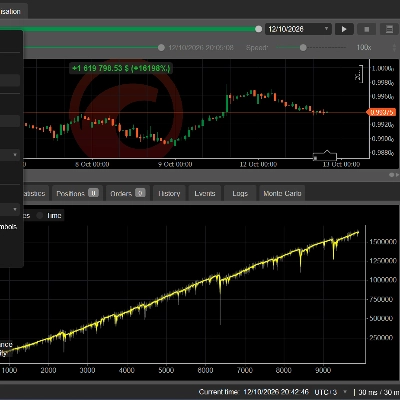
The system integrates technical indicators like Moving Average (MA), Relative Strength Index (RSI), MACD, and Bollinger Bands to analyze market signals and generate trade decisions. It evaluates signal confidence before executing trades, simulating outcomes based on configured parameters. Real-time performance monitoring includes profit/loss tracking, trade count, and success rate, with a detailed trading log for transparency.
Control features allow starting, stopping, pausing, and resetting the trading process. The interface provides a status overview and performance progress visualization, supporting informed management of automated trading activities.