Penerangan
Superior Local Trade Copier for cTrader
High-Speed Multi-Account Replication & Risk Engine for Windows, Mac & VPS
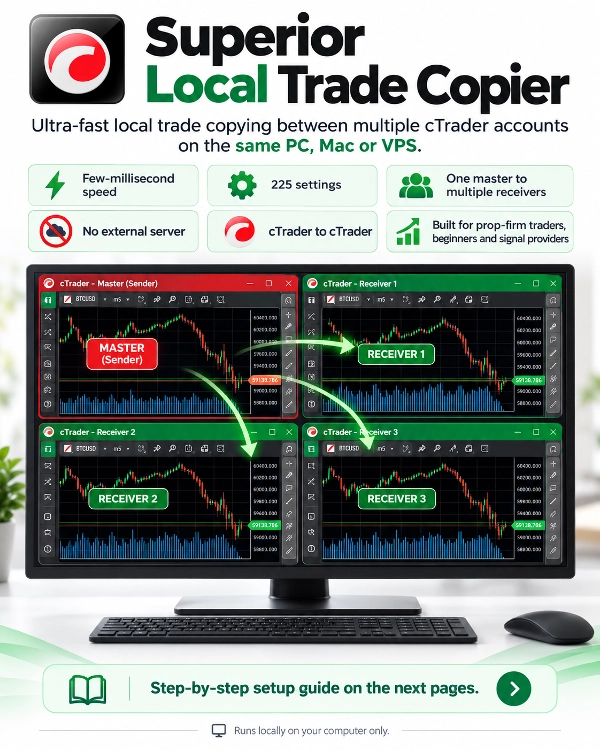
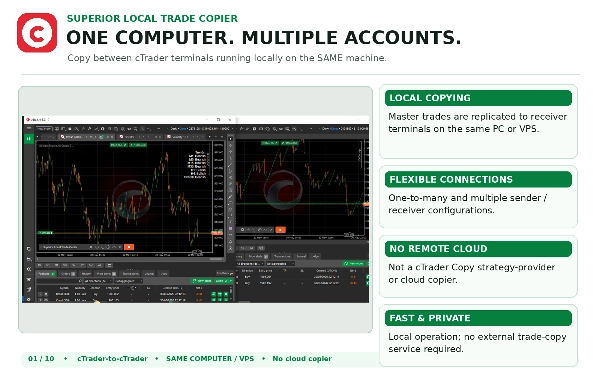
Copy trades seamlessly between multiple cTrader accounts running on the same computer or VPS with sub-millisecond execution speeds.
Built for traders managing personal portfolios, pass-and-fund prop firm challenges, and multi-broker setups, Superior Local Trade Copier provides institutional-grade trade synchronization with complete data privacy and advanced risk controls. Start copying in seconds with a simple two-step setup, backed by an extensive engine of granular settings giving you complete control over risk, lot sizing, and account protection.
Note: The complete step-by-step installation guide is provided in the Discussion tab.
Key Capabilities at a Glance
- Execution Speed: Sub-millisecond local inter-process memory transfer.
- Total Data Privacy: Operates 100% locally on your machine with zero external cloud servers. Account credentials, balance figures, and trade histories never leave your computer.
- Account Topologies: Supports One-to-Many, Many-to-One, and Many-to-Many copying configurations.
- Account Compatibility: Seamless copying between Real and Demo accounts across any cTrader broker.
- Platform Compatibility: Runs natively on cTrader Desktop for Windows, Mac, and Windows VPS environments.
- Read-Only Account Copying: Master accounts can be logged in with read-only investor passwords.
- Minimal System Footprint: High-efficiency code engineered to consume negligible CPU and memory, even when managing dozens of open positions.
Advanced Risk & Position Sizing Suite
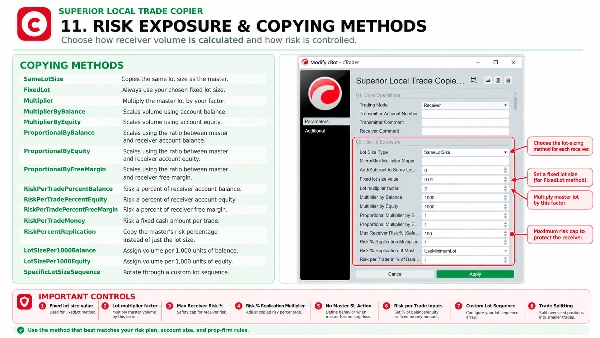
- Master Risk Percentage Replication: Calculates the exact percentage of balance the master is risking on each trade based on Stop Loss distance, volume, and tick value: Risk Money = SL Distance (Points) x Symbol TickValue x Volume Master Risk % = (Risk Money / Master Balance) x 100 The receiver replicates this exact risk percentage on its own account, automatically adjusting for differences in balance sizes and account currencies.
- Configurable Risk Multiplier: Scale master risk up or down (e.g., 0.5x for half risk, 2.0x for double risk) with a hard maximum receiver risk percentage safety cap.
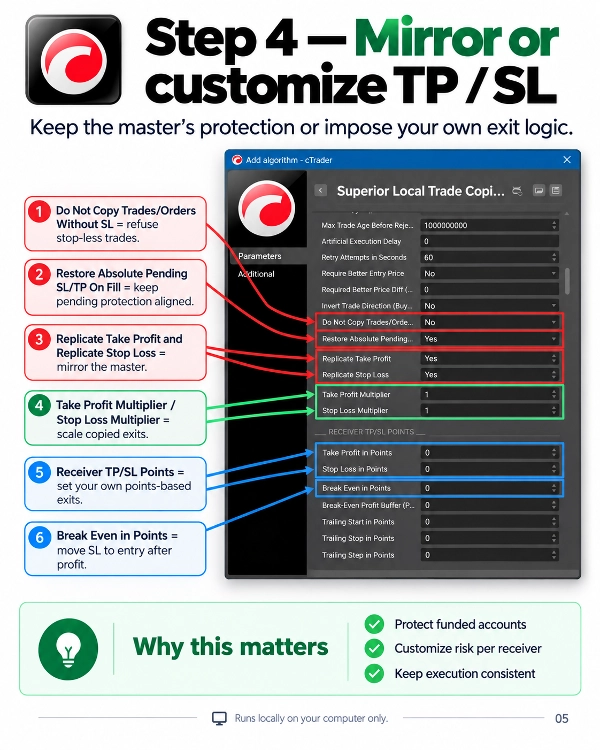
- No-SL Safety Handling: Configurable safety behavior if the master trade has no Stop Loss (safely skip the trade or execute at minimum lot so uncalculated risk is never taken).
- Minimum Lot Overshoot Guard: Protects small accounts by skipping trades if the broker's minimum lot size would force the position to exceed your designated risk threshold.
- Dynamic Risk Sizing Modes: Risk Percentage of Balance, Risk Percentage of Equity, Risk Percentage of Free Margin, or Fixed Cash Amount per trade.
- Proportional Balance & Equity Scaling: Sizes positions dynamically according to the exact balance, equity, or free margin ratio between the follower and master accounts.
- Lot-per-Balance Allocations: Set dedicated lot increments per 1,000 units of balance or equity.
- Custom Lot Sequences & Arrays: Step through user-defined lot size arrays per symbol, fixed lots, multipliers, or symbol-specific volume overrides.
- Contract Size Auto-Normalization: Automatically detects and normalizes differences in contract specifications across brokers (e.g., standard vs. mini/micro lots).
- Dynamic Recovery Scaling: Optional lot multipliers on consecutive losses or wins, with automated reset thresholds.
- Trade Volume Splitting: Automatically splits oversized positions into multiple smaller tickets when volume exceeds broker maximums.
- Synthetic Index Lot Handling: Configure automated rules (ForceMinimum or SkipTrade) when calculated volume falls below broker minimums.
Prop Firm Challenge & Stealth Protection
- Prop Firm Drawdown Baselines: Track daily drawdown from Start of Day Equity, Start of Day Balance, or Trailing Daily Peak Equity (high-water mark trailing matching major funded challenge rules like Apex, Topstep, and MyFundedFX).
- Timezone Calibration: Adjust daily reset hours to match your prop firm's exact server timezone.
- Lot Size Randomization: Slightly varies copied lot sizes by a configurable percentage to prevent identical clone sizes across funded accounts and avoid algorithmic copy detection.
- Millisecond Time Randomizer: Introduces randomized micro-delays before copying so orders do not land at identical timestamps across accounts.
- Ghost Trailing (Stealth Stop Loss): Tracks trailing stops internally within cBot memory, closing trades locally without ever broadcasting Stop Loss levels to the broker. Includes a catastrophic server stop option to guard against power or internet loss.
- Stop-less Trade Shield: Option to automatically refuse to copy any master trade that does not carry a Stop Loss.
Order Lifecycle & Live Synchronization
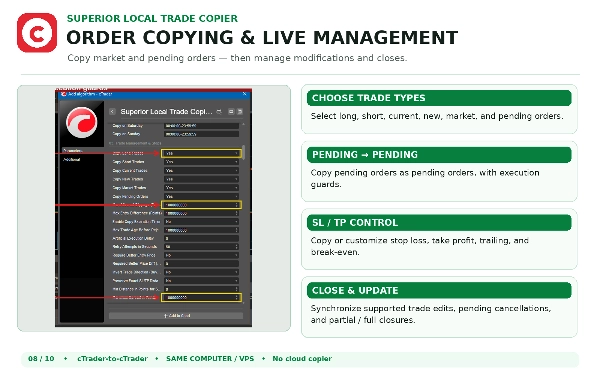
- True Pending-to-Pending Execution: Copies Buy/Sell Limit, Stop, and Stop-Limit orders strictly as pending orders without converting them prematurely to market trades.
- Market Chase Prevention: If a master pending order fills before the receiver can place it, the follower does not chase the market with a delayed market order.
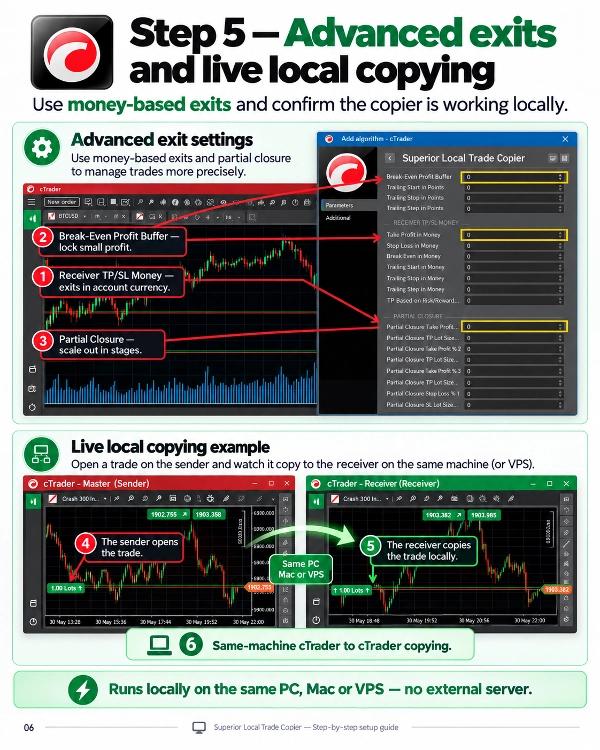
- Independent Break-Even Calculation: Receiver break-even triggers are calculated strictly from the receiver's own actual fill price, not the master's fill price. Includes profit buffers to lock in spreads and commissions.
- Live Modifications: Mirrors updates to SL, TP, entry prices, and order expirations in real time.
- Partial Close Synchronization: Flawlessly mirrors partial closes and multi-stage scale-outs across accounts.
- Scheduled Order Purge: Automatically delete untriggered pending orders at a scheduled time each day.
- Restore Absolute Stops on Fill: Restores exact price levels on pending order fills even during fast market slippage.
- Local State Reconnection: If cTrader or your computer restarts, the cBot automatically reconnects existing copied orders without opening duplicate trades.
Safety Filters & Broker Compatibility
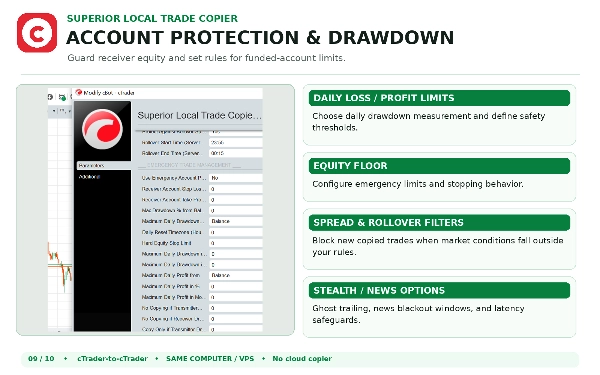
- Daily Drawdown & Profit Limits: Automatically pauses copying if daily profit targets or maximum drawdown thresholds are reached.
- Emergency Equity Floor: Hard dollar limit that liquidates all open copied positions and stops copying if equity breaches your floor.
- Rollover Spread Spike Shield: Freezes new copy execution during broker midnight rollover windows to protect accounts from wide spreads.
- High-Impact News Blackout: Define specific time windows to pause trade copying around volatile news releases.
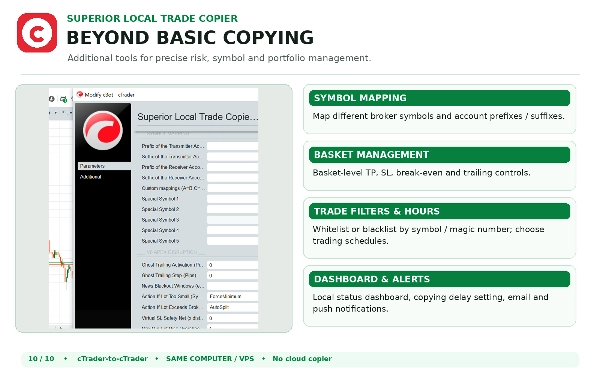
- Special Symbol Mapping: Translate custom symbol names across brokers (e.g., GOLD=XAUUSD, US30=DJ30) with automatic prefix and suffix detection.
- 24/7 Weekend Copying: Dedicated toggle to copy Cryptocurrencies and Deriv Synthetic Indices 24/7 over weekends.
- Anti-Hedging & FIFO Rules: Built-in settings for US/FIFO-regulated accounts to prevent opposite-direction trades on the same symbol.
- Magic Number Whitelist & Blacklist: Filter copies by specific EA magic numbers or manual trades.
- Stale Signal & Max Latency Rejection: Rejects orders if network delays exceed your maximum allowed latency in milliseconds.
- Basket Management: Manage portfolio-wide Take Profit, Stop Loss, Break-Even, and Trailing Stops in money, percentage, or average points.
- On-Chart HUD & Alerts: Draggable visual dashboard displaying live connection status, transmitter balance, and trade metrics, with optional email and push notifications.
Simple 2-Step Setup
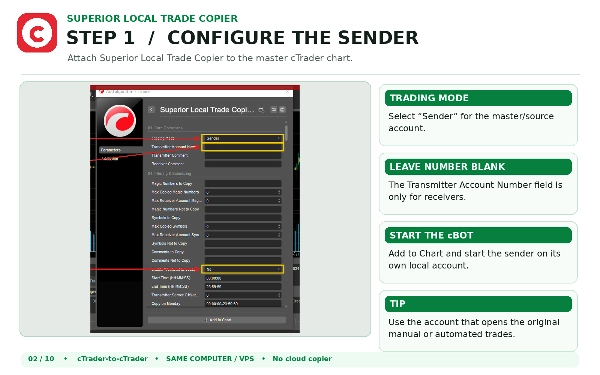
- On your Master account: Attach the cBot to any chart and set Role to Transmitter.
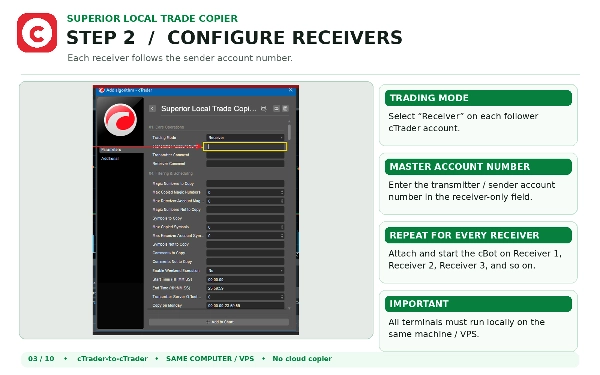
- On your Follower account: Attach the cBot to any chart and set Role to Receiver.
Click Start on both. The copier links your accounts locally and begins copying immediately.
Important Notes & Support
- Local Accounts Only: Superior Local Trade Copier operates between accounts running on the same PC or VPS. It does not copy cloud strategy providers from the cTrader Copy web portal.
- Setup Guide: Full setup instructions are available in the Discussion tab.
- Support & Assistance: If you need assistance or setup help, reach out directly through our cTrader Profile.
Ringkasan
The cBot can function as a Sender (transmitting trades) or Receiver (copying trades), enabling users to distribute strategies, manage multiple accounts, or scale portfolios efficiently. It supports all order types, including active market positions and pending orders (limits and stops).
Key features include multiple lot sizing modes—copy exact sender lot sizes, use fixed lot sizes, apply multipliers, or calculate dynamic risk based on account balance and stop-loss distance. Symbol mapping options allow compatibility across brokers with different instrument naming conventions through prefixes, suffixes, or custom mappings.
Integrated daily equity protection limits risk by stopping copying when daily loss thresholds (percentage or absolute value) are exceeded, with options to close all trades and cancel pending orders automatically. The equity protection resets daily at midnight GMT.
Setup involves installing the cBot on master and client terminals, configuring trading modes, file identifiers for communication, lot sizing, symbol mapping, and equity protection settings. This tool is recommended for VPS environments to ensure low-latency trade copying.
Perbincangan
Ulasan pelanggan
5 | 100 % | |
4 | 0 % | |
3 | 0 % | |
2 | 0 % | |
1 | 0 % |