Penerangan
【Title】 EMA-Stoch_TraderPRO_SELLONLY
【Description】 Sistem dagangan hari yang sangat kukuh, condong kepada scalping yang dioptimumkan secara eksklusif untuk indeks paling tidak stabil di dunia.
Daripada melaksanakan scalping frekuensi tinggi tulen, sistem ini dengan sabar mengenal pasti setup berkemungkinan tinggi dalam sesi harian. Ia menggunakan penapis EMA Multi-Timeframe yang canggih dan Stochastic Oscillator untuk menunggang momentum menurun yang telah ditetapkan, memastikan pengurusan risiko yang ketat dan pemeliharaan modal.
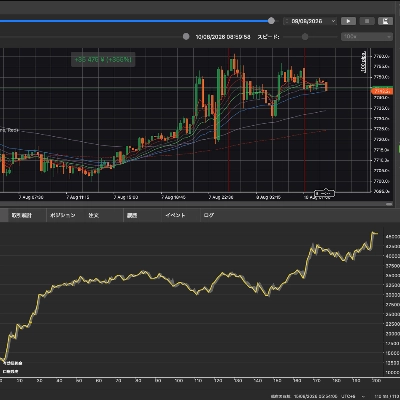
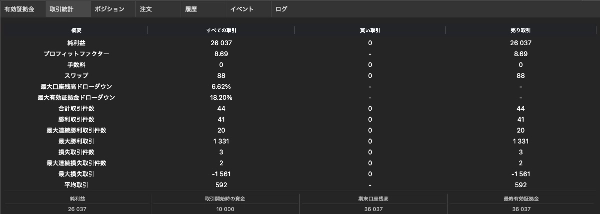
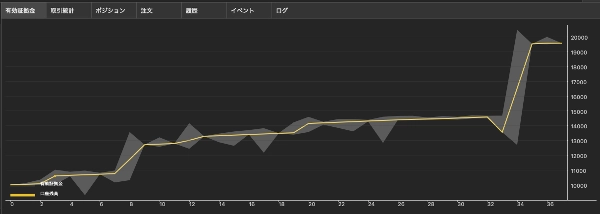
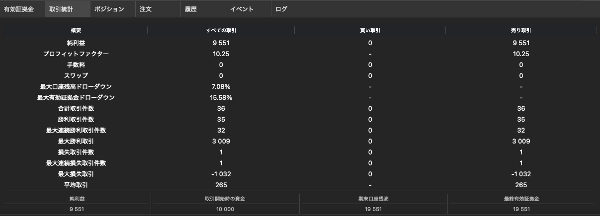
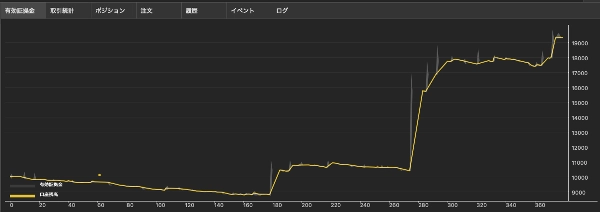
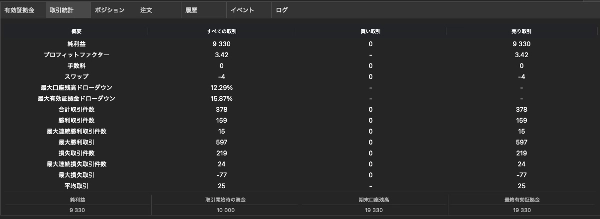
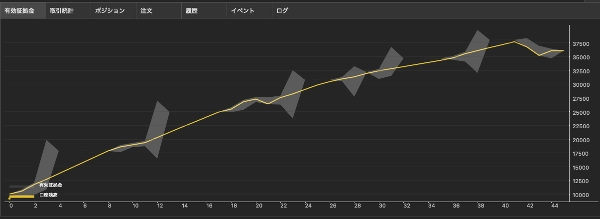
[ Kelebihan Terbukti & Keputusan Sebenar ] Mencapai Faktor Keuntungan yang menakjubkan dan kawalan kerugian yang teliti (di bawah 20%) dalam ujian semula yang ketat merentasi indeks utama. Sistem ini berjaya mengemudi volatiliti berbeza US500, pergerakan pantas US100, dan ayunan tidak dapat diramalkan JP225.
[ Ciri Utama ]
- Penapis Trend Multi-Timeframe: Menggunakan Macro EMA (100/200) untuk memastikan perdagangan hanya diambil mengikut arah trend timeframe lebih tinggi yang tidak dapat dinafikan.
- Sistem Henti Panik: Memotong posisi dengan serta-merta apabila pembalikan ganas tiba-tiba (contohnya, Short Squeeze) dikesan berdasarkan had kerugian terapung.
- Keluar Had Masa: Mengelakkan modal terikat dalam pasaran yang statik dengan menutup perdagangan secara automatik yang gagal bergerak ke arah keuntungan.
- Perlindungan Lanjutan: Mekanisme Break-Even dan Trailing Stop berasaskan Pips yang boleh disesuaikan sepenuhnya.
💡 [ PENTING ] Nota mengenai Penapis Masa & Pengoptimuman cBot ini mempunyai "Penapis Masa" yang membolehkan anda menentukan waktu dagangan yang tepat. Apabila menjalankan pengoptimuman ujian semula dalam cTrader, sila ambil perhatian tingkah laku sistem berikut:
- Jika "Gunakan Penapis Masa" ditetapkan kepada [Tidak]: Walaupun sesi individu (contohnya, Asia, London, NY) ditetapkan kepada "Ya", ia akan diabaikan sepenuhnya, dan sistem akan beroperasi 24/7.
Prosedur Disyorkan untuk Pengoptimuman Lebih Pantas & Berkesan:
- Apabila menguji sesi masa tertentu: Nyahpilih kotak pengoptimuman untuk "Gunakan Penapis Masa" dan tetapkan nilai tetapnya kepada [Ya]. Kemudian, anda boleh menjalankan pengoptimuman pada togol sesi individu dan nilai jam.
- Apabila menguji operasi 24/7: Tetapkan "Gunakan Penapis Masa" kepada nilai tetap [Tidak]. Penting untuk memastikan semua kotak pengoptimuman untuk tetapan sesi individu di bawahnya tidak dipilih. Ini mengelakkan enjin mengira "parameter mati," yang akan mempercepatkan masa penyelesaian pengoptimuman dengan ketara.
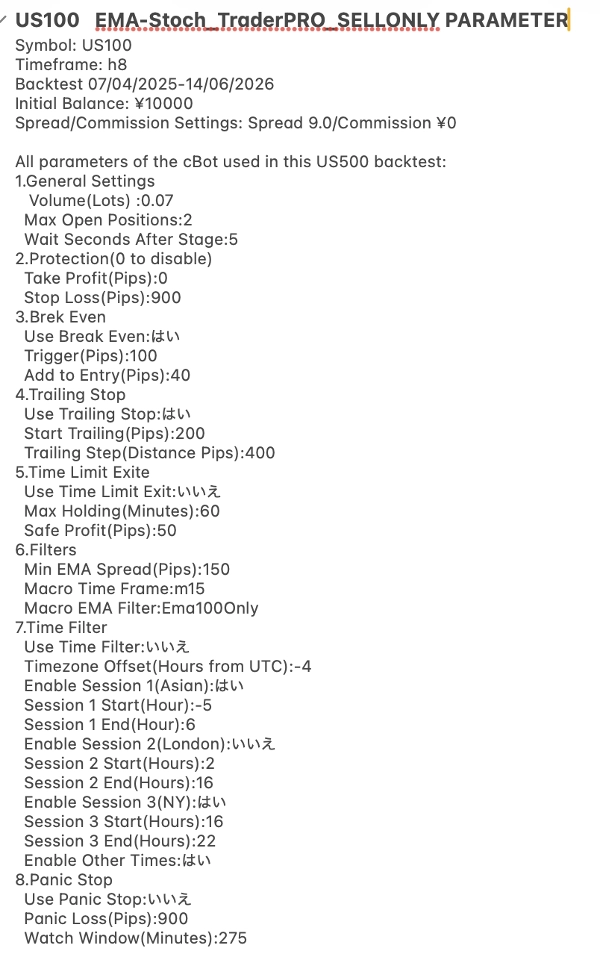
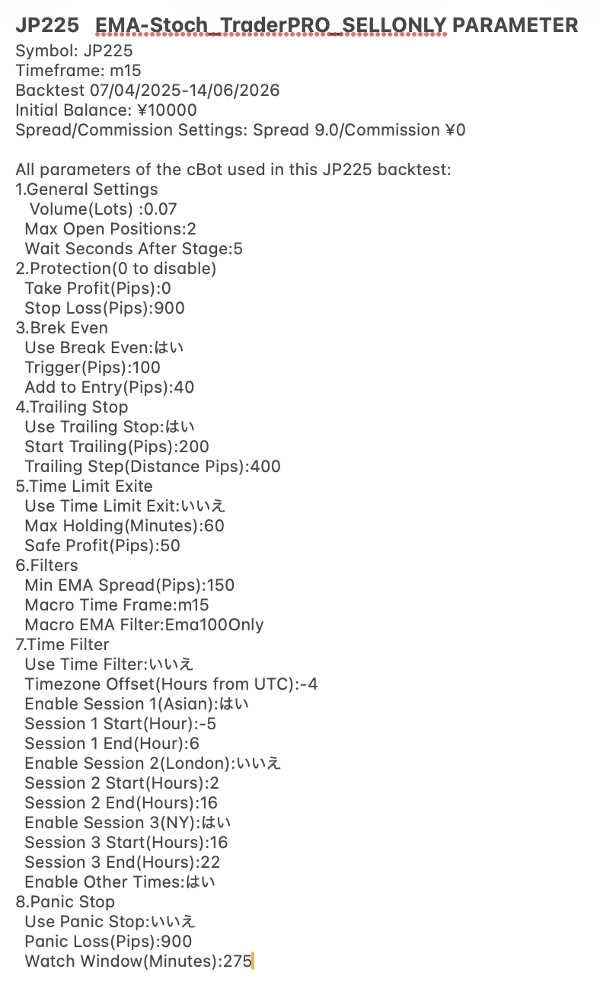
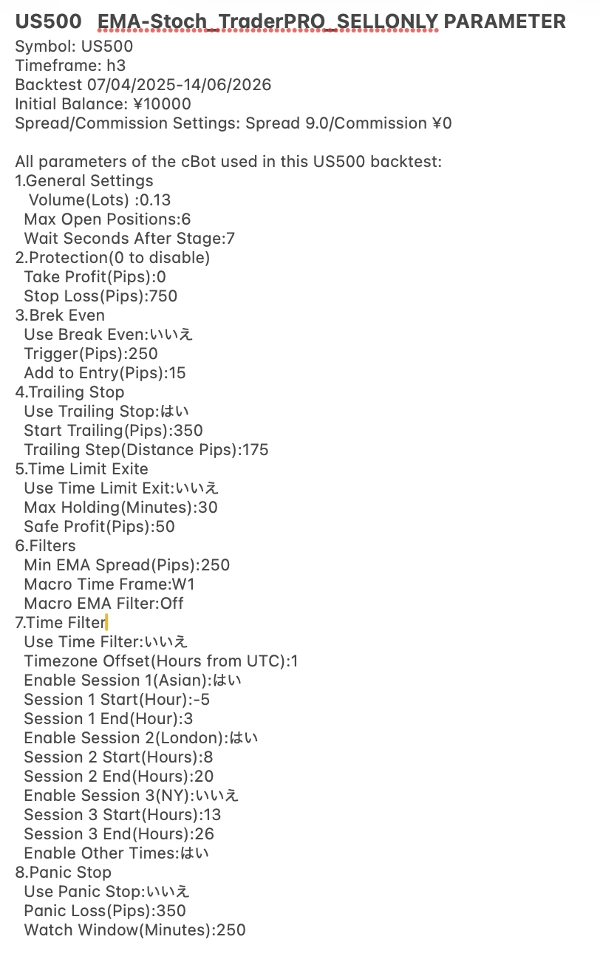
[ ⚙️ Tetapan Dioptimumkan (Praset) ] Untuk memastikan keselamatan tertinggi dan pematuhan dengan platform cTrader, fail luaran atau pautan muat turun tidak digunakan. Sebaliknya, kami menyediakan tetapan yang sangat dioptimumkan secara langsung melalui tangkapan skrin produk kami.
Sila semak galeri imej untuk melihat konfigurasi parameter tepat bagi US500, US100, dan JP225. Masukkan nilai-nilai ini ke dalam parameter cBot anda untuk meniru hasil ujian semula yang dipaparkan dengan lancar.
[ Rujukan: Persekitaran Ujian ]
- Akaun Dagangan: AXIORY Standard
• • Leverage: 1:1000 (Ditukar dari 1:400)
【概要】世界で最も変動の激しい指数に特化した、堅牢なスキャルピング寄りのデイトレードシステムです。
純粋な高頻度スキャルピングではなく、このシステムは日足セッション内で高確率のトレード機会をじっくりと見極めます。高度なマルチタイムフレームEMAフィルターとストキャスティックオシレーターを活用し、確立された下降トレンドに乗ることで、厳格なリスク管理と資本保全を実現します。
【実証済みの優位性と実績】主要指数における厳密なバックテストにおいて、驚異的な利益率と20%未満という極めて低いドローダウンを達成しました。US500の顕著な変動性、US100の急激な値動き、JP225の予測不可能な値動きにも、このシステムはうまく対応します。
【主な機能】* マルチタイムフレームトレンドフィルター:マクロEMA(100/200)を使用し、上位時間軸の明確なトレンド方向のみでトレードを行います。
* パニックストップシステム:変動損失制限に基づき、急激な急激な反転(例:ショートスクイーズ)を検知すると、ポジションを即座に決済します。
* 時間制限決済:利益が出ないトレードを自動的に決済することで、停滞した市場で資金が拘束されるのを防ぎます。
* 高度な保護機能:ピップスベースのブレークイーブンストップとトレーリングストップのメカニズムを完全にカスタマイズできます。
💡 [重要] 時間フィルターと最適化に関する注意事項 このcBotには、取引時間を指定できる「時間フィルター」機能があります。cTraderでバックテスト最適化を実行する際は、以下のシステム動作にご注意ください。
* 「時間フィルターを使用」が[いいえ]に設定されている場合:個々のセッション(例:アジア、ロンドン、ニューヨーク)が「はい」に設定されていても、それらは完全に無視され、システムは24時間365日稼働します。
より迅速かつ効率的な最適化のための推奨手順:
1. 特定の時間帯セッションをテストする場合:「時間フィルターを使用」の最適化チェックボックスをオフにし、固定値を[はい]に設定します。その後、個々のセッションのトグルと時間値に対して最適化を実行できます。
2. 24時間365日稼働をテストする場合:「時間フィルターを使用」を固定値[いいえ]に設定します。重要なのは、その下にある個々のセッション設定のすべての最適化チェックボックスをオフにすることです。これにより、エンジンが「無効なパラメーター」を計算するのを防ぎ、最適化の完了時間を大幅に短縮できます。
[⚙️ 最適化設定(プリセット)] cTraderプラットフォームのセキュリティとコンプライアンスを最大限に確保するため、外部ファイルやダウンロードリンクは使用していません。代わりに、最適化された設定を製品のスクリーンショットで直接提供しています。
US500、US100、JP225の正確なパラメーター設定については、画像ギャラリーをご確認ください。これらの値をcBotパラメーターに入力するだけで、表示されているバックテスト結果をシームレスに再現できます。
[参考:テスト環境]
* 取引口座:AXIORY Standard
* レバレッジ:1:1000(1:400から変更)
Ringkasan
Key features include:
- Multi-Timeframe Trend Filter using 100/200-period EMAs to align trades with the higher timeframe trend.
- Panic Stop System that closes positions instantly upon detecting sudden reversals such as short squeezes.
- Time Limit Exit to avoid capital being tied in stagnant trades by closing unprofitable positions after a set duration.
- Customizable break-even and trailing stop mechanisms based on pips for advanced trade protection.
The cBot supports configurable trading hours via a time filter and includes optimized presets for each supported index, provided through parameter screenshots. Backtesting over a one-year period with 1:1000 leverage shows strong profit factors and controlled drawdowns under 20%. It is suitable for algorithmic trend trading with medium trade frequency and supports market order types with equity-based stop risk management. Recommended minimum balance is $500 with a risk per trade of 1%.