Opis
TradeCommand Bot - Wykonawca transakcji dla panelu TradeCommand
========================================================
To jest towarzyszący wykonawca transakcji dla wtyczki panelu TradeCommand.
WAŻNE: TradeCommand Bot nie ma funkcjonalności samodzielnej. Został zaprojektowany wyłącznie do współpracy z panelem TradeCommand. Proszę najpierw zainstalować TradeCommand (wtyczkę panelu).
CO ON ROBI?
----------------
TradeCommand Bot działa jako silnik wykonawczy, który realizuje polecenia handlowe wysyłane z panelu TradeCommand:
• Odbiera żądania zleceń z panelu za pomocą cTrader LocalStorage
• Wykonuje transakcje korzystając z API handlowego cTrader
• Zwraca wyniki wykonania z powrotem do panelu
• Zarządza silnikiem planów dla wielopoziomowych strategii wyjścia
• Wysyła sygnały heartbeat, aby panel wiedział, że wykonawca jest online
DLACZEGO POTRZEBNY JEST OSOBNY BOT?
-----------------------------
Wtyczki cTrader (panele) nie mogą bezpośrednio składać ani modyfikować zleceń ze względu na ograniczenia bezpieczeństwa platformy. Tylko cBoty (roboty) mają uprawnienia handlowe.
TradeCommand Bot wypełnia tę lukę:
• Panel obsługuje interfejs użytkownika, obliczenia i interakcję z użytkownikiem
• Bot obsługuje faktyczne wykonanie zleceń z pełnym dostępem do API handlowego
Ta architektura zapewnia:
• Bezpieczne rozdzielenie obowiązków
• Niezawodne wykonanie zleceń
• Pełny dostęp do wszystkich typów zleceń, w tym Stop-Limit
JAK UŻYWAĆ
----------
1. Pobierz i zainstaluj TradeCommand (wtyczkę panelu) ze sklepu cTrader
2. Dodaj TradeCommand Bot do dowolnego wykresu
3. Uruchom bota (kliknij Play)
4. Panel TradeCommand wyświetli "Exec: ON", gdy wykryje bota
5. Teraz możesz składać i zarządzać zleceniami przez panel
Bot może działać na dowolnym wykresie — nie musi odpowiadać wykresowi panelu. Na konto potrzebna jest tylko jedna instancja.
OBSŁUGIWANE OPERACJE
--------------------
Po połączeniu z panelem TradeCommand ten bot wykonuje:
Składanie zleceń:
• Zlecenia rynkowe
• Zlecenia zakresu rynkowego
• Zlecenia limitowane
• Zlecenia stop
• Zlecenia Stop-Limit (w stylu MT5)
Zarządzanie pozycjami:
• Zamknięcie pozycji (całkowite lub częściowe)
• Modyfikacja stop loss i take profit
• Przesunięcie do breakeven
• Włączenie trailing stop
Zarządzanie zleceniami oczekującymi:
• Anulowanie zleceń oczekujących
• Modyfikacja zleceń oczekujących
Silnik planów:
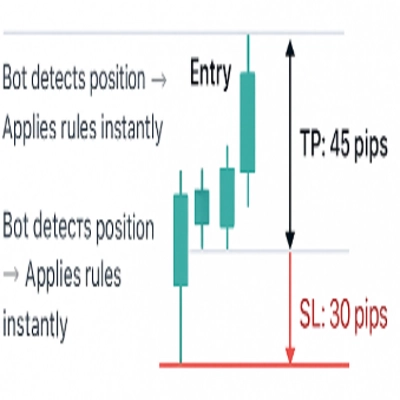
• Realizacja wielopoziomowych strategii take-profit
• Realizacja wielopoziomowych strategii stop-loss
• Zarządzanie trailing stopami z poziomami aktywacji
• Zachowanie planów między sesjami
SZCZEGÓŁY TECHNICZNE
-----------------
• Komunikacja: Używa cTrader LocalStorage do bezpiecznego, lokalnego przesyłania wiadomości
• Interwał odpytywania: 100ms dla responsywnego wykonania
• Heartbeat: Zapisywany w każdym cyklu, aby panel wiedział, że bot jest aktywny
• Przechowywanie danych: Plany są zapisywane lokalnie i przetrwają ponowne uruchomienia
• Obsługa wielu zakresów: Kompatybilny zarówno z pamięcią urządzenia, jak i instancji
WYMAGANIA
------------
• Wtyczka panelu TradeCommand (wymagana)
• Włączone uprawnienia handlowe na Twoim koncie
• Bot musi być uruchomiony, aby wykonanie zleceń działało
CO JEŚLI NIE MOGĘ URUCHOMIĆ BOTÓW?
--------------------------
Jeśli Twoje konto nie pozwala na uruchamianie cBotów lub wolisz tego nie robić:
Panel TradeCommand nadal oferuje:
• Wyświetlanie pozycji i zleceń
• Obliczenia i podsumowania P&L
• Obliczenia ryzyka i podglądy transakcji
• Wizualizację nakładki na wykresie
Tylko faktyczne wykonanie zleceń wymaga tego bota.
AUTOR
------
efem2000
W przypadku pytań lub wsparcia prosimy o kontakt z twórcą przez społeczność cTrader lub zapoznanie się ze stroną produktu panelu TradeCommand.
Podsumowanie
Due to platform security restrictions preventing panels from placing or modifying orders directly, TradeCommand Bot bridges this gap by separating user interface and calculation tasks (handled by the panel) from actual order execution (handled by the bot). It communicates securely via LocalStorage with a 100ms polling interval and sends heartbeat signals to confirm it is active. Plans and strategies persist locally across sessions. The bot can run on any chart and only one instance is needed per account.
TradeCommand Bot supports trading across multiple markets and symbols including Forex, Indices, Commodities, Stocks, and Cryptocurrencies such as BTCUSD, EURUSD, GBPUSD, and others. It requires the TradeCommand panel plugin and trading permissions enabled on the account.