
Beschreibung
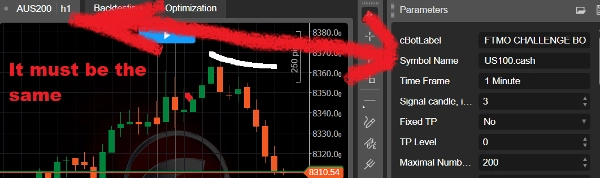
Der Prop Firm Bot ist für US100.Cash auf FTMO voreingestellt
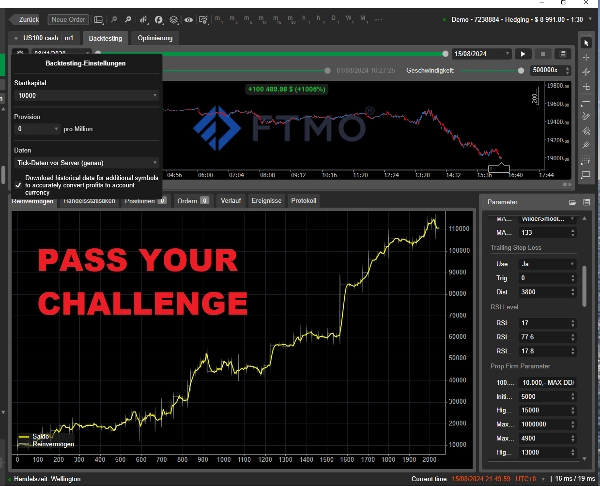
durchschnittlich 2233,-$/Monat mit 0,5 Lot
Max. täglicher DD: <4900,-$
Max. Kontostand DD: <13.000$
Bitte schauen Sie unter den Youtube-Videos nach, dort finden Sie weitere Optimierungen in der Beschreibung.
Am 01.08. stoppte der Bot während des Backtests mit dem Maximalrisiko von 0,5 Lot. Hier funktionierte der maximale tägliche Drawdown von 4900,- gut. Sie können den Bot am nächsten Tag, dem 02.08., wie gewohnt wieder starten.
PROP FIRM PARAMETER
Initialer Eigenkapital-Drawdown:
Das bedeutet das Anfangskapital, wenn der Algorithmus startet.
Zum Beispiel bei einem 100k-Konto setzen Sie 5.000,- und der Bot stoppt bei 95.000,-.
Höchster Eigenkapital-Drawdown:
Hier wird der Stopp auf Basis des maximalen Eigenkapitals bestimmt.
Wenn zum Beispiel das Eigenkapital nach einiger Zeit seinen Höchststand erreicht, wird der Stopp darauf basierend gesetzt.
Auch wenn das Eigenkapital intraday z.B. mit allen offenen Positionen von 10.000,- auf 11.000,- steigt und wieder auf 10.000,- fällt, ist das neue Hoch 11.000,-. Und wenn Sie einen Stopp von 1.000,- aktiviert haben, werden Sie bei 10.000,- ausgestoppt.
Sie können dieses Tool auch zur Optimierung verwenden, aber es ist nicht ganz so genau, da, wie gesagt, der Gewinn eines Tages als neue Referenz betrachtet werden kann. Um den tatsächlichen Rückgang zu bestimmen, müssen Sie das maximale Guthaben und das minimale Eigenkapital berücksichtigen. Und die Differenz ist dann der reale maximale Drawdown.
Dieses Tool ist eher dafür gedacht, wenn Sie Ihr Konto von 100k auf 150k handeln, damit Sie das Eigenkapital bei 120k absichern können.
Es ist auch vorgesehen, falls Ihre Prop-Firma einen trailing Drawdown auf das Eigenkapital verlangt.
Max. Gewinnziel:
Hier können Sie das Gewinnziel eingeben, das Sie erreichen müssen.
So müssen Sie keine Angst haben, dass das Eigenkapital während Ihrer Abwesenheit 10.000,- in den Gewinn läuft, nur um abends festzustellen, dass das Konto vielleicht sogar im Minus ist.
Max. täglicher Eigenkapital-Drawdown:
Ich habe dieses Tool programmiert, damit Sie den täglichen Drawdown bei allen Prop-Firmen überleben können.
An jedem neuen Tag, Serverzeit, prüft der Bot das aktuelle Eigenkapital inklusive aller offenen Positionen.
Dieser Wert wird nun zur Referenz für den maximal zulässigen Tagesverlust.
Sie können es auch für die Backtest-Optimierung als nützliches Werkzeug verwenden, da so eine viel genauere Optimierung möglich ist.
Ich habe 3100 als maximalen Drawdown für ein 100k-Konto voreingestellt.
Sie können den Wert auch ändern und z.B. ein noch höheres Risiko eingehen und mit 0,8 Lots handeln, aber bedenken Sie, dass Sie einen Puffer benötigen.
Höchster Kontostand-Drawdown:
Das ist der Drawdown vom höchsten Kontostand bis zum minimalen Eigenkapital. Es ist genauer als der höchste Eigenkapital-Drawdown und der Kontostand-Drawdown von der CTrader-Plattform.
Hinweis!
- Wenn Sie den Bot zwischendurch stoppen, wird nach dem Neustart der initiale Eigenkapital-Drawdown nicht mehr bei 95.000,- wie im obigen Beispiel liegen, sondern basierend auf dem aktuellen Kontostand neu bestimmt.
- Denken Sie immer an einen Puffer wegen unvorhersehbarer Marktereignisse. Der Algorithmus kann den Stopp nicht auf den Cent genau auslösen.
- Je nachdem, welches Stopp-Level zuerst erreicht wird, stoppt der Bot und alle Positionen werden automatisch geschlossen. Gleiches gilt für das Gewinnziel.
- Die maximale Risikovorabe von 0,5 Lots für das 100k-Konto ist die maximale Lotzahl, die Sie verwenden können, um den täglichen Drawdown von 5.000,- nicht zu überschreiten. Der maximale Kontostand-DD lag unter 13.000,-, sodass der 10.000,- Max Drawdown mindestens einmal gebrochen wurde.
Mit 0,3 Lots wurden im Backtest der maximale Kontostand-DD und der tägliche DD nicht überschritten. Da der tägliche DD unter 3100,- und der maximale Kontostand unter 8000,- lag. Sie müssen also selbst entscheiden, welches Risiko Sie eingehen.
- Natürlich können Sie ihn für jeden Broker, jede Prop-Trading-Firma oder mit eigenem Kapital und für jedes andere Symbol verwenden.
- Vergessen Sie nicht, den Symbolnamen bei anderen Brokern zu ändern, falls der Nasdaq einen anderen Namen hat.
- Und es ist auch wichtig, dass Sie im Parameterfenster "cBotLabel" einen persönlichen Namen eingeben. Dies erhöht die Chance, von den Prop-Firmen nicht erkannt zu werden, wenn mehrere Personen denselben EA verwenden.
Während der Challenge sollte das jedoch kein Problem sein.
- Beachten Sie, dass die Ergebnisse bei anderen Brokern mit denselben Einstellungen erheblich abweichen können.
Zeiteinstellungen News Trading:
Mit diesem Tool können Sie auch an Nachrichtentagen handeln, ohne gegen die Regeln zu verstoßen.
Grundsätzlich können Sie bestimmen, ob an bestimmten Tagen gehandelt werden soll: "ja" oder "nein" einstellen.
Dann entscheiden Sie anhand der "Non-Trading Time", in welchem Zeitfenster nicht gehandelt wird.
Sie haben die Möglichkeit, an jedem Tag 3 Non-Trading-Zeiten einzugeben.
Wenn Sie an einem Tag "Nein" eingestellt haben, spielt es keine Rolle, welche Non-Trading-Zeit gesetzt ist.
Andernfalls, wenn Sie z.B. von 14:24-14:36 nicht handeln wollen, werden alle offenen Positionen um 14:24 geschlossen. Danach beginnt der Handel wieder um 14:36. Prüfen Sie also sehr genau, wann Sie handeln dürfen. Der Bot wird nicht gestoppt, sondern ab 14:36 startet die Signallogik wieder und Positionen können eröffnet werden.
Sie können auch entscheiden, alle Positionen jeden Freitagabend zu schließen. Geben Sie dazu für Non-Trade Start: 20:00 und für Non-Trade End: 22:00 ein.
Was nicht funktioniert, ist, wenn Sie "Trade am Samstag" auf "nein" setzen in der Hoffnung, dass alle Positionen automatisch am Freitag geschlossen werden. Das gilt nur für Freitag, da hier nur die Non-Trade-Endzeit von 22:00 für die Signallogik verwendet werden kann. An allen anderen Wochentagen wird immer um 00:00 geschlossen, wenn Sie für den nächsten Tag „nein“ einstellen.
Die Standardwerte sind immer von 23:59:59-00:00:59. Das bedeutet, dass der Algo komplett ohne Unterbrechung läuft. Wenn Sie an einem bestimmten Tag oder mehreren eine Unterbrechung wünschen, ist es wichtig, immer einen Wert für die "Non-Trade End Time" vor 00:00 einzustellen. Also z.B. von 23:50-23:59. Sonst funktioniert es an diesem Tag nicht.
Außer freitags, an diesem Tag müssen Sie 22:00 (UTC+0) als maximale Non-Trade-Endzeit eingeben, da dann die Märkte schließen.
Die Wochenendtage Samstag und Sonntag sind jetzt egal. Ich habe es nur programmiert, falls Sie mit einem Broker handeln, bei dem die Märkte auch am Wochenende geöffnet sind. Solange die C-Trader-Plattform aufgrund geschlossener Märkte inaktiv ist, werden die 2 Tage nicht in die Handelslogik einbezogen. Wenn Sie jedoch den Wert auf "Nein" bei "Handel am Sonntag" setzen, werden Positionen zum Marktöffnung, die am Sonntag (ab 22:00) eröffnet worden wären, nicht mehr berücksichtigt.
Und was Sie sonst noch wissen müssen: Die Einstellungen werden aufgrund der Serverzeit (UTC+0) umgesetzt. Sie müssen ausprobieren, welche Einstellungen basierend auf Ihrer eigenen Zeitzone für Sie richtig sind.
Zusammenfassend: Alle Positionen werden entweder um 00:00 geschlossen, wenn Sie für den folgenden Tag das Wort "nein" eingeben. Oder sie werden aufgrund der Non-Trade-Startzeit geschlossen. Danach werden Positionen wieder normal eröffnet und laufen weiter bis zur nächsten Non-Trade-Startzeit oder Non-Trade-Tag. Und Sie können die Handelssitzung am Dienstag für nur wenige Minuten unterbrechen, am Mittwoch komplett aussetzen und dann von Donnerstag bis Freitag bis Marktschluss weiterhandeln.
Der Bot hat jetzt einen neuen Code, der bestehende offene Positionen erkennt. Wenn Sie den Bot zwischendurch stoppen, werden alle offenen Positionen so behandelt, als wäre er nie gestoppt worden.
Bei Bedarf gebe ich Ihnen Anweisungen, wie Sie den Bot installieren.
Damit der Backtest richtig funktioniert, ist es wichtig, dass Sie „Tick Data from server accurate“ eingeben.
Natürlich ist dieser Bot kostenlos und Sie können ihn für alle Werte und Symbole optimieren. Die Einstellungen aller meiner anderen "Quantum"-Bots können hier ebenfalls übernommen werden.
Egal welchen Prop Firm Bot Sie kaufen, Sie erhalten alle meine anderen Einstellungen per cbotset-Datei. (EURUSD, NZDUSD, USTEC etc.)
Und ich gebe Ihnen lebenslange Updates.
Kein Martingale
100% automatisch, läuft 24h
Sofort einsatzbereit
100% made in Germany
Sie können mir vertrauen, dass alle Bilder auf der Seite korrekt sind und alle Informationen wahr sind.
Bitte kontaktieren Sie mich bei Fragen.
Mit freundlichen Grüßen,
Luke
Zusammenfassung
The bot includes features to comply with prop firm rules, such as daily drawdown limits and profit targets, automatically closing all positions when limits are reached. It supports customizable trading schedules, allowing users to specify non-trading times or days, including the ability to pause trading during news events or weekends. The bot recognizes existing open positions after restarts to maintain continuity.
It is compatible with any broker or prop trading company and can be optimized for various symbols beyond US100. Users must adjust symbol names if different across brokers. The bot requires accurate tick data for backtesting and comes with additional preset configurations for other instruments like EURUSD and NZDUSD. It is developed in Germany and includes lifetime updates.