Description
My Management is a professional risk and trade management assistant built for discretionary cTrader traders.
You decide when and where to trade. My Management handles the calculations, order preparation and rule-based management of your positions.
It is designed to help traders apply consistent risk management without manually calculating position sizes or managing every trade adjustment themselves.
Precise Position Sizing
Choose how you want to size your trades:
• Risk percentage of account balance
• Fixed monetary risk
• Fixed lot sizeMy Management calculates the appropriate position size based on your Stop Loss distance and can account for spread and broker commission when calculating trade risk.
Plan the Trade Directly on the Chart
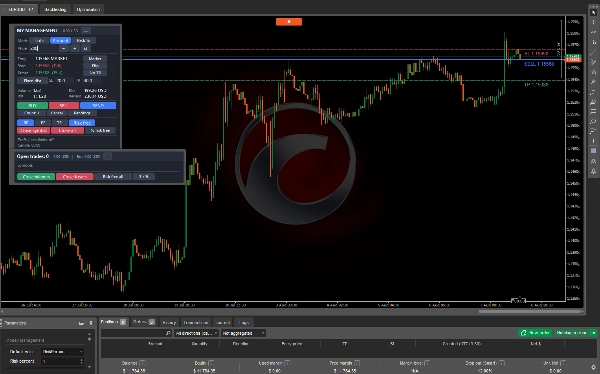
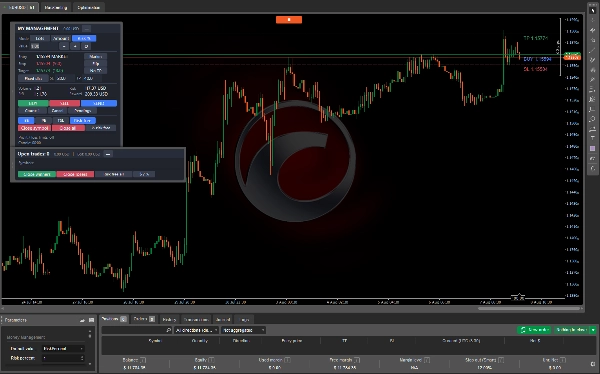
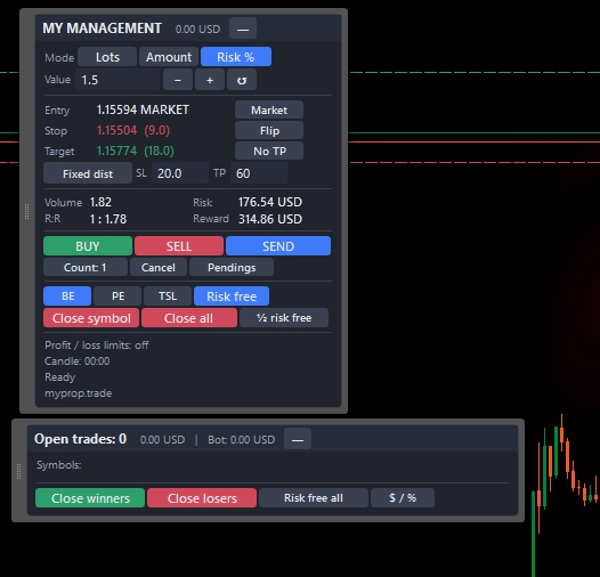
Prepare BUY or SELL setups using interactive Entry, Stop Loss and Take Profit levels.
Move the levels directly on the chart and instantly see updated:
• Position size
• Monetary risk
• Potential profit
• Risk-to-Reward ratioThe entry level can also be moved away from the current market price to prepare Limit or Stop orders.
Automated Trade Management
After a trade is opened, My Management can manage it according to predefined rules:
• Break-even management
• Break-even offset
• Trailing Stop
• Partial close
• Manual Risk-Free function
• Risk-Free by partially closing volumeManagement triggers can be configured in pips or in R multiples, allowing the same risk framework to be used across different symbols and trading styles.
Multiple Position Execution
Split the calculated volume across multiple positions. My Management can distribute the total position size and create progressive Take Profit levels while keeping the same Stop Loss.
Profit & Loss Protection
Define account or symbol-level profit and loss limits.
When a configured limit is reached, My Management can close the relevant positions and cancel pending orders, helping traders enforce predefined risk rules.
This functionality can be especially useful for traders operating under strict daily or overall risk limits.
Open Position Management Panel
Monitor active positions from a dedicated panel showing:
• Symbol
• Trade direction
• Volume
• Entry price
• Stop Loss
• Take Profit
• Current profit or lossIndividual and group management actions are available directly from the panel.
Trading Shortcuts
Optional keyboard shortcuts provide faster access to common actions including:
• Prepare Buy setup
• Prepare Sell setup
• Submit order
• Cancel setup
• Risk-Free positions
• Close symbol positions
• Show or hide panelsPersistent Settings
Panel configuration and trading-plan preferences are saved automatically for each account, allowing your preferred setup to remain available between sessions.
Who Is My Management For?
My Management is designed for discretionary traders who want to separate trading decisions from execution and risk-management calculations.
It can be particularly useful for:
• Prop firm traders
• Risk-based traders
• Day traders
• Scalpers
• Swing traders
• Traders managing multiple positionsImportant
My Management is not an automated trading strategy and does not generate trading signals.
It does not analyze the market or decide when to enter a trade. The trader remains fully responsible for the trading strategy and entry decisions.
The purpose of My Management is to help execute and manage those decisions according to predefined risk rules.
Before using the product on a live account, test your preferred configuration on a demo account and verify broker-specific settings such as commission.
Summary
Traders can plan trades directly on the chart by interactively setting entry, stop loss, and take profit levels, with real-time updates on position size, monetary risk, potential profit, and risk-to-reward ratio. The panel supports preparing market, limit, and stop orders.
The product automates trade management through configurable rules such as break-even adjustments, trailing stops, partial closes, and risk-free functions, with triggers set in pips or risk multiples. It allows splitting total position size across multiple positions with progressive take profit levels sharing a common stop loss.
Profit and loss protection features enable defining account or symbol-level limits that, when reached, trigger closing positions and canceling pending orders. An open position management panel provides detailed monitoring and management of active trades by symbol, direction, volume, entry price, stop loss, take profit, and current profit or loss.
Optional keyboard shortcuts enhance workflow efficiency. Settings persist across sessions per account. This tool is suitable for various trading styles including day trading, scalping, swing trading, and is compatible with prop firm requirements. It does not generate trade signals but assists in executing and managing trader decisions according to predefined risk rules.