Description
IronVale Prime
IronVale Prime is a fully automated multi-pair Forex cBot built around mean reversion, relative-value market structures, basket trading, adaptive recovery and portfolio-level risk management.
The cBot contains several internal trading engines. It does not analyse only the chart symbol on which the instance is attached. Instead, it loads and analyses the required Forex symbols internally and manages positions across multiple pairs.
Quick Start – Recommended Setup
For the current recommended configuration:
Host symbol: AUDCAD
Host period: M15
Instances: One instance per trading account
Recommended minimum balance: 1,000 in the account base currency
Recommended leverage: 1:30 or higher where available
Required account type: Hedging account
AUDCAD is recommended as the host symbol because this is the configuration used during development and reference testing. However, the host chart symbol itself does not control the trading logic. IronVale Prime obtains the required symbol data internally.
The strategy is designed specifically around M15 data. M15 should therefore be used for both normal operation and backtesting.
Only one instance per account is recommended. IronVale Prime already manages several symbols and several internal engines from one instance.
Required Symbols
With the current default strategy architecture, the broker must provide the following standard Forex symbols:
AUDCAD
AUDNZD
NZDCAD
EURUSD
GBPUSD
EURGBP
USDJPY
EURJPY
AUDUSD
EURAUD
The main triangle is:
AUDCAD / AUDNZD / NZDCAD
Additional internal satellite structures use:
EURUSD / GBPUSD / EURGBP
EURUSD / USDJPY / EURJPY
EURUSD / AUDUSD / EURAUD
The active FLOW engines can also trade AUDCAD, EURGBP, EURAUD, EURJPY and NZDCAD.
The user does not need to start separate cBot instances on these symbols. IronVale Prime accesses them automatically.
Important broker requirement: the broker must make the required symbols available under names compatible with the cBot. Brokers using non-standard symbol suffixes or alternative symbol names may not be compatible with all internal engines.
Current Recommended Core Configuration
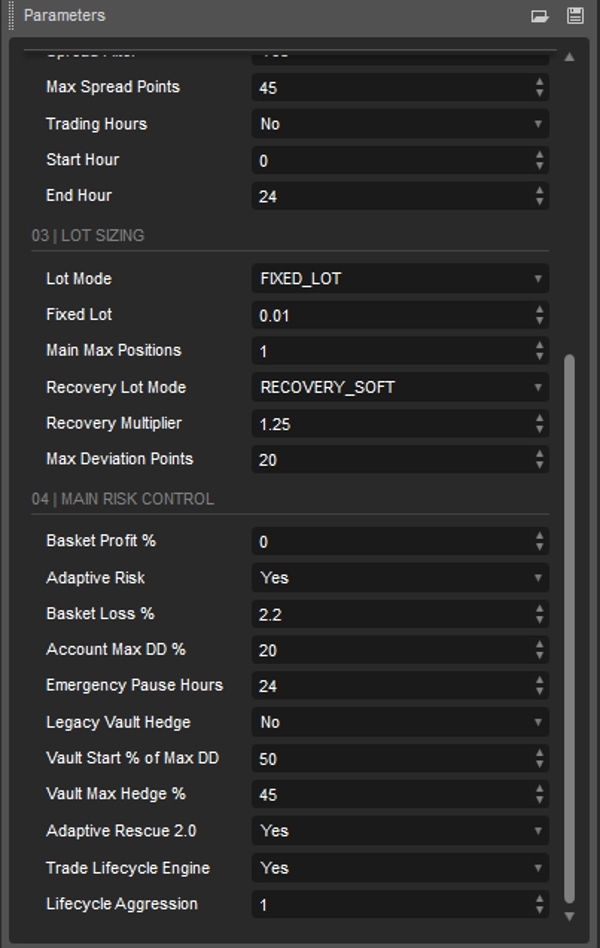
The current strategy logic has been developed and tested around the supplied default structural settings. Unless you are deliberately performing your own backtesting or optimisation, it is recommended to leave the strategy, recovery and lifecycle parameters at their default values.
Current recommended structural defaults:
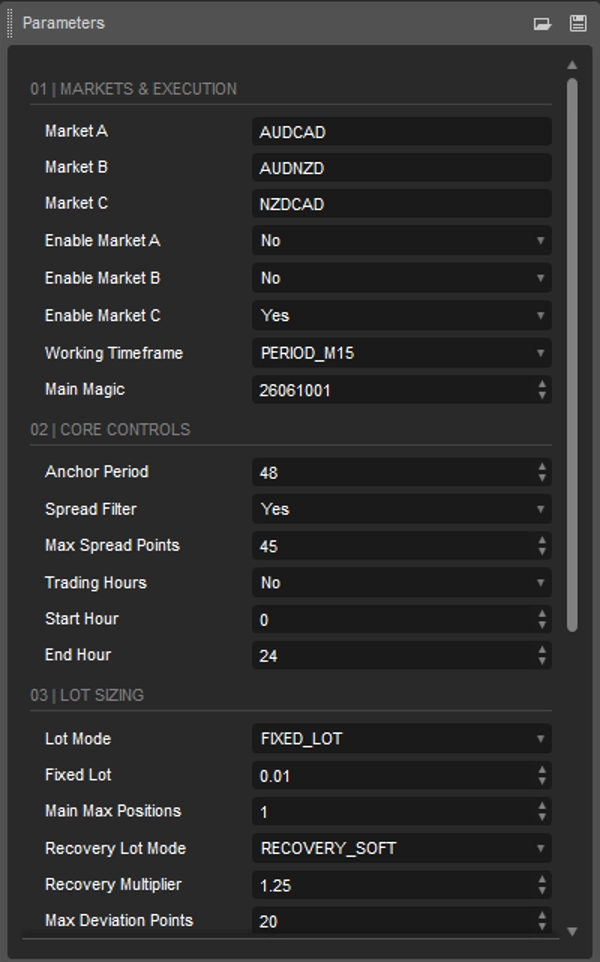
Market A: AUDCAD
Market B: AUDNZD
Market C: NZDCAD
Enable Market A: False
Enable Market B: False
Enable Market C: True
Working Timeframe: M15
Anchor Period: 48
Spread Filter: True
Max Spread Points: 45
Trading Hours: False
Lot Mode: Fixed Lot
Recovery Lot Mode: Recovery Soft
Main Max Positions: 1
Basket Profit %: 0
Adaptive Risk: True
Basket Loss %: 2.20
Account Max DD %: 20
Emergency Pause Hours: 24
Legacy Vault Hedge: False
Adaptive Rescue 2.0: True
Trade Lifecycle Engine: True
Lifecycle Aggression: 1.00
These settings represent the current intended operating configuration of the strategy.
Important Difference Between Factory Lot and Reference Backtest Risk
The cBot is supplied with a conservative Fixed Lot default of 0.01.
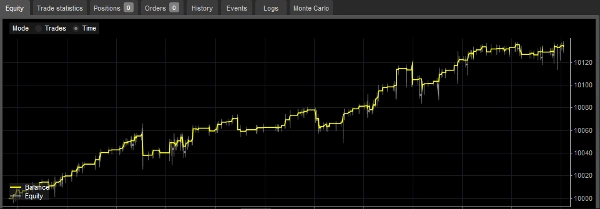
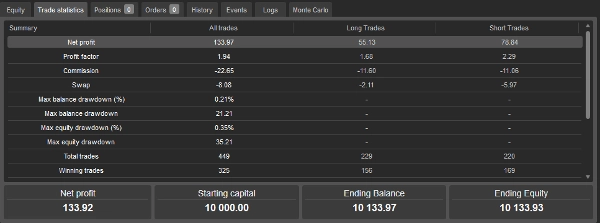
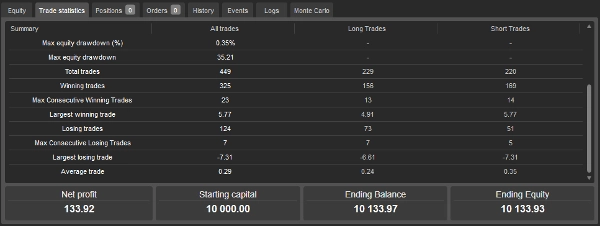
The development reference backtest used a higher risk configuration with Fixed Lot 0.10 on a 10,000 EUR starting balance.
Therefore, a user running the factory 0.01 lot setting should not expect the same absolute profit or ROI as a 0.10 reference backtest.
The trading logic remains the same, but the risk and monetary results change with position sizing.
Parameter Guide
01 | Markets & Execution
Market A / Market B / Market C
These define the three symbols forming the main statistical triangle.
Recommended values:
Market A = AUDCAD
Market B = AUDNZD
Market C = NZDCAD
These values are part of the current tested strategy structure and should normally be left unchanged.
Enable Market A / B / C
These settings determine which symbols may be used as entry targets by the main core Mean Reversion engine.
The recommended configuration is:
Market A = False
Market B = False
Market C = True
This does not mean that the complete cBot trades only NZDCAD. Other internal FLOW, satellite and model engines can still trade their own symbols.
These switches affect the main core engine only.
Working Timeframe
Recommended and currently supported value: M15.
The internal data engine is designed around 15-minute bars. Changing the chart period does not convert the strategy to another timeframe.
Main Magic
Default: 26061001.
This identifies positions belonging to the main strategy engine.
Normally this should not be changed.
Running several IronVale Prime instances on the same account is not recommended because the system is designed as a single multi-engine portfolio manager.
02 | Core Controls
Anchor Period
Default: 48.
This controls the main statistical anchor used when measuring price deviation and mean-reversion behaviour.
On M15, 48 bars represent approximately 12 hours of market data.
The current recommended value is 48.
Spread Filter
Default: True.
When enabled, new exposure is blocked if the spread exceeds the configured limit.
Existing positions continue to be managed normally.
It is recommended to leave this enabled.
Max Spread Points
Default: 45.
This defines the maximum accepted spread measured in the symbol's own tick-size points.
This is a spread protection parameter, not a profit target.
The recommended default is 45.
Very low values can unnecessarily block trades, especially on cross pairs during quieter or less liquid periods.
Trading Hours
Default: False.
False means the strategy is allowed to search for entries throughout the normal Forex trading week.
When enabled, only the configured Start Hour and End Hour window is used for new exposure.
Existing positions continue to be managed outside the entry window.
The recommended default is False.
Start Hour / End Hour
Defaults: 0 / 24.
These are used only when Trading Hours is enabled.
The cBot operates in UTC time.
03 | Lot Sizing
Lot Mode
Two modes are available:
FIXED_LOT
AUTO_BY_BALANCE
The current factory default is FIXED_LOT.
FIXED_LOT provides predictable user-controlled risk scaling.
AUTO_BY_BALANCE automatically increases the strategy's starting lot floor as the account grows.
Fixed Lot
Factory default: 0.01.
Important: this parameter is not simply the exact lot used by every trade.
IronVale Prime contains multiple engines with their own relative position geometry. Fixed Lot acts as the starting/minimum risk floor from which the internal lot structure is scaled.
A larger Fixed Lot therefore increases the entire strategy exposure.
For a new user, 0.01 is the conservative starting value.
The higher-risk development reference test used 0.10 on a 10,000 EUR account.
Do not use 0.10 on a small account simply because it was used in the reference test.
AUTO_BY_BALANCE
When AUTO_BY_BALANCE is selected, the cBot adjusts the base lot according to account balance.
With a normal 0.01 minimum-lot account, the internal reference steps begin approximately as follows:
Below 1,300 → 0.01
1,300 → 0.02
1,700 → 0.03
2,500 → 0.04
3,500 → 0.05
5,000 → 0.06
8,000 → 0.08
10,000 → 0.10
The scaling continues upward for larger balances.
When using AUTO_BY_BALANCE, keeping Fixed Lot at 0.01 is recommended unless the user intentionally wants to force a higher minimum exposure.
Main Max Positions
Default: 1.
This is the normal core-position limit.
However, this should not be interpreted as a strict maximum of one position for the complete strategy.
IronVale Prime contains an active Recovery Shield. During recovery, the cBot can add additional positions when its recovery conditions are satisfied.
This behaviour is essential to understand before using the cBot.
Recovery Lot Mode
Available modes:
RECOVERY_FLAT
RECOVERY_SOFT
RECOVERY_MULTIPLIER
Recommended default: RECOVERY_SOFT.
RECOVERY_SOFT uses staged recovery sizing rather than applying a simple unrestricted multiplier to every recovery order.
This is the current recommended recovery mode.
RECOVERY_FLAT keeps recovery sizing flatter.
RECOVERY_MULTIPLIER uses the Recovery Multiplier parameter and can increase exposure more aggressively.
Recovery Multiplier
Default: 1.25.
This parameter is primarily relevant when Recovery Lot Mode is set to RECOVERY_MULTIPLIER.
With the recommended RECOVERY_SOFT mode, the cBot uses its internal staged recovery geometry instead.
Max Deviation Points
Default: 20.
This controls the maximum execution deviation/slippage allowed when an order is submitted.
The recommended value is 20 unless broker execution conditions require otherwise.
04 | Main Risk Control
Basket Profit %
Default: 0.
A value of 0 disables the additional user-defined percentage basket-profit target.
This does not disable the cBot's normal statistical exits, recovery-profit exits or other internal closing logic.
The recommended value is 0.
Adaptive Risk
Default: True.
Adaptive Risk allows risk thresholds to adapt when balance-based sizing is used.
It is recommended to leave this enabled.
Basket Loss %
Default: 2.20%.
This parameter must not be interpreted as a conventional fixed stop loss.
IronVale Prime uses Recovery Shield logic. When a basket reaches a difficult drawdown area, the system can move into controlled recovery rather than immediately closing the basket.
Recovery may involve additional positions.
Therefore, a 2.20% Basket Loss setting does not mean that every basket is guaranteed to close at exactly -2.20%.
The account-level emergency drawdown setting remains the final risk boundary.
Account Max DD %
Default: 20%.
This is the major emergency account-drawdown protection level used by the risk framework.
When the emergency drawdown threshold is reached, the strategy's emergency protection can close active strategy exposure.
This setting should not be increased casually.
Lower values provide a tighter account-level safety limit but can interrupt recovery earlier.
Emergency Pause Hours
Default: 24.
After an emergency account drawdown event, this value controls the core strategy's emergency lock period before new core exposure is allowed again.
Legacy Vault Hedge
Default: False.
This is an older alternative recovery/hedging mechanism.
It is not part of the current recommended setup.
The current preferred architecture uses Adaptive Rescue 2.0.
Leave Legacy Vault Hedge disabled unless specifically testing the older recovery method.
Vault Start % of Max DD
Default: 50%.
Vault Max Hedge %
Default: 45%.
These settings belong to the Legacy Vault Hedge mechanism.
With the recommended Legacy Vault Hedge = False configuration, they should normally be left at their defaults and do not need to be adjusted.
Adaptive Rescue 2.0
Default: True.
This is a central part of the current recovery architecture.
Adaptive Rescue 2.0 is designed to avoid blindly adding exposure at the worst point of an adverse move.
Later recovery stages look for evidence of an actual market turn, while the system also limits combined directional exposure and can use profitable recovery legs to reduce older losing exposure.
Recommended setting: True.
Disabling it changes the recovery behaviour significantly and is not recommended for normal use.
Trade Lifecycle Engine
Default: True.
The Lifecycle Engine continually evaluates whether an active market situation should be treated as an opportunity, normal hold, recovery situation, de-risking situation or invalidated setup.
It is designed to prevent baskets from remaining unmanaged indefinitely and works together with the recovery architecture.
Recommended setting: True.
Lifecycle Aggression
Default: 1.00.
1.00 is the recommended balanced setting.
Lower values reduce lifecycle-driven sizing.
Higher values allow stronger sizing in favourable lifecycle conditions.
This setting does not bypass the cBot's exposure and margin controls.
Recommended default: 1.00.
How Recovery Works
IronVale Prime is not a single-entry/single-stop trading system.
When a trade or basket moves against the initial entry, the cBot may add additional positions if its statistical and recovery conditions are satisfied.
These positions are intended to manage the basket as a combined structure.
This means that during recovery:
total market exposure may increase;
margin usage may increase;
floating drawdown may increase;
several positions can exist on the same symbol;
a prolonged adverse move can cause larger losses.
Recovery is conditional. The cBot does not simply add another order every time price moves against it.
Adaptive Rescue 2.0 and the Trade Lifecycle Engine evaluate market structure, adverse distance and evidence of a market turn before allowing later recovery actions.
Recovery does not guarantee that every losing basket will return to profit.
Account Size and Leverage
Recommended minimum balance: 1,000 or equivalent.
The code contains special small-account handling below 1,000, but accounts below this level are not the recommended Store configuration because broker minimum lot sizes can represent disproportionately high risk.
Suggested leverage: 1:30 or higher where legally available.
Lower leverage can reduce the amount of recovery exposure the account is able to support.
The cBot includes a free-margin guard and can reduce or reject an order if sufficient margin is not available.
Users trading with lower leverage should use lower lot settings and/or a larger account balance.
Backtesting – How to Reproduce the Strategy
For consistent testing, use cTrader Windows or Mac and open the cBot's Backtesting tab.
Recommended reference setup:
Host symbol: AUDCAD
Chart period: M15
Data: Tick data from server / highest-quality available tick data
Starting capital for the development reference test: 10,000 EUR
Lot Mode: FIXED_LOT
Fixed Lot used for the higher-risk reference test: 0.10
Market A: AUDCAD
Market B: AUDNZD
Market C: NZDCAD
Enable Market A: False
Enable Market B: False
Enable Market C: True
Recovery Lot Mode: RECOVERY_SOFT
Adaptive Risk: True
Legacy Vault Hedge: False
Adaptive Rescue 2.0: True
Trade Lifecycle Engine: True
Lifecycle Aggression: 1.00
Leave the remaining structural parameters at their supplied defaults unless reproducing a test that explicitly shows different settings.
For the closest comparison with Store backtesting screenshots, use the same:
testing dates;
broker;
spread/commission assumptions;
account leverage;
starting capital;
parameter set.
Different broker data, spreads, commissions, swaps and execution conditions can materially change the result.
The Store screenshots and Backtesting Results section should always be used as the reference for the exact published test configuration.
Demo and Live Use
Before using IronVale Prime on a live account, running the cBot on a demo account with the intended broker is strongly recommended.
This verifies that:
all required symbols are available;
symbol names are compatible;
spreads are suitable;
the account supports hedging;
margin requirements are appropriate for the selected lot size;
the cBot behaves correctly under that broker's execution conditions.
After starting the cBot, manual intervention is normally not required.
Because IronVale Prime manages baskets and recovery exposure as a complete system, manually closing individual strategy positions can alter the intended basket structure.
Broker and Prop-Firm Requirements
The account must support hedging.
The required Forex symbols must be available.
IronVale Prime does not claim automatic compliance with prop-firm rules.
In particular, a prop firm may use daily drawdown, overall drawdown or exposure rules that differ from the cBot's own account-level protection.
Users are responsible for verifying compatibility with their broker or prop firm's rules.
Important Risk Information
IronVale Prime can add positions to trades or baskets that move against the original entry.
This can increase total exposure, margin usage and floating drawdown.
Recovery logic is not a guarantee against losses.
Leveraged trading involves substantial risk and may result in the loss of part or all of the invested capital.
Backtests are historical simulations and cannot reproduce all live-market conditions.
Spreads, commissions, swaps, liquidity, slippage, broker data and market behaviour can cause live results to differ from historical tests.
Trading involves risk. Past performance does not guarantee future results.
Summary
The strategy is optimized for 15-minute (M15) chart data and is recommended to run one instance per trading account, preferably on a hedging account type with a minimum balance of 1,000 in the account base currency and leverage of 1:30 or higher. Key features include fixed or balance-adaptive lot sizing, spread filtering to avoid trading during high spread conditions, and an advanced recovery system (Adaptive Rescue 2.0) that manages drawdowns by adding positions under controlled conditions rather than using fixed stops.
Risk controls include a basket-level loss threshold (default 2.20%), an emergency account drawdown limit (default 20%), and a trade lifecycle engine that evaluates market conditions continuously to manage exposure. The cBot supports market orders and is structured to handle medium-frequency swing trades with a focus on statistical market structures and portfolio risk. Users should verify broker compatibility, especially symbol naming and hedging support, before live deployment.