Descripción
Deja de exportar operaciones a hojas de cálculo. PnL Calendar Pro añade una pestaña de panel limpia al Trade Watch de cTrader que convierte tu historial de operaciones cerradas en algo que realmente puedes leer de un vistazo — y se actualiza en el momento en que se cierra una posición.
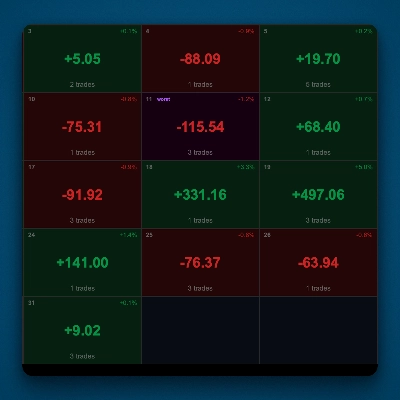
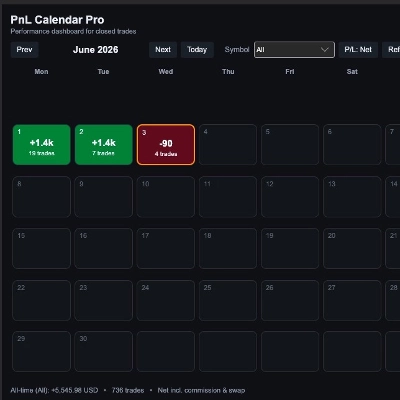
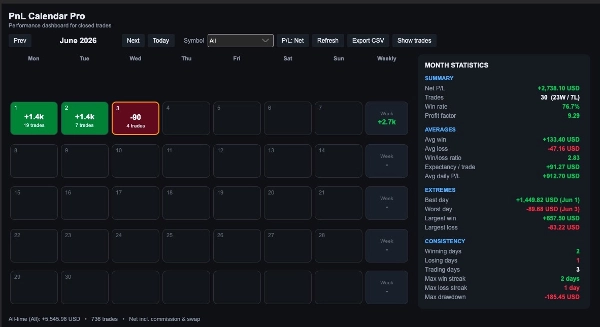
Un calendario mensual codificado por colores muestra tus días ganadores y perdedores, sombreados según la magnitud de cada día, junto a un desglose completo de los números que te indican si realmente estás mejorando.
Calendario de un vistazo
- Cuadrícula mensual codificada por colores — días ganadores en verde, días perdedores en rojo
- Intensidad del mapa de calor escalada al tamaño del P/L de cada día, para que tus días más grandes destaquen al instante
- Conteo diario de operaciones en cada día
- Columna de totales semanales
- Hoy resaltado; navega por los meses con Anterior / Siguiente / Hoy
Panel completo de rendimiento
- P/L neto, total de operaciones, ganancias vs. pérdidas
- Tasa de ganancia y factor de beneficio
- Ganancia promedio, pérdida promedio y ratio ganancia/pérdida (payoff)
- Expectativa por operación y P/L diario promedio
- Mejor y peor día, además de la operación ganadora y perdedora más grande
- Conteo de días ganadores / perdedores / de operaciones
- Rachas más largas de días ganadores y perdedores
- Máxima caída de operaciones cerradas del mes
Diseñado para cómo realmente operas
- Filtra por símbolo para analizar un instrumento o todo tu libro
- Alterna entre Neto (incluyendo comisión y swap) y Bruto P/L
- Lista de operaciones expandible para el mes seleccionado
- Exportación CSV con un clic para análisis más profundo
- Actualización en vivo — el panel se actualiza automáticamente cuando se cierra una posición
Privado, ligero y nativo
- Solo lee tu historial local de operaciones cerradas — nada se sube ni se envía a ningún lado
- No requiere permisos especiales de acceso
- Tema oscuro elegante que se integra con la plataforma
- Funciona con cTrader en Windows y macOS
Para quién es
Traders discrecionales y sistemáticos que quieren retroalimentación instantánea y honesta sobre sus resultados — sin salir de la plataforma ni estar pendientes de una hoja de cálculo.
Cómo empezar
Instala el plugin, abre un panel Trade Watch y selecciona la pestaña PnL Calendar Pro . Tu mes comenzará a llenarse inmediatamente con tu historial de operaciones.
Resumen
Key features include a color-coded monthly calendar where winning days are shown in green and losing days in red, with heatmap intensity reflecting the size of each day’s profit or loss. The calendar displays daily trade counts, weekly totals, and highlights the current day, allowing easy navigation through months.
The performance dashboard provides comprehensive metrics such as net and gross P/L, total trades, win/loss counts, win rate, profit factor, average win/loss, payoff ratio, expectancy per trade, best/worst days, largest single trades, streaks, and maximum drawdown for the month.
Users can filter data by trading symbol, toggle between net and gross P/L, expand monthly trade lists, and export data to CSV for further analysis. The plugin operates locally without uploading data, requires no special permissions, and supports both Windows and macOS with a dark theme that integrates seamlessly into the platform.
Designed for discretionary and systematic traders, PnL Calendar Pro offers immediate, clear feedback on trading performance without leaving cTrader or managing external spreadsheets.




![Logotipo de "Custom Timeframes [Iridio Capital]"](https://cdn.ctrader.com/image/webp/4d75a920-23c7-4fea-a7b5-594a9d067f2e_63286)