present
ลงทะเบียนและรับส่วนลด $50 สำหรับการซื้อครั้งแรกของคุณ
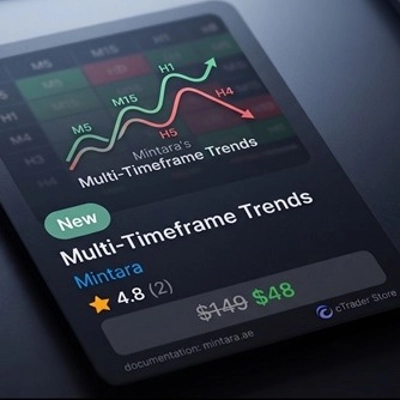
Trading product for Trends ปลั๊กอินเดสก์ท็อป Market Scanner, image 1
Trends
ปลั๊กอินเดสก์ท็อป
เวอร์ชัน 1.0, May 2026
Windows, Mac
Trading product for Trends ปลั๊กอินเดสก์ท็อป Market Scanner, image 2
Trading product for Trends ปลั๊กอินเดสก์ท็อป Market Scanner, image 3
ตั้งแต่ 23/03/2025

คำอธิบาย

https://mintara.ae/ctrader/plugin/MTF_Trends_Documentation.html
แผนที่ความร้อนแนวโน้ม

หลาย

เครื่องสแกนตลาดเรียลไทม์ที่ประเมินทิศทางแนวโน้มในสองกรอบเวลาที่ผู้ใช้เลือกพร้อมกัน — ให้สัญญาณที่ใช้งานได้ทันทีสำหรับเครื่องมือทุกตัวในรายการเฝ้าดูของคุณ


สิ่งที่มันทำ

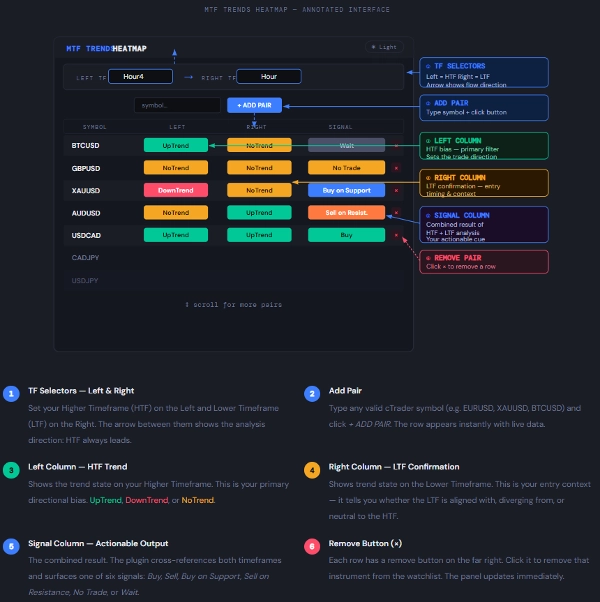
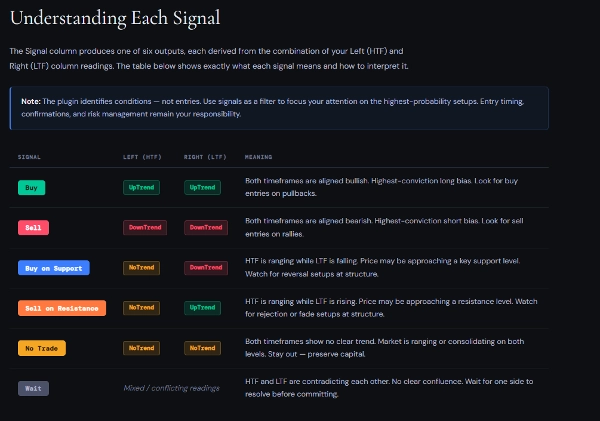
ปลั๊กอิน MTF Trends Heatmap ตรวจสอบเครื่องมือหลายตัวพร้อมกันและประเมินสภาพแนวโน้มในสองกรอบเวลาที่คุณเลือก กรอบเวลาซ้าย คือกรอบเวลาที่สูงกว่า (HTF) และ กรอบเวลาขวา คือกรอบเวลาที่ต่ำกว่า (LTF) ปลั๊กอินเปรียบเทียบทั้งสองและสร้าง สัญญาณ ในคอลัมน์สุดท้าย

แทนที่จะสลับกราฟด้วยตนเอง คุณจะได้รับมุมมองรวมของเครื่องมือจำนวนมาก — มีการใช้สี อัปเดตสด และเลื่อนดูได้ — ทั้งหมดในแผงเดียวที่ปรับขนาดได้ภายใน cTrader

หลักการสำคัญ: กรอบเวลาซ้าย (HTF) กำหนด แนวโน้มทิศทาง กรอบเวลาขวา (LTF) ยืนยันหรือขัดแย้งกับมัน คอลัมน์สัญญาณบอกคุณว่าควรมองหาอะไร — คุณเป็นผู้ตัดสินใจว่าจะดำเนินการเมื่อใด

การจับคู่ที่แนะนำ:
นักเทรดรายวัน → ซ้าย: H4 / ขวา: H1 — แนวโน้มบน H4, เวลาการเข้าเทรดบน H1
นักเทรดสวิง → ซ้าย: รายวัน / ขวา: H4 — ทิศทางบนรายวัน, การตั้งค่าบน H4
นักเทรดตำแหน่ง → ซ้าย: รายสัปดาห์ / ขวา: รายวัน — มุมมองภาพใหญ่บนรายสัปดาห์, ตัวกระตุ้นบนรายวัน

สำคัญ: อย่าตั้งกรอบเวลาซ้ายต่ำกว่ากรอบเวลาขวา ปลั๊กอินจะให้น้ำหนักกรอบเวลาซ้ายเป็นผู้มีอำนาจสูงกว่า การสลับตำแหน่งจะทำให้ตรรกะสัญญาณกลับด้านและให้ผลลัพธ์ที่ทำให้เข้าใจผิด


สรุป

สรุปโดย AI
The Trends plugin is a real-time market scanner designed for the cTrader platform. It evaluates trend direction simultaneously across two user-selected timeframes: a Higher Timeframe (HTF) on the left and a Lower Timeframe (LTF) on the right. By comparing these timeframes, the plugin generates a consolidated signal indicating trend alignment or divergence for each instrument in the user’s watchlist. This signal helps traders identify directional bias from the HTF and confirmation or contradiction from the LTF, aiding decision-making without manually switching charts. The interface is a color-coded, live-updating, scrollable heatmap panel that can display multiple instruments at once. Recommended timeframe combinations vary by trading style, such as H4/H1 for day trading, Daily/H4 for swing trading, and Weekly/Daily for position trading. The plugin requires the HTF to be set higher than the LTF to maintain correct signal logic. This tool supports efficient multi-instrument trend analysis by providing an at-a-glance view of market conditions across different timeframes.
โปรไฟล์ปลั๊กอิน
หมวดหมู่ปลั๊กอิน
UX ของกราฟ
การเข้าถึงข้อมูล
ข้อมูลตลาด

รีวิวจากลูกค้า

0.0
รีวิว: 0
รีวิวจากลูกค้า
ยังไม่มีรีวิวสำหรับผลิตภัณฑ์นี้ หากเคยลองแล้ว ขอเชิญมาเป็นคนแรกที่บอกคนอื่น!

การสนทนา

คำถามที่พบบ่อย

Market Scanner
ผลิตภัณฑ์ที่มีให้บริการผ่าน cTrader Store รวมถึงบอทการเทรด อินดิเคเตอร์ และปลั๊กอิน มีให้บริการโดยนักพัฒนาบุคคลที่สามและมีไว้เพื่อวัตถุประสงค์ในการเข้าถึงข้อมูลและทางเทคนิคเท่านั้น cTrader Store ไม่ใช่โบรกเกอร์และไม่ได้ให้คำแนะนำการลงทุน คำแนะนำส่วนบุคคล หรือการรับประกันผลการดำเนินงานในอนาคต

นอกจากนี้คุณยังอาจชอบ

"Performance Calendar" โลโก้
ยอดนิยม
4.0
(1)
ปลั๊กอินเดสก์ท็อป
Prop
Forex
+4
Visual monthly trading journal that displays your performance day-by-day in a calendar view.
ปลั๊กอินเดสก์ท็อป
Trade Journal
AI Integration
+1
Turn your closed-trade history into an at-a-glance monthly calendar and a deep performance dashboard.
"Risk Manager Pro" โลโก้
ยอดนิยม
4.0
(4)
ปลั๊กอินเดสก์ท็อป
SMC
Grid
+5
The all-in-one trade management plugin that automates your risk, execution, and position management.
ปลั๊กอินเดสก์ท็อป
Forex
Crypto
+3
Build custom second and tick charts using adjustable bar sampling intervals.
ปลั๊กอินเดสก์ท็อป
Risk Reward management tools (风险回报管理工具)
ปลั๊กอินเดสก์ท็อป
Risk/Reward
Chart UI Tools
+3
Visual cTrader backtesting tool with trade drawing, risk sizing, stats, and automatic trade simulation.
"RiskManagement - Full" โลโก้
ยอดนิยม
4.5
(4)
ปลั๊กอินเดสก์ท็อป
Prop
Forex
+4
Professional risk management plugin with automatic lot calculation, chart panels, and R:R automation. Version 1.4.2.
ปลั๊กอินเดสก์ท็อป
Trade Journal
AI Integration
+1
#1 Trade Journal, PnL analytics, bot monitoring and strategy statistics.
"wt.UNiRENKO" โลโก้
ยอดนิยม
5.0
(2)
ปลั๊กอินเดสก์ท็อป
Forex
Signal
+2
Adaptive Renko chart builder for precise, flexible trading - ideal for both scalping and trend analysis.
ปลั๊กอินเดสก์ท็อป
AI
ATR
+27
Turn your cTrader trade history into a visual performance dashboard to see trading patterns and strategy strength
ปลั๊กอินเดสก์ท็อป
AI
ATR
+27
Trade Analytics delivers advanced trading insights and heatmaps directly inside TradeWatch.
"PnL Calendar" โลโก้
ยอดนิยม
5.0
(4)
ปลั๊กอินเดสก์ท็อป
Prop
Forex
+3
Visual calendar with daily PnL, trades, win rate, profit factor, and performance insights.
ปลั๊กอินเดสก์ท็อป
AI
ATR
+27
Apply Stop Loss and Take Profit to all positions and pending orders in one click.
ปลั๊กอินเดสก์ท็อป
Market Scanner
An 8-currency strength ranking, multi-TF heatmap & impulse tracker — read the real driver at a glance. Read-only.
"TradeGuard" โลโก้
ยอดนิยม
4.6
(3)
ปลั๊กอินเดสก์ท็อป
ATR
Prop
+5
cTrader risk management plugin with daily & total drawdown limits, CBot control, and risk-based order execution.
ปลั๊กอินเดสก์ท็อป
Prop
Forex
+5
Place professional OCO & OSO orders in cTrader — visually, instantly, and without execution mistakes.

ราคา

ตั้งแต่ 23/03/2025