الوصف
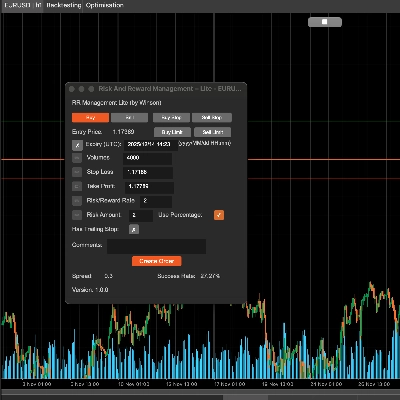
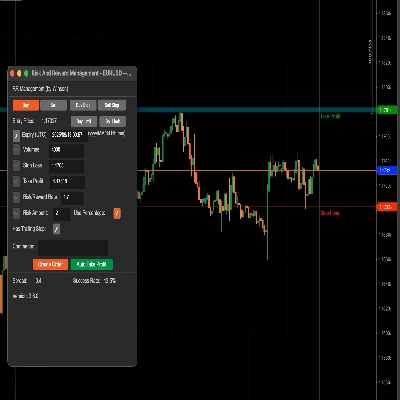
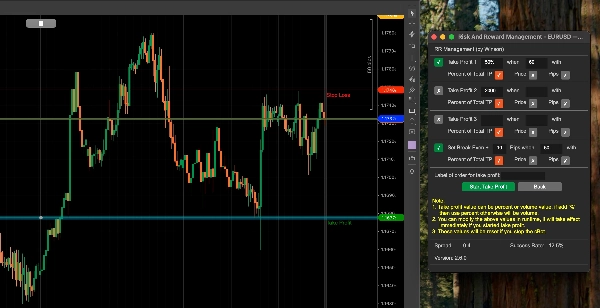
يمكن لأداة إدارة المخاطر والمكافآت في cTrader مساعدتك بسهولة في تعيين قيم المخاطرة مقابل المكافأة، يمكنك فقط سحب خطوط جني الأرباح وإيقاف الخسارة لحساب مبلغ المخاطرة أو الأحجام المطلوبة تلقائيًا. كما يتضمن ميزة جني الأرباح التلقائي التي تسمح لك بتعيين أربعة (4) سيناريوهات مختلفة لتثبيت تلك الأرباح.
تخطيط تداولاتك هو أحد أهم أجزاء حياة المتداول اليومي، إذا فشلت في القيام بذلك فسوف تفشل، تتيح لك هذه الأداة تعيين أهداف جني الأرباح وإيقاف الخسارة بسهولة حسب شهية المخاطرة الخاصة بك.
الميزات الرئيسية
- اسحب خط TP/SL لحساب قيم المخاطرة/المكافأة تلقائيًا
- جني الأرباح التلقائي للالطلبات المعلقة .
- استنادًا إلى القيمة أدناه لتعيين معلومات المخاطرة/المكافأة
- الأحجام: تعيين الأحجام سيحسب مبلغ المخاطرة تلقائيًا
- إيقاف الخسارة: تعيين SL لحساب معدل ومبلغ TP/RR
- جني الأرباح: تعيين TP سيحسب تلقائيًا معدل ومبلغ SL/RR
- معدل المخاطرة/المكافأة: تعيين معدل RR سيحسب TP تلقائيًا
- مبلغ المخاطرة (مع/بدون نسبة مئوية): يمكنك تعيين القيمة الفعلية للمبلغ أو مع النسبة المئوية
- يمكن استخدام إيقاف الخسارة المتحرك
- إضافة التعليقات إلى الطلب
- دعم أوامر الشراء، البيع، شراء إيقاف، بيع إيقاف
- تعيين جني الأرباح التلقائي (ولكن نظرًا لأن هذه cBot فلا يمكنك إيقاف الأداة إذا استخدمت هذه الوظيفة)
- دعم ويندوز وماك أو إس
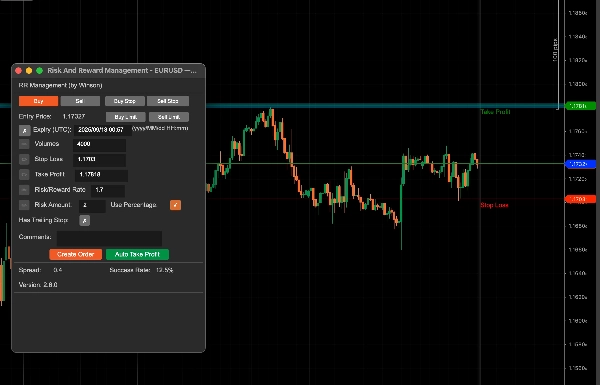
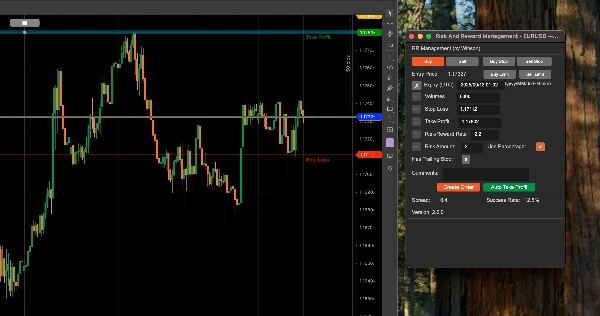
اسحب خط إيقاف الخسارة (الافتراضي أخضر) وسيحسب تلقائيًا معدل المخاطرة والمكافأة ومقدار الحجم لحجم المركز. يمكنك أيضًا تحديث الحجم عن طريق الإدخال اليدوي، عندما تغير القيمة أدناه، سيتم تمكين أيقونة التحرير اليسرى حتى تتمكن من تحديث القيم.
دعم أوامر الحد للشراء والبيع
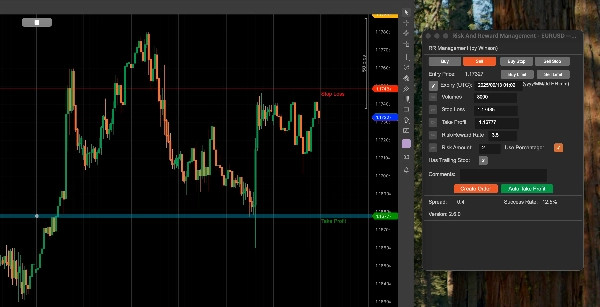
تدعم الأداة الآن أوامر الحد للشراء والبيع مع تاريخ/وقت انتهاء.
استخدام النسبة المئوية
إذا كنت تريد استخدام النسبة المئوية بناءً على رصيدك، فقط انقر على مربع اختيار استخدام النسبة المئوية أو سيستخدم القيمة الفعلية للمبلغ. ملاحظة: إذا كان رصيد حسابك صغيرًا، فلن ينخفض الحجم المحسوب عن أقل حجم مركز مسموح به للرمز.
معدل المخاطرة والمكافأة
يمكنك تعيين المخاطرة مقابل المكافأة لإيقاف الخسارة وجني الأرباح، لذا فإن معدل المخاطرة/المكافأة 2 يعني أن جني الأرباح هو ضعف المخاطرة، عند النقر على زر البيع سيتم حساب إيقاف الخسارة وجني الأرباح تلقائيًا باستخدام هذه النسبة.
معدل النجاح
معدل النجاح يعتمد على جميع أوامر تاريخك، سيحسب الأوامر الناجحة للمعدل، و"إيقاف الخسارة المتحرك" هو خيار أصلي في cTrader لإنشاء أمر للعمل، أنا فقط أمرر هذا عند إنشاء الأمر.
زر جني الأرباح التلقائي
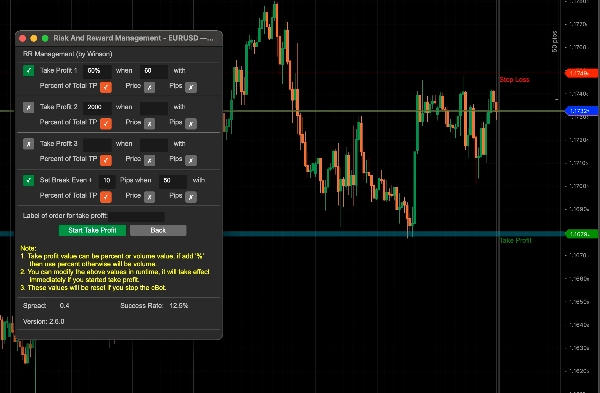
هناك 3 مستويات لتعيين جني الأرباح التلقائي، مما يعني أنه يمكنك استخدام 4 شروط لجني الأرباح، على سبيل المثال:
- جني 50% من الأرباح الجزئية بعد تحقيق أكثر من 60% من هدف الربح.
- جني 50% من الأرباح الجزئية عندما يصل سعر الرمز إلى 60 أو لشيء مثل الفوركس 1.72245
يمكنك تعديل القيم أعلاه أثناء التشغيل، ستسري فورًا إذا بدأت زر جني الأرباح. كما سيتم إعادة تعيين جميع القيم بعد إيقاف cBot. إذا تم تحقيق الربح 1 فلن يتم جني الأرباح مرة أخرى، هذا يعني أنه يعمل مرة واحدة فقط لكل شرط ربح ما لم يتم إيقاف الربح التلقائي وتشغيله مرة أخرى، سيتم إعادة تعيين جميع حالات الشروط.
تحديث: هناك الآن دعم للأوامر المعلقة لتطبيق جني الأرباح التلقائي عندما تتحول إلى أوامر سوق.
تحديث: يمكنك أيضًا تعيين شرط جني الأرباح بالنقاط، بحيث يمكنك اختيار نسبة مئوية من الإجمالي، السعر وعدد النقاط أيضًا.
استخدام الحجم لجني الأرباح
بدلاً من استخدام 50% أو نسبة مئوية أخرى في مربع جني الأرباح، يمكنك استخدام قيمة مثل 1000 (1K) وهي حجم المركز.
لكن لا تنسَ يجب تحديد مربع الاختيار الأخضر لتمكين شرط جني الأرباح هذا.
تعيين تسمية الطلب لجني الأرباح، وذلك لأنه قد يكون هناك عدة أوامر في نفس الوقت، لذا تحتاج إلى تحديد أي أمر تريد استخدام جني الأرباح التلقائي له، وإذا استخدمت هذه الأداة لإنشاء الأمر، فسيتم تعيين تسمية الأمر تلقائيًا هنا.
كيفية إدارة التداولات من cBot آخر؟
يمكنك أيضًا استخدام هذه الأداة لإدارة التداولات التي تم فتحها من cBot آخر ببساطة عن طريق تعيين اسم تسمية عند تقديم الأمر واستخدام نفس اسم التسمية هذا في الحقل أعلاه لـ تسمية الأمر لجني الأرباح.
تعيين نقطة التعادل
تسمح هذه الأداة أيضًا بتطبيق نقطة التعادل على تداولاتك، مرة أخرى، يمكنك استخدام إما نسبة مئوية من إجمالي رصيد الحساب أو سعر ثابت.
لتطبيق الإعدادات والعودة إلى الشاشة الرئيسية تحتاج إلى النقر على زر بدء جني الأرباح.
إعدادات المعلمات
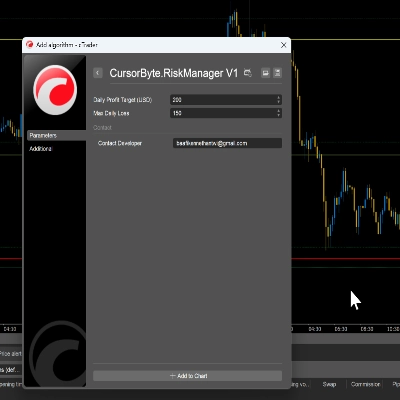
عند إرفاق cBot بالرسم البياني، سيتم عرض نافذة الإعدادات الرئيسية أولاً.
إعدادات النمط
قم بتعيين لون وسمك خط SL/TP والسعر الحالي هنا.
محاذاة اللوحة
قم بتعيين موقع اللوحة هنا، ولكن يمكنك أيضًا استخدام Ctrl+الفأرة لتحريك اللوحة.
إدارة RR
- تعيين القيم الافتراضية لمعلومات المخاطرة/المكافأة.
- جني الأرباح التلقائي 1،2،3 - تعيين القيم الافتراضية لوظيفة جني الأرباح التلقائي، هناك 3 مستويات لجني الأرباح.
- تعيين نقطة التعادل التلقائي - تعيين القيمة الافتراضية لنقطة التعادل التلقائية عند الوصول إليها.
الملخص
Key features include:
- Drag-and-drop adjustment of TP and SL lines with automatic recalculation of risk/reward values.
- Auto take profit functionality with up to four configurable profit-taking scenarios, including partial profit-taking at specified profit levels or price points.
- Support for various order types: Buy, Sell, Buy Stop, Sell Stop, Buy Limit, and Sell Limit orders with expiry.
- Trailing stop support and the ability to add comments to orders.
- Break-even setting based on fixed price or percentage.
- Management of trades opened by other cBots via order labeling.
- Customizable style settings for SL/TP lines and panel alignment.
- Compatibility with Windows and MacOS platforms.
This tool is applicable across multiple markets, including Forex, Indices, Crypto, and Stocks, facilitating precise trade planning and risk management within the cTrader environment.
مناقشة
تقييمات العملاء
5 | 67 % | |
4 | 33 % | |
3 | 0 % | |
2 | 0 % | |
1 | 0 % |
![شعار "[CB] Pivot Points Pro"](https://cdn.ctrader.com/image/webp/43463c82-67b0-4f10-a4ba-901bba091d81_32594)