

الوصف
بوت التداول الشبكي مع مؤشر سوبرترند - دليل المستخدم
مرحبًا بك في بوت التداول الشبكي مع مؤشر سوبرترند! تم تصميم هذا البوت لأتمتة استراتيجيات التداول الشبكي مع دمج مؤشر سوبرترند لتصفية الصفقات بناءً على اتجاهات السوق. فيما يلي دليل مفصل حول كيفية إعداد واستخدام البوت بفعالية.
الميزات الرئيسية:
- التداول الشبكي: يقوم البوت بوضع أوامر شراء وبيع على فواصل محددة مسبقًا (خطوات) للاستفادة من تقلبات السوق.
- مرشح سوبرترند: يُستخدم مؤشر سوبرترند لضمان تنفيذ الصفقات فقط في اتجاه الاتجاه، مما يقلل من مخاطر الصفقات المعاكسة للاتجاه.
- تعديل الخطوة الديناميكي: يمكن تعديل حجم خطوة الشبكة ديناميكيًا بناءً على عدد المراكز المفتوحة.
- إدارة المخاطر: تشمل ميزات مثل حماية الحد الأقصى للسحب والحد الأقصى للسحب المتحرك لحماية حسابك.
- معلمات قابلة للتخصيص: يمكن تخصيص جميع الإعدادات، بما في ذلك خطوات الشبكة، الحجم، ومعلمات سوبرترند، لتناسب أسلوب تداولك.
كيفية استخدام البوت
- التثبيت:
-
- تحميل البوت: تأكد من حصولك على ملف .cAlgo الخاص بالبوت.
- فتح cTrader: قم بتشغيل منصة cTrader وانتقل إلى تبويب Automate.
- إضافة البوت: انقر على استيراد cBot واختر ملف .cAlgo الذي تم تحميله.
- إرفاق إلى الرسم البياني: اسحب وأسقط البوت على الرسم البياني لزوج التداول الذي ترغب في تداوله.
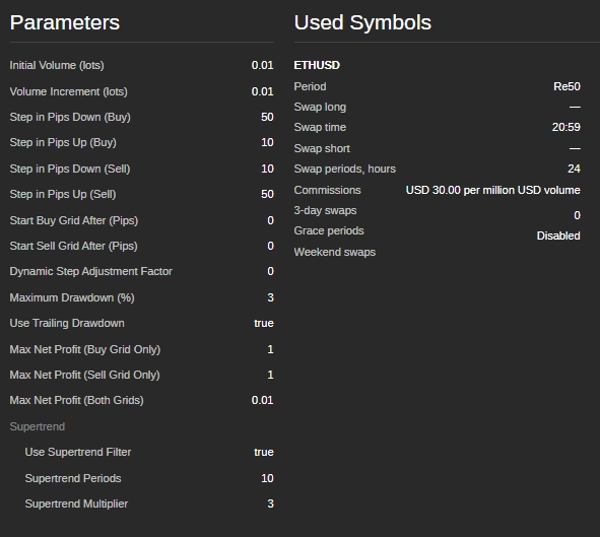
- إعداد المعلمات: بمجرد إرفاق البوت بالرسم البياني، قم بتكوين المعلمات التالية في تبويب المعلمات.
معلمات الحجم:
معلمات خطوة الشبكة:
شروط بدء الشبكة:
معلمات سوبرترند:
إدارة المخاطر:
شروط الحد الأقصى للربح الصافي: -
- الحجم الابتدائي (اللوت): حجم اللوت الابتدائي لأول صفقة.
- زيادة الحجم (اللوت): مقدار زيادة حجم اللوت لكل صفقة لاحقة.
-
- خطوة بالبيب للأسفل (شراء): المسافة بالبيب لوضع أمر الشراء التالي أسفل الأمر السابق.
- خطوة بالبيب للأعلى (شراء): المسافة بالبيب لوضع أمر الشراء التالي أعلى الأمر السابق.
- خطوة بالبيب للأسفل (بيع): المسافة بالبيب لوضع أمر البيع التالي أسفل الأمر السابق.
- خطوة بالبيب للأعلى (بيع): المسافة بالبيب لوضع أمر البيع التالي أعلى الأمر السابق.
-
- بدء شبكة الشراء بعد (بيب): عدد البيب التي يجب أن يتحرك بها السعر للأعلى من السعر الابتدائي لبدء شبكة الشراء.
- بدء شبكة البيع بعد (بيب): عدد البيب التي يجب أن يتحرك بها السعر للأسفل من السعر الابتدائي لبدء شبكة البيع.
-
- فترات سوبرترند: عدد الفترات المستخدمة لحساب مؤشر سوبرترند.
- مضاعف سوبرترند: المضاعف المستخدم لحساب مؤشر سوبرترند.
-
- الحد الأقصى للسحب (%) : الحد الأقصى المسموح به للسحب كنسبة مئوية من رصيد الحساب.
- استخدام السحب المتحرك: يتيح السحب المتحرك لضبط مستوى الحد الأقصى للسحب مع زيادة حقوق الملكية في الحساب.
-
- الحد الأقصى للربح الصافي (شبكة الشراء فقط): الحد الأقصى للربح الصافي المسموح به لشبكة الشراء قبل أن يغلق البوت جميع مراكز الشراء ويعيد التشغيل.
- الحد الأقصى للربح الصافي (شبكة البيع فقط): الحد الأقصى للربح الصافي المسموح به لشبكة البيع قبل أن يغلق البوت جميع مراكز البيع ويعيد التشغيل.
- الحد الأقصى للربح الصافي (كلا الشبكتين): الحد الأقصى للربح الصافي المسموح به لكلا الشبكتين قبل أن يغلق البوت جميع المراكز ويعيد التشغيل.
- بدء تشغيل البوت:
-
- ضبط المعلمات: قم بضبط المعلمات وفقًا لاستراتيجية التداول وتحمل المخاطر الخاص بك.
- تشغيل البوت: انقر على زر البدء لتفعيل البوت.
- مراقبة الأداء: راقب أداء البوت وقم بإجراء التعديلات على المعلمات حسب الحاجة.
- إيقاف البوت:
-
- لإيقاف البوت، انقر على زر الإيقاف في منصة cTrader.
- سيغلق البوت جميع المراكز المفتوحة ويتوقف عن التداول.
نصائح للأداء الأمثل:
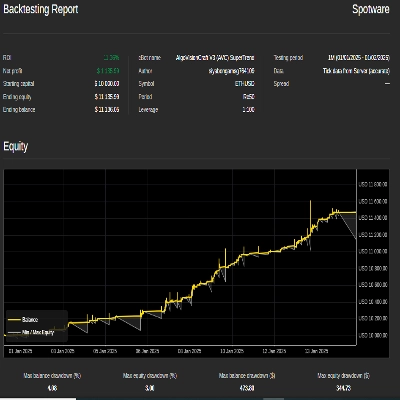
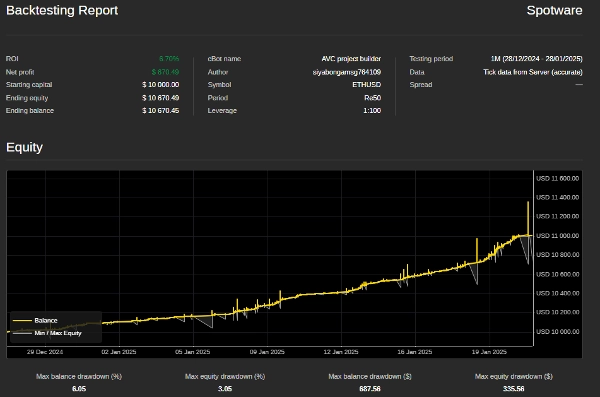
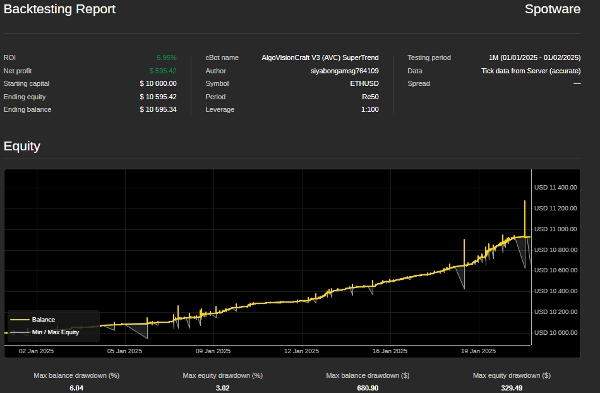
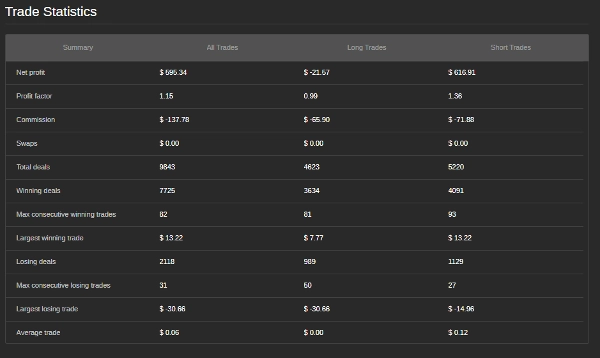
- اختبر أولاً: قبل تشغيل البوت على حساب حقيقي، اختبره على بيانات تاريخية لضمان أدائه الجيد تحت ظروف سوق مختلفة.
- ضبط المعلمات: قم بضبط خطوات الشبكة، معلمات سوبرترند، وإعدادات إدارة المخاطر لتتناسب مع أسلوب تداولك وظروف السوق.
- مراقبة السحب: راقب الحد الأقصى للسحب لضمان بقائه ضمن تحمل المخاطر الخاص بك.
- استخدامه على أزواج مستقرة: يعمل البوت بشكل أفضل على أزواج العملات ذات الاتجاهات المستقرة والتقلب المنخفض.
معلومات الاتصال: إذا كان لديك أي أسئلة، أو تحتاج إلى مساعدة، أو ترغب في تخصيص البوت بشكل أكبر، لا تتردد في التواصل:
- البريد الإلكتروني: siyabongamsg764109@gmail.com
- واتساب: +27 73 714 0490
إخلاء المسؤولية: يتم توفير هذا البوت كما هو، والمطور غير مسؤول عن أي خسائر مالية تحدث أثناء استخدامه. التداول في الأسواق المالية ينطوي على مخاطر، ويجب أن تتداول فقط بالأموال التي يمكنك تحمل خسارتها. اختبر البوت دائمًا في حساب تجريبي قبل استخدامه في حساب حقيقي.
تجنب التداول خلال الأحداث الإخبارية الكبرى أمر بالغ الأهمية لأن هذه الفترات غالبًا ما تتميز بتقلبات عالية وحركات سعرية غير متوقعة. يمكن أن يؤدي التداول الإخباري إلى سلوك سوقي متقلب ينحرف عن الاتجاهات المعتادة، مما يزيد من مخاطر الخسائر. وبالمثل، يمكن أن يؤدي التداول في سوق متذبذب—حيث تتحرك الأسعار بشكل جانبي دون اتجاه واضح—إلى حدوث اختراقات كاذبة وفرص ربح محدودة، مما يصعب تنفيذ استراتيجية متماسكة. بالإضافة إلى ذلك، تتميز أيام الحجم المنخفض عادة بسيولة منخفضة، مما قد يسبب فروق أسعار أوسع وانزلاقًا سعريًا، مما يعقد تنفيذ الصفقات. من خلال تجنب التداول الإخباري، والأسواق المتذبذبة، وفترات الحجم المنخفض، يمكن للمتداولين التركيز على ظروف سوق أكثر استقرارًا توفر اتجاهات أوضح وتنفيذًا أفضل، مما يعزز أدائهم التداولي بشكل عام.
الملخص
Users can customize all parameters, including initial trade volume, volume increments, grid step distances, Supertrend calculation periods and multipliers, as well as profit targets for buy and sell grids. The bot is designed for use on the cTrader platform, where it is imported as a .cAlgo file and attached to the desired trading pair’s chart. It is recommended to backtest the bot on historical data and to avoid trading during major news events, ranging markets, or low volume periods to optimize performance.
The bot automatically closes positions and stops trading when stopped via the platform. It is suitable for currency pairs exhibiting stable trends and low volatility. Contact details are provided for support and customization inquiries.
مناقشة
تقييمات العملاء
5 | 67 % | |
4 | 0 % | |
3 | 33 % | |
2 | 0 % | |
1 | 0 % |
الأسئلة الشائعة
المزيد من هذا المؤلف













السعر