

الوصف
استخدام رينكو
كيفية استخدام بوت التداول الشبكي
يشرح هذا الدليل كيفية استخدام بوت التداول الشبكي بفعالية. يقوم البوت بأتمتة التداول الشبكي من خلال وضع أوامر شراء وبيع عند فواصل سعرية محددة، مما يسمح للمتداولين بالاستفادة من تحركات السوق.
الخطوة 1: تكوين المعلمات
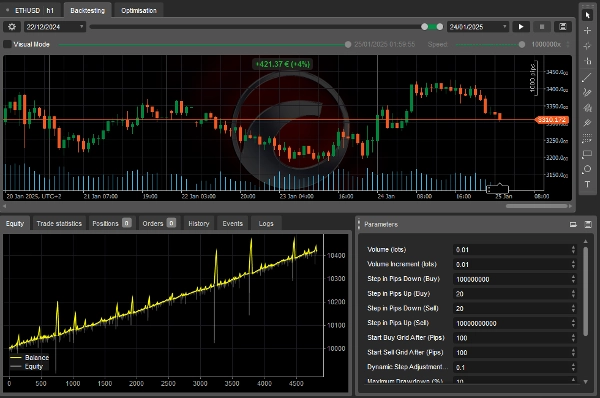
يتيح لك البوت تخصيص عدة إعدادات لتناسب استراتيجية التداول الخاصة بك. فيما يلي المعلمات الرئيسية:
إعدادات الحجم
- الحجم الابتدائي (اللوت) – حجم الصفقة الابتدائية.
- زيادة الحجم (اللوت) – الكمية المضافة لكل صفقة جديدة.
إعدادات خطوة الشبكة
- الخطوة بالبيب للأسفل (شراء) – المسافة أسفل آخر أمر شراء للأمر التالي.
- الخطوة بالبيب للأعلى (شراء) – المسافة أعلى آخر أمر شراء للأمر التالي.
- الخطوة بالبيب للأسفل (بيع) – المسافة أسفل آخر أمر بيع للأمر التالي.
- الخطوة بالبيب للأعلى (بيع) – المسافة أعلى آخر أمر بيع للأمر التالي.
تفعيل الشبكة
- بدء شبكة الشراء بعد (بيب) – الزيادة السعرية اللازمة لبدء شبكة الشراء.
- بدء شبكة البيع بعد (بيب) – الانخفاض السعري اللازم لبدء شبكة البيع.
التعديلات الديناميكية
- عامل تعديل خطوة ديناميكي – يضبط حجم خطوة الشبكة بناءً على عدد الصفقات المفتوحة.
إدارة المخاطر
- أقصى سحب (%) – الحد الأقصى للخسارة كنسبة من رصيد الحساب.
- استخدام السحب المتتبع – إذا تم التفعيل، يتتبع البوت أعلى حقوق الملكية لضبط حدود السحب.
شروط الربح
- أقصى ربح صافي (شبكة الشراء فقط) – أعلى ربح قبل إغلاق جميع مراكز الشراء.
- أقصى ربح صافي (شبكة البيع فقط) – أعلى ربح قبل إغلاق جميع مراكز البيع.
- أقصى ربح صافي (كلا الشبكتين) – أعلى ربح مسموح به عبر كلا الشبكتين.
الخطوة 2: بدء البوت
- ضبط تفضيلاتك – ضبط الإعدادات بناءً على مستوى المخاطرة والاستراتيجية الخاصة بك.
- تأكد من وجود أموال كافية – تأكد من أن حساب التداول الخاص بك يحتوي على هامش كافٍ.
- تشغيل البوت – انقر على "ابدأ" لتفعيل التداول. سيفتح البوت المراكز ويديرها تلقائيًا.
الخطوة 3: مراقبة البوت
- فحص الصفقات المفتوحة – يتبع البوت استراتيجية الشبكة للدخول والخروج من المراكز.
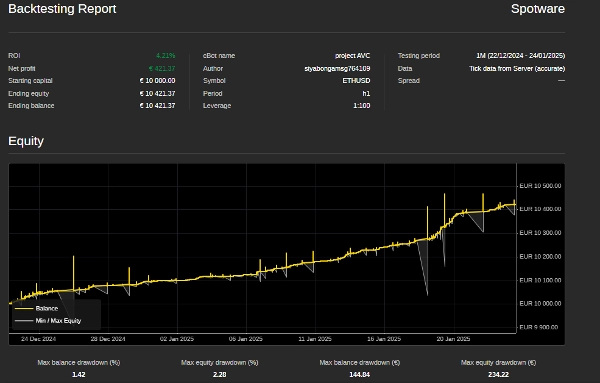
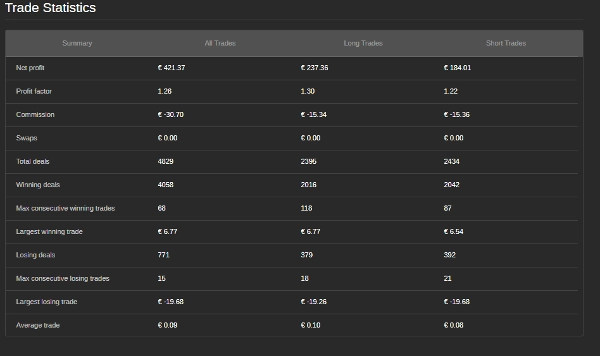
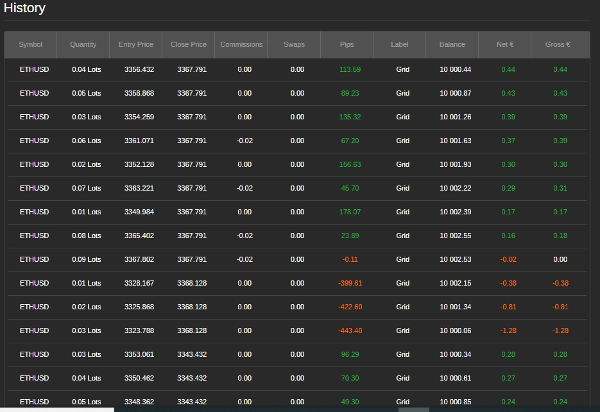
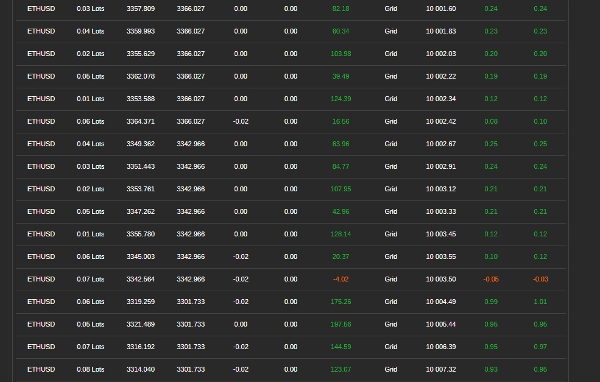
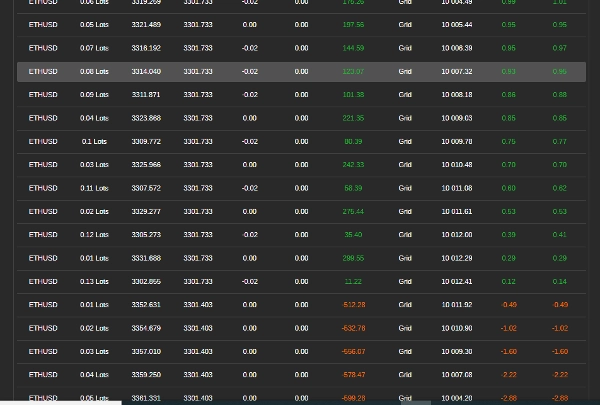
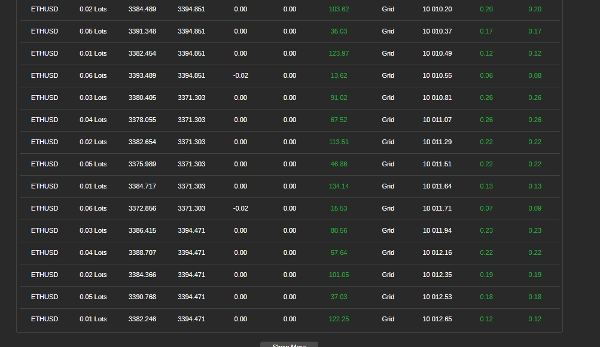
- متابعة الأداء – راجع الأرباح، السحب، وتاريخ التداول. سيغلق البوت الصفقات إذا تم الوصول إلى حدود الربح أو المخاطرة.
الخطوة 4: إيقاف أو إعادة تشغيل البوت
- إيقاف البوت – انقر على "إيقاف" لوقف التداول وإغلاق جميع المراكز.
- إعادة تشغيل البوت – إذا توقف البوت بسبب الوصول إلى حدوده، يمكنك إعادة تشغيله يدويًا.
نصائح لأفضل النتائج
- ابدأ صغيرًا – استخدم حجم صفقة صغير ومسافة خطوة صغيرة للاختبار.
- ضبط الإعدادات – قم بتحسين خطوات الشبكة، زيادات الحجم، ومستويات المخاطرة بناءً على ظروف السوق.
- راقب السحب – تأكد من بقاء الخسائر ضمن تحمل المخاطر الخاص بك.
معلومات الاتصال
للدعم أو الاستفسارات:
- واتساب: +27 73 714 0490
- البريد الإلكتروني: siyabongamsg764109@gmail.com
إخلاء مسؤولية التداول
التداول ينطوي على مخاطر وقد لا يكون مناسبًا لجميع المستثمرين. لا يوجد ضمان للأرباح، والأداء السابق لا يشير إلى النتائج المستقبلية. أنت مسؤول عن جميع قرارات التداول. استخدم هذا البوت بحذر، وقم بإجراء اختبارات خلفية، وتداول على حساب تجريبي قبل التداول الحقيقي. اطلب نصيحة مالية محترفة إذا لزم الأمر.
باتباع هذه الخطوات، يمكنك استخدام بوت التداول الشبكي لأتمتة استراتيجية التداول الخاصة بك. تداول دائمًا بمسؤولية.
تجنب التداول خلال الأحداث الإخبارية الكبرى أمر بالغ الأهمية لأن هذه الفترات غالبًا ما تتميز بتقلبات عالية وحركات سعرية غير متوقعة. يمكن أن يؤدي التداول الإخباري إلى سلوك سوق متقلب ينحرف عن الاتجاهات المعتادة، مما يزيد من خطر الخسائر. وبالمثل، يمكن أن يؤدي التداول في سوق متذبذب—حيث تتحرك الأسعار بشكل جانبي دون اتجاه واضح—إلى حدوث اختراقات كاذبة وفرص ربح محدودة، مما يصعب تنفيذ استراتيجية متماسكة. بالإضافة إلى ذلك، تتميز أيام حجم التداول المنخفض عادة بسيولة منخفضة، مما قد يسبب فروقات سعرية أوسع وانزلاقًا سعريًا، مما يعقد تنفيذ الصفقات. من خلال الابتعاد عن التداول الإخباري، والأسواق المتذبذبة، وفترات حجم التداول المنخفض، يمكن للمتداولين التركيز على ظروف سوق أكثر استقرارًا توفر اتجاهات أوضح وتنفيذًا أفضل، مما يعزز أدائهم التداولي بشكل عام.
الملخص
Risk management features include setting a maximum drawdown percentage and an optional trailing drawdown that tracks peak equity to adjust limits. Profit conditions allow defining maximum net profit thresholds for buy grids, sell grids, or both combined, upon which the bot closes positions.
To operate, users configure settings according to their strategy and risk tolerance, ensure sufficient margin, and start the bot to automatically manage trades. Monitoring involves reviewing open trades, profits, drawdown, and trade history, with automatic closure of trades when limits are reached. The bot can be stopped to close all positions or restarted manually if stopped due to limit triggers.
Best practices include starting with small trade sizes and step distances, adjusting settings based on market conditions, and avoiding trading during major news events, ranging markets, or low volume periods to reduce volatility and execution risks.
تقييمات العملاء
5 | 25 % | |
4 | 25 % | |
3 | 50 % | |
2 | 0 % | |
1 | 0 % |
مناقشة
الأسئلة الشائعة
المزيد من هذا المؤلف















السعر