
STAK RR Trade Panel Overview
Informazioni su questo video
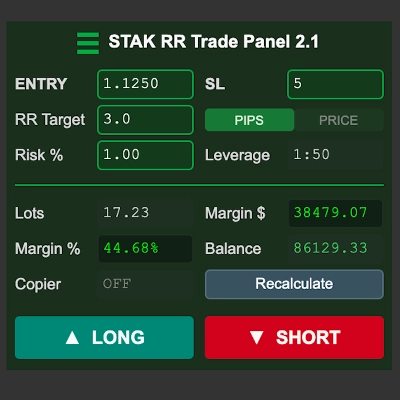
A cTrader panel that works out your position size from the risk you want to take and the stop you intend to use, shows you the whole trade before anything is sent, and refuses anything over your limits. Set your risk percentage, your reward-to-risk target and your stop. The panel calculates the lot size, the margin the trade will use, and the take profit. Press LONG or SHORT and a confirmation screen shows the entry, stop, target, lot size and the exact money at risk. Nothing reaches your broker until you confirm. WHAT YOU SEE IN THIS VIDEO 00:00 The panel 00:00 Setting the stop in pips or as a price level 00:00 Placing a trade and the confirmation screen 00:00 How the target is measured from the real fill 00:00 Order type detection 00:00 Margin caps, auto-reduce and the position limit 00:00 Other symbols and timeframes KEY POINTS - The stop can be a distance in pips or the price level itself. In PRICE mode the stop goes exactly on the level you type - On a market order the panel reads the price you actually filled at and moves the take profit to match, so a 3R trade is 3.00R on the position - Max Margin %, Total Margin % and Max open positions are hard limits. A trade that breaches one is refused with the reason on screen, and nothing is sent - The Leverage field reports the leverage your broker is really applying, which is not always what their documentation says - An optional Master/Slave trade copier mirrors trades between two cTrader accounts, sizing each from its own balance in its own currency - It is an indicator, not a cBot. It does not trade automatically and every trade needs manual confirmation Available on the cTrader Store: [link once the listing is live] Trading involves risk. Past performance does not guarantee future results.