Beschreibung
Isabelle ist ein ausgeklügelter voll- und halbautomatischer Handelsassistent für Trader, die das Beste aus beiden Welten wollen: leistungsstarke Automatisierung und Steuerung direkt im Chart. Führen Sie ihn vollautomatisch mit intelligentem Timing, volatilitätsadaptiver Gitterlogik, Erholungsmodus und virtuellem Trailing-Gewinnmanagement aus – oder übernehmen Sie selbst das Steuer mit intuitiven Panels, die es Ihnen ermöglichen, manuell zu pausieren, zu erholen und Positionen zu öffnen/schließen.
WICHTIG:
Die Standardparameter-Konfiguration ist optimiert für EURUSD im M15-Zeitrahmen und bietet eine ausgewogene Demonstration von Isabelles Kernlogik und Verhalten.
Allerdings ist Isabelle vollständig kompatibel mit allen Währungspaaren, Rohstoffen und Indizes.
Für beste Leistung sollten Parameter wie Gitterabstand, Zielgewinn, Volatilitätspause und Filtereinstellungen an die Volatilität und Handelscharakteristika des Symbols angepasst werden.
Neu in Version 6.0.0
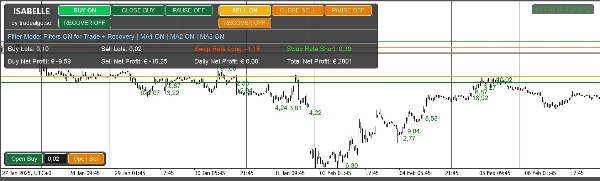
- Neues Hauptpanel mit zusätzlichen Analysen:
-
- Seiten-Lot-Summen (Kaufen/Verkaufen)
- Live Swap-Sätze (long/short) mit positiver/negativer Farbgebung
- Erweiterte Gewinnanzeigen (Kaufen, Verkaufen, Täglich, Gesamt)
- Neue Handelsfilter
-
- Center of Gravity (CoG) Richtungsfilter (optional)
- RSI Filter mit Zeitrahmen- und Schwellenwertsteuerung (optional)
- Bollinger Bänder (BB) Filter mit Zeitrahmen- und Schwellenwertsteuerung (optional)
- MA1 Filter mit Zeitrahmen- und Schwellenwertsteuerung (optional)
- MA2 Filter mit Zeitrahmen- und Schwellenwertsteuerung (optional)
- MA3 Filter mit Zeitrahmen- und Schwellenwertsteuerung (optional)
- Allgemeine UX-Verbesserungen, flüssigere visuelle Aktualisierungen im Chart und leistungsorientierte interne Optimierungen.
Warum Trader Isabelle wählen
- Flexibel im Design: Isabelles Eingaben umfassen Timing, Gitterabstand, dynamische Pausen, Filter, Trailing, Erholung und UI – so können Sie es an die meisten Handelsstile anpassen: automatisches Grid, diszipliniertes Mean-Reversion, halbmanuelles Scalping mit Automatisierungshilfe oder erholungsorientiertes Sitzungsmanagement.
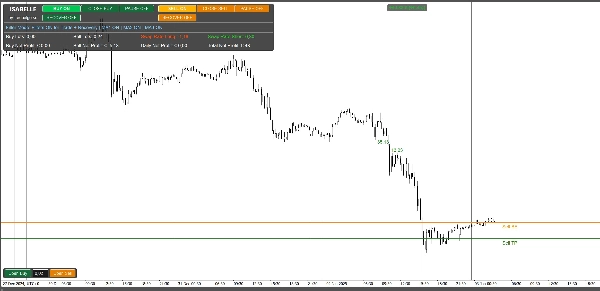
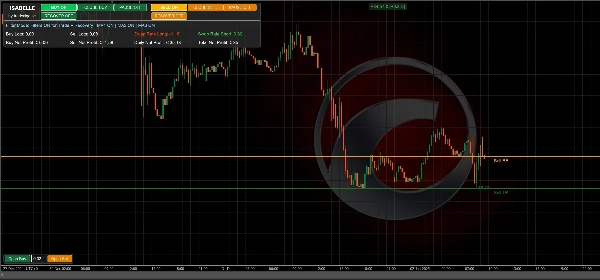
- Präzise Visualisierungen: BE/TP/SL/Trailing-Linien im Chart plus klare Gewinnpanels halten Sie auf einen Blick über Risiko und Fortschritt informiert.
- Erholungsbewusst: Schalten Sie die Erholung ein oder aktivieren Sie sie automatisch nach einem Schwellenwert. Reduzieren Sie Gewinnziele intelligent in schwierigen Phasen.
- Volatilitätsadaptiv: Ein geglätteter Standardabweichungs-Mechanismus dehnt oder komprimiert die Pause zwischen den Einstiegen dynamisch, um besser zu den aktuellen Marktbedingungen zu passen.
Kernfunktionen
- Grid-Handel mit konfigurierbarem Abstand, Volumenwachstum, maximalen Aufträgen pro Seite und optionalem festem SL.
- Dynamische Pause basierend auf geglätteter Volatilität (StdDev-Periode + Zeitrahmen) mit Min/Max-Grenzen.
- Erholungsmodus mit vier Zielverhalten: Keine Änderung, Halb, Geteilt nach Positionen oder Break-Even.
- Virtueller Take Profit / Trailing Profit:
-
- Fester TP (Punkte vom Netto-Breakeven inklusive Kommissionen & Swap), oder
- Virtuelles Trailing, das nach Erreichen des Ziels aktiviert wird.
- Filter & Sicherheit:
-
- Spread-Filter, Handelsfenster, optionale CoG und RSI Filter.
- Steuerungspanels im Chart:
-
- Gewinnübersicht (Kaufen/Verkaufen/Täglich/Gesamt), Lots nach Seite, Swap long/short
- Manuelle KAUF/VERKAUF-Schaltflächen, Pausenumschalter und Erholungsumschalter.
- Visuelle Overlays:
-
- Automatisches Zeichnen von BE, TP-Aktivierung, SL und (wenn aktiv) Trailing Linien.
Demo-Hinweis: Die Store-Demo funktioniert nur im Backtesting zur Bewertung von Logik und UI. Für Live-/Forward-Tests benötigen Sie eine lizenzierte Version.
Vorgeschlagene Arbeitsabläufe
Automatisches Grid:
Stellen Sie Handelszeiten, Schrittweite, maximale Aufträge, Basislot & Multiplikator ein; aktivieren Sie die dynamische Pause; lassen Sie Filter aus oder leicht voreingenommen.
Halbmanuelle Steuerung:
Deaktivieren Sie Startaufträge, verwenden Sie die manuellen Schaltflächen des Panels, um die Anfangsrichtung(en) zu öffnen, halten Sie die Erholung verfügbar und lassen Sie Trailing/TP die Ausstiege verwalten.
Erholungsorientierte Sitzung:
Aktivieren Sie Auto Recovery nach N Positionen, wählen Sie ein reduziertes Zielverhalten und verlassen Sie sich auf visuelle Hilfen (BE/TP-Linien + Panel) zur Überwachung.
Risikohinweis
Isabelle ist ein leistungsstarkes Werkzeug. Bei Fehlkonfiguration oder Einsatz mit hohem Hebel kann Grid-Handel zu großen Drawdowns oder katastrophalen Verlusten führen. Testen Sie immer im Demo-Modus, dimensionieren Sie konservativ und nutzen Sie Filter-/Timing-Steuerungen sowie Erholungsfunktionen mit Bedacht.
Vollständige Parameterreferenz (v6.0.0)
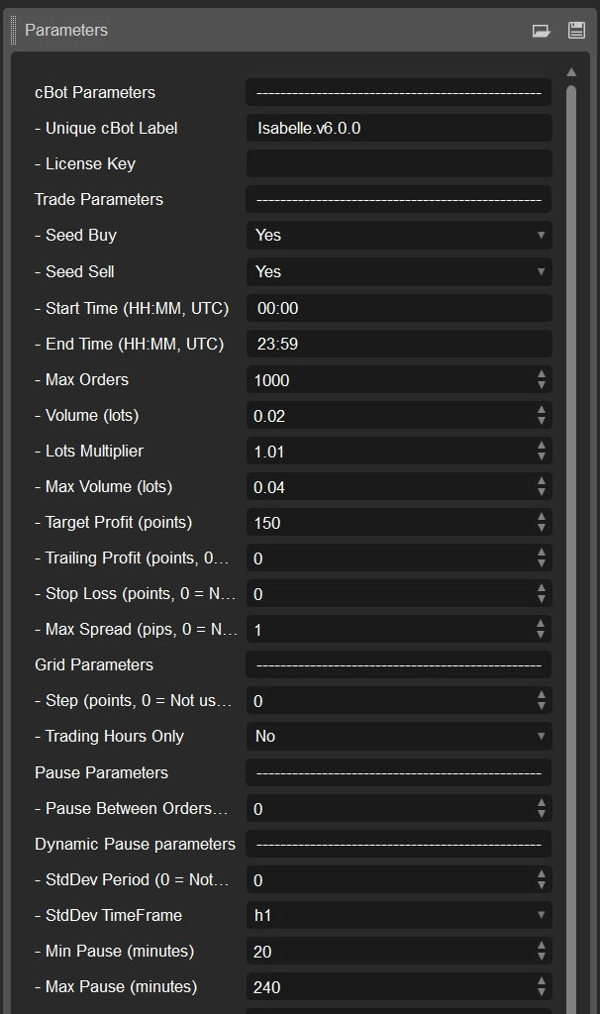
Alle untenstehenden Parameter spiegeln den aktuellen Quellcode und die Standardwerte wider.
Identität / Lizenzierung
- CBot-Bezeichnung (Standard: Isabelle.v6.0.0) — Bezeichner zur Gruppierung aller Positionen und Historie dieser Instanz. Ändern bei mehreren Kopien.
- Lizenzschlüssel — Nur für lizenzierte Versionen erforderlich (nicht in Demo- oder Volltestversionen verwendet).
Handelsparameter
- Startkauf (Standard: EIN) — Öffnet automatisch die erste KAUF-Position, wenn Handelsbedingungen es erlauben.
- Startverkauf (Standard: EIN) — Öffnet automatisch die erste VERKAUF-Position, wenn Handelsbedingungen es erlauben.
- Startzeit (UTC) (Standard: 00:00) — Früheste Zeit, zu der der Bot neue Positionen öffnen darf.
- Endzeit (UTC) (Standard: 23:59) — Späteste Zeit, zu der der Bot neue Positionen öffnen darf.
- Maximale Aufträge (Standard: 1000) — Maximale Anzahl offener Positionen pro Seite (KAUF oder VERKAUF).
- Volumen (Lots) (Standard: 0.02) — Anfangs-Lotgröße für die erste Position auf jeder Seite.
- Lots-Multiplikator (Standard: 1.01) — Wachstumsfaktor für jede zusätzliche Gitterorder (1.0 = feste Größe).
- Maximales Volumen (Lots) (Standard: 0.04) — Maximal zulässige Lotgröße pro Einzelauftrag (nach Multiplikator).
- Zielgewinn (Punkte) (Standard: 150) — Abstand vom gewichteten Breakeven bis zur Take-Profit-Aktivierung (10 Punkte ≈ 1 Pip bei den meisten Symbolen).
- Trailing-Gewinn (Punkte) (Standard: 0) — Wenn 0: Schließen bei festem TP. Wenn >0: Verwendung eines virtuellen Trailing-Stops dieser Größe nach TP-Aktivierung.
- Stop Loss (Punkte) (Standard: 0) — Optionaler fester SL vom gewichteten Einstieg (0 = deaktiviert).
- Maximaler Spread (Pips) (Standard: 1.0) — Verhindert neue Marktaufträge, wenn der Spread ≥ diesem Wert ist (0 = deaktiviert).
Gitterparameter
- Schritt (Punkte) (Standard: 0) — Mindestabstand vom letzten Einstieg, bevor eine weitere Gitterorder hinzugefügt wird (0 = kein Abstandsfilter).
- Nur Handelszeiten (Standard: AUS) — Wenn EIN, erfolgen Gitter- und Startaufträge nur innerhalb des Start-End-Zeitfensters.
Pausenparameter
- Pause zwischen Aufträgen (Minuten) (Standard: 0) — Basis-Abkühlzeit pro Seite zwischen Gitteraufträgen; kann durch dynamische Pausenlogik modifiziert werden.
Dynamische Pause (volatilitätsadaptiv)
- StdDev-Periode (Standard: 0) — Rückblickperiode für die Standardabweichung, die zur Anpassung der Pausendauer verwendet wird (0 = deaktiviert).
- StdDev-Zeitrahmen (Standard: Stunde) — Zeitrahmen für die Volatilitätsmessung.
- Minimale Pause (Minuten) (Standard: 20) — Minimale adaptive Pause bei niedriger Volatilität.
- Maximale Pause (Minuten) (Standard: 240) — Maximale adaptive Pause bei hoher Volatilität.
Filterparameter (alle optional)
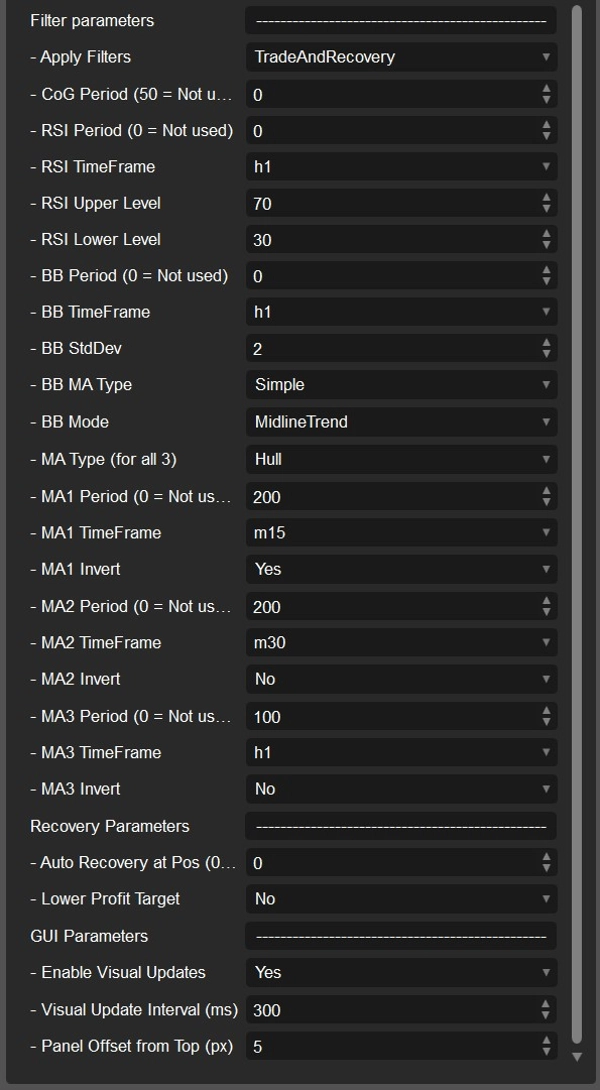
- Filter anwenden (Standard: Auto + Recovery) — Steuert, wann Filter (CoG, RSI, MA, BB) angewendet werden. Manuelle Aufträge werden nie gefiltert.
- CoG-Periode (Standard: 0, 0 = aus) — Erfordert, dass der Center of Gravity (CoG) in Handelsrichtung geneigt ist (Kaufen = Aufwärtsneigung; Verkaufen = Abwärtsneigung).
RSI-Filter
- RSI-Periode (Standard: 0, 0 = aus) — Aktiviert RSI-basierte Filterung.
- RSI-Zeitrahmen (Standard: Stunde) — Zeitrahmen für RSI-Berechnungen.
- RSI-Oberes Niveau (Standard: 55) — Verkaufseinträge nur erlaubt, wenn RSI ≥ diesem Niveau (wenn Filter aktiv).
- RSI-Unteres Niveau (Standard: 45) — Kaufseinträge nur erlaubt, wenn RSI ≤ diesem Niveau (wenn Filter aktiv).
Bollinger-Band-Filter
- BB-Periode (Standard: 0, 0 = aus) — Periode für den Bollinger-Band-Filter.
- BB-Zeitrahmen (Standard: Stunde) — Zeitrahmen für die Berechnung des Bollinger-Bands.
- BB-StdDev (Standard: 2.0) — Standardabweichungsfaktor für die Bandbreite.
- BB-MA-Typ (Standard: Einfach) — Typ des gleitenden Durchschnitts, der im Bollinger-Band verwendet wird.
- BB-Modus (Standard: MidlineTrend) — Filtermodus, der bestimmt, wie Bollinger-Bänder die Handelsrichtung beeinflussen.
Multi-MA-Trendfilter
- MA-Typ (für alle) (Standard: Hull) — Typ des gleitenden Durchschnitts, der auf alle drei untenstehenden MA-Filter angewendet wird.
MA1-Filter
- MA1-Periode (Standard: 50) — Erste Periode des gleitenden Durchschnitts (0 = aus).
- MA1-Zeitrahmen (Standard: Minute15) — Zeitrahmen für MA1.
- MA1-Invertierung (Standard: Wahr) — Kehrt die MA1-Regel um: KAUF, wenn Preis ≤ MA1, VERKAUF, wenn Preis ≥ MA1.
MA2-Filter
- MA2-Periode (Standard: 200) — Zweite Periode des gleitenden Durchschnitts (0 = aus).
- MA2-Zeitrahmen (Standard: Minute30) — Zeitrahmen für MA2.
- MA2-Invertierung (Standard: Falsch) — Kehrt die MA2-Regel um: KAUF, wenn Preis ≤ MA2, VERKAUF, wenn Preis ≥ MA2.
MA3-Filter
- MA3-Periode (Standard: 100) — Dritte Periode des gleitenden Durchschnitts (0 = aus).
- MA3-Zeitrahmen (Standard: Stunde) — Zeitrahmen für MA3.
- MA3-Invertierung (Standard: Falsch) — Kehrt die MA3-Regel um: KAUF, wenn Preis ≤ MA3, VERKAUF, wenn Preis ≥ MA3.
Erholungsparameter
- Automatische Erholung bei Positionen (Standard: 0 = aus) — Aktiviert den Erholungsmodus automatisch nach N offenen Positionen auf einer Seite.
- Reduziertes Gewinnziel (Standard: Nein) — Definiert, wie das Zielgewinn während der Erholung angepasst wird:
-
- Nein — Behalte das volle Ziel unverändert.
- Halb — Verwende die Hälfte des Zielgewinns.
- GeteiltNachPositionen — Teile den Zielgewinn durch die Anzahl offener Positionen (mindestens 1 Punkt).
- BreakEven — Setze das Ziel genau auf den Breakeven (Ziel = 0).
GUI / Visualisierungen
- Visuelle Aktualisierungen aktivieren (Standard: EIN) — Zeichnet BE-, TP-, SL- und Trailing-Linien mit Live-Gewinnanzeigen. Für schnellere Backtests deaktivieren.
- Intervall für visuelle Aktualisierung (ms) (Standard: 300) — Häufigkeit der visuellen Aktualisierungen (0 = bei jedem Tick aktualisieren).
- Panel-Abstand von oben (px) (Standard: 5) — Vertikaler Abstand für das obere Panel, um Überlappungen mit Chart-Indikatoren zu vermeiden.
Visualisierungen & Panels
- Hauptpanel (oben links)
Netto-Gewinn Kaufen/Verkaufen, Täglich und Gesamt Netto-Gewinn, Lots Kaufen/Verkaufen, Swap-Satz Long/Short mit intuitiver Farbgebung. - Handelspanel (unten links)
Manuelle KAUF/VERKAUF-Schaltflächen, Pausenumschalter, Erholungsumschalter und Live-Statusrückmeldung. - Chart-Overlays
-
- BE-Linie (netto nach Kommissionen & Swap)
- TP-Aktivierungslinie (vom BE ausgehend um Zielgewinn)
- Optionale SL-Linie (vom gewichteten Einstieg)
- Virtuelle Trailing-Linien, wenn Trailing aktiv ist
Demo vs. Lizenzierte Version
- Demo-Version: Nur Backtesting. Verwenden Sie sie, um Logik, UI und Leistung unter verschiedenen Konfigurationen zu bewerten.
- Lizenzierte Version: Erforderlich für Live- oder Forward-Tests. Kontaktieren Sie den Autor für Lizenzbedingungen.
Erste Schritte (Schnellanleitung)
Die Standardparameter sind optimiert für EURUSD im M15-Zeitrahmen – ideal für erste Tests und zur Einarbeitung.
- Backtesten Sie Ihr Symbol mit den Standardeinstellungen und Startkauf/-verkauf = EIN.
-
- Beginnen Sie mit konservativem Volumen und vernünftigen maximalen Aufträgen zur Kontrolle des Risikos.
- Legen Sie einen Schrittwert fest und aktivieren Sie dynamische Pausen mit praktischen Min/Max-Pausen zur Anpassung an die Marktvolatilität.
- Fügen Sie RSI- und/oder CoG-Filter hinzu, wenn Sie eine Richtungspräferenz einführen und Überhandeln reduzieren möchten.
- Wählen Sie zwischen festem TP und virtuellem Trailing:
-
- Verwenden Sie Trailing-Gewinn > 0, um den adaptiven Trailing-Modus zu aktivieren.
- Konfigurieren Sie das Erholungsverhalten und die Schwellenwerte sorgfältig und testen Sie Worst-Case-Drawdown-Szenarien, um die Widerstandsfähigkeit des Gitters zu verstehen.
- Sobald die Ergebnisse stabil sind, führen Sie einen Demo-Forward-Test durch mit der lizenzierten Version, bevor Sie mit echtem Geld live gehen.
Zusammenfassung
Traders can run Isabelle fully automated with smart timing controls or use on-chart panels for manual intervention, including pausing, recovery toggling, and manual order placement. Visual overlays display breakeven, take-profit activation, stop loss, and trailing profit lines, alongside live profit summaries and swap rate indicators.
The bot incorporates multiple optional trade filters such as Center of Gravity, RSI, Bollinger Bands, and three configurable moving averages to reduce overtrading and introduce directional bias. It supports fixed or virtual trailing take-profit modes and includes safety features like spread filters and trading time windows.
Default settings are optimized for EURUSD on the M15 timeframe, but Isabelle is compatible with all currency pairs, commodities, and indices. The demo version operates in backtesting mode only, while licensed builds enable live and forward testing.