
Beschreibung
Strategieübersicht
Das Golden Trap Model ist eine auf Sitzungen basierende Handelsstrategie, die den natürlichen Ablauf der drei wichtigsten Forex-Sitzungen (Asien, London und New York) nutzt, um Handelsmöglichkeiten mit hoher Wahrscheinlichkeit zu identifizieren.
Kernkonzept: „Die 3 Sitzungen, die Goldbewegungen erzeugen“
- Asien-Sitzung = Baut die Spanne auf (Konsolidierungsphase)
- London-Sitzung = Räumt eine Seite ab (Liquiditätsaufnahme)
- New York-Sitzung = Bestätigt oder fängt (Umkehr/Fortsetzung)
- Jede Sitzung = Liquiditätssteuerung
Wie die Strategie funktioniert
1. Asien-Sitzung (00:00 - 08:00 UTC)
- Zweck: Festlegung der Handelsspanne für den Tag
- Aktion: Der Bot erfasst das Hoch und Tief der Asien-Sitzung
- Anforderungen: Mindestspanne (Standard 15 Pips) zur Filterung von Tagen mit geringer Volatilität
- Visualisierung: Blauer Kasten, der die Asien-Sitzungsspanne hervorhebt
2. London-Sitzung (08:00 - 16:00 UTC)
- Zweck: Erste Ausbruchs-/Abfegphase
- Aktion: Der Preis durchbricht typischerweise das Asien-Hoch nach oben oder das Asien-Tief nach unten (Liquiditätsabfegung)
- Strategie:
-
- Kaufe bei Ausbruch über das Asien-Hoch
- Verkaufe bei Ausbruch unter das Asien-Tief
- Visualisierung: Grüner Kasten, der die London-Sitzung hervorhebt
3. New York-Sitzung (13:00 - 22:00 UTC)
- Zweck: Bestätigung oder Falle (Umkehr)
- Aktion: Zwei mögliche Szenarien:
-
- Bestätigung: Der Preis setzt die Richtung des London-Ausbruchs fort
- Falle: Der Preis kehrt zurück in oder durch die Asien-Spanne (Mean Reversion)
- Strategie:
-
- Wenn der Preis die Asien-Spanne deutlich überschreitet → Suche nach Umkehr (Falle)
- Wenn der Preis nahe dem Ausbruchsniveau konsolidiert → Suche nach Fortsetzung
- Visualisierung: Oranger Kasten, der die New York-Sitzung hervorhebt
Hauptmerkmale
Handelslogik
- ✅ Sitzungsbasierte Einstiege unter Verwendung der Asien-Spanne als Referenz
- ✅ Ausbruchsstrategie für Momentum-Bewegungen
- ✅ Mean Reversion Strategie für Fallen-Umkehrungen
- ✅ Risikomanagement mit prozentualer Positionsgröße
- ✅ Spread-Filterung zur Vermeidung schlechter Ausführungen
- ✅ Ein Trade pro Sitzung zur Vermeidung von Überhandel
Visuelle Chart-Elemente
- 📊 Sitzungsboxen, die die Asien-, London- und New York-Sitzungen zeigen
- 📈 Hoch-/Tief-Linien, die die Asien-Sitzungsspanne markieren
- 📍 Mittellinie, die das Zentrum der Asien-Spanne zeigt
- 🎨 Anpassbare Farben für jede Sitzung
Risikomanagement
- 💰 Prozentuale Positionsgröße (Risiko pro Trade)
- 🎯 Fester Stop Loss und Take Profit in Pips
- 🛡️ Maximaler Spread-Filter zur Vermeidung schlechter Einstiege
- 📊 Automatische Positionsberechnung basierend auf Kontostand
Schritt 1: Zum Chart hinzufügen
- Öffnen Sie ein Forex-Chart (empfohlen: EUR/USD, GBP/USD, XAU/USD)
- Gehen Sie zu „Automatisieren“ → „cBots“
- Finden Sie „GoldenTrapModel“ in der Liste
- Ziehen Sie es auf Ihr Chart
- Konfigurieren Sie die Parameter (siehe unten)
Schritt 2: Parameter konfigurieren
Das Parameterfenster erscheint. Wichtige Einstellungen:
Risikomanagement
- Risiko % pro Trade: 1,0 (empfohlen 0,5-2%)
- Stop Loss Pips: 20 (an Volatilität anpassen)
- Take Profit Pips: 40 (2:1 Risiko-Ertrags-Verhältnis)
Sitzungszeiten (UTC)
Standardzeiten sind für normale Sitzungen eingestellt:
- Asien: 00:00 - 08:00 UTC
- London: 08:00 - 16:00 UTC
- New York: 13:00 - 22:00 UTC
Hinweis: Passen Sie die Zeiten an, wenn Ihr Broker eine andere Serverzeit verwendet
Strategie-Einstellungen
- Handel Asien-Sitzung: false (Asien baut nur die Spanne auf, keine Trades)
- Handel London-Sitzung: true (primäre Einstiegssitzung)
- Handel New York-Sitzung: true (sekundäre Einstiegssitzung)
- Min. Asien-Spanne Pips: 15 (Mindestspanne für den Handel)
- Max. Spread Pips: 2,0 (maximal erlaubter Spread)
- Breakout-Strategie verwenden: true (London-Ausbrüche)
- Mean Reversion verwenden: true (New York-Fallen)
Visuelle Einstellungen
- Sitzungsboxen anzeigen: true
- Hoch-/Tief-Linien anzeigen: true
- Asien-Box-Farbe: Blau
- London-Box-Farbe: Grün
- New York-Box-Farbe: Orange
Empfohlene Einstellungen
Für EUR/USD
Risiko %: 1,0
Stop Loss: 20 Pips
Take Profit: 40 Pips
Min. Asien-Spanne: 15 Pips
Max. Spread: 2 Pips
Für GBP/USD
Risiko %: 0,75
Stop Loss: 30 Pips
Take Profit: 60 Pips
Min. Asien-Spanne: 25 Pips
Max. Spread: 2,5 Pips
Für XAU/USD (Gold)
Risiko %: 0,5
Stop Loss: 50 Pips
Take Profit: 100 Pips
Min. Asien-Spanne: 30 Pips
Max. Spread: 5 Pips
Nutzungstipps
Beste Praktiken
- Verwenden Sie den 15M- oder 30M-Zeitrahmen für beste Sichtbarkeit der Sitzungsspannen
- Vermeiden Sie den Handel bei wichtigen Nachrichtenereignissen (NFP, FOMC usw.)
- Beobachten Sie die Größe der Asien-Spanne - größere Spannen führen oft zu besseren Trades
- Achten Sie auf Konfluenz - verwenden Sie Unterstützungs-/Widerstandsniveaus mit der Strategie
- Testen Sie zuerst Backtests - verwenden Sie die Backtesting-Funktion von cTrader vor dem Live-Handel
Worauf Sie achten sollten
✅ Klare Asien-Spanne (keine unruhige Konsolidierung) ✅ Sauberer Ausbruch in der London-Sitzung ✅ Starkes Momentum oder klare Ablehnung für New York-Einstiege ✅ Niedriger Spread zum Einstiegszeitpunkt ✅ Normale Marktbedingungen (Vermeidung von Feiertagen/dünner Liquidität)
Was zu vermeiden ist
❌ Kleine Asien-Spannen (< 15 Pips typischerweise) ❌ Hohe Spread-Phasen (> 2-3 Pips bei Majors) ❌ Wichtige Nachrichtenveröffentlichungen während der Sitzung ❌ Montagsöffnungen (Gaps und unruhige Bewegungen) ❌ Freitagspäter New York (dünne Liquidität)
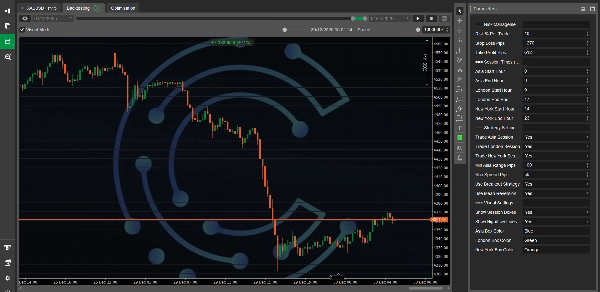
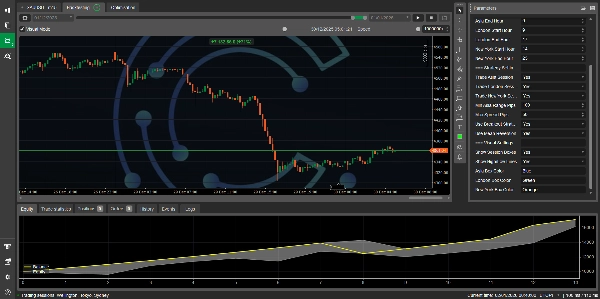
Verständnis der Chart-Visualisierungen
Wenn der Bot läuft, sehen Sie:
- Farbige Kästen: Drei rechteckige Kästen im Chart, die jede Handelssitzung darstellen
-
- Blau = Asien (Spannenaufbau)
- Grün = London (Abfegphase)
- Orange = New York (Bestätigung/Falle)
- Horizontale Linien:
-
- Rote durchgezogene Linie = Asien-Sitzungshoch
- Blaue durchgezogene Linie = Asien-Sitzungstief
- Graue gepunktete Linie = Asien-Sitzungsmittelpunkt
- Diese Visualisierungen aktualisieren sich automatisch, wenn neue Sitzungen beginnen
Zusammenfassung der Strategielogik
TÄGLICHER ABLAUF:
├── 1. Asien-Sitzung (00:00-08:00 UTC)
│ └── Erfassen: Hoch, Tief, Spanne
│
├── 2. London-Sitzung (08:00-16:00 UTC)
│ ├── WENN Preis über Asien-Hoch ausbricht → KAUFEN
│ └── WENN Preis unter Asien-Tief ausbricht → VERKAUFEN
│
└── 3. New York-Sitzung (13:00-22:00 UTC)
├── Fortsetzung: Folge der London-Richtung
└── Falle: Umkehr bei Überdehnung
Backtesting
Wie man Backtests durchführt
- Gehen Sie in cTrader zu „Automatisieren“ → „cBots“
- Rechtsklick auf „GoldenTrapModel“
- Wählen Sie „Optimierung starten“ oder „Backtest“
- Legen Sie Ihren Datumsbereich fest (empfohlen: mindestens 3-6 Monate)
- Wählen Sie Ihre Parameter
- Klicken Sie auf „Start“
Optimierungsvorschläge
Testen Sie verschiedene Kombinationen von:
- Stop Loss (15-30 Pips)
- Take Profit (30-80 Pips)
- Min. Asien-Spanne (10-25 Pips)
- Risiko % (0,5-2%)
Fehlerbehebung
Bot nimmt keine Trades an?
- Überprüfen Sie, ob die Asien-Spanne erfasst wurde (achten Sie auf Linien im Chart)
- Vergewissern Sie sich, dass die Sitzungszeiten mit der Serverzeit Ihres Brokers übereinstimmen
- Stellen Sie sicher, dass der Spread unter dem Maximum liegt
- Prüfen Sie, ob Handelsflags aktiviert sind (Handel London/NY-Sitzungen)
Linien werden im Chart nicht angezeigt?
- Aktivieren Sie „Hoch-/Tief-Linien anzeigen“ in den Parametern
- Stellen Sie sicher, dass die Asien-Sitzung beendet ist (Linien erscheinen nach Ende der Asien-Sitzung)
- Überprüfen Sie, ob die Mindest-Asien-Spanne erfüllt ist
Positionsgröße zu klein/groß?
- Passen Sie den Parameter „Risiko % pro Trade“ an
- Vergewissern Sie sich, dass Ihr Kontostand ausreichend ist
- Überprüfen Sie die Mindestvolumenanforderungen des Symbols
Leistungsoptimierung
Für bessere Ergebnisse
- Kombinieren Sie mit Marktstruktur - suchen Sie nach HTF-Unterstützung/Widerstand
- Verwenden Sie mehrere Zeitrahmen - bestätigen Sie die Richtung auf 1H/4H-Charts
- Filtern nach Wochentag - Einige Tage performen besser als andere
- Anpassen nach Instrument - Gold verhält sich anders als EUR/USD
- Überwachen Sie Korrelationen - Vermeiden Sie mehrere korrelierte Paare gleichzeitig
Wichtige Hinweise
⚠️ Risikohinweis:
- Dieser Bot handelt mit echtem Geld – verwenden Sie ein angemessenes Risikomanagement
- Vergangene Leistungen garantieren keine zukünftigen Ergebnisse
- Testen Sie immer zuerst auf einem Demokonto
- Setzen Sie niemals mehr Risiko ein, als Sie sich leisten können zu verlieren
📝 Anpassung:
- Der Code ist vollständig anpassbar
- Sie können zusätzliche Filter, Indikatoren oder Bedingungen hinzufügen
- Erwägen Sie die Integration eines News-Filter-API
- Kann mit maschinellem Lernen oder Mustererkennung verbessert werden
Support & Updates
Bei Fragen oder Problemen:
- Überprüfen Sie zuerst die Parametereinstellungen
- Überprüfen Sie die Strategielogik im Code
- Testen Sie auf einem Demokonto vor dem Live-Handel
- Überwachen Sie die Print-Anweisungen im cTrader-Log
Lizenz
Dieser cBot wird zu Bildungszwecken bereitgestellt. Nutzung auf eigenes Risiko.
Viel Erfolg beim Trading! 📈
Denken Sie daran: Das Ziel ist es, dem institutionellen Geldfluss über die drei Hauptsitzungen zu folgen und von der Liquiditätssteuerung zu profitieren, die im Forex-Markt natürlich stattfindet.
Zusammenfassung
The strategy operates as follows:
- Asia Session (00:00–08:00 UTC): Establishes the daily trading range by capturing the high and low prices, marking a consolidation phase.
- London Session (08:00–16:00 UTC): Acts as the breakout phase where price typically breaks above or below the Asia range, triggering buy or sell entries.
- New York Session (13:00–22:00 UTC): Confirms the breakout direction or signals a trap reversal if price reverts into the Asia range.
Key features include session-based entries, breakout and mean reversion strategies, percentage-based position sizing for risk management, fixed stop loss and take profit levels, spread filtering to avoid poor execution, and a limit of one trade per session to reduce overtrading. Visual chart elements display colored session boxes and Asia range lines with customizable colors.
The bot supports parameter customization such as risk percentage, stop loss, take profit, session times, and trading session flags. It is recommended for use on 15M or 30M timeframes and includes guidance for backtesting and optimization within cTrader. The code is fully customizable for adding filters or indicators.
Kundenbewertungen
5 | 50 % | |
4 | 50 % | |
3 | 0 % | |
2 | 0 % | |
1 | 0 % |