![Trading product for [CB] RR Management cBot Forex Indices, image 1](https://cdn.ctrader.com/image/webp/0390d544-4996-4346-974b-d41dd9e73c64_32505)
![Trading product for [CB] RR Management cBot Forex Indices, image 2](https://cdn.ctrader.com/image/webp/62a2f277-6531-4405-9387-d4eec2142b06_32506)
![Trading product for [CB] RR Management cBot Forex Indices, image 3](https://cdn.ctrader.com/image/webp/b9dad7e0-8fa2-4f29-8bf7-8b47116e97fa_32507)
![Trading product for [CB] RR Management cBot Forex Indices, image 4](https://cdn.ctrader.com/image/webp/772e2aa1-7349-43fa-ae70-fdc71ff9cf24_32508)
![Trading product for [CB] RR Management cBot Forex Indices, image 5](https://cdn.ctrader.com/image/webp/f2cdb27c-4b85-472a-a3c8-a2d607c06558_32509)
![Trading product for [CB] RR Management cBot Forex Indices, image 6](https://cdn.ctrader.com/image/webp/2d928340-8ae7-49f7-8942-4263af502b02_32510)
Description
L'outil de gestion du risque et de la récompense cTrader peut facilement vous aider à définir les valeurs risque vs récompense, vous pouvez simplement faire glisser les lignes de prise de profit et de stop loss pour calculer automatiquement le montant du risque ou les volumes nécessaires à utiliser. De plus, une fonction de prise de profit automatique est incluse, vous permettant de définir quatre (4) scénarios différents pour sécuriser ces profits.
Planifier vos trades est l'une des parties les plus importantes de la vie d'un trader journalier, si vous ne le faites pas, vous échouerez, cet outil vous permettra de définir facilement vos objectifs de prise de profit et de stop loss en fonction de votre appétit pour le risque.
Caractéristiques principales
- Faites glisser la ligne TP/SL pour calculer automatiquement les valeurs risque/récompense
- Prise de profit automatique pour ordres en attente.
- Basé sur la valeur ci-dessous pour définir les informations risque/récompense
- Volumes : définir les volumes calculera automatiquement le montant du risque
- Stop Loss : définir le SL pour calculer le taux et le montant TP/RR
- Take Profit : définir le TP calculera automatiquement le taux et le montant SL/RR
- Taux Risque/Récompense : définir le taux RR calculera automatiquement le TP
- Montant du risque (avec/sans pourcentage) : vous pouvez définir la valeur réelle ou avec le pourcentage
- Peut utiliser le trailing stop
- Ajouter des commentaires à l'ordre
- Supporte les ordres Buy, Sell, Buy Stop, Sell Stop
- Définir la prise de profit automatique (mais comme c'est un cBot, si vous utilisez cette fonction, vous ne pouvez pas arrêter l'outil)
- Supporte Windows et MacOS
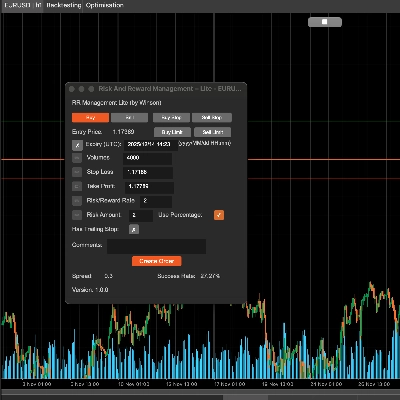
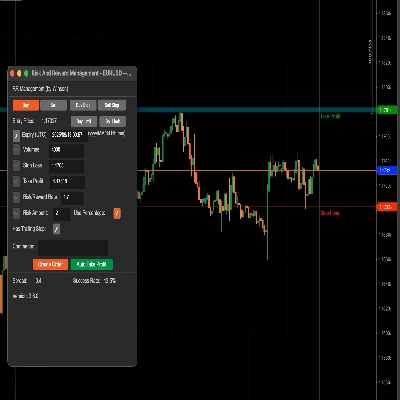
Faites glisser la ligne de stop loss (par défaut verte) et elle calculera automatiquement le taux risque & récompense ainsi que le volume pour la taille de la position. Vous pouvez également mettre à jour le volume par saisie manuelle, lorsque vous modifiez la valeur ci-dessous, l'icône d'édition à gauche sera activée pour que vous puissiez mettre à jour les valeurs.
Support des ordres Buy & Sell Limit
L'outil supporte désormais les ordres limite d'achat et de vente avec une date/heure d'expiration.
Utiliser le pourcentage
Si vous souhaitez utiliser un pourcentage basé sur votre solde, cliquez simplement sur la case à cocher Utiliser le pourcentage ou il utilisera la valeur réelle. Note : si le solde de votre compte est faible, le volume calculé ne sera pas inférieur à la taille de position minimale autorisée pour le symbole.
Taux Risque & Récompense
Vous pouvez définir le risque vs récompense pour votre stop loss et votre prise de profit, ainsi un taux Risque/Récompense de 2 signifie que votre prise de profit est deux fois votre risque, lorsque vous cliquez sur le bouton vendre, le stop loss et la prise de profit seront automatiquement calculés en utilisant ce ratio.
Taux de réussite
Le taux de réussite est basé sur tous vos ordres historiques, il calculera les ordres réussis pour le taux, et le "Trailing Stop" est simplement une option native de cTrader pour créer un ordre fonctionnel, je le transmets simplement lorsque vous créez l'ordre.
Bouton de prise de profit automatique
Il y a 3 niveaux pour définir la prise de profit automatique, ce qui signifie que vous pouvez utiliser 4 conditions pour prendre des profits, par exemple :
- Prendre 50% de prise de profit partielle après avoir dépassé 60% de l'objectif de profit.
- Prendre 50% de prise de profit partielle lorsque le prix du symbole atteint 60 ou pour le Forex quelque chose comme 1.72245
Vous pouvez modifier les valeurs ci-dessus en temps réel, cela prendra effet immédiatement si vous avez démarré le bouton de prise de profit. Cela réinitialisera également toutes les valeurs après l'arrêt du cBot. Si le profit 1 est atteint, il ne sera pas pris à nouveau, ce qui signifie qu'il ne s'exécute qu'une seule fois pour chaque condition de profit à moins d'arrêter la prise de profit automatique et de la redémarrer, ce qui réinitialisera tous les statuts des conditions.
Mise à jour : Il y a maintenant un support pour que les ordres en attente aient une prise de profit automatique appliquée lorsqu'ils deviennent des ordres de marché.
Mise à jour : Vous pouvez également définir une condition de prise de profit en pips, vous pouvez donc choisir un % du total, le prix et aussi le nombre de pips.
Utilisation du volume pour la prise de profit
Au lieu d'utiliser 50% ou un autre pourcentage dans la case Prise de profit, vous pouvez utiliser une valeur comme 1000 (1K) qui est le volume de la position.
Mais n'oubliez pas de cocher la case verte pour activer cette condition de prise de profit.
Définissez le label de l'ordre pour la prise de profit, cela est nécessaire car il peut y avoir plusieurs ordres en même temps, vous devez donc définir quel ordre vous souhaitez utiliser pour la prise de profit automatique, et si vous utilisez cet outil pour créer l'ordre, il définira automatiquement le label de l'ordre ici.
Comment gérer les trades depuis un autre cBot ?
Vous pouvez également utiliser cet outil pour gérer les trades ouverts depuis un autre cBot simplement en définissant un nom de label lors de la soumission de l'ordre et en utilisant ce même nom de label dans le champ ci-dessus pour le label de l'ordre pour prendre un profit.
Définir un seuil de rentabilité
Cet outil permettra également d'appliquer un seuil de rentabilité à vos trades, encore une fois, vous pouvez utiliser soit un pourcentage du solde total du compte, soit un prix fixe.
Pour appliquer les réglages et revenir à l'écran principal, vous devez cliquer sur le bouton Démarrer la prise de profit.
Paramètres
Lorsque vous attachez le cBot à un graphique, la fenêtre principale des paramètres s'affiche en premier.
Paramètres de style
Définissez ici la couleur et l'épaisseur des lignes SL/TP et du prix actuel.
Alignement du panneau
Définissez la position du panneau ici, mais vous pouvez également utiliser Ctrl+Souris pour déplacer le panneau.
Gestion RR
- Définir les valeurs par défaut pour les informations risque/récompense.
- Prise de profit automatique 1,2,3 - définir les valeurs par défaut pour la fonction de prise de profit automatique, il y a 3 niveaux de prise de profit.
- Définir automatiquement le seuil de rentabilité - définir la valeur par défaut pour le seuil de rentabilité automatique lorsqu'il est atteint.
![Logo de "[CB] Pivot Points Pro"](https://cdn.ctrader.com/image/webp/43463c82-67b0-4f10-a4ba-901bba091d81_32594)