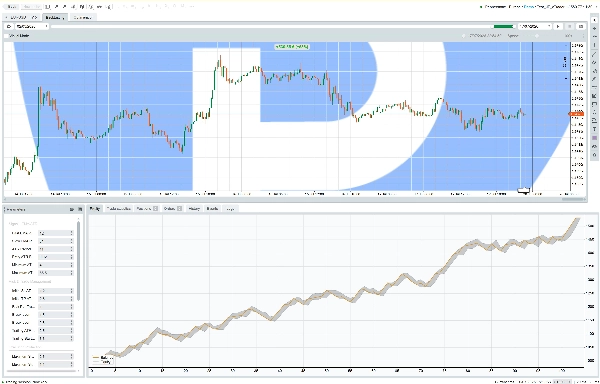
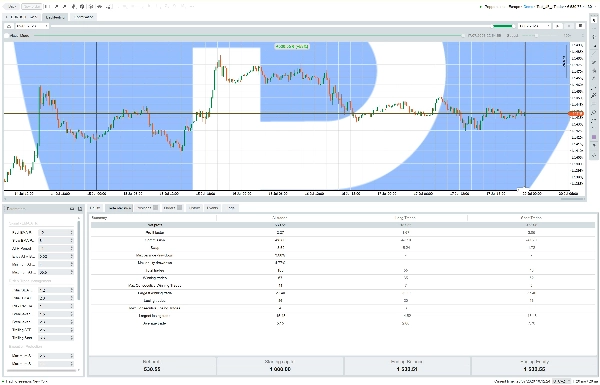
Description
Robot EURUSD M15 EMA-ATR (Premium) — Description du Marketplace
Présentation du produit
**EURUSD M15 EMA-ATR Robot** est un cBot à moteur unique, suivant la tendance, conçu
exclusivement pour **EURUSD** sur la période **M15**. Il combine un signal simple et
transparent de croisement EMA avec un tampon de confirmation ATR, et l'associe
à un moteur strict et systématique de gestion du risque et de protection contre les pertes.
Objectifs principaux de conception :
- Trader uniquement des configurations confirmées à partir de barres M15 entièrement fermées (pas de repaint, pas de
changements de signal intrabar).
- Utiliser un modèle de signal clair (croisement EMA rapide/lent + contexte ATR) au lieu
d'empiler de nombreux filtres stricts qui réduisent la fréquence des trades sans ajouter
un véritable avantage.
- Garder la taille des positions et le risque strictement systématiques : chaque trade risque un
pourcentage fixe de l'Equity ou du Solde, calculé à partir de l'objet `Symbol` en direct
(pas de constantes codées en dur pour la taille des pips/lots).
- Fournir une protection de compte de qualité production : filtre de spread, filtre de plage ATR, break-even, stop suiveur ATR, pause après pertes consécutives, verrouillage de la perte d'équité quotidienne, verrouillage d'urgence global de la perte d'équité/solde, et protection contre les gaps du weekend.
Fonctionnement du Robot
1. Marché et Période
Le robot est verrouillé sur **EURUSD, M15**. S'il est attaché à un autre symbole
ou une autre période, il affichera un avertissement clair et n'ouvrira aucune position,
tout en permettant à l'utilisateur de le déplacer vers le graphique correct et de redémarrer.
2. Moteur de Signal
- Déclencheur de direction : **croisement EMA (rapide) / EMA (lent)**, évalué uniquement sur
la dernière barre M15 entièrement fermée.
- Confirmation : le prix doit clôturer au-delà de l'EMA rapide avec un tampon calibré sur l'ATR
(`Entry ATR Buffer`), évitant les croisements bruyants/marginaux.
- Contexte de volatilité : **ATR de Wilder**. Le trading est autorisé uniquement lorsque l'ATR (en
pips) est dans une bande minimum/maximum configurée, évitant les marchés morts et les conditions anormalement volatiles.
3. Gestion du Risque et Exécution des Ordres
- La taille des positions utilise un **pourcentage fixe de l'Equity ou du Solde** par trade
(base de capital sélectionnable par l'utilisateur).
- Le Stop Loss initial est un **multiple de l'ATR** (plancher technique minimum de 5 pips).
- Le Take Profit initial est un multiple ATR indépendant.
- Un tampon de sécurité contre le slippage est inclus directement dans le calcul du volume,
et le risque réellement réalisé est revérifié juste après l'exécution ; si
le slippage pousse le risque réel plus de 5 % au-dessus de la cible, la position est
fermée immédiatement à titre de mesure de protection.
- Les nouvelles entrées sont bloquées si le spread dépasse soit une limite absolue en pips
soit 25 % de l'ATR actuel.
4. Gestion des Positions
- **Break-even** : le stop est déplacé à l'entrée + un petit tampon une fois que le profit
atteint un déclencheur configurable basé sur l'ATR.
- **Stop suiveur ATR** : une fois que le profit dépasse un déclencheur ATR distinct, le
stop suit le marché à un multiple ATR configurable. Le stop ne peut que
se déplacer en faveur du trade et ne se met à jour que lorsque l'amélioration est
significative (≥ 0,5 pip), évitant des allers-retours inutiles vers le serveur.
- Exactement **une position ouverte à la fois** — le robot ne gère que les positions
et ordres en attente sous son propre label Bot configurable.
5. Couche de Protection
- **Verrouillage de la perte d'équité quotidienne** : ferme toutes ses positions et bloque
les nouvelles entrées pour le reste de la journée de trading du broker si le seuil
de perte quotidienne configuré est atteint ; se réinitialise automatiquement le jour de trading suivant.
- **Verrouillage d'urgence global** : ferme toutes ses positions et bloque _toutes_ les
nouvelles opérations indéfiniment, si le seuil de perte d'équité globale ou de solde global
est atteint. Il s'agit d'un verrou de sécurité délibérément **collant** —
il ne peut être levé que par l'utilisateur en réglant explicitement `Reset Emergency
Lock = true` et en redémarrant le cBot, ce qui réinitialise également les
repères hauts d'équité/solde.
- **Pause après pertes consécutives** : après un nombre configuré de trades perdants consécutifs,
les nouvelles entrées sont suspendues pour un nombre configurable de barres M15, puis reprennent automatiquement.
- **Protection contre les gaps/weekend** : les nouvelles entrées sont bloquées après une heure limite
configurable le vendredi ; les positions ouvertes peuvent être fermées avant le
weekend ; et après tout gap dépassant 1.5x ATR (y compris la réouverture du lundi), les nouvelles entrées attendent des barres de confirmation.
6. Couleur de l'Étiquette de Statut sur le Graphique (Indicateur En Marche / Arrêt)
L'étiquette de statut sur le graphique utilise un schéma de couleurs fixe, indépendant du thème, afin qu'elle
reste clairement lisible sur les plateformes **cTrader Desktop** et
**cTrader WebTrader**, que le fond du graphique soit clair ou sombre :
- **Vert Émeraude — RGB(16, 185, 129)** : affiché chaque fois que l'instance du cBot est
activement en fonctionnement (y compris lorsqu'un verrouillage quotidien interne, un verrouillage d'urgence
ou une pause après pertes consécutives bloque temporairement les nouveaux trades — le
processus lui-même est toujours actif et surveille le marché).
- **Corail / Rouge Néon — RGB(239, 68, 68)** : affiché dès que l'instance du cBot
s'arrête réellement (arrêt manuel, retiré du graphique, ou terminé par
la plateforme), pour que l'utilisateur puisse immédiatement reconnaître d'un coup d'œil que le
robot ne fonctionne plus et doit être redémarré.
Il s'agit d'un indicateur purement visuel superposé au panneau de statut existant ; il ne modifie aucune logique d'entrée, de sortie, de risque ou de protection contre les pertes.
Paramètres (19 optimisables + réglages opérationnels)
- Signal - EMA/ATR (6)
- Période EMA rapide, Période EMA lente, Période ATR, Tampon ATR d'entrée, ATR minimum (pips), ATR maximum (pips)
- Gestion du risque et des trades (7)
- Multiplicateur SL initial ATR, Multiplicateur TP initial ATR, Risque par trade (%), Déclencheur break-even (ATR), Tampon break-even (pips), Multiplicateur ATR suiveur, Début suiveur (ATR)
- Protection d'exécution (2)
- Spread maximum (pips), - Tolérance maximale de slippage (pips)
- Protection contre les pertes (4)
- Perte maximale quotidienne d'équité (%), Perte maximale globale d'équité (%), Perte maximale globale de solde (%), Nombre maximum de pertes consécutives
- Réglages opérationnels
- Base de capital à risque, Activation du trading, Réinitialiser le verrouillage d'urgence, Heure de début/fin de trading, Heure limite d'entrée du vendredi, Fermer avant le weekend, Barres de pause après pertes quotidiennes, Label du bot, Notifications activées
Notes opérationnelles pour les utilisateurs du Marketplace
- Confirmez toujours que le graphique est réglé sur **EURUSD, M15** avant de démarrer le
cBot — c'est une exigence stricte, pas une suggestion.
- Effectuez des back-tests et optimisez avec des paramètres réalistes de spread, commission et slippage.
Évaluez le facteur de profit, la perte maximale et la stabilité du nombre de trades, pas seulement le profit net.
- Le paramètre `Reset Emergency Lock` est une soupape de sécurité manuelle. Il ne doit pas
être laissé à `true` — le cBot enregistre un rappel pour le remettre à
`false` après avoir effectué une réinitialisation.
- Les performances passées dans les back-tests ou les tests en démo ne garantissent pas
les résultats futurs.
À qui s'adresse ce robot
- Aux traders qui veulent une stratégie de tendance transparente à moteur unique avec des contrôles de risque solides et auditables.
- Aux utilisateurs qui veulent un contrôle total à la fois sur la rigueur du signal (plages EMA/ATR)
et sur le comportement de sécurité (limites de perte, pause, gestion du weekend).
- Aux utilisateurs systématiques qui valident les stratégies avec des tests in-sample, out-of-sample et
des tests en avant avant de passer en live.
Une version **Trial** gratuite, avec capacités réduites, de ce produit est disponible.
Voir la comparaison Trial vs Premium.
Résumé
Key features include systematic position sizing that risks a fixed percentage of equity or balance per trade, with stop loss and take profit levels set as ATR multiples. The robot incorporates multiple risk management and protection mechanisms such as spread and volatility filters, break-even and ATR-based trailing stops, consecutive loss cooldowns, daily and global drawdown locks, and weekend gap protection.
Only one position is managed at a time under a configurable bot label. The robot is hard-locked to EURUSD M15 and will not trade on other symbols or timeframes. It provides a visual status indicator on the chart for running or stopped states.
Parameters allow customization of signal sensitivity, risk and trade management, execution protection, and drawdown limits. The robot is intended for traders seeking a transparent, auditable trend strategy with strong risk controls and systematic trade management.
Discussion
Avis clients
5 | 0 % | |
4 | 100 % | |
3 | 0 % | |
2 | 0 % | |
1 | 0 % |