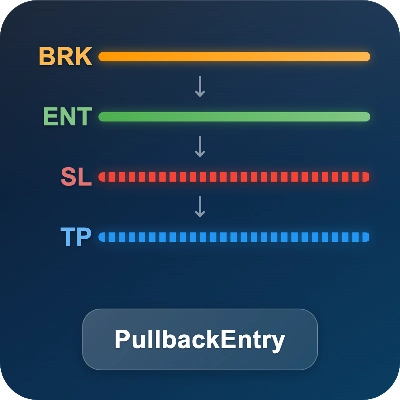
Logo "PullbackEntry"
cBot
Versi 1.0, Nov 2025
Windows, Mac, Mobile, Web
Gambar unggahan "PullbackEntry"
Sejak 23/01/2025
7
Penjualan
80
Instal gratis

PULLBACK ENTRY: SMARTER BREAKOUT TRADING

-----------------------------------------


Don't chase breakouts - let price come to you!


This bot automates the classic "breakout + pullback" strategy that professional traders use:

1. Wait for price to break a key level (confirming momentum)

2. Enter on the pullback/retracement (better price, tighter stop)


Why Pullback Entry?

- Avoid false breakouts by waiting for confirmation

- Get better entry prices than chasing the breakout

- Tighter stop losses = better risk/reward ratio

- No need to watch charts 24/7 - bot handles execution


How It Differs from Native Stop-Limit:


cTrader's stop-limit:

- Triggers limit order when price hits stop level

- Entry at or near the trigger price


PullbackEntry:

- Waits for breakout confirmation (BK line)

- Places limit order at pullback level (EN line)

- Catches the retracement for optimal entry


KEY FEATURES

------------


[Powerful Visual Planning]

- Drag-and-drop lines directly on chart: BK (breakout), EN (entry), SL (stop loss), TP (take profit)

- Real-time preview showing pips, dollars, and lot size for each level

- Smart constraints prevent illogical line positions (e.g., SL above entry for Buy)

- Auto-adapting colors for light/dark chart backgrounds

- State preservation when switching timeframes


[Complete Position & Risk Management]

Three professional position sizing modes:

- Fixed Lots: Trade a constant lot size you specify

- Equity %: Size based on percentage of account equity

- Risk %: Calculate lots based on stop loss distance and your risk tolerance


Combined with customizable Stop Loss and Take Profit, you get complete control over position sizing and risk protection.


[Flexible Direction]

- Ctrl+Click sets the breakout (BK) AND decides direction by click position:

- Click above current price → Buy setup

- Click below current price → Sell setup

- Click-based direction overrides the Direction parameter. If no click was made (e.g. restored state), the Direction parameter is used as default.


WHY CHOOSE THIS BOT?

--------------------


Unlike basic limit order tools, this bot offers:

- Visual drag-and-drop planning (not just input boxes)

- Breakout-triggered logic (different from native cTrader stop-limit)

- 3 position sizing modes in ONE tool

- Real-time P&L preview before trade triggers

- Integrated SL/TP with smart constraints


All-in-one solution. No need for multiple separate tools.


HOW IT WORKS

------------


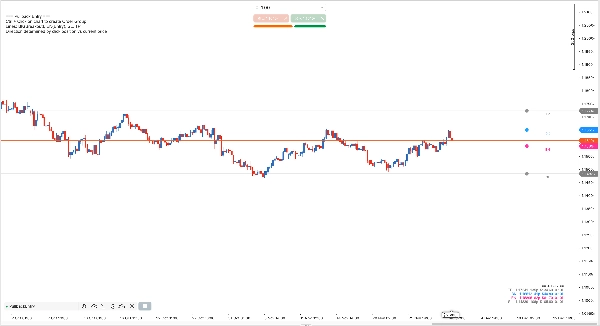
1. Ctrl+Click on chart to set the breakout (BK). Direction is chosen automatically by your click position (above price → Buy, below → Sell). A hint is shown at top-left until you create the order group.

2. The bot creates EN/SL/TP planning lines automatically; drag to fine-tune levels.

3. The bot monitors price; after breakout it places a limit order at EN with SL/TP attached.

4. Delete BK or EN line anytime to cancel the setup (you can then Ctrl+Click again to create a new one).

5. If you delete SL or TP line, you can recreate it by changing the corresponding parameter in the settings panel.


NOTE: Single-group version only allows ONE order group at a time. Additional Ctrl+Clicks are ignored until the current group is deleted or triggered.


FREE VERSION

------------


This is the FREE single-group edition - perfect for traders who need one breakout setup at a time.


Need more power? Upgrade to "PullbackEntryPro" for:

- Multiple simultaneous order groups

- Independent settings per group

- Visual group connectors and labels

- Scale-in and bracket order strategies


REQUIREMENTS

------------

- Works on all symbols and timeframes

- No external dependencies

- AccessRights: None (safe, no external access)


VERSION INFO

------------

Version: 1.1

Author: efem2000

License: Freeware

Profil trading
Produk-produk yang tersedia melalui cTrader Store, termasuk bot trading, indikator, dan plugin, disediakan oleh pengembang pihak ketiga serta hanya ditujukan untuk akses teknis dan informasi. cTrader Store bukan broker dan tidak menyediakan saran investasi, rekomendasi pribadi, atau jaminan apa pun tentang kinerja di masa mendatang.

Anda mungkin juga suka

Sejak 23/01/2025
7
Penjualan
80
Instal gratis