ブローカー&プロップファーム
事業者向け
00
Days
:
00
Hours
:
00
Minutes
:
00
Seconds
PullbackEntryPro
cBot
Version 1.2, Jan 2026
Windows, Mac, Mobile, Web
登録日 23/01/2025
販売
4
無料インストール
15
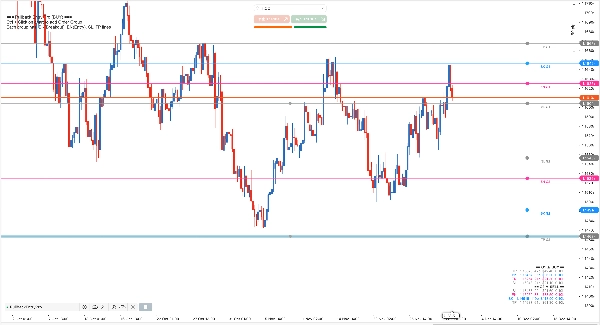
「PullbackEntryPro」アップロード画像
トライアルバージョンについて
PullbackEntryPro — 7-Day Trial This is a fully functional 7-day trial version. - Trial starts on first launch. - All features available with no limitations. - After 7 days, an expiration message is displayed. - Uses cTrader LocalStorage (Device scope). No external data transfer. To continue after trial, install the full version from cTrader Store. For feature details, see the full version product page. Author: efem2000 | License: 7-day trial

================================================================================

PullbackEntryPro

================================================================================


SHORT DESCRIPTION (for cTrader Store listing):

Multi-group pullback entry bot: unlimited setups, enter on retracement after breakout. Ctrl+Click to add.


================================================================================

FULL DESCRIPTION:

================================================================================


PULLBACK ENTRY PRO: SMARTER BREAKOUT TRADING

---------------------------------------------


Don't chase breakouts - let price come to you! Now with unlimited order groups.


This bot automates the classic "breakout + pullback" strategy that professional traders use:

1. Wait for price to break a key level (confirming momentum)

2. Enter on the pullback/retracement (better price, tighter stop)


Why Pullback Entry?

- Avoid false breakouts by waiting for confirmation

- Get better entry prices than chasing the breakout

- Tighter stop losses = better risk/reward ratio

- No need to watch charts 24/7 - bot handles execution


How It Differs from Native Stop-Limit:


cTrader's stop-limit:

- Triggers limit order when price hits stop level

- Entry at or near the trigger price


PullbackEntryPro:

- Waits for breakout confirmation (BK line)

- When BK is reached, submits a LIMIT pending order at EN (with SL/TP)

- Before BK is reached, there is no server-side pending order for that group

- Catches the retracement for optimal entry

- Supports MULTIPLE simultaneous setups!


MULTIPLE ORDER GROUPS

---------------------


PullbackEntryPro provides full multi-group capability - manage unlimited simultaneous pullback entry setups on a single chart!


Why Multi-Group Matters:

- Scale-in Strategies: Set multiple entry points at different levels

- Bracket Orders: Place breakout orders above AND below key levels

- News Trading: Pre-define multiple scenarios before high-impact events

- Multi-Timeframe Setups: Combine signals from different analyses

- Pyramiding: Add to winning positions at predetermined levels


KEY FEATURES

------------


[Powerful Visual Planning]

- Drag-and-drop lines directly on chart: BK, EN, SL, TP for each group

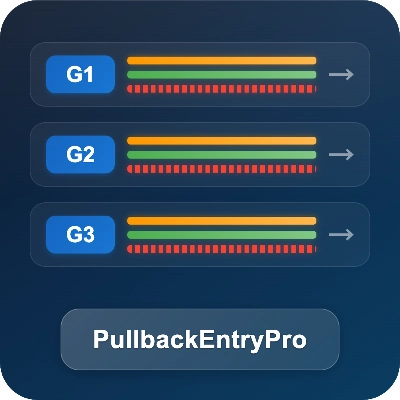
- Visual group identification with labeled lines (G1, G2, G3...) and connectors

- Real-time preview panel showing locked groups' pips, dollars, and lot sizes

- Lock/unlock per group: only locked groups are active (pending orders + tags + persistence); unlocking cancels the group's pending order; unlocked groups are editable drafts

- Smart constraints prevent illogical line positions

- Quick Add: Ctrl+Click anywhere to add new group at clicked price

- Auto-adapting colors for light/dark chart backgrounds

- State preservation for locked groups when switching timeframes


[Complete Position & Risk Management]

Three professional position sizing modes:

- Fixed Lots: Trade a constant lot size for all groups

- Equity %: Size based on percentage of account equity

- Risk %: Calculate lots based on each group's stop loss distance


Combined with customizable Stop Loss and Take Profit per group, you get complete control over position sizing and risk protection across all your setups.


[Flexible Direction]

- Each group operates independently with its own direction

- Ctrl+Click creates a group based on click position:

- Click above current price → Buy setup

- Click below current price → Sell setup

- Direction is determined by BK vs EN line positioning, and you can change it by dragging the lines


WHY CHOOSE THIS BOT?

--------------------


Unlike basic limit order tools, this bot offers:

- Visual drag-and-drop planning (not just input boxes)

- Breakout-triggered logic (different from native cTrader stop-limit)

- 3 position sizing modes in ONE tool

- Real-time P&L preview before trade triggers

- Multiple order groups for advanced strategies

- Integrated SL/TP with smart constraints


All-in-one solution. No need for multiple separate tools.


HOW IT WORKS

------------


1. Ctrl+Click on chart to add a group at the clicked price (this sets BK and chooses direction: above price → Buy, below → Sell). A theme-aware hint is shown at top-left.

2. Drag lines to adjust each group's levels (labeled G1, G2, etc.), then lock the group to activate it.

- Only locked groups are active: they can place/sync pending orders, appear in the tags, and be persisted/restored.

- Unlocked groups are drafts for planning/editing.

3. When a group is locked, the bot monitors price; once BK is reached, it submits a LIMIT pending order at EN with SL/TP.

4. Delete BK or EN line to remove a specific group.


REQUIREMENTS

------------

- Works on all symbols and timeframes

- No external dependencies

- AccessRights: None (safe, no external access)


0.0
レビュー: 0
カスタマーレビュー
この商品にはまだレビューがありません。お使いになったことがある方は、ぜひレビューをお願いします。
Grid
NAS100
NZDUSD
Breakout
XAUUSD
Commodities
Martingale
Forex
Signal
EURUSD
GBPUSD
BTCUSD
Indices
Prop
Stocks
Crypto
USDJPY
Scalping

この作成者の他の商品

インジケーター
Grid
NAS100
NZDUSD
+18
SmartFractalZigZagPlus
Smart fractals + auto Fibonacci + dynamic S/R zones with HTF confluence & Bull/Bear bias panel. Institutional-grade.
インジケーター
Grid
NAS100
NZDUSD
+17
Super Wick
Super Wick detects powerful candle rejections: fractal long-wicks, HTF resonance zones, and a WSI gauge.
TradeCommand
TradeCommand: Visual drag-and-drop orders, Stop-Limit, Plan En gine exits, smart risk sizing, batch management.
インジケーター
Grid
NAS100
NZDUSD
+17
SmartFractalZigZagPro
Smart fractal + ZigZag with fully automated Fibonacci levels for precise swing and structure trading.
GoldSilverPulse
FedWatch, DXY/yields, ETF/COMEX data and Gold/Silver ratio—key metals fundamentals in one cTrader panel.
OilGasPulse
Oil & Gas Pulse: US crude oil & natural gas fundamentals dashboard (EIA WPSR/WNGSR) plus weather & alerts.

これも好きかも

cBot
NAS100
Indices
XAUUSD
+8
SmartBot-Hand Trade Assistant_Premium
cBot : Hand Trade Assistant
cBot
Martingale
Range Bar Strategy and Martingale (Made With AlgoBuilderX)
The Range Bar Strategy uses candlestick shadow conditions and a Martingale system for precise trade entries and sizing.
cBot
Grid
NAS100
RSI
+12
RSI Grid EMA Strategy
RSI Grid System with 200 EMA filter combining momentum, grid distance, and trend alignment for precision entries.
Trading_stop Plus DEMO
📄 Trading_stop Plus DEMO 🧪 DEMO VERSION – LIMITED TO 48 HOURS This is the demo version of Trading_stop Plus. It works
Alligator Strategy + Advanced Take Profit Demo
This strategy is based on the Alligator indicator and has 4 levels of Take Profit.
AlgoCorner Trading Dashboard MP
Custom trading dashboard for fast one-click orders. Set Stop Loss, Take Profit, and customize layout & symbols easily.
cBot
RSI
XAUUSD
ATR
+1
FW_SymbolTuner.cs
Symbol Tuner
cBot
NAS100
RSI
NZDUSD
+18
needThaiBot Version 46
Low Risk Trader Bot,,Please Try Default Setting Before Running an Optimisation Features!! ENJOY!!
cBot
Indices
Prop
Commodities
+1
Ultimate Trade Panel
Ultimate Trade Panel - a powerful, on-chart trading tool designed for precision and efficiency.
cBot
XAUUSD
Breakout
Forex
+3
London Session Breakout Pro
Capture London volatility automatically with smart risk sizing and clean breakout logic.
cBot
Grid
RSI
NZDUSD
+7
DragonRSIcBotDemo
DragonRSIcBot is an RSI-driven grid/martingale cBot
cBot
Indices
RSI
XAUUSD
+5
TrendPullback ATR Pro
Trend-following with deep pullbacks and advanced risk/position management.