present
Registrati e ricevi uno sconto da $50 sul tuo primo acquisto
Trading product for Quick Trading Panel cBot BTCUSD Forex, image 1
Quick Trading Panel
cBot
Testato su IC
Versione 2.0, Nov 2025
Windows, Mac, Mobile, Web
2
Acquisti
3
Fattore di profitto
0%
Drawdown massimo
Trading product for Quick Trading Panel cBot BTCUSD Forex, image 2
Trading product for Quick Trading Panel cBot BTCUSD Forex, image 3
Trading product for Quick Trading Panel cBot BTCUSD Forex, image 4
Trading product for Quick Trading Panel cBot BTCUSD Forex, image 5
Da 29/05/2025
3.05M
Volume negoziato
68.12K
Profitto in pip
29
Vendite
883
Installazioni gratuite

Descrizione

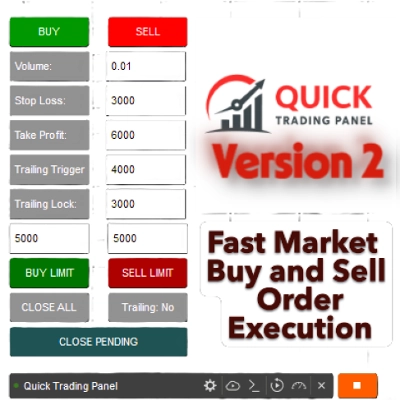
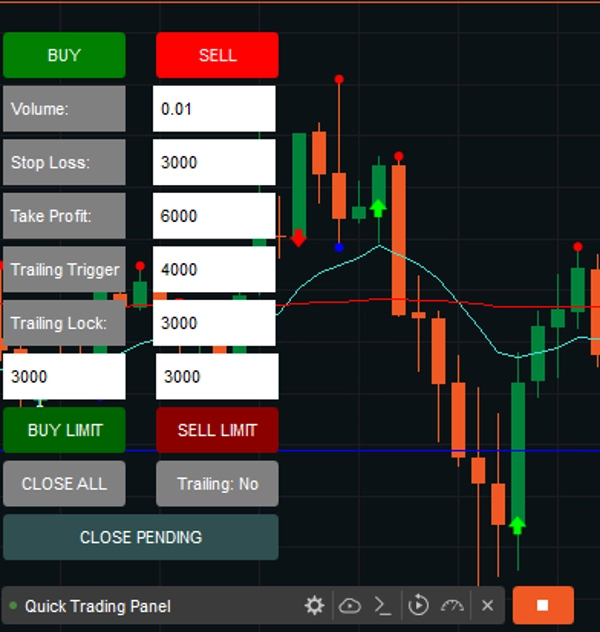
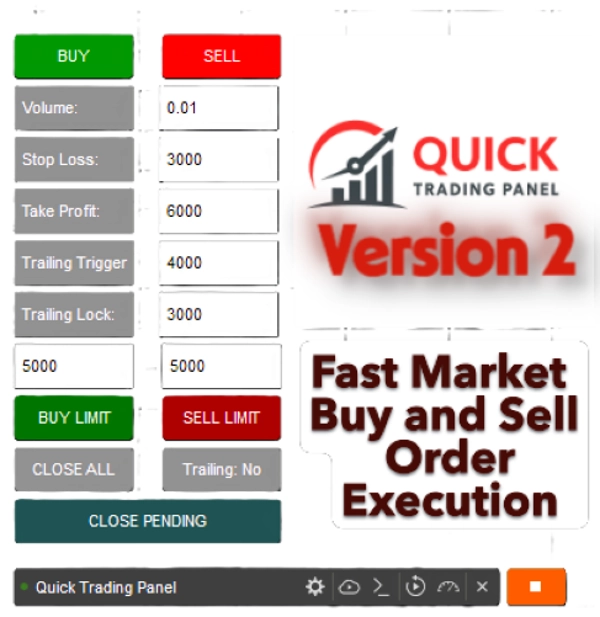
Questo è un cTrader cBot (Robot) che crea un piccolo QUICK TRADING PANEL V2 direttamente sul tuo grafico. Include Trailing Trigger e Locked per evitare perdite una volta che il tuo trade è in positivo.
Ti permette di aprire e gestire rapidamente le operazioni senza digitare comandi o impostare manualmente gli ordini.

Vendute le prime 10 copie a $ 50; torneremo al prezzo originale di $ 99.

1. Esecuzione del Trade (BUY / SELL)

  • Hai due grandi pulsanti:
    • ✅ BUY (verde) → apre una posizione di acquisto sul simbolo corrente.
    • ❌ SELL (rosso) → apre una posizione di vendita.
  • Quando clicchi uno di questi, il robot:
    1. Legge i valori dalle caselle di input (Volume, SL, TP, ecc.)
    2. Converte il volume in unità (Symbol.QuantityToVolumeInUnits())
    3. Esegue un ordine di mercato con il tuo Stop Loss (SL) e Take Profit (TP) scelto.


2. Gestione del Trade

  • 🟦 CHIUDI TUTTO pulsante → chiude tutte le posizioni aperte create da questo pannello.
  • 🟧 Pulsante Trailing: Sì/No → attiva o disattiva il sistema di trailing stop.
    • "Sì" = trailing stop attivo
    • "No" = trailing stop disattivato


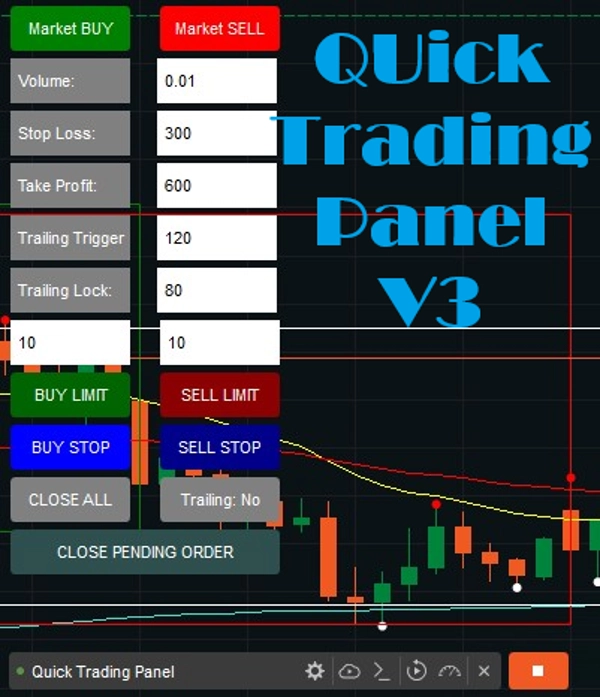
3. Caselle di Input con Etichette

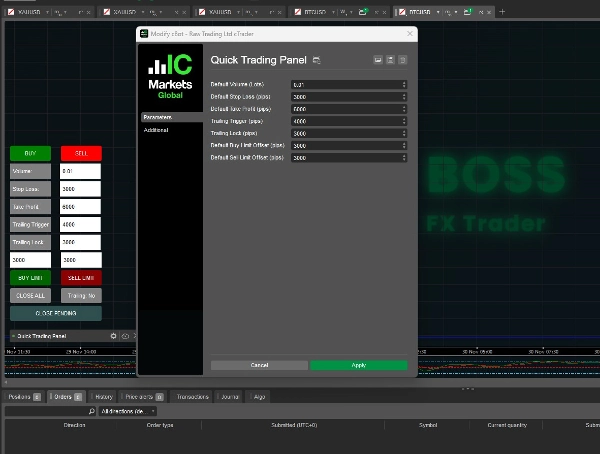
Ora hai campi di input con etichette così sai esattamente cosa significa ogni numero.

  • Volume:
    • La dimensione del trade (in lotti).
    • Esempio: 0.01 = 1 micro lotto (1.000 unità).
  • SL (Stop Loss):
    • La perdita massima (in pips) che sei disposto a rischiare.
    • Esempio: 300= il trade si chiude se il prezzo si muove di 300 pips contro di te.
  • TP (Take Profit):
    • Il profitto target (in pips).
    • Esempio: 600 = il trade si chiude una volta raggiunti 600 pips di profitto.
  • Trailing Trigger:
    • La soglia di profitto (in pips) in cui il trailing stop inizia a funzionare.
    • Esempio: 120 = il trailing stop si attiva quando il trade ha almeno 120 pips di profitto.
  • Trailing Lock:
    • Quanti pips di profitto bloccare dopo che il trailing inizia?
    • Esempio: 80 = una volta che il trade raggiunge TP + 80 pips, lo stop loss si sposta per garantire un profitto di +5 pips.
  • BUY Limit
    • Opzione per ordini Buy limit sul mercato.
    • Puoi impostare le opzioni o digitare i pips nel pannello del grafico, con un valore predefinito di 300 Pips.
  • SELL limit
    • Opzione per ordini Sell limit sul mercato.
    • Puoi impostare le opzioni o digitare i pips nel pannello del grafico, con un valore predefinito di 300 Pips.

AGGIUNTE nuove funzionalità:

Buy Stop e Sell Stop sono ordini condizionali e automatizzati che attivano un ordine di mercato una volta raggiunto un "prezzo di stop" specifico. Un Buy Stop viene posizionato sopra il prezzo di mercato corrente per entrare in una posizione long (breakout) o chiudere una short, mentre un Sell Stop è impostato sotto per entrare in una posizione short o proteggere una long.

Buy Stop (Sopra il Mercato): Usato per acquistare un asset solo dopo che il suo prezzo sale a un certo livello, solitamente per entrare in una posizione durante un trend rialzista o chiudere una posizione short.

Sell Stop (Sotto il Mercato): Usato per vendere un asset solo dopo che il suo prezzo scende a un livello specifico, spesso per limitare le perdite o proteggere i profitti su una posizione long.

4. Logica del Trailing Stop (Regolazione Automatica)

Ad ogni tick, il bot controlla i trade aperti:

  • Se il trailing è attivato e il profitto ≥ Trailing Trigger →
    • Per i trade BUY: lo Stop Loss si sposta a Bid - Trailing Lock.
    • Per i trade SELL: lo Stop Loss si sposta a Ask + Trailing Lock.

In questo modo, il bot blocca automaticamente il profitto lasciando comunque correre il trade se il trend continua.

✅ In breve:

  • Questo bot ti offre un interfaccia di trading manuale veloce.
  • Puoi impostare rischio (SL), ricompensa (TP), dimensione della posizione (Volume) e logica del trailing stop in tempo reale.
  • Il pannello è sempre visibile nel tuo grafico, nell'angolo in basso a sinistra.
  • Le etichette assicurano che tu non confonda i tuoi numeri.
  • Gli ordini Buy e Sell Limit sono ora disponibili nella Versione 2.


Nota: Questo funzionerà su tutti gli Asset.


La Versione 2 è stata appena rilasciata.


Buon Trading, e dai un'occhiata ai miei altri prodotti!


Riepilogo

AI summary
Quick Trading Panel is a cTrader cBot that integrates a compact trading interface directly onto your chart, enabling faster manual trade execution and management. It features two primary buttons for immediate BUY or SELL market orders, which automatically apply user-defined parameters such as volume, stop loss (SL), and take profit (TP). The panel includes labeled input fields for precise control over trade size, risk, and reward settings.

Key functionalities include:

- Trade Execution: Open buy or sell positions instantly with preset volume, SL, and TP.
- Trade Management: Close all positions opened via the panel with a single button.
- Trailing Stop System: Toggleable trailing stop that activates after a specified profit threshold (Trailing Trigger) and locks in profit by adjusting stop loss (Trailing Lock).
- Limit Orders: Support for Buy Limit and Sell Limit orders, with configurable pip distances.
- Conditional Orders: Buy Stop and Sell Stop orders that trigger market entries once specified price levels are reached.

The panel remains visible on the chart’s bottom-left corner for quick access and supports all asset types. It automates stop loss adjustments on each tick when trailing is enabled, helping to secure profits while allowing trades to run further if favorable trends continue. This tool is designed to streamline manual trading workflows by reducing the need for manual order entry and management.
Profilo di trading

Recensioni dei clienti

0.0
Recensioni: 0
Recensioni dei clienti
Questo prodotto non ha ancora ricevuto recensioni. L'hai già provato? Fallo sapere agli altri per primo!

Discussioni

Domande frequenti

BTCUSD
Forex
Signal
Breakout
Indices
EURUSD
Commodities
GBPUSD
NZDUSD
Martingale
Prop
Scalping
SMC
Crypto
Grid
Stocks
AI
XAUUSD
NAS100
USDJPY
I prodotti disponibili tramite cTrader Store, inclusi bot di trading, indicatori e plugin, sono forniti da sviluppatori terzi e resi disponibili esclusivamente a scopo informativo e di accesso tecnico. cTrader Store non è un broker e non fornisce consulenze in materia di investimento, raccomandazioni individualizzate o garanzie di risultati futuri.

Altro da questo autore

Indicatore
Market Sessions is very important for traders.
Indicatore
Signal
Fractal Arrow Buy and Sell Indicator
Indicatore
The Break of Structure (BoSCHoCh) Indicator is a smart market structure tool designed to help traders easily spot trend.
Indicatore
AI
ATR
+23
The ZigZag Trend is a market structure tool that filters out small price fluctuations and highlights major swing.
Indicatore
Area of Interest with the power of AI to detect the market interest.
Indicatore
Prop
Forex
+13
Volume Meter
Indicatore
MultiTF Pivot and SR Indicator
Indicatore
AI
ATR
+23
Candle Timer best used for Scalper
Indicatore
AI
ATR
+27
The Fibonacci Automated Levels Indicator is a smart trading tool that automatically detects the most recent market.
Indicatore
The Market BIAS Detector is a smart trading assistant designed to identify the market.
Indicatore
Forex
Spread Calculator to calculate the difference between two prices or values.
Indicatore
AI
ATR
+27
Intraday MultiTimeframe Candle Status Indicator

Potrebbe interessarti anche

cBot
Order Block
Fixed Risk %
+2
Automated XAUUSD cBot using market-structure swing detection, fixed-% risk and a minimum reward-to-risk filter.
1.13
Fattore di profitto
cBot
Drawdown Guard
Daily Loss Limit
Monitor account-wide loss and stop-loss risk budgets, with optional order cancellation and post-fill closure.
cBot
CHOCH
SL Manager
+1
Trade with clarity. Protect your capital. Let Risk Manager enforce the rules.
cBot
A powerful smart trading robot based on a secret, highly effective strategy. ✅ Backtested using tick data for real-marke
cBot
ATR
Forex
+5
Profitable low-risk robot, ROI 32%
43.9%
ROI
7.51
Fattore di profitto
cBot
SL Manager
Break Even
+4
FRACTAL STOP LOSS BOT AND RISK MANAGER
cBot
// LIMITED OFFER - GREAT PRICE // XAU/USD 4H TIMEFRAME // 5 YEARS BACKTEST, PROFIT 16 200 USD
cBot
VWAP
Fibonacci
+5
Autonomous Nasdaq execution engine featuring VWAP confluence, macro sweeps, and strict prop-firm drawdown defense.
8%
ROI
11.67
Fattore di profitto
cBot
ATR
Simple and Effective Trading Panel with On-Screen Statistics and Trade Management Options.
cBot
AI
ATR
+26
Review and User Guide: PROP Account Guardian Pro cBot 🛡️
cBot
XAUUSD
Bollinger
+1
Sfrutta il breakout delle bande di bollinger.
cBot
Forex
Crypto
+2
The cTrader Risk & Reward management tool can easily help you to set the risk vs reward values
cBot
AI
SMC
+18
✨ Get ready to rediscover trading through a lens of geometric elegance.📈
cBot
Fixed Lot
Equity Stop
+5
Copy trades between cTrader accounts on one PC or VPS. Symbol names mapped across brokers for you. Three-step setup.
cBot
Prop
Forex
+9
Forex Wizard
cBot
BOS
CHOCH
+5
Ai_SMC Trading Robot v2 – Precision Smart Money Concept Automation
1.4
Fattore di profitto
cBot
Fixed Risk %
Market Structure
Gold Edge trades XAUUSD using market-structure swing detection, fixed-percentage risk per trade, a minimum RR
1.13
Fattore di profitto
cBot
AI
RSI
+8
ORB cBot: Comprehensive Opening Range Breakout Strategy for XAU/USD

Prezzo

Da 29/05/2025
3.05M
Volume negoziato
68.12K
Profitto in pip
29
Vendite
883
Installazioni gratuite