
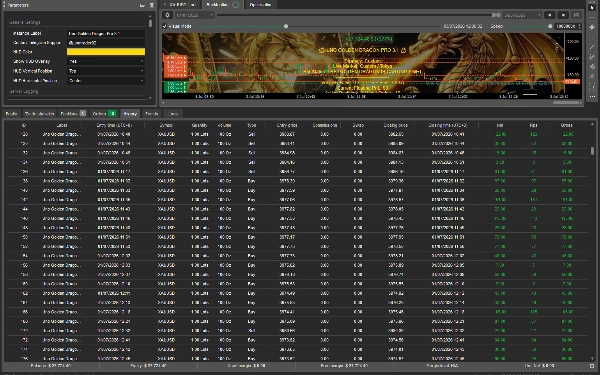
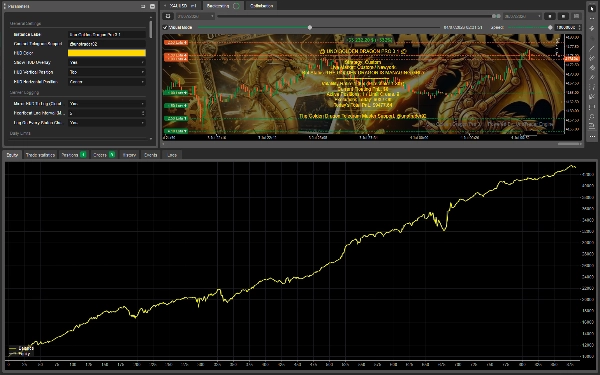
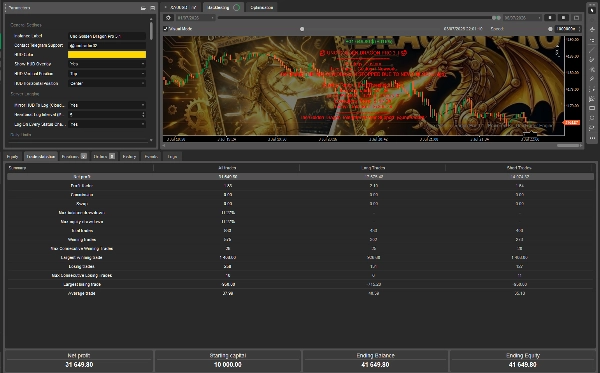
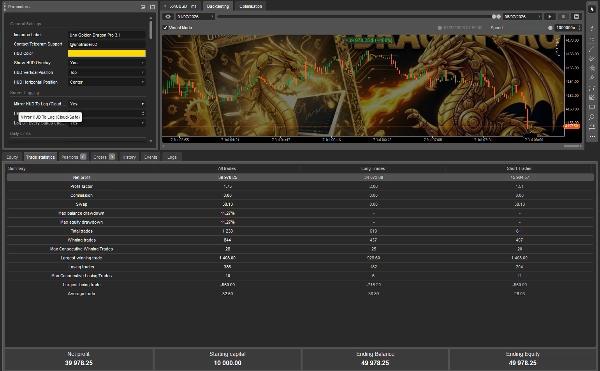


Description
🐲 UNO GOLDEN DRAGON PRO 3.1 🐲
The Cloud-Optimized Multi-Level Grid Suite & Master Risk Engine
🚀 OVERVIEW
The Uno Golden Dragon Pro 3.1 is an automated trading system built for the ctrader platform. Version 3.1 builds directly upon the adaptive, multi-tier scaling grid architecture of previous versions, introducing rigorous Server/Cloud Logging protections, an aggressive Volatility Filter engine, and comprehensive execution safeguards designed specifically for seamless, un-monitored execution in remote or cloud environments.
🧠 STRATEGY AND ADAPTABILITY
- Universal Instrument Support: Dynamically applies its logic across any asset (Gold, Forex, Crypto, Indices, Commodities) by normalizing spacing based on symbol pip structures.
- The Master Risk Engine: Features 5 selectable strategic risk profiles: Foundational, Systematic, Advanced, Institutional, or Custom.
- Adaptive SMA Anchor: Utilizes a dynamic Simple Moving Average (SMA) baseline to define fair value structural equilibrium before casting grid limit orders.
- ATR-Proportional Spacing: Uses an Exponential Average True Range (ATR) calculation to automatically expand grid spacing during high volatility and contract it during tight consolidation.
- Double-Sided Grid Deployment: Automatically places a ladder of Buy Limit orders below the SMA anchor and Sell Limit orders above it simultaneously.
🛡️ SYSTEM INTEGRITY, SECURITY & VOLATILITY FILTERS
- Variable Cap Scaling (Up to 10 Levels): While legacy constraints remain removed, Version 3.1 allows granular structural limits per profile, capping grid depths from 1 to 10 levels deep for precise capital protection.
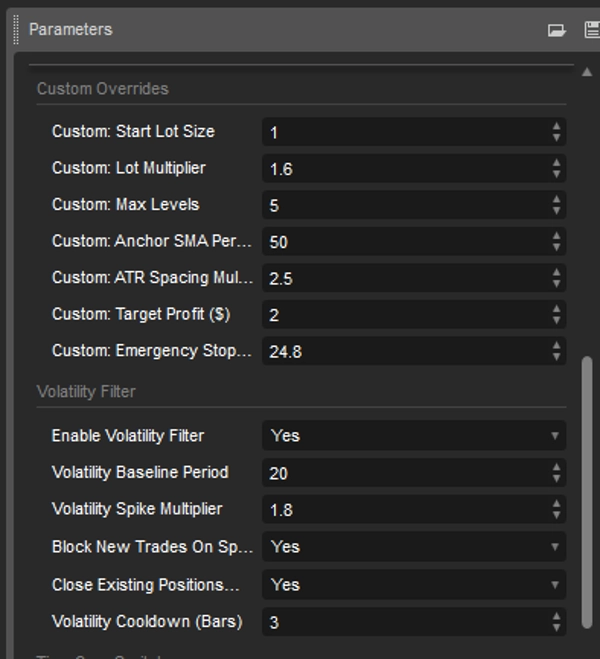
- Basket-Level Financial Target Management: Manages trades using unified, basket-wide Target Profit ($) and Emergency Stop Out ($) monetary values hardcoded into the risk profiles or user-defined in Custom mode.
- Advanced Volatility Filter: Monitors real-time ATR against an SMA baseline. Can be configured to explicitly Block New Trades or Close Existing Positions immediately upon a severe volatility spike, enforcing a user-defined cooldown period (in bars).
- Max Daily Execution Limit: An operational circuit breaker preventing runaway loops. Caps the maximum number of structural grid setups deployed within a single trading day.
- Automatic Volume Normalization: The lot-sizing engine automatically routes all scaled volumes through broker parameter checks to round to the nearest allowable lot step.
📥 INTEGRATED RISK PROFILES MATRIX
⚠️ Profile Modification Note: In Version 3.1, the Max Levels ceiling for preset profiles (Foundational through Institutional) is now dynamically restricted via explicit parameter controls mapping up to 10 levels deep.
[1] FOUNDATIONAL PROFILE
- Max Grid Depth: Profile Default (Configurable up to 10 Levels)
- Lot Multiplier: (1.2x)
- Target Profit: $1.00
- Emergency Stop: $15.00
- Core Settings: 50 SMA / (2.5x) ATR Spacing
[2] SYSTEMATIC PROFILE
- Max Grid Depth: Profile Default (Configurable up to 10 Levels)
- Lot Multiplier: (1.4x)
- Target Profit: $1.50
- Emergency Stop: $20.00
- Core Settings: 50 SMA / (2.5x) ATR Spacing
[3] ADVANCED PROFILE
- Max Grid Depth: Profile Default (Configurable up to 10 Levels)
- Lot Multiplier: (1.6x)
- Target Profit: $2.00
- Emergency Stop: $24.80
- Core Settings: 50 SMA / (2.5x) ATR Spacing
[4] INSTITUTIONAL PROFILE
- Max Grid Depth: Profile Default (Configurable up to 10 Levels)
- Lot Multiplier: (1.8x)
- Target Profit: $3.50
- Emergency Stop: $40.00
- Core Settings: 50 SMA / (2.5x) ATR Spacing
[5] CUSTOM PROFILE
- Lot Size: Fully Customizable (Min (0.01) Lots)
- Max Grid Depth: Fully Customizable (1 to 10 Levels)
- Lot Multiplier: Fully Customizable (Min (1.0x)
- Target Profit: Fully Customizable ($)
- Emergency Stop: Fully Customizable ($)
- Core Settings: Fully Customizable SMA & ATR Spacing
🚨 Martingale Scaling Alert: On Institutional mode (1.8x multiplier), your position size compound-scales rapidly. Verify your maximum allowed levels against your account equity allocation prior to live execution.
🕹️ MASTER PARAMETER AND HUD GUIDE
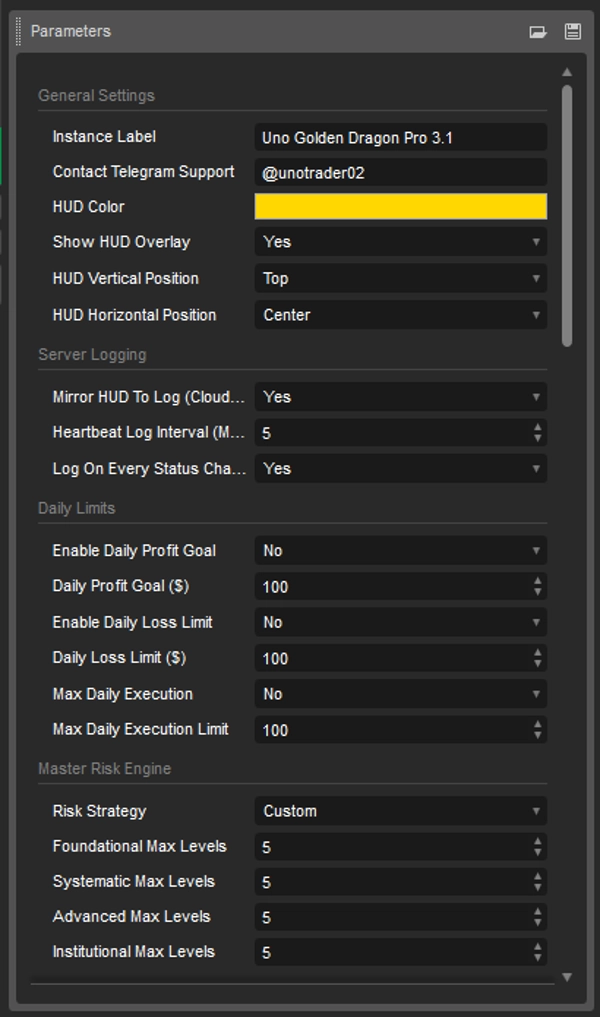
🖥️ GENERAL AND BRANDING SETTINGS
- Contact Telegram: Connect directly with developer support via telegram.
- Instance Label: Customize your bot instance name (Default:
Uno Golden Dragon Pro 3.1). - HUD Customization: Toggle the on-screen gold dashboard overlay (
True/False), customize the base color scheme (HUD Color), and align layouts seamlessly using Hud Vertical (Top/Bottom) and Hud Horizontal (Left/Right/Center).
☁️ SERVER / CLOUD LOGGING (NEW)
- Mirror HUD To Log: Duplicate full HUD overlay telemetry safely into the ctrader Automate log file—ideal for tracking status when running on unmonitored VPS setups.
- Heartbeat Log Interval: Defines a strict recurrent timer (in minutes) to force a performance report into the system logs, ensuring the bot is verified online.
- Log On Every Status Change: Instantly updates the ctrader log if the internal processing state transitions.
🛑 DAILY LIMITS (PNL & EXECUTION CIRCUIT BREAKERS)
- Enable Daily Profit Goal: Clears active exposure and pauses new grids for the day upon hitting your target dollar profit.
- Enable Daily Loss Limit: Your ultimate equity shield. Closes open exposure if your combined history and open floating PNL hits this target.
- Max Daily Execution Engine: Toggle and configure the maximum number of structural grid execution loops permitted within a single daily cycle.
📉 VOLATILITY FILTER INTERFACE (NEW)
- Enable Volatility Filter: Activates tracking math checking live ATR expansions against historical trend baselines.
- Volatility Baseline Period: Simple Moving Average lookback period calculating normalized market conditions.
- Volatility Spike Multiplier: The exact scaling multiple of variance required to trigger a lock-out state (e.g., (1.8x) above normal).
- Block New Trades On Spike: Disallows net deployment during high-velocity price action.
- Close Existing Positions On Spike: Hard equity protection that forces an immediate close on open structures if extreme volatility hits.
⏱️ ADVANCED TIME, DAY & ZONE FILTER ENGINE
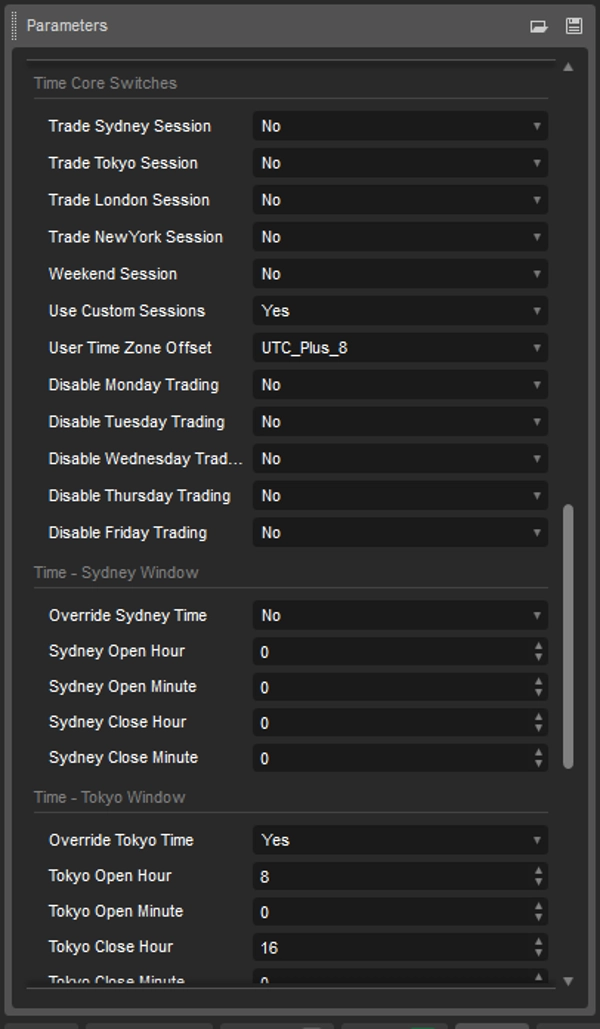
- Simultaneous Session Toggles: Independently activate or disable core trading windows (Sydney, Tokyo, London, New York).
- User Time Zone Offset: Explicitly set your preferred UTC offset via dropdown parameters to match local or broker-specific clocks precisely.
- Individual Day Filters: Toggle unique parameters to entirely skip specific trading days (Disable Monday through Disable Friday individually).
- Weekend Session Permit: Switch to allow or completely block trading during weekend market hours.
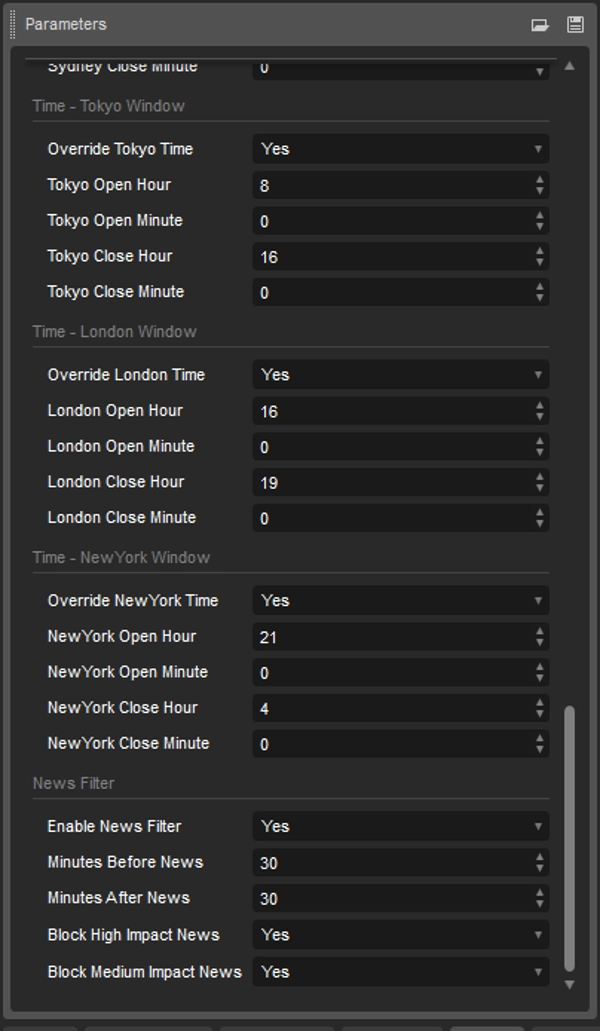
- Custom Window Overrides: When Use Custom Sessions is enabled, configure specific hour and minute ranges for individual session opens and closes.
📰 ECONOMIC NEWS FILTER
- Enable News Filter: Toggles an automated trading blackout window surrounding critical economic calendar data.
- Minutes Before / After News: Restricts new grid setups a set number of minutes prior to and following a news event.
- Impact Blockers: Choose to explicitly block trading for High Impact News and/or Medium Impact News.
⚡ UNDERSTANDING THE RESTRUCTURED HUD STATUS COLORS
The Version 3.1 engine features an Adaptive Color Alert System built straight into the HUD text:
- 🟢 GREEN / GOLD (DEFAULT): Normal operations. The engine is either HUNTING, has a NET CAST, or is actively MANAGING GRID.
- 🔴 RED ALERT: Emergency or structural hard lockout. Triggered when DRAGON GOAL REACHED, LOSS LIMIT REACHED, or when the system is actively stopped by a scheduled NEWS BLOCK.
- 🟠 ORANGE NOTICE: Structural standby or passive lockouts. Displays when operations are paused due to VOLATILITY LOCKOUT, a day is explicitly filtered (Day Disabled), system is WAITING FOR A SESSION, or when the MARKET IS CLOSED.
🐉 OPTIMIZATION & INSTALLATION GUIDE
CBOT OPTIMIZATION
- Navigate to ctrader Automate -> Optimization tab, choose your symbol, and set your starting capital.
- Set your Risk Strategy parameter to
Customto unlock user overrides. - Check the parameter boxes for
CustomStartLot,CustomMultiplier,CustomMaxLevels,CustomSmaPeriod, andCustomSpaceMult. - Configure ctrader's fitness parameters to maximize Net Profit or minimize Drawdown.
RUNNING LIVE
- Ensure your User Time Zone Offset matches your deployment platform environment if using custom session parameters.
- Always test configurations extensively using a Demo Environment to monitor the interaction of the new Volatility Filter against your selected asset step sizing!
#XAUUSD #BTCUSD #FOREX #CRYPTO #INDICES #METALS
Summary
Key features include:
- Universal instrument support with pip-structure normalization.
- Five selectable risk profiles (Foundational, Systematic, Advanced, Institutional, Custom) allowing tailored lot sizing, grid depth (up to 10 levels), target profits, and emergency stops.
- Double-sided grid deployment placing buy limit orders below and sell limit orders above the SMA anchor.
- A master risk engine managing basket-level profit targets and stop-losses.
- Advanced volatility filters that monitor ATR spikes to block new trades or close positions during high volatility.
- Daily execution limits and circuit breakers to prevent excessive trading.
- Time, session, and day filters with customizable trading windows and economic news blackout periods.
- Server/cloud logging for remote monitoring and detailed telemetry.
- An adaptive HUD with color-coded status alerts for operational transparency.
The bot supports limit order types, uses martingale scaling in institutional mode, and includes volume normalization to comply with broker constraints. It is suitable for high-frequency scalping strategies and supports leverage up to 1:100. Recommended minimum balance is $300.
Discussion
Customer reviews
5 | 67 % | |
4 | 33 % | |
3 | 0 % | |
2 | 0 % | |
1 | 0 % |