
Deskripsi
🛡️ Memperkenalkan Account Guardian PRO — Versi 2.0
Kami dengan senang hati mengumumkan rilis versi terbaru dari Account Guardian PRO. Setelah menerima masukan dari pengguna dan melakukan tinjauan mendalam terhadap basis kode, pembaruan ini memperbaiki logika perlindungan drawdown yang krusial, memberikan alat manajemen risiko yang lebih andal dan kuat untuk akun trading Anda.
Jika Anda sudah membeli versi sebelumnya, Anda berhak mendapatkan pembaruan ini secara gratis sepenuhnya. Cukup hubungi kami di Discord dan tim kami akan segera memberikan versi terbaru kepada Anda.
Berikut ringkasan singkat dari semua perubahan yang dilakukan pada cBot dibandingkan versi asli:
1. Manajemen status diganti dengan enum (BotState) Versi asli menggunakan dua flag boolean (_isClosing dan _stopForPeriod) yang bisa bertentangan. Keduanya digantikan oleh satu enum BotState dengan tiga status jelas: Running, StoppedForPeriod, dan HaltedForLoss. Ini adalah penyebab utama blok DD tidak berfungsi — _isClosing direset ke false pada tick yang sama saat diset ke true, sehingga aksi terjadi tapi status segera dihapus.
2. Reset periode sekarang selalu dijalankan Versi asli OnTick() keluar lebih awal jika tidak ada posisi terbuka (Positions.Count == 0), yang mencegah pembaruan baseline saldo harian dan mingguan. Logika reset sekarang dipisahkan ke metode khusus CheckPeriodReset() yang berjalan setiap tick tanpa terkecuali.
3. Baseline awal menggunakan Equity bukan Balance _initialAccountBalance diset menggunakan Account.Balance saat startup. Jika sudah ada posisi terbuka dengan P&L mengambang, perhitungan drawdown total salah sejak awal. Sekarang menggunakan Account Equity untuk baseline yang akurat.
4. ClosePosition() sekarang memeriksa hasilnya Versi asli memanggil ClosePosition() tanpa penanganan error. Versi perbaikan memeriksa result.IsSuccessful dan mencatat peringatan jika posisi gagal ditutup (misal pasar tutup, kesalahan broker).
5. Jeda periode direset dengan benar pada hari/minggu baru Pada versi asli, _stopForPeriod direset di blok pengecekan tanggal hanya jika OnTick() mencapai titik tersebut — yang tidak terjadi jika tidak ada posisi terbuka. Reset sekarang terjadi dengan andal di dalam CheckPeriodReset().
6. Parameter menggunakan label Enable yang eksplisit Label parameter boolean diubah dari string dekoratif seperti "--- DAILY DRAWDOWN ---" menjadi nama fungsional seperti "Enable Daily Drawdown Limit", yang tampil dengan benar di UI cTrader.
7. Metode pembantu GetWeek() dipisahkan Perhitungan minggu dalam tahun diduplikasi di versi asli. Sekarang menjadi satu metode privat yang dipanggil di mana pun diperlukan.
Account Guardian Pro adalah alat manajemen yang kuat dan fleksibel untuk akun trading Anda. Ini bukan bot yang membuka perdagangan sendiri, melainkan co-pilot otomatis 🧑✈️ untuk trading manual Anda. Tujuannya hanya untuk menegakkan aturan risiko dan keuntungan Anda dengan ketat dengan menutup semua posisi terbuka saat ambang tertentu tercapai.
Anggap bot ini sebagai manajer risiko pribadi Anda yang bekerja 24/7, memungkinkan Anda fokus pada strategi trading dengan ketenangan pikiran bahwa jaring pengaman 🥅 selalu aktif.
Apa itu PROP Account Guardian?
Cara Mengaktifkan dan Menggunakan Bot (Panduan Singkat) 🚀
Ikuti langkah sederhana ini untuk mengaktifkan guardian:
- Aktivasi (Langkah Terpenting) ✅
-
- Anda hanya perlu menjalankan satu instance saja dari bot untuk melindungi seluruh akun Anda.
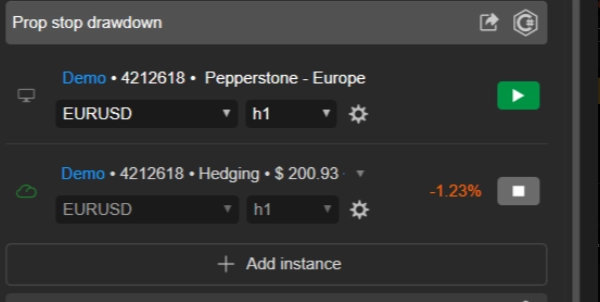
- Pilih chart apa saja yang Anda suka 📉 (banyak trader menggunakan chart yang tidak mereka perdagangkan aktif, seperti AUD/CAD M1, hanya untuk "menampung" bot).
- Tambahkan instance cBot
Account Guardian Proke chart tersebut. - Anda tidak perlu membuka instance untuk setiap aset yang Anda perdagangkan! ❌
- Konfigurasi ⚙️
-
- Sebelum menekan "Play," atur parameter bot sesuai rencana trading Anda. Tentukan batas kerugian dan target keuntungan mana yang ingin Anda aktifkan dan dengan nilai berapa.
- Mulai & Pantau ▶️
-
- Setelah parameter diatur, tekan tombol "Play" pada instance cBot.
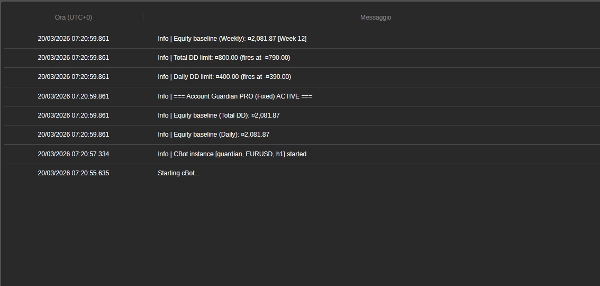
- Anda akan melihat pesan muncul di tab "Log" 📜, mengonfirmasi bahwa bot aktif dan menampilkan batas yang telah Anda tetapkan.
- Selesai! Sekarang Anda bisa fokus pada trading manual. Bot akan berjalan diam-diam di latar belakang dan hanya akan bertindak saat salah satu aturan Anda terpenuhi.
🚨 PENTING UNTUK TRADER PROP FIRM 🚨
Bot ini dilengkapi dengan sistem perlindungan ekuitas kelas profesional, penting untuk melewati tantangan prop firm. Untuk memaksimalkan peluang keberhasilan Anda, kami sangat menyarankan agar tidak mengatur parameter Max Daily Drawdown (%) bot sama dengan batas prop firm Anda (misal, 4% atau 5%).
💡 Strategi Menang: Tetapkan Batas yang Lebih Ketat
Kuncinya adalah menggunakan parameter drawdown bot sebagai stop-loss harian pribadi yang lebih konservatif, tetap jauh di dalam batas absolut prop firm.
🎯 Contoh Praktis:
- Jika prop firm Anda mengizinkan drawdown harian 4%...
- atur parameter
Max Daily Drawdown (%)bot ke 1% atau 1.5%.
✅ Mengapa Ini Berhasil: Jika Anda mengalami hari merugi, bot akan memicu Hard Stop setelah kerugian kecil dan terkendali (misal, 1%). Ini melindungi modal Anda, menjaga Anda jauh dari pelanggaran aturan prop firm, dan memungkinkan Anda trading lagi keesokan harinya. Strategi ini dirancang untuk membantu Anda bertahan dari rentetan kerugian dan secara dramatis meningkatkan probabilitas keberhasilan jangka panjang Anda.
🧠 Ingat: Tujuan tantangan bukan untuk mempertaruhkan seluruh buffer harian Anda dalam satu hari, tapi untuk bertahan dalam jangka panjang. Gunakan parameter risiko bot untuk menegakkan disiplin besi dalam trading Anda.
Rincian Parameter 📋
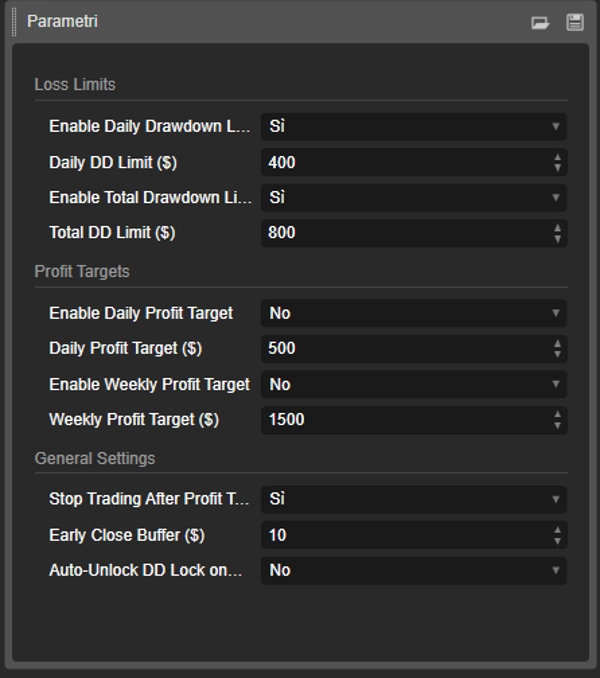
Berikut penjelasan setiap parameter yang Anda temukan di antarmuka bot.
Grup: Batas Kerugian 🛑
- EnableDailyDrawdownLimit (
Ya/Tidak) -
- Penjelasan: Mengaktifkan (
Ya) atau menonaktifkan (Tidak) pemeriksaan drawdown maksimum harian. - Cara kerjanya: Jika diaktifkan, bot akan menghitung kerugian maksimum dari saldo akun pada awal hari.
- Penjelasan: Mengaktifkan (
- Batas DD Harian ($) (misal,
400.0) -
- Penjelasan: Menetapkan jumlah kerugian maksimum (dalam mata uang akun Anda) yang bersedia Anda terima dalam satu hari. Ini harus berupa angka positif.
- EnableTotalDrawdownLimit (
Ya/Tidak) -
- Penjelasan: Mengaktifkan (
Ya) atau menonaktifkan (Tidak) pemeriksaan drawdown maksimum total. - Cara kerjanya: Jika diaktifkan, bot akan menghitung kerugian maksimum dari saldo saat Anda pertama kali memulai bot.
- Penjelasan: Mengaktifkan (
- Batas DD Total ($) (misal,
800.0) -
- Penjelasan: Menetapkan jumlah kerugian total maksimum yang bersedia Anda terima.
Grup: Target Keuntungan 🎯
- EnableDailyProfitTarget (
Ya/Tidak) -
- Penjelasan: Mengaktifkan (
Ya) atau menonaktifkan (Tidak) target keuntungan harian.
- Penjelasan: Mengaktifkan (
- Target Keuntungan Harian ($) (misal,
500.0) -
- Penjelasan: Menetapkan jumlah keuntungan harian di mana bot akan menutup semua posisi terbuka.
- EnableWeeklyProfitTarget (
Ya/Tidak) -
- Penjelasan: Mengaktifkan (
Ya) atau menonaktifkan (Tidak) target keuntungan mingguan.
- Penjelasan: Mengaktifkan (
- Target Keuntungan Mingguan ($) (misal,
1500.0) -
- Penjelasan: Menetapkan jumlah keuntungan mingguan (dihitung dari hari Senin) di mana bot akan menutup semua posisi.
Grup: Pengaturan Umum 🔧
- Berhenti Trading Setelah Target Keuntungan? (
Ya/Tidak) -
- Penjelasan: Parameter penting ini menentukan apa yang terjadi setelah target keuntungan tercapai.
- Jika
Ya: Bot menutup semua posisi dan berhenti memantau sampai hari (atau minggu) berikutnya. Ini adalah opsi paling aman untuk mengamankan keuntungan Anda. 🔒 - Jika
Tidak: Bot menutup posisi tapi terus memantau. Jika Anda membuka perdagangan baru dan mengalami kerugian, batas drawdown masih aktif dan bisa dipicu. 👀
- Buffer Penutupan Dini ($) (misal,
10.0) -
- Penjelasan: Ini adalah margin pengaman 🛡️. Jumlah yang dimasukkan di sini dikurangkan dari batas drawdown Anda untuk menciptakan titik pemicu lebih awal.
- Contoh: Jika
Daily DD LimitAnda adalah $400 danBufferadalah $10, bot akan campur tangan dan menutup semuanya segera setelah drawdown mencapai $390, memastikan Anda tidak pernah mencapai batas maksimum mutlak.
Ringkasan
Key features include:
- Daily and total drawdown limits to cap losses within set amounts.
- Daily and weekly profit targets that trigger position closures upon achievement.
- Configurable parameters with clear enable/disable options and safety buffers for early intervention.
- Robust state management ensuring reliable enforcement of drawdown protection.
- Continuous period resets for accurate baseline tracking of equity and balance.
- Error handling for position closures to ensure proper execution.
- Single-instance operation protecting the entire account, regardless of the number of traded assets.
The bot is suitable for various markets including Forex, indices, commodities, stocks, and cryptocurrencies. It supports swing trading with medium trade frequency and is compatible with prop firm trading challenges, advising conservative drawdown settings to enhance long-term survival.
Designed for use on any chart within the cTrader platform, PROP Account Guardian v.2 runs quietly in the background, providing 24/7 risk oversight aligned with your trading plan.
Ulasan pelanggan
5 | 0 % | |
4 | 100 % | |
3 | 0 % | |
2 | 0 % | |
1 | 0 % |