

Descrizione
✨ TRASFORMA IL TUO FLUSSO DI LAVORO DI TRADING
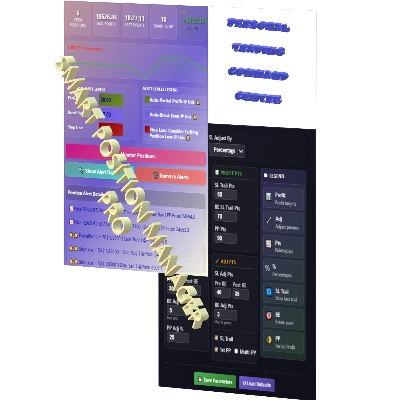
Smart Position Manager PRO è la soluzione professionale che consolida la gestione delle operazioni in un'unica interfaccia elegante e funzionale. Costruito con un'architettura di livello istituzionale e un design UI di classe mondiale con un'interfaccia a gradiente pulita con effetti hover e feedback UI istantaneo. Questo plugin funziona perfettamente insieme a qualsiasi cBot, Indicatore o Plugin per offrire maggiore tranquillità al trader.
Monitora automaticamente i livelli chiave tramite avvisi intelligenti, gestisce gli stop loss tramite trailing intelligente e blocca profitti parziali basati sui tuoi livelli predefiniti—liberandoti per concentrarti sulla tua strategia.
Progettato per trader che utilizzano:
- Concetti SMC/ICT (FVG, Order Blocks, Breakers, Market Timing MACROs & Deviazioni Standard)
- Sessioni FOREX (Kill Zones – Apertura e Chiusura di Londra / Apertura e Chiusura di NY)
- Indici (Sessioni AM, Lunch & PM oltre a Silver Bullet)
- Strategie di trend following su Oro/XAUUSD
- Strumenti tradizionali (RSI, MACD, Medie Mobili, ATR)
Come membro ICT Charter da 8 anni, ho creato questo strumento per il mio trading personale—e la concentrazione che offre è davvero impagabile.
Non è solo un altro plugin—è il tuo centro di comando personale per il trading. Resta sintonizzato per altri strumenti basati su ICT/SMC.
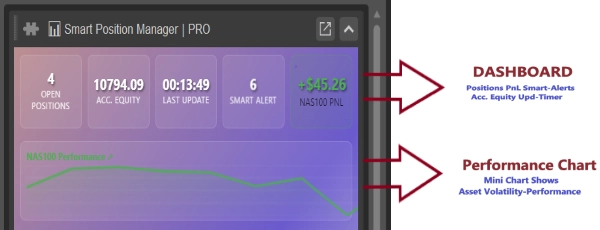
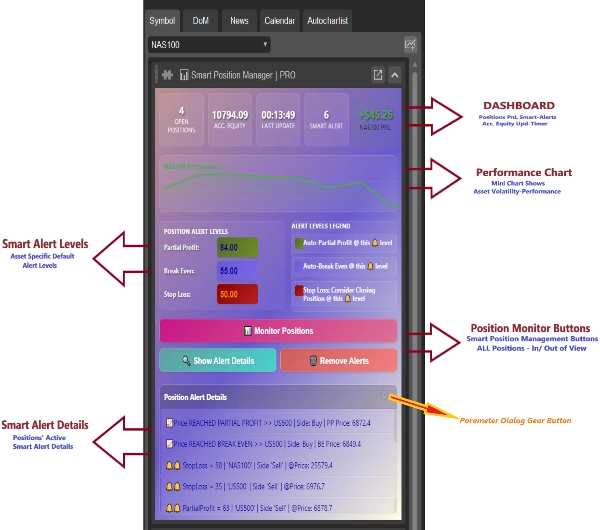
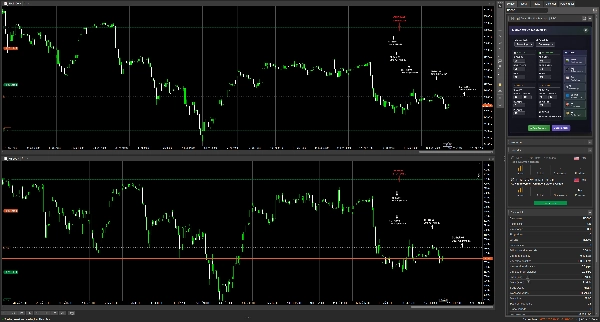
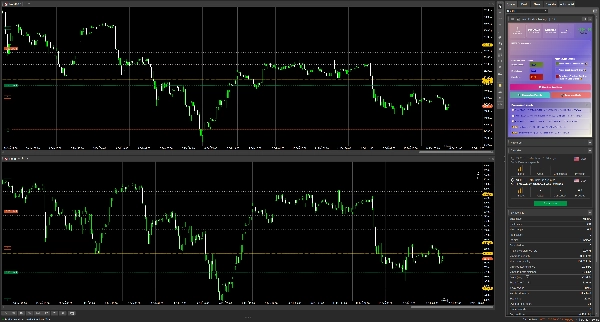
✅ DASHBOARD INTELLIGENTE TUTTO-IN-UNO
Niente più cambio di schede o calcoli mentali. Ottieni informazioni in tempo reale su:
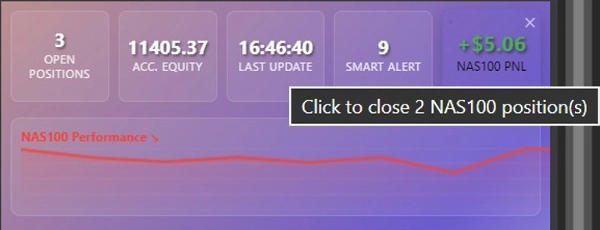
- Panoramica Posizioni: Tutte le posizioni aperte con gestione a un clic
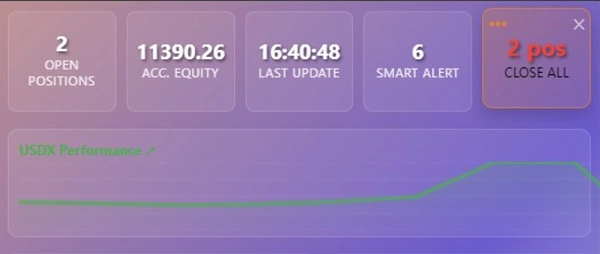
- Tracciamento PnL in tempo reale: Visualizza il PnL per simbolo (grafico attivo) o il PnL totale su tutti i simboli con operazioni aperte
- Chiudi Posizioni: Per simbolo (grafico attivo) o tutti i simboli con operazioni aperte — integrato nella scheda di tracciamento PnL
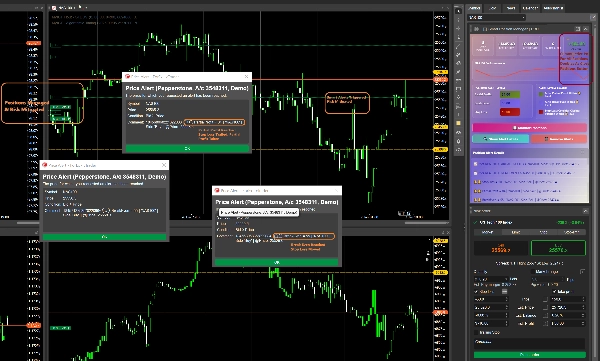
- Conteggio Avvisi Intelligenti: Visualizza il conteggio totale degli avvisi intelligenti – ottieni intuizioni intuitive, non solo trigger di prezzo
- Equità del Conto: Mostra l'equità corrente del conto, escludendo il PnL non realizzato
- Aggiornamenti in tempo reale: Timestamp dell'ultimo aggiornamento degli elementi della dashboard intelligente
- Mini Grafico: Visualizzazione in tempo reale della volatilità del simbolo per il grafico attualmente selezionato
✅ FUNZIONALITÀ DI AUTOMAZIONE PROFESSIONALE
- Gestione Posizioni Automatizzata: Avviando Smart Position Manager PRO attiva trailing stop intelligenti e blocchi automatici di profitti parziali
- Input Livello Avviso Intelligente: Usa o modifica i livelli predefiniti calcolati per simbolo in base alla sua categoria, es. Indice vs FOREX vs Commodities
- Legenda Avvisi Intelligenti: Legenda che descrive il significato di ogni livello di avviso intelligente
- Gestione Posizioni con un clic:
-
- Clicca Monitor Positions per impostare avvisi intelligenti per tutte le posizioni in tutti i grafici
- Clicca Remove Alerts per rimuovere gli avvisi intelligenti per tutte le posizioni in tutti i grafici
- Clicca Show Alert Details per mostrare gli avvisi intelligenti attivi per tutte le posizioni in tutti i grafici nella vista a griglia Position Alert Details
- Vista a Griglia Dettagli Avvisi: Visualizza tutti i dettagli degli avvisi intelligenti in una griglia dati scorrevole
- Gestione del Rischio: Trailing stop loss intelligente e blocchi automatici di profitti parziali — entrambi integrati
- Smart Profit Timer — Ciclo di vita efficiente e autogestito
-
- Tempi ottimizzati per le risorse: Minimizza l'uso di CPU e memoria
- Pronto per avvio a freddo: Rileva e gestisce automaticamente le posizioni aperte
- Controllo ciclo di vita automatico: Si avvia e si ferma con le operazioni attive
- Logica auto-riparatrice: Controlli di sicurezza integrati e recupero errori
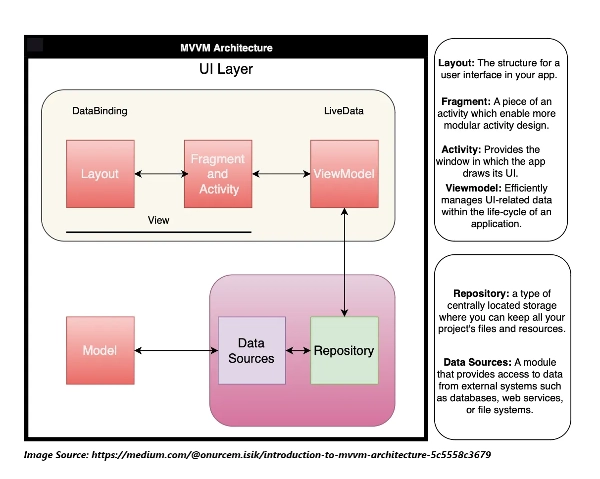
- Architettura pulita: Basata su MVVM, manutenibile e stabile
- Gestore Parametri Personalizzati: Accedi al modulo/dialogo di gestione parametri personalizzato tramite un'icona a forma di ingranaggio nell'angolo in alto a destra del controllo vista a griglia
✅ MODALE PARAMETRI PERSONALIZZATO – CONTROLLO E FLESSIBILITÀ SENZA PARI
Sperimenta una gestione rivoluzionaria delle operazioni con la nostra UI progettata intelligentemente che puoi adattare al tuo stile di trading.
⚙️ Interfaccia Compatta e Funzionale
- Organizzata in gruppi di parametri codificati per colore
- Sezioni raggruppate per uno spazio di lavoro focalizzato
- Tutti i controlli essenziali in un unico modale compatto
🎯 Modalità di Calcolo Doppie
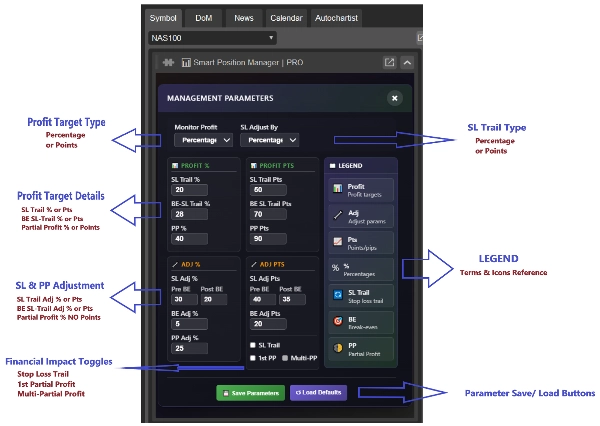
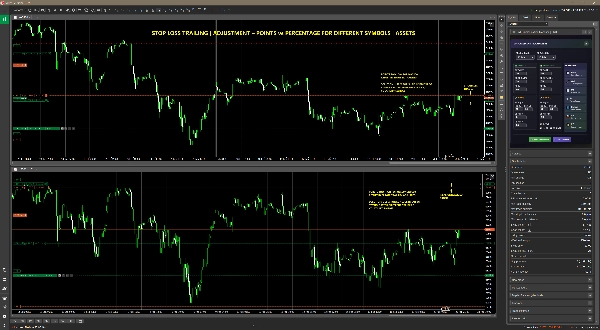
Una combinazione di modalità di calcolo tra basate su percentuale o punti, adatta per simboli in categorie simili – può usare un calcolo basato su percentuale o punti – o simboli in categorie diverse – dovrebbe idealmente usare un calcolo basato su percentuale per la regolazione dello SL – es. FOREX vs Indici vs Commodities.
- Operazioni per simboli nella stessa categoria (EURUSD & GBPUSD) & simboli in categorie diverse (EURUSD & NAS100) possono usare qualsiasi combinazione, sia Percentuale o Punti per il Target di Profitto in tracciamento – Monitoraggio Profitto nel dialogo dei parametri.
- Operazioni per simboli nella stessa categoria (EURUSD & GBPUSD) possono usare qualsiasi combinazione, sia Percentuale o Punti per la Regolazione del trailing dello stop loss prima e dopo il break even – SL Adjust By nel dialogo dei parametri.
- Operazioni per simboli in categorie diverse (EURUSD & NAS100) dovrebbero, idealmente, usare Percentuale per la Regolazione del trailing dello stop loss prima e dopo il break even – SL Adjust By nel dialogo dei parametri.
Tuttavia, qualsiasi combinazione è ancora possibile e la flessibilità è totalmente nelle mani dell’utente per adattare Smart Position Manager PRO al proprio stile di trading.
📊 Gruppi di Parametri
- Monitoraggio Profitto % — Imposta obiettivi di profitto in percentuale
-
- SL Trail %: Quando il prezzo raggiunge questo livello, esegui trailing dello SL di SL Adj % o Pts – basato su SL Adjust By, cioè Percentuale o Punti
-
- Se lo SL NON HA superato il break even, Pre-BE viene usato
- Se lo SL HA superato il break even, Post-BE viene usato
- BE SL-Trail %: Quando il prezzo raggiunge questo livello, esegui trailing dello SL di BE Adj % o Pts – basato su SL Adjust By, cioè Percentuale o Punti
- PP %: Quando il prezzo raggiunge questo livello, blocca un profitto parziale tramite PP Adj %, assicurando così che una percentuale del profitto non realizzato diventi profitto reale.
NB: PP Adj Pts non è applicabile poiché non è possibile prendere un profitto parziale basato su punti. Non esiste tale concetto nel trading
- Regolazione % — Regola finemente le posizioni in percentuale
-
- SL Adj %: Il livello dello stop loss è regolato in percentuale | %
-
- Pre-BE %: Questo valore è applicato se lo SL NON HA superato il livello di break even
- Post-BE %: Questo valore è applicato se lo SL HA superato il livello di break even
- BE Adj %: Il livello dello stop loss è regolato sopra il break even da questa percentuale | valore % . Questo valore è limitato al 10% e l'ideale è il 5%
- PP Adj %: Il profitto parziale di questa percentuale | valore % è bloccato
- Monitoraggio Profitto Punti — Imposta obiettivi di profitto in punti/pips
-
- SL Trail Pts: Quando il prezzo raggiunge questo livello, esegui trailing dello SL di SL Adj Pts o % – basato su SL Adjust By, cioè Punti o Percentuale
-
- Se lo SL NON HA superato il break even, Pre-BE viene usato
- Se lo SL HA superato il break even, Post-BE viene usato
- BE SL-Trail Pts: Quando il prezzo raggiunge questo livello, esegui trailing dello SL di BE Adj Pts o % – basato su SL Adjust By, cioè Punti o Percentuale
- PP Pts: Quando il prezzo raggiunge questo livello, blocca un profitto parziale tramite PP Adj %, assicurando così che una percentuale del profitto non realizzato diventi profitto reale.
NB: PP Adj Pts non è applicabile poiché non è possibile prendere un profitto parziale basato su punti. Non esiste tale concetto nel trading
- Regolazione Punti — Regola finemente le posizioni in punti/pips
-
- SL Trail Pts: Il livello dello stop loss è regolato in punti | Pts
-
- Pre-BE Pts: Questo valore è applicato se lo SL NON HA superato il livello di break even
- Post-BE Pts: Questo valore è applicato se lo SL HA superato il livello di break even
- BE Adj Pts: Il livello dello stop loss è regolato sopra il break even da questo valore in punti. Questo valore è limitato a 15 punti e l'ideale è 3
- PP Adj Pts: Blocco del profitto parziale basato su punti NON APPLICABILE. Non esiste tale concetto nel trading
- Interruttore Impatto Finanziario — Passa tra avere impatto finanziario o solo monitoraggio puro
-
- SL Trail — Determina se la capacità di trailing SL è attiva o meno
-
- ON: Impatto Finanziario, OFF: Nessun Impatto, solo avvisi intelligenti
- 1° Profitto Parziale — Determina se la capacità di profitto parziale è attiva o meno. Se disattivato, Multi-PP è anche disattivato
-
- ON: Impatto Finanziario, OFF: Nessun Impatto, solo avvisi intelligenti
- Multi-Profitto Parziale — Determina se la capacità Multi-Profitto Parziale è attiva o meno. Dipende dal 1° PP
-
- ON: Impatto Finanziario, OFF: Nessun Impatto & dipende dal 1° PP attivo
- Legenda — Riferimento visivo rapido per tutti i termini e le icone
🔄 Salvataggio/Caricamento Istantaneo
- Salvataggio con un clic per applicare i parametri — *È possibile salvare solo in memoria, poiché le regole del plugin cTrader consentono solo: AccessRights = AccessRights.None
- Carica impostazioni predefinite per un rapido reset — *È possibile caricare solo dalla memoria, poiché le regole del plugin cTrader consentono solo: AccessRights = AccessRights.None
- Cambio Parametri Hot — Le modifiche effettuate nel dialogo dei parametri si riflettono immediatamente nella gestione di posizione e rischio
💡 GESTIONE INTELLIGENTE DELLE POSIZIONI
- Interfaccia a gradiente pulita con effetti hover
- Sezioni codificate a colori per riconoscimento immediato
- Layout reattivo che si adatta a qualsiasi schermo
- Gestisci più operazioni in uno o più grafici per gli stessi o diversi simboli
- Un Smart Position Manager PRO gestisce tutta la gestione delle operazioni in tutti i grafici con simboli diversi, in una sessione cTrader
Tutto ciò di cui hai bisogno per una gestione precisa delle operazioni in un pannello ottimizzato e compatto. Trader che superano gli strumenti base e necessitano di flessibilità di livello enterprise senza complessità.
✅ ARCHITETTURA DI LIVELLO ISTITUZIONALE
Costruito da zero utilizzando i migliori pattern di progettazione software:
- Architettura MVVM: Separazione pulita delle responsabilità per affidabilità, riutilizzabilità e manutenzione
- UI WebView2 in tempo reale: Aggiornamenti rapidissimi senza lag di cTrader
- Operazioni Thread-Safe: Elaborazione professionale in background con metodi API pubblici sicuri
- Design Resiliente agli Errori: Gestione completa delle eccezioni e recupero
- Memoria Efficiente: Prestazioni ottimizzate anche con un alto volume di operazioni
🛡️ COSTRUITO CON AFFIDABILITÀ IN MENTE
Abbiamo risolto le comuni frustrazioni che i trader affrontano:
- Ottimizzato per le prestazioni:
-
- Uso minimo della CPU anche durante trading intenso
- Gestione chiave del Profit Timer – Evita sprechi di risorse di cTrader
- Niente più errori di riferimento nullo: Gestione robusta degli errori ovunque
- Protezione da perdite di memoria: Smaltimento corretto di tutte le risorse
- Sicurezza del thread UI: Funzionamento fluido senza blocchi di cTrader
- Sistemi di recupero: Recupero automatico da disconnessioni
🎯 SUDDIVISIONE DELLE CARATTERISTICHE PRINCIPALI
Sfoglia le immagini intuitive caricate con descrizioni e la sequenza che seguono per la suddivisione delle caratteristiche principali.
📈 CHI HA BISOGNO DI QUESTO PLUGIN?
Perfetto per:
- Scalper: Gestisci più posizioni di scalping su diversi simboli
- Day Trader: Gestisci più posizioni di day trading su diversi simboli
- Swing Trader: Monitora posizioni a lungo termine con avvisi automatici e controllo del rischio
- Trader attenti al rischio: Monitora le posizioni da vicino con gestione precisa del rischio
- Professionisti impegnati: Automatizza le attività di trading di routine
🔧 PUNTI SALIENTI TECNICI
- Compatibile: cTrader 5.0+
- Leggero: < 80MB di occupazione di memoria
- Veloce: Intervalli di aggiornamento di due secondi per la dashboard
- Stabile: Mesi di beta testing con trader reali
- Supporto: Aggiornamenti regolari e correzioni di bug
💰 INVESTIMENTO SENZA RISCHI NEL TUO TRADING
Pensa al tempo risparmiato:
- 5 minuti per operazione per i calcoli × 20 operazioni/giorno = 100 minuti al giorno
- 100 minuti × 20 giorni di trading = 33+ ore al mese
- 33 ore del tuo tempo = Impreziosibili
Il tuo tempo di trading è prezioso. Non sprecarlo in attività manuali che possono essere automatizzate.
✅ NOTE DELLO SVILUPPATORE | PROPRIETARIO
- Aprire lo stop loss dopo che è stato regolato/ seguito non è consigliato poiché non verrà regolato nuovamente. Questo perché lo stato interno della posizione sarebbe stato aggiornato e aprire manualmente lo SL lo metterebbe fuori sincronizzazione con il suo stato interno. Questa non è una buona pratica di trading, tuttavia, a volte viene praticata. Solo il riavvio del plugin aggiornerà lo stato interno.
- Le operazioni senza stop loss o take profit non possono essere gestite a livello di rischio poiché i livelli SL e TP sono fondamentali per i calcoli di gestione del rischio. In tal caso Smart Position Manager PRO monitorerà solo tale posizione con avvisi intelligenti, cioè solo per monitoraggio. Verrà anche visualizzata una notifica a riguardo. La capacità di non avere né SL né TP è in considerazione per la prossima versione.
- Se esistono posizioni quando il plugin viene avviato/ lanciato, verranno applicate le impostazioni predefinite. Se il trader vuole cambiare le impostazioni predefinite, è consigliabile farlo quando non ci sono posizioni aperte.
- Smart Position Manager PRO non è stato ampiamente testato per asset crypto e i trader possono usare il plugin a loro discrezione in questo senso.
- WebView2 ha un problema chiave di soppressione per i tasti DELETE e FRECCIA. Questa è una limitazione nota relativa a come WebView2 (il controllo browser sottostante usato da cTrader) gestisce l'input da tastiera, in particolare per la navigazione e i tasti speciali.
- Questo problema è attualmente in fase di analisi e dovrebbe essere risolto nella prossima versione. La soluzione temporanea è usare il tasto backspace, evidenziare il testo e sovrascriverlo o usare le barre di scorrimento nelle caselle di input/testo. Le barre di scorrimento nelle caselle di input/testo sono attualmente disponibili nel dialogo dei parametri.
- Resta sintonizzato per altri strumenti basati su ICT/SMC.
🏆 CHIAMATA FINALE ALL'AZIONE
Smetti di gestire le tue posizioni—inizia a dominarle.
P.S. Non è solo un altro plugin. È il risultato di centinaia di ore di sviluppo, test con trader reali e implementazione di feedback da professionisti come te. Il vantaggio che offre potrebbe ripagarsi in una singola sessione di trading.
Riepilogo
Built on institutional-grade MVVM architecture with a responsive WebView2 UI, it ensures fast, stable, and memory-efficient operation with robust error handling and recovery systems. The interface is clean and color-coded for intuitive use, allowing traders to monitor multiple positions simultaneously without switching tabs or manual calculations.
SmartPositionManagerPRO caters to various trading styles including scalping, day trading, swing trading, and is compatible with strategies based on Smart Money Concepts (SMC/ICT), Forex sessions, indices, gold/XAUUSD trend following, and traditional indicators like RSI and MACD. It offers flexible parameter management with dual calculation modes (percentage or points-based) for stop loss and profit target adjustments, and supports financial impact toggles for alerts and automation.
Compatible with cTrader 5.0+, the plugin updates every two seconds and is optimized for minimal CPU usage. It is suitable for traders seeking precise, automated position and risk management in Forex, indices, and commodities markets.
Discussioni
Recensioni dei clienti
5 | 0 % | |
4 | 100 % | |
3 | 0 % | |
2 | 0 % | |
1 | 0 % |
Domande frequenti
Prezzo