Descripción
RiskBudget Guard es un cBot de monitoreo de riesgo a nivel de cuenta. Reúne las pérdidas realizadas, el riesgo de stop-loss de posiciones abiertas y el riesgo de órdenes pendientes en una vista presupuestaria única a través de los símbolos en su cuenta. No abre nuevas posiciones.
Lea su presupuesto de riesgo restante
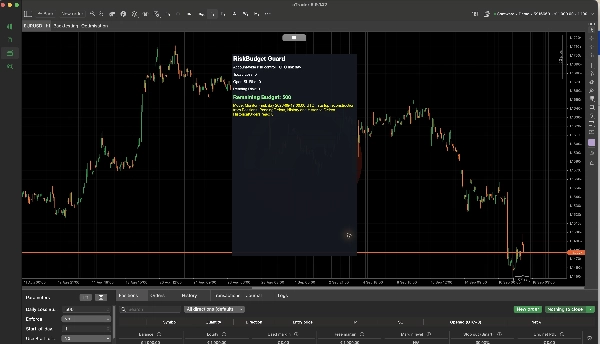
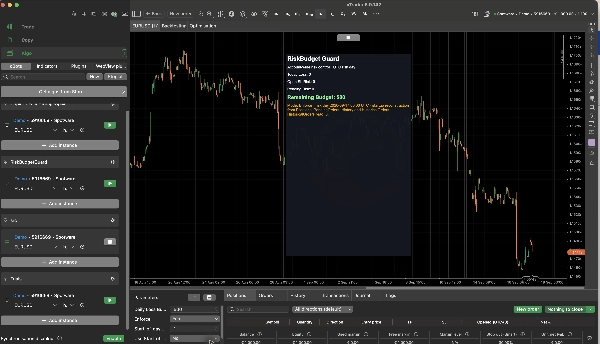
El HUD del gráfico muestra Pérdida de Hoy, Riesgo de SL Abierto, Riesgo Pendiente y Presupuesto Restante. El presupuesto combina las pérdidas realizadas durante el día de riesgo UTC actual con el riesgo calculado de stop-loss de posiciones abiertas y órdenes pendientes. Las operaciones rentables no reponen la asignación de pérdidas para ese día.
Elija un presupuesto fijo en la moneda de la cuenta, o un porcentaje de un saldo reconstruido al inicio del día. También puede establecer la hora UTC en la que comienza un nuevo día de riesgo. La reconstrucción del saldo al inicio del día puede ser aproximada cuando ocurren depósitos o retiros durante el día.
Monitorear o hacer cumplir
Con Enforce = No, el cBot monitorea y muestra el riesgo de la cuenta sin cancelar órdenes ni cerrar posiciones. Este es el modo predeterminado.
Con Enforce = Sí, el cBot puede intentar cancelar una orden pendiente recién creada o cerrar una posición recién abierta o ejecutada cuando el riesgo resultante de la cuenta excede el presupuesto. Estas acciones ocurren después de la creación o ejecución de la orden. RiskBudget Guard no puede bloquear una orden manual antes de que llegue al bróker y no promete un límite estricto en las pérdidas realizadas.
Las posiciones u órdenes pendientes sin un Stop Loss utilizable pueden tratarse como riesgo ilimitado. Revise el HUD y la configuración de protección de su cuenta antes de habilitar la aplicación estricta. La ejecución del bróker, el deslizamiento y las solicitudes de operaciones fallidas pueden afectar el resultado.
Comience
1. Instale RiskBudget Guard y agregue una instancia de cBot a la cuenta que desea monitorear.
2. Deje Enforce configurado en No mientras verifica el presupuesto mostrado y el estado de la cuenta.
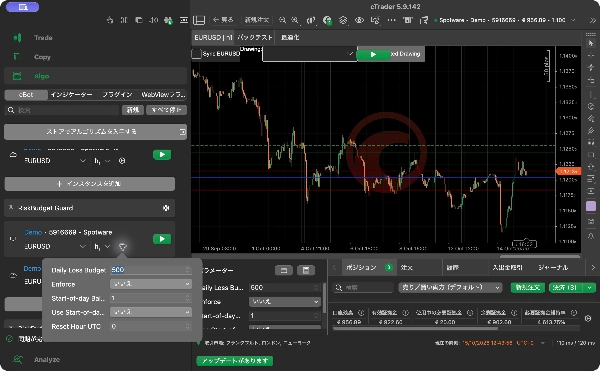
3. Para un presupuesto fijo, ingrese el Presupuesto Diario de Pérdida y deje deshabilitada la opción Usar % de Presupuesto al Inicio del Día. Para un presupuesto porcentual, habilite esa opción y configure el % de Saldo al Inicio del Día.
4. Configure la Hora de Reinicio UTC de 0 a 23. El valor predeterminado es 0.
5. Inicie el cBot y revise los cuatro valores del HUD y el modo actual. Habilite Enforce solo cuando desee que el cBot realice las acciones posteriores a la ejecución descritas arriba.
El presupuesto fijo predeterminado es 500 en la moneda de la cuenta; el porcentaje predeterminado es 1%. RiskBudget Guard debe permanecer en ejecución para monitorear eventos y actuar sobre ellos. No genera señales de entrada ni promete rendimientos comerciales.
Resumen
Key features include a chart HUD displaying Today Loss, Open Stop-Loss Risk, Pending Risk, and Remaining Budget. Users can set a fixed daily loss budget in account currency or define it as a percentage of a reconstructed start-of-day balance, with the option to specify the UTC hour when the risk day resets.
RiskBudget Guard operates in two modes: monitoring only (default), which displays risk metrics without intervention, and enforcement mode, which can cancel new pending orders or close positions if the resulting risk exceeds the set budget. Enforcement actions occur post-execution and depend on stop-loss settings and broker execution factors.
The cBot requires continuous operation to monitor and act on risk events. It is intended to assist in managing daily loss limits and drawdown guard strategies by providing real-time risk budget visibility and optional automated risk control actions.
Conversación
Valoraciones de clientes
5 | 100 % | |
4 | 0 % | |
3 | 0 % | |
2 | 0 % | |
1 | 0 % |