
Beschreibung
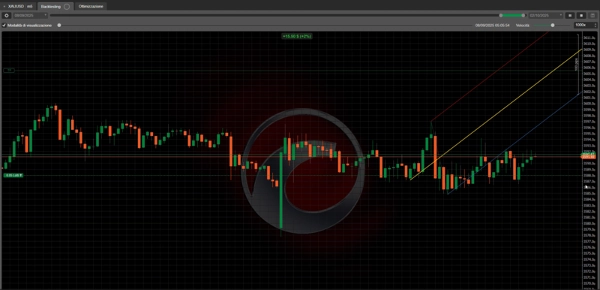
Wir freuen uns, einen bahnbrechenden cBot für die cTrader-Plattform vorzustellen, der eines der faszinierendsten und historischsten Werkzeuge der technischen Analyse zurückbringt: Andrews Pitchfork. Dies ist nicht nur ein einfacher Algorithmus; es ist ein ausgeklügeltes Analysewerkzeug, das automatisch Marktwendepunkte erkennt, um dynamische Preiskanäle zu zeichnen und eine einzigartige geometrische Perspektive auf Marktbewegungen bietet.
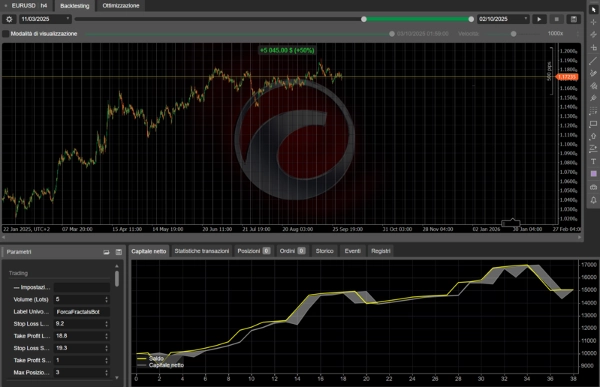
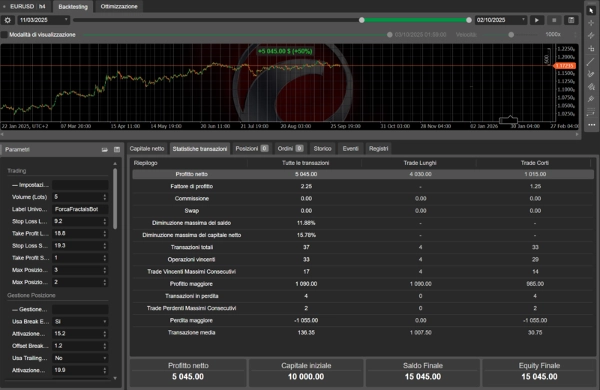
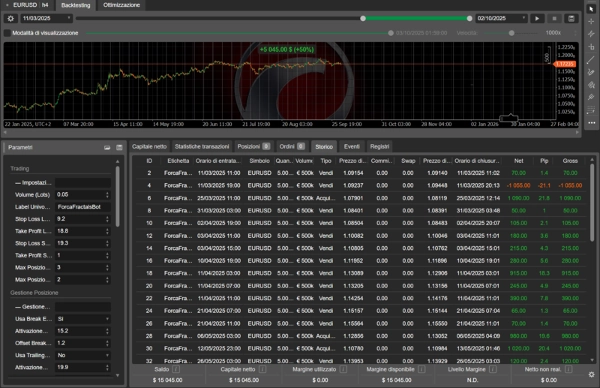
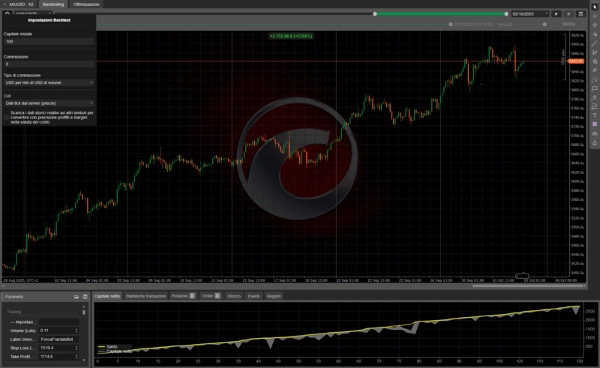
Die ersten Ergebnisse sprechen für sich: Mit überraschend einfachen und genauen Optimierungen hat dieser Bot ein außergewöhnliches Potenzial gezeigt, das in den Fotos zu sehen ist, und dabei eine bemerkenswerte Risikokontrolle beibehält.
Die wahre Schönheit dieses cBots liegt in seiner Philosophie: dem Trader volle Kontrolle zu geben. Jeder einzelne Aspekt, von der Identifikation und Zeichnung der Pitchfork bis zur Markteintrittsstrategie, ist vollständig anpassbar. Dieser Bot gibt keine vorgegebene Sichtweise vor; er bietet eine Leinwand, auf der Sie Ihre eigene Strategie malen können.
Machen Sie sich bereit, das Trading durch eine Linse geometrischer Eleganz neu zu entdecken. Viel Erfolg beim Trading! 🚀
Detaillierte Parameteranleitung: Ihr Kontrollzentrum
Das beeindruckendste Merkmal dieses cBots ist seine außergewöhnliche Anpassbarkeit. Jeder Parameter ist ein Hebel, den Sie ziehen können, um die Strategie an Ihren Stil anzupassen und ein klassisches Konzept in einen modernen, maßgeschneiderten Algorithmus zu verwandeln.
1. Trading-Einstellungen ⚙️
Hier definieren Sie die Kernregeln für jeden Trade.
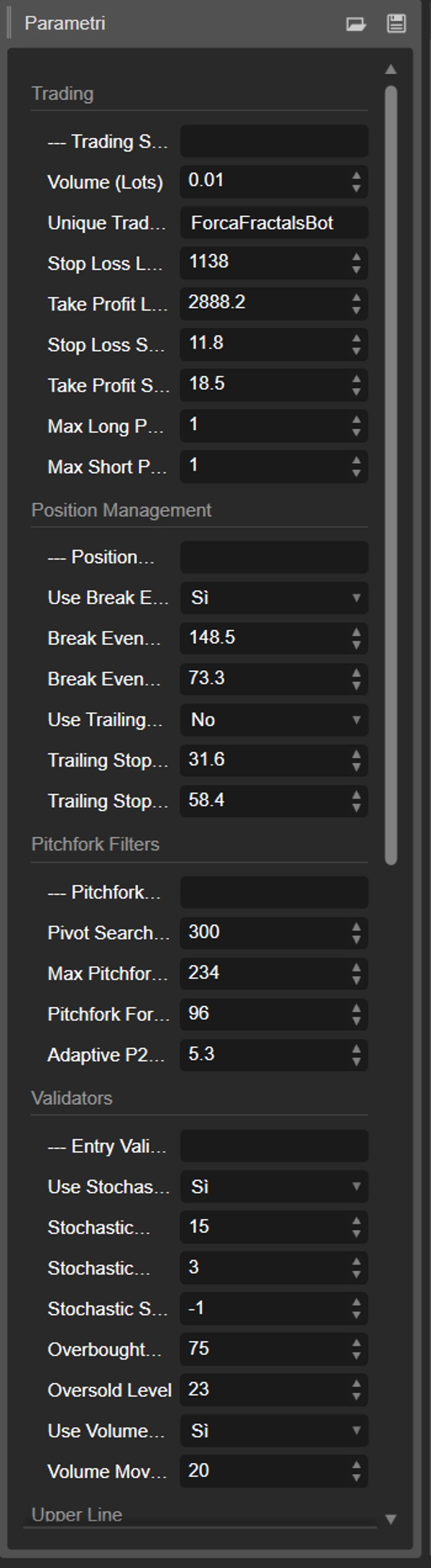
- Volumen (Lots): Die feste Lotgröße für jeden Trade.
- Einzigartiges Trade-Label: Ein Name zur Identifikation der vom Bot geöffneten Trades.
- Stop Loss Long/Short (Pips): Legt den spezifischen Stop Loss für Kauf- (Long) und Verkaufs- (Short) Trades fest.
- Take Profit Long/Short (Pips): Legt das spezifische Gewinnziel für Long- und Short-Trades fest.
- Maximale Long/Short-Positionen: Definiert die maximale Anzahl von Kauf- und Verkaufspositionen, die der Bot gleichzeitig offen haben kann.
2. Positionsmanagement 🛡️
Fortgeschrittene Werkzeuge zur Verwaltung und zum Schutz Ihrer offenen Trades.
- Break Even verwenden: Wenn aktiviert, wird der Stop Loss auf den Einstiegspreis verschoben, sobald ein bestimmter Gewinn erreicht ist, wodurch das Risiko eliminiert wird.
- Break Even Auslöser (Pips): Der in Pips erforderliche Gewinn, um den Break Even auszulösen.
- Break Even Versatz (Pips): Ein kleiner Puffer in Pips, der zum Einstiegspreis hinzugefügt wird, wenn der Stop verschoben wird, um Kosten abzudecken.
- Trailing Stop verwenden: Wenn aktiviert, folgt der Stop Loss dem Preis in einem festen Abstand, um Gewinne zu sichern.
- Trailing Stop Auslöser (Pips): Der in Pips erforderliche Gewinn, um den Trailing Stop zu aktivieren.
- Trailing Stop Abstand (Pips): Der Abstand in Pips, den der Stop vom aktuellen Preis hält.
3. Pitchfork-Bildungsfilter 📐
Hier definieren Sie die Seele der Pitchfork und steuern, wie der Bot die geometrische Struktur im Chart identifiziert und validiert.
- Pivot-Suchperiode (Bars): Wie viele Bars der Bot in der Vergangenheit analysiert, um Marktwendepunkte zu finden. Ein höherer Wert erzeugt Pitchforks basierend auf größeren, langsameren Bewegungen.
- Maximales Pitchfork-Alter (Bars): Die maximale Lebensdauer (in Bars), die eine gezeichnete Pitchfork gültig bleiben kann, bevor sie als "zu alt" verworfen wird.
- Pitchfork-Bildungsfenster (Bars): Die maximale Distanz (in Bars) zwischen dem ersten und letzten Pivot-Punkt, damit eine Pitchfork als gültig betrachtet wird. Ein niedriger Wert erzeugt kompaktere und reaktionsschnellere Pitchforks.
- Adaptiver P2-Schwellenwert (Pips): Ermöglicht der Pitchfork zu "atmen" und sich dynamisch zu erweitern, wenn der Preis neue Hochs oder Tiefs bildet, jedoch nur, wenn die Bewegung diesen Pip-Schwellenwert überschreitet.
4. Entry-Validatoren ✅
Optionale Filter zur Erhöhung der Qualität der Handelssignale.
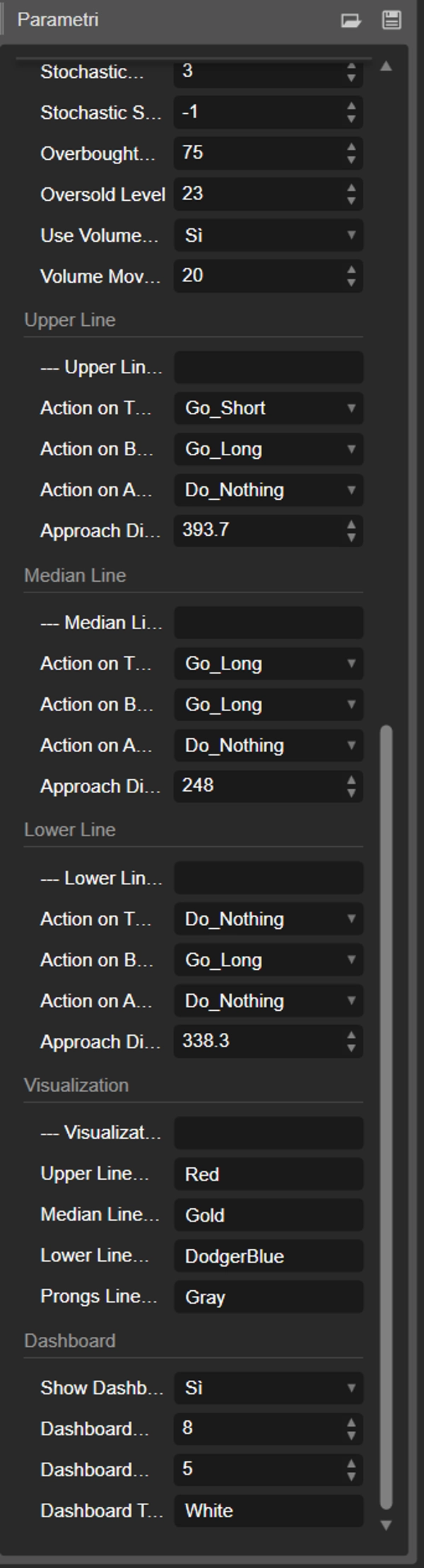
- Stochastischen Validator verwenden: Wenn aktiviert, wird ein Long-Trade nur in überverkauften Bedingungen und ein Short-Trade nur in überkauften Bedingungen berücksichtigt.
- Stochastische Parameter (%K, %D, Verlangsamung, Levels): Volle Kontrolle über die Einstellungen des Indikators.
- Volumen-Validator verwenden: Wenn aktiviert, wird ein Trade nur eröffnet, wenn das Volumen über seinem gleitenden Durchschnitt liegt und somit das Marktinteresse bestätigt wird.
- Periode des gleitenden Volumendurchschnitts: Der Rückblickzeitraum für den gleitenden Durchschnitt des Volumens.
5. Logik für obere / mittlere / untere Linie 🎯
Hier wird die strategische Anpassung lebendig. Für jede der drei Pitchfork-Linien können Sie ein unterschiedliches Verhalten für jede Art der Preisinteraktion definieren.
- Aktion bei BERÜHRUNG: Was zu tun ist, wenn der Preis die Linie berührt. Zum Beispiel "Short gehen" auf der oberen Linie für Trades vom Typ "Umkehr".
- Aktion bei DURCHBRUCH: Was zu tun ist, wenn der Preis die Linie durchbricht. Zum Beispiel "Long gehen" auf der oberen Linie für Trades vom Typ "Ausbruch".
- Aktion bei ANNÄHERUNG: Was zu tun ist, wenn sich der Preis der Linie nähert, sie aber nicht berührt.
- Annäherungsabstand (Pips): Definiert die "Annäherungszone" für jede Linie.
6. Visualisierung 🎨
Passen Sie das Aussehen des Bots in Ihrem Chart an.
- Linienfarben: Wählen Sie die Farben für jede Pitchfork-Linie für perfekte Lesbarkeit.
- Dashboard anzeigen: Aktivieren oder deaktivieren Sie das Informationspanel auf dem Bildschirm.
- Position & Farbe des Dashboards: Volle Kontrolle darüber, wo das Panel platziert wird und welche Farbe sein Text hat.
Haftungsausschluss und wichtige Nutzerhinweise 📜
Algorithmischer Handel birgt erhebliche Risiken, und vergangene Ergebnisse sind keine Garantie für zukünftige Resultate. Die gezeigten außergewöhnlichen Ergebnisse wurden durch Backtesting auf historischen Daten und unter spezifischen Marktbedingungen erzielt.
Es wird dringend empfohlen, dass jeder Nutzer gründliche Tests und Optimierungen durchführt, bevor dieser cBot auf einem Live-Konto mit echtem Geld eingesetzt wird. Es ist essenziell:
- Backtest: Testen Sie den Bot auf verschiedenen Finanzinstrumenten, Zeitrahmen und historischen Perioden, um sein Verhalten zu verstehen.
- Verwenden Sie ein Demokonto: Handeln Sie in einer simulierten Umgebung über einen angemessenen Zeitraum, um die Leistung unter realen Marktbedingungen zu überprüfen, ohne Ihr Kapital zu riskieren.
- Verstehen Sie die Parameter: Studieren Sie jeden Parameter und seine Auswirkungen auf die Strategie sorgfältig, bevor Sie live gehen.
Der Autor und Vertreiber übernehmen keine Verantwortung für Verluste, die durch die Nutzung dieser Software entstehen. Verwenden Sie dieses Werkzeug mit Bewusstsein und angemessenem Risikomanagement.
Zusammenfassung
Key features include full control over trade parameters such as lot size, stop loss, take profit, and maximum open positions for both long and short trades. It offers advanced position management tools like break-even stop loss adjustments and trailing stops to protect profits. The bot’s pitchfork formation filters allow users to define how pivot points are detected and validated, including parameters for search periods, pitchfork age, and adaptive thresholds.
Entry validators can be enabled to filter trades based on stochastic oscillator conditions and volume moving averages, enhancing signal quality. Users can customize the bot’s response to price interactions with the pitchfork’s upper, median, and lower lines, specifying actions on touch, break, or approach events.
Visual customization options include line colors and an on-screen dashboard with adjustable position and color settings. The bot supports multiple markets and symbols, including Forex pairs (EURUSD, GBPUSD, USDJPY, NZDUSD), indices (NAS100, DAX), commodities (XAUUSD), crypto (BTCUSD), and stocks.
This cBot requires thorough backtesting and optimization before live use, as it provides a flexible platform for traders to implement their own strategies based on Andrew’s Pitchfork analysis.
Diskussion
Kundenbewertungen
5 | 50 % | |
4 | 25 % | |
3 | 25 % | |
2 | 0 % | |
1 | 0 % |