

설명
리스크 워치
cTrader 내에 직접 구축된 명확한 실시간 리스크 대시보드로 라이브 거래 노출과 최악의 리스크를 모니터링하세요.
리스크 워치는 트레이더가 현재 노출과 잠재적 하락 위험을 한눈에 이해할 수 있도록 설계된 경량 리스크 모니터링 플러그인입니다.
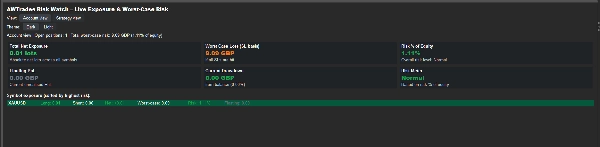
여러 개의 열린 포지션에 대한 리스크를 수동으로 계산하는 대신, 리스크 워치는 계정을 자동으로 분석하여 가장 중요한 리스크 지표를 명확한 대시보드에 표시합니다. 전체 노출, 스톱로스가 발동될 경우 최악의 손실, 미실현 손익 및 심볼별 집중도를 강조하여 계정의 얼마나 많은 부분이 위험에 처해 있는지 빠르게 확인할 수 있습니다.
대시보드는 자동으로 새로 고쳐져 포지션이 열려 있는 동안 거래 리스크를 지속적으로 업데이트된 상태로 보여줍니다.
주요 기능
실시간 리스크 모니터링
리스크 워치는 열린 포지션을 지속적으로 분석하여 현재 노출을 실시간으로 보여줍니다.
대시보드는 자동으로 다음을 표시하도록 업데이트됩니다:
• 모든 심볼에 대한 총 순 노출
• 미실현 손익
• 스톱로스 기준 최악의 손실
• 잔액 대비 현재 드로우다운
이를 통해 열린 포지션이 계정에 어떤 영향을 미치는지 빠르게 이해할 수 있습니다.
최악의 리스크 계산
플러그인은 모든 스톱로스가 발동될 경우 최대 잠재 손실을 계산하여 현실적인 하락 위험을 제공합니다.
이를 통해 트레이더는 명확하게 확인할 수 있습니다:
• 포지션별 총 금전적 리스크
• 계정 자본 대비 리스크 비율
• 계정 리스크 수준이 안전한지, 정상인지, 또는 높게 보이는지 여부
리스크 미터
리스크 워치는 현재 위험에 처한 자본 비율을 기준으로 전체 계정 리스크를 자동으로 분류합니다.
대시보드는 다음과 같은 간단한 리스크 분류를 표시합니다:
• 안전
• 정상
• 높음
• 고위험
이는 계정이 현재 얼마나 공격적으로 포지셔닝되어 있는지 빠른 시각적 표시를 제공합니다.
심볼 노출 분해
시장 전반에 걸쳐 리스크가 어디에 집중되어 있는지 정확히 확인하세요.
심볼 패널은 다음을 표시합니다:
• 심볼별 롱 노출
• 심볼별 숏 노출
• 순 포지션 크기
• 심볼별 최악의 리스크
• 자본 대비 리스크 비율
• 미실현 손익 기여도
심볼은 가장 높은 리스크 순으로 자동 정렬되어 가장 중요한 포지션을 빠르게 식별할 수 있습니다.
계정 및 전략 뷰
리스크 워치는 전체 계정의 리스크를 분석하거나 특정 거래 시스템에만 집중할 수 있습니다.
다음 중 선택하세요:
• 계정 뷰 – 모든 열린 포지션 포함
• 전략 뷰 – 라벨이 붙은 포지션만 표시
이를 통해 동일 계정 내에서 실행 중인 개별 전략의 리스크를 더 쉽게 모니터링할 수 있습니다.
깔끔하고 경량화된 인터페이스
리스크 워치는 cTrader 내에서 직접 실행되며 빠른 해석을 위해 깔끔한 대시보드를 제공합니다.
특징은 다음과 같습니다:
• 다크 및 라이트 테마
• 몇 초마다 자동 새로 고침
• 색상으로 구분된 리스크 수준 및 노출 표시기
그 결과 외부 도구나 스프레드시트 없이도 라이브 리스크를 명확하게 개요할 수 있습니다.
더 나은 리스크 가시성을 원하는 트레이더를 위해 제작됨
리스크 워치는 계정의 얼마나 많은 부분이 현재 노출되어 있는지 빠르게 이해하고자 하는 트레이더에게 이상적입니다.
다음과 같은 경우에 유용합니다:
• 여러 열린 포지션을 관리하는 수동 트레이더
• 여러 전략을 동시에 운영하는 알고리즘 트레이더
• 포트폴리오 전반의 노출을 모니터링하는 신호 제공자
• 최악의 계정 리스크를 더 명확히 보고자 하는 트레이더
다른 AWTrades 도구와 함께 작동:
리스크 워치는 트레이더가 성과와 리스크를 더 명확히 이해할 수 있도록 설계된 광범위한 AWTrades 분석 툴킷의 일부입니다.
다음과 결합할 수 있습니다:
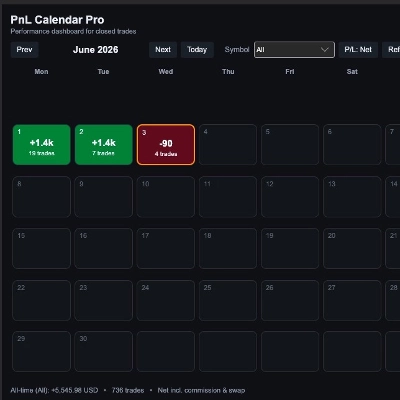
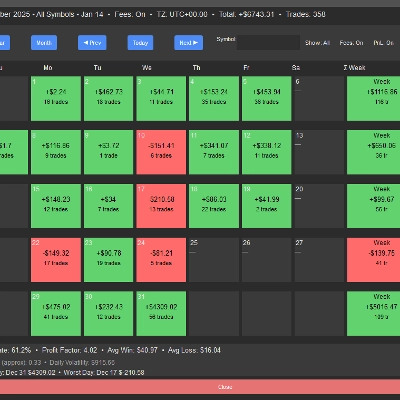
• PnL Studio – 거래 내역을 달력 기반 개요로 변환하여 거래일과 성과 패턴을 분석하는 시각적 성과 대시보드입니다.
• Trade Analytics – 거래 우위의 통계적 품질과 견고성에 중점을 둔 고급 분석 대시보드입니다.
이 도구들은 함께 더 완전한 거래 워크플로우를 만듭니다:
PnL Studio – 시각적 성과 검토
리스크 워치 – 라이브 노출 및 리스크 모니터링
Trade Analytics – 우위 품질 및 견고성 분석
간단한 사용법
설치 후, cTrader 내의 리스크 워치 탭을 열어 현재 노출과 계정 리스크를 즉시 확인하세요.
외부 소프트웨어, 내보내기 또는 설정이 필요 없습니다.
요약
고객 리뷰
상담
자주 묻는 질문(FAQ)

!["Custom Timeframes [Iridio Capital]" 로고](https://cdn.ctrader.com/image/webp/4d75a920-23c7-4fea-a7b5-594a9d067f2e_63286)





가격