present
ลงทะเบียนและรับส่วนลด $50 สำหรับการซื้อครั้งแรกของคุณ
Trading product for CTrader_Jornal ปลั๊กอินเดสก์ท็อป Consistent Returns No Overtrading, image 1
CTrader_Jornal
ปลั๊กอินเดสก์ท็อป
1 การซื้อ
เวอร์ชัน 1.7, Oct 2026
Windows, Mac
4.0
รีวิว: 3
Trading product for CTrader_Jornal ปลั๊กอินเดสก์ท็อป Consistent Returns No Overtrading, image 2
Trading product for CTrader_Jornal ปลั๊กอินเดสก์ท็อป Consistent Returns No Overtrading, image 3
Trading product for CTrader_Jornal ปลั๊กอินเดสก์ท็อป Consistent Returns No Overtrading, image 4
Trading product for CTrader_Jornal ปลั๊กอินเดสก์ท็อป Consistent Returns No Overtrading, image 5
Trading product for CTrader_Jornal ปลั๊กอินเดสก์ท็อป Consistent Returns No Overtrading, image 6
Trading product for CTrader_Jornal ปลั๊กอินเดสก์ท็อป Consistent Returns No Overtrading, image 7
Trading product for CTrader_Jornal ปลั๊กอินเดสก์ท็อป Consistent Returns No Overtrading, image 8
Trading product for CTrader_Jornal ปลั๊กอินเดสก์ท็อป Consistent Returns No Overtrading, image 9
Trading product for CTrader_Jornal ปลั๊กอินเดสก์ท็อป Consistent Returns No Overtrading, image 10
Trading product for CTrader_Jornal ปลั๊กอินเดสก์ท็อป Consistent Returns No Overtrading, image 11
ตั้งแต่ 09/02/2026
29
การขาย
179
ติดตั้งฟรี

คำอธิบาย

CTRADER JOURNAL - บันทึกน้อยลง เรียนรู้มากขึ้น

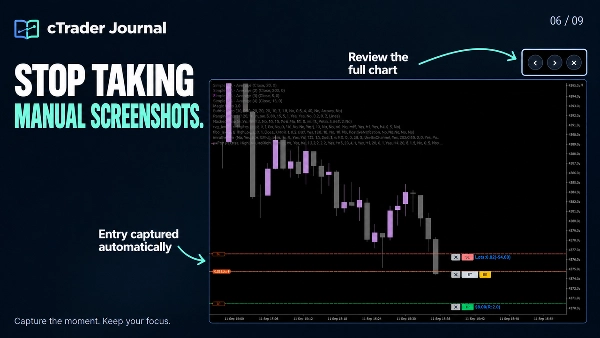
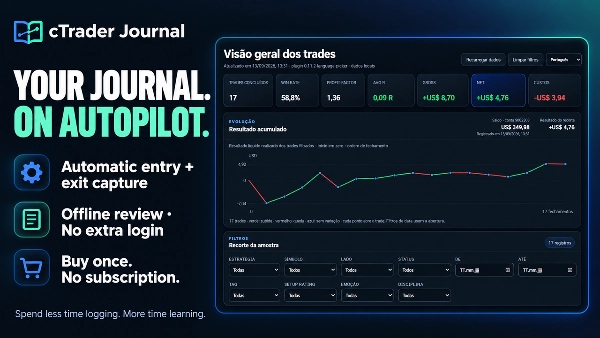
หยุดเสียเวลาทบทวนโดยการสร้างเหตุการณ์ซ้ำ cTrader Journal บันทึกการเทรดของคุณโดยอัตโนมัติและจับภาพหน้าจอการเข้าและออก เพื่อให้คุณสามารถมุ่งเน้นที่การเข้าใจการตัดสินใจของคุณ การสังเกตแบบแผน และการปรับปรุงกระบวนการของคุณ

ซื้อครั้งเดียว ไม่มีการสมัครสมาชิก Journal ไม่มีการเข้าสู่ระบบ Journal เพิ่มเติม ความเรียบง่ายคือกุญแจสำคัญ!


✅ เปลี่ยนประวัติการเทรดของคุณให้เป็นสิ่งที่มีประโยชน์

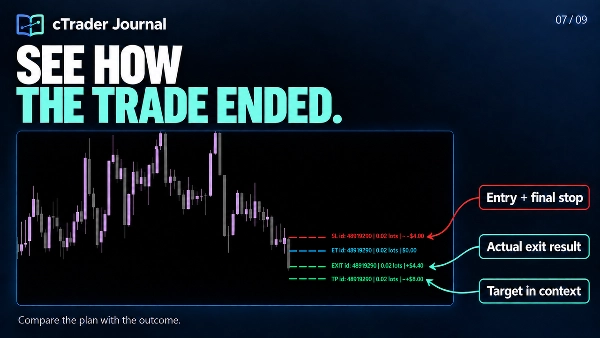
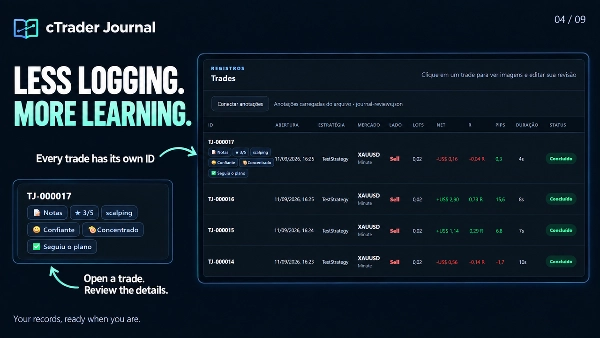
  • ประหยัดเวลา: การจับภาพเข้าและออกโดยอัตโนมัติจะเก็บบันทึกและภาพหน้าจอที่เชื่อมโยงกับรหัสการเทรดแต่ละรายการ รวมถึงตำแหน่งหลายรายการ
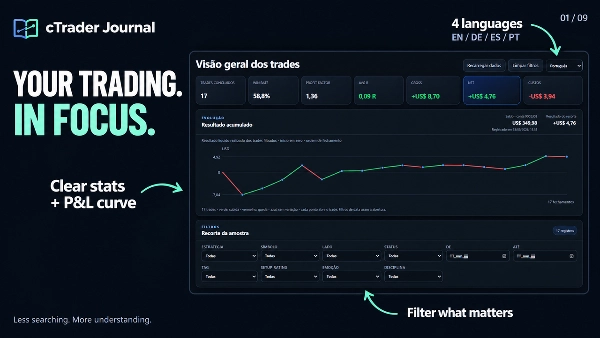
  • ดูสิ่งที่ควรให้ความสนใจ: สถิติที่ชัดเจน กราฟกำไรขาดทุนสะสม และตัวกรองที่เน้นช่วยให้คุณทบทวนตัวอย่างที่สำคัญ
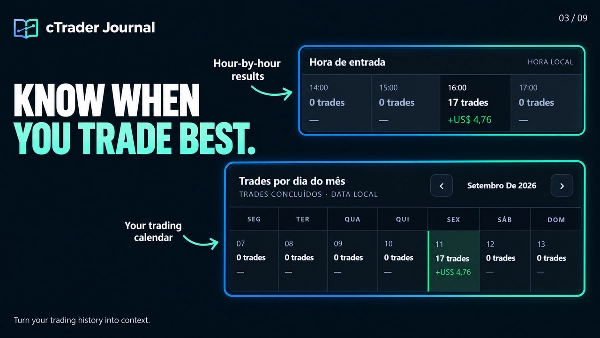
  • เปรียบเทียบวิธีการของคุณ: ทบทวนกลยุทธ์ ช่วงเวลา ชั่วโมงเข้า และวันเทรด ตรวจสอบค่าใช้จ่าย การลื่นไถลในการดำเนินการ และ MFE/MAE เพื่อสนับสนุนการวิเคราะห์ของคุณ
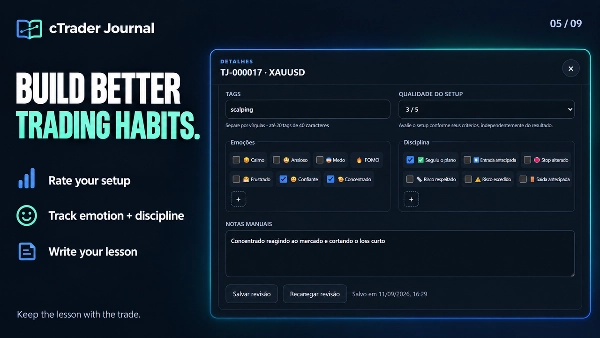
  • เรียนรู้จากการตัดสินใจของคุณ: เพิ่มบันทึกส่วนตัว การให้คะแนนการตั้งค่า ป้ายกำกับ อารมณ์ และเครื่องหมายวินัยในแต่ละการเทรด สร้างตัวเลือกอารมณ์และวินัยของคุณเอง
  • ทบทวนภาพรวมทั้งหมด: ขยายภาพหน้าจอและสลับระหว่างการเข้าและออกโดยไม่ต้องออกจากตัวดู
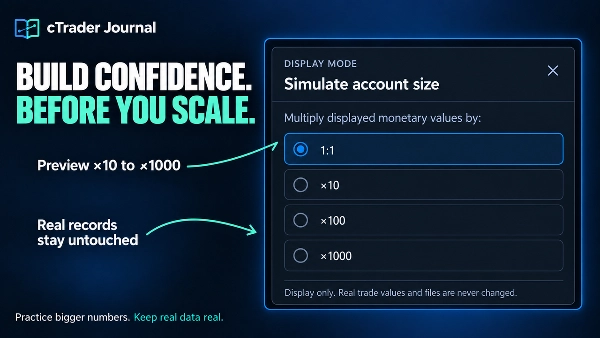
  • จำลองขนาดบัญชีที่ใหญ่ขึ้นโดยไม่เปลี่ยนข้อมูลการเทรดที่บันทึกไว้
  • เพิ่มภาพหน้าจอ ใส่คำอธิบายบนแผนภูมิ และอัปเดตรายการตรวจสอบการเทรด
  • นำทางบันทึกและสำรวจกราฟสะสมได้เร็วขึ้น
  • กู้คืนการจับภาพที่ถูกขัดจังหวะผ่านการลองใหม่อัตโนมัติที่ปลอดภัยกว่า
  • เก็บการทบทวน ภาพหน้าจอ และบันทึกไว้ในเครื่อง

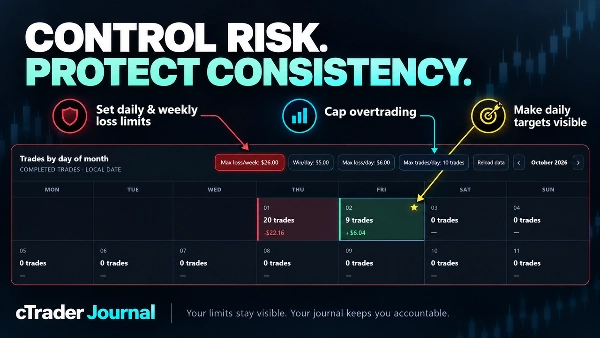
✅ตั้งค่าขีดจำกัดของคุณ ปกป้องกระบวนการของคุณ

  • สร้างวินัยในการเทรดที่แข็งแกร่งขึ้นด้วยการควบคุมความเสี่ยงที่ต่อเนื่องโดยตรงภายในปฏิทิน Journal ของคุณ
  • ตั้งค่าขีดจำกัดการขาดทุนรายวันและรายสัปดาห์ตามมูลค่าเงินหรือจำนวนการเทรดที่ขาดทุน
  • ป้องกันการเทรดเกินด้วยจำนวนการเทรดสูงสุดต่อวัน
  • กำหนดเป้าหมายกำไรรายวันและเห็นวันที่บรรลุเป้าหมายได้ทันทีโดยมีดาวสีทองทำเครื่องหมาย
  • เก็บขีดจำกัดและคำเตือนที่ใช้งานอยู่ข้ามการโหลดซ้ำและรีเฟรชเบราว์เซอร์


🖥️ JOURNAL ของคุณ พร้อมพื้นที่สำหรับคิด

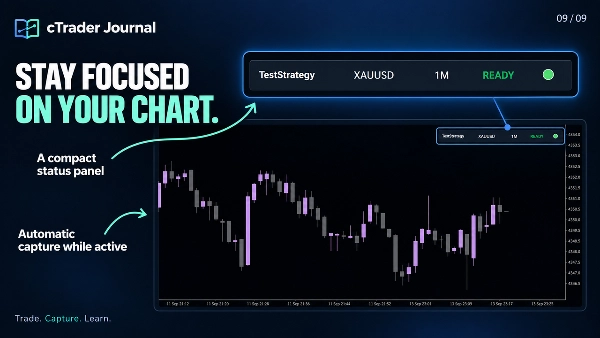
  1. Journal เปิดใช้งานในเครื่องบนเบราว์เซอร์ของคุณ ให้แผนภูมิ สถิติ ภาพหน้าจอ และการทบทวนส่วนตัวมีพื้นที่เต็มหน้าต่างเบราว์เซอร์ แผงควบคุมขนาดกะทัดรัดจะอยู่บนแผนภูมิ cTrader ของคุณ
  2. ไฟล์ Journal ของคุณจะอยู่บนคอมพิวเตอร์ของคุณ ทบทวนข้อมูลที่บันทึกไว้แบบออฟไลน์โดยไม่ต้องโฮสต์เซิร์ฟเวอร์หรือเข้าสู่ระบบบริการ Journal แยกต่างหาก
  3. อินเทอร์เฟซรองรับภาษาอังกฤษ โปรตุเกส เยอรมัน และสเปน ภาษาอังกฤษเป็นค่าเริ่มต้น; เขียนบันทึกและป้ายกำกับที่กำหนดเองในภาษาใดก็ได้


📂 ที่ตั้งของ JOURNAL ของคุณ

คลิก "Open Journal" บนแผงควบคุมขนาดกะทัดรัดเพื่อเข้าถึงที่อยู่ในเครื่อง หากเบราว์เซอร์ไม่เปิดโดยอัตโนมัติ ให้เลือกที่อยู่ที่แสดง คัดลอกด้วย Ctrl+A / Ctrl+C และวางลงในแถบที่อยู่ของ Edge หรือ Chrome.


หน้าที่สร้างขึ้นคือ journal .html. ตำแหน่งทั่วไปใน Windows คือ:

Documents\cAlgo\Data\Plugins\CTrader Jornal\jornal\journal.html


ตำแหน่งที่แน่นอนขึ้นอยู่กับการตั้งค่า Documents/OneDrive ชื่อปลั๊กอินที่ติดตั้ง และการตั้งค่าโฟลเดอร์ย่อย Journal ใช้ที่อยู่ที่แสดงโดยปลั๊กอินของคุณ


✍️ เชื่อมต่อการทบทวนส่วนตัวของคุณ

  1. เปิด journal .html ใน Microsoft Edge หรือ Google Chrome
  2. คลิก เชื่อมต่อคำอธิบายประกอบ
  3. เลือก journal-reviews .json จากโฟลเดอร์ journal เดียวกันและอนุญาตให้เบราว์เซอร์บันทึกการเปลี่ยนแปลง
  4. เปิดการเทรด เพิ่มการทบทวนของคุณ และคลิก บันทึกการทบทวน

ตัวอย่าง: ให้คะแนนการตั้งค่า 3/5 เลือก “วิตกกังวล” เพิ่มเครื่องหมายวินัยการเข้าเร็ว และเขียนว่า: “ฉันเข้าไปก่อนยืนยัน รอให้แท่งเทียนปิดครั้งหน้าดีกว่า.”

สำคัญ: นี่คือการเชื่อมต่อไฟล์การทบทวนที่มีอยู่; คุณไม่จำเป็นต้องนำเข้าการเทรดด้วยตนเอง เก็บ journal-reviews .json ไว้กับ journal ของคุณและรวมไว้เมื่อสำรองข้อมูลโฟลเดอร์ หากเบราว์เซอร์ขอให้คุณเชื่อมต่อใหม่ในภายหลัง ให้เลือกไฟล์เดียวกันนั้น


🌐 เลือกใช้ EDGE หรือ CHROME เพื่อประสบการณ์ที่ครบถ้วน

Journal ได้รับการปรับแต่งสำหรับ Microsoft Edge และ Google Chrome ซึ่งฟีเจอร์การเข้าถึงไฟล์ช่วยให้บันทึกการทบทวนของคุณโดยตรงลงในไฟล์ JSON ในเครื่องได้

ใน Firefox และเบราว์เซอร์ที่ไม่มีการสนับสนุนที่จำเป็น คุณยังสามารถดูแดชบอร์ด สถิติ และภาพหน้าจอได้ การสร้างหรือแก้ไขการทบทวน—รวมถึงบันทึก คะแนน อารมณ์ วินัย และป้ายกำกับ—ไม่สามารถทำได้ในกระบวนการนั้น หากไม่มีไฟล์การทบทวนที่เชื่อมต่อ คำอธิบายประกอบที่แสดงจะสะท้อนภาพสแนปช็อตแดชบอร์ดที่สร้างล่าสุด


⚙️ ขอบเขตการจับภาพ

ให้ปลั๊กอินทำงานอยู่และแผนภูมิเดิมแสดงอยู่เพื่อถ่ายภาพหน้าจอ การลงทะเบียนอัตโนมัติครอบคลุมตำแหน่งใหม่บนสัญลักษณ์ของแผนภูมิที่ใช้งานอยู่; การเทรดที่ลงทะเบียนจะยังคงถูกติดตามโดยรหัสเมื่อคุณเปลี่ยนแผนภูมิ ตำแหน่งที่เปิดก่อนการลงทะเบียนจะไม่ถูกนำเข้าโดยอัตโนมัติ Journal บันทึกและทบทวนการเทรด; แต่ไม่ทำการวางหรือจัดการคำสั่ง.

สรุป

สรุปโดย AI
cTrader Journal is a plugin designed for automatic trade capture and offline review within the cTrader platform. It records trades by automatically capturing entry and exit data along with linked screenshots, enabling traders to focus on analyzing their decisions rather than manual logging. The journal tracks multiple positions per trade ID and provides clear statistics, including cumulative realized profit and loss curves, filters for focused review, and detailed metrics such as costs, execution slippage, and maximum favorable/adverse excursions (MFE/MAE).

Users can add personal notes, setup ratings, tags, emotions, and discipline markers to individual trades, with customizable options to support personalized analysis. The journal interface opens locally in a web browser (optimized for Microsoft Edge and Google Chrome) and stores all data on the user's computer, allowing offline access without requiring subscriptions or external servers. A compact panel integrates with the cTrader chart for easy access.

The plugin supports multiple languages for the interface and allows connection of personal review files for annotation and editing directly within the browser. It captures trades only from the active chart symbol while the plugin is active and visible, but does not place or manage orders. This tool is intended to enhance trading review efficiency and insight through automated data capture and comprehensive trade journaling.
โปรไฟล์ปลั๊กอิน
หมวดหมู่ปลั๊กอิน
ยูทิลิตี้
การเข้าถึงข้อมูล
โพสิชัน
ข้อมูลตลาด
คำสั่ง
กราฟ

การสนทนา

รีวิวจากลูกค้า

4.0
รีวิว: 3
5
0 %
4
100 %
3
0 %
2
0 %
1
0 %
รีวิวจากลูกค้า
October 28, 2026
Trade IDs keep screenshots connected to slippage, MFE and MAE for a more useful review, with offline viewing supported but Edge or Chrome required for full annotation editing and local saves.
October 22, 2026
linking screenshots to trade IDs gives the journal a practical anchor. Slippage, MFE and MAE can sit beside the relevant image, with 4 interface languages and offline review. Edge or Chrome are needed for the full annotation editing and local saving workflow.
October 16, 2026
CTrader_Jornal successfully generates a local trading journal with a clean browser dashboard, statistics, filters, analytics and calendar. Empty states display correctly, and the compact chart panel initializes as expected. However, the Open Journal button repeatedly triggers a Windows 0xC0000005 exception, forcing manual access to the HTML file. Score: 3.8/5.

คำถามที่พบบ่อย

Consistent Returns
No Overtrading
Risk/Reward
SL/TP Templates
Trade Journal
Performance Report
Trade Statistics
ผลิตภัณฑ์ที่มีให้บริการผ่าน cTrader Store รวมถึงบอทการเทรด อินดิเคเตอร์ และปลั๊กอิน มีให้บริการโดยนักพัฒนาบุคคลที่สามและมีไว้เพื่อวัตถุประสงค์ในการเข้าถึงข้อมูลและทางเทคนิคเท่านั้น cTrader Store ไม่ใช่โบรกเกอร์และไม่ได้ให้คำแนะนำการลงทุน คำแนะนำส่วนบุคคล หรือการรับประกันผลการดำเนินงานในอนาคต

เพิ่มเติมจากผู้เขียนคนนี้

อินดิเคเตอร์
BOS
CHOCH
+5
Spot market structure shift with ease, overlay timeframes, avoid false breakouts with open close pivots, hide chart bars
"BubbleXRay" โลโก้
ยอดนิยม
4.3
(3)
$19
/
$29
อินดิเคเตอร์
Volume
Imbalance
+5
Spot Institutional Order Flow with Proportional Volume Bubbles & Integrated Cumulative Volume Delta (CVD) Intelligence.
"FimatheViewer" โลโก้
ยอดนิยม
4.6
(3)
$19
/
$29
อินดิเคเตอร์
Forex
EURUSD
+5
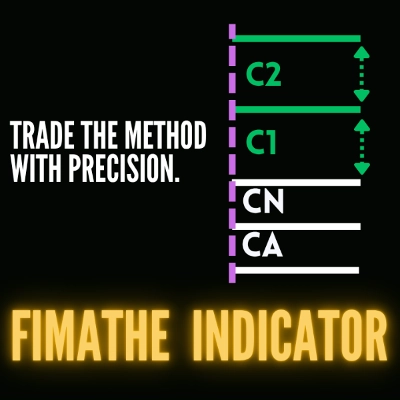
Fimathe Indicator - Fimathe PCM - Automated Trend Channels & Levels — Ideal for live trading and backteting
"ZigXRay" โลโก้
เรตติ้งสูง
4.6
(5)
$29
/
$49
อินดิเคเตอร์
CHOCH
Key Levels
+5
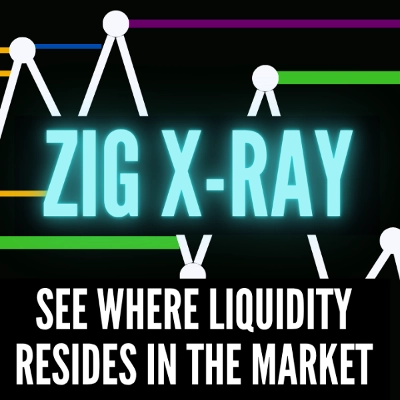
ZigZag Market Structure Identifier - Multi-Layer Scanner: Convergent Pivot Detection, 4-TF Overlay & Naked Chart Mode.
"DrbcLevels" โลโก้
เรตติ้งสูง
4.0
(4)
$19
/
$29
อินดิเคเตอร์
Key Levels
Break & Retest
+5
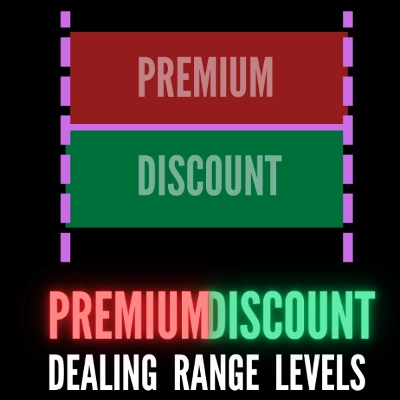
Premium Discount Levels - Professional Dealing Range Zones with Draggable Lines, Alerts, Wartermark & Backtest Mode.
cBot
Fixed Lot
TP Manager
+5
Hotkeys Trading Assistant - Professional Shortcut Assitant with Risk Manager, Hotkeys & Lot Sizing.
"TradeLens" โลโก้
เรตติ้งสูง
4.5
(4)
$29
/
$49
อินดิเคเตอร์
CHOCH
Inducement
+5
TradeLens - Frame the Trade. Refine the Entry. Two Timeframes. One Decision.
"fvg_levels" โลโก้
เรตติ้งสูง
4.0
(4)
$19
/
$29
อินดิเคเตอร์
Key Levels
Order Block
+5
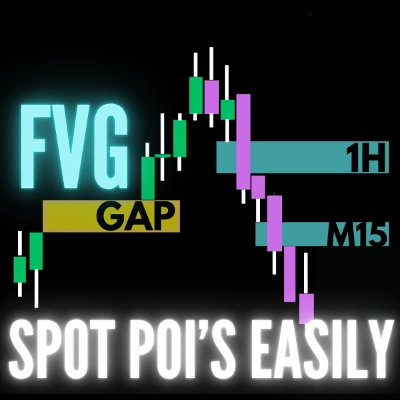
FVG Levels — Auto-Detection of Multi-Timeframe Fair Value Gaps & GAPs, Smart Filters and Liquidity Zone Monitoring

นอกจากนี้คุณยังอาจชอบ

ปลั๊กอินเดสก์ท็อป
Trade Journal
AI Integration
+1
#1 Trade Journal, PnL analytics, bot monitoring and strategy statistics.
ปลั๊กอินเดสก์ท็อป
Risk/Reward
Chart UI Tools
+3
Visual cTrader backtesting tool with trade drawing, risk sizing, stats, and automatic trade simulation.
ปลั๊กอินเดสก์ท็อป
Market Scanner
An 8-currency strength ranking, multi-TF heatmap and impulse tracker. Read the real driver at a glance. Read-only.
ปลั๊กอินเดสก์ท็อป
AI
ATR
+27
Trade Analytics delivers advanced trading insights and heatmaps directly inside TradeWatch.
ปลั๊กอินเดสก์ท็อป
External Data
Study economic event reactions with broker M1 history, bar replay, range comparisons and a reproducible export.
ปลั๊กอินเดสก์ท็อป
File Access
Trade Journal
Your watchlist in one grid: trend on five timeframes, ADR used, correlation to the chart's symbol, currency strength.
ปลั๊กอินเดสก์ท็อป
Risk Reward management tools (风险回报管理工具)
ปลั๊กอินเดสก์ท็อป
Prop
Forex
+4
Visual monthly trading journal that displays your performance day-by-day in a calendar view.
ปลั๊กอินเดสก์ท็อป
Forex
Crypto
+3
Seconds | Ticks | Range | RangeY | Delta | Heikin-Ashi Bar types. Any size or Symbol.
ปลั๊กอินเดสก์ท็อป
AI
ATR
+27
Turn your cTrader trade history into a visual performance dashboard to see trading patterns and strategy strength
ปลั๊กอินเดสก์ท็อป
Chart UI Tools
Replay your broker’s charts candle by candle. Rewind any time, switch timeframes and practise trades with full stats.
ปลั๊กอินเดสก์ท็อป
SL Manager
Break Even
+5
Risk-based position sizing, multi-target take profits, automated trailing stops, and bulk exits directly on your chart.
"RiskManagement - Full" โลโก้
ยอดนิยม
4.5
(4)
$45
/
$55
ปลั๊กอินเดสก์ท็อป
Prop
Forex
+4
Professional risk management plugin with automatic lot calculation, chart panels, and R:R automation. Version 1.4.2.
"TradeGuard" โลโก้
ยอดนิยม
4.6
(3)
$25
ปลั๊กอินเดสก์ท็อป
ATR
Prop
+5
cTrader risk management plugin with daily & total drawdown limits, CBot control, and risk-based order execution.
ปลั๊กอินเดสก์ท็อป
Position Sizer
Risk Calculator
Size manual trades from your risk settings and review Market, Limit or Stop orders before execution.
ปลั๊กอินเดสก์ท็อป
ECN-friendly
Chart UI Tools
Any timeframe cTrader lacks: seconds, minutes, hours, tick & range bars, Heikin-Ashi in the timeframe menu.
"BatchTPSL" โลโก้
ยอดนิยม
4.5
(2)
$40
/
$60
ปลั๊กอินเดสก์ท็อป
Forex
Crypto
+4
Apply Stop Loss and Take Profit to all positions and pending orders in one click.
ปลั๊กอินเดสก์ท็อป
Trade Journal
AI Integration
+1
Turn your closed-trade history into an at-a-glance monthly calendar and a deep performance dashboard.

ราคา

ตั้งแต่ 09/02/2026
29
การขาย
179
ติดตั้งฟรี