
Mô tả
StrongaBar Trader
Tổng quan
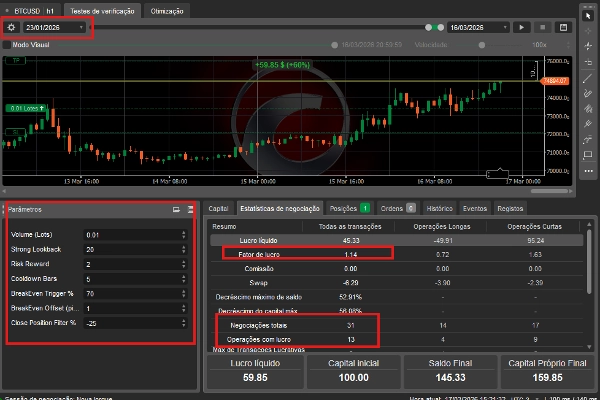
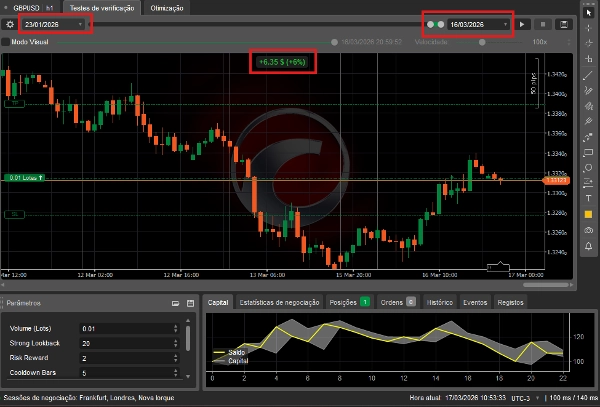
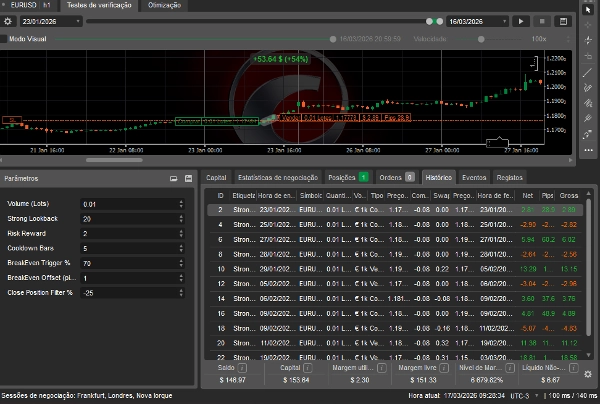
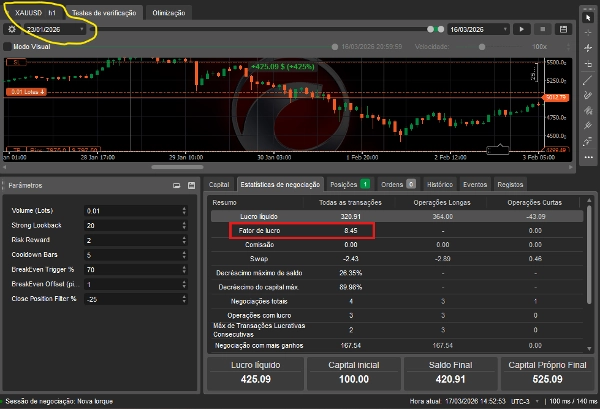
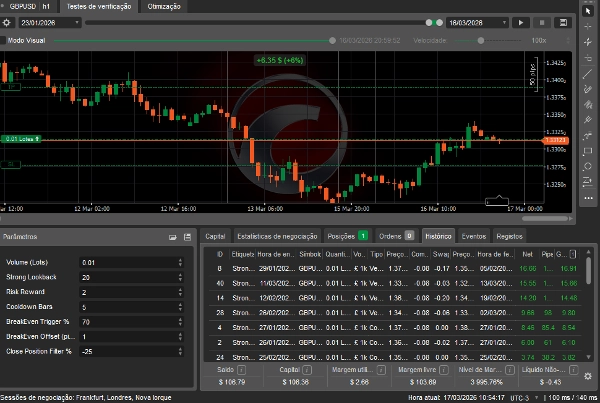
StrongaBar Trader chỉ vào lệnh khi ba bộ lọc độc lập đồng thời đồng thuận: hướng xu hướng qua EMA, sức mạnh động lượng qua vùng xung RSI, và một thanh tín hiệu chiếm ưu thế với đóng cửa mạnh. Phương pháp hội tụ đa lớp này giảm các lệnh vào chất lượng thấp và tập trung bot vào các thiết lập có độ tin cậy cao. Quản lý vị trí bao gồm Break Even và Trailing Stop, cả hai đều có thể cấu hình độc lập.
Cách hoạt động
Ở mỗi thanh đóng, bot kiểm tra:
- Thanh tín hiệu — thanh phải có thân lớn nhất trong số N thanh gần nhất, với giá đóng cửa ở phần trên (bull) hoặc dưới (bear) của phạm vi.
- Bộ lọc EMA — giá phải nằm ở phía đúng của EMA, và EMA phải có độ dốc tối thiểu, xác nhận động lượng xu hướng.
- Bộ lọc RSI — RSI phải nằm trong vùng xung đã định nghĩa, xác nhận rằng chuyển động có động lượng nhưng chưa bị kiệt sức.
Khi cả ba đồng thuận, một tín hiệu được kích hoạt. Lệnh vào được thực hiện tại mở thanh tiếp theo (Chế độ 0) hoặc khi phá vỡ mức cao/thấp của thanh tín hiệu (Chế độ 1).
Tham số vào lệnh
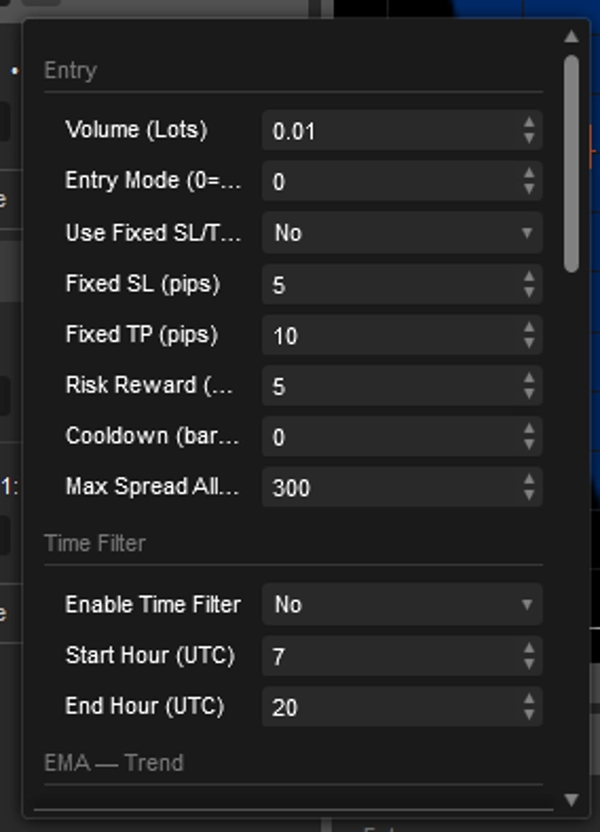
- Khối lượng — Kích thước vị trí tính theo lot.
- Chế độ vào lệnh — 0: vào lệnh tại mở của thanh tiếp theo ngay sau tín hiệu. 1: chờ giá phá mức cao (mua) hoặc thấp (bán) của thanh tín hiệu.
- Sử dụng SL/TP cố định — Khi BẬT, bỏ qua tính toán SL dựa trên thanh và dùng giá trị pip cố định. Khi TẮT, SL được lấy từ thanh tín hiệu và TP tính theo Tỷ lệ Rủi ro Lợi nhuận.
- Tỷ lệ Rủi ro Lợi nhuận — TP = SL × RR. Chỉ hoạt động khi SL/TP cố định TẮT.
- Thời gian nghỉ — Số thanh mà bot ngừng vào lệnh sau khi đóng một giao dịch. Ngăn chặn giao dịch quá mức sau chuỗi tín hiệu.
- Spread tối đa — Nếu spread hiện tại vượt quá giá trị này tính bằng pip, lệnh vào bị chặn hoặc hủy (Chế độ 0 hủy ngay lập tức).
Bộ lọc thời gian
- Bật bộ lọc thời gian — Giới hạn lệnh vào trong khung giờ UTC. Ngoài khung giờ, bot chỉ quản lý các vị trí mở.
- Giờ bắt đầu / kết thúc — Xác định khung giờ giao dịch cho phép theo UTC.
EMA — Bộ lọc xu hướng (Lớp 1)
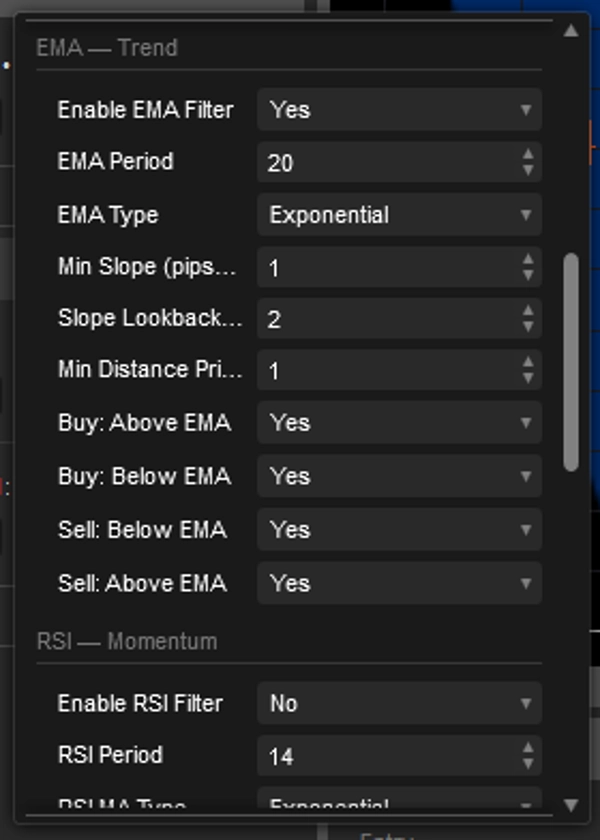
- Bật bộ lọc EMA — Khi TẮT, bot bỏ qua kiểm tra EMA hoàn toàn và chỉ dựa vào Thanh tín hiệu và RSI.
- Chu kỳ / loại EMA — Xác định đường tham chiếu xu hướng.
- Độ dốc tối thiểu — EMA phải tăng/giảm ít nhất X pip trong N thanh gần nhất. Ngăn lệnh vào trong thị trường đi ngang, phẳng.
- Số thanh để đo độ dốc — Số thanh lùi lại để đo độ dốc.
- Khoảng cách tối thiểu giá đến EMA — Giá phải cách EMA ít nhất X pip trước khi được phép vào lệnh.
- Mua trên/dưới EMA / Bán trên/dưới EMA — Kiểm soát phía nào của EMA hợp lệ cho mỗi hướng. Bật cả trên và dưới cho cùng một hướng sẽ vô hiệu hóa kiểm tra vị trí cho phía đó. ⚠️ Nếu không bật Mua trên hoặc Mua dưới, sẽ không có tín hiệu mua nào được kích hoạt.
RSI — Bộ lọc động lượng (Lớp 2)
- Bật bộ lọc RSI — Khi TẮT, RSI bị bỏ qua hoàn toàn. Bot vào lệnh chỉ dựa trên Thanh tín hiệu + EMA.
- Chu kỳ RSI — Độ nhạy của phép tính RSI.
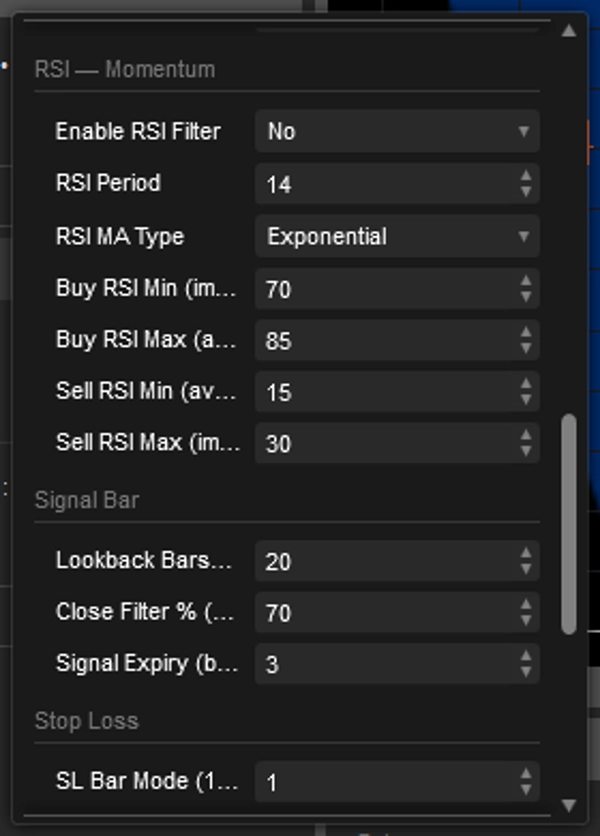
- Giá trị RSI mua tối thiểu / tối đa — RSI phải nằm trong khoảng này để cho phép mua (ví dụ 50–75: động lượng tăng nhưng chưa kiệt sức).
- Giá trị RSI bán tối thiểu / tối đa — RSI phải nằm trong khoảng này để cho phép bán (ví dụ 25–50: động lượng giảm nhưng chưa quá bán).
⚠️ Nếu Min >= Max ở bất kỳ phía nào, vùng đó không hợp lệ và không có tín hiệu nào được kích hoạt cho hướng đó. Một cảnh báo sẽ được ghi vào nhật ký khi khởi động.
Thanh tín hiệu — Bộ lọc cấu trúc (Lớp 3)
- Số thanh lùi — Thân thanh tín hiệu phải lớn hơn tất cả các thân trong N thanh gần nhất. Giá trị càng cao = càng nghiêm ngặt, ít tín hiệu hơn.
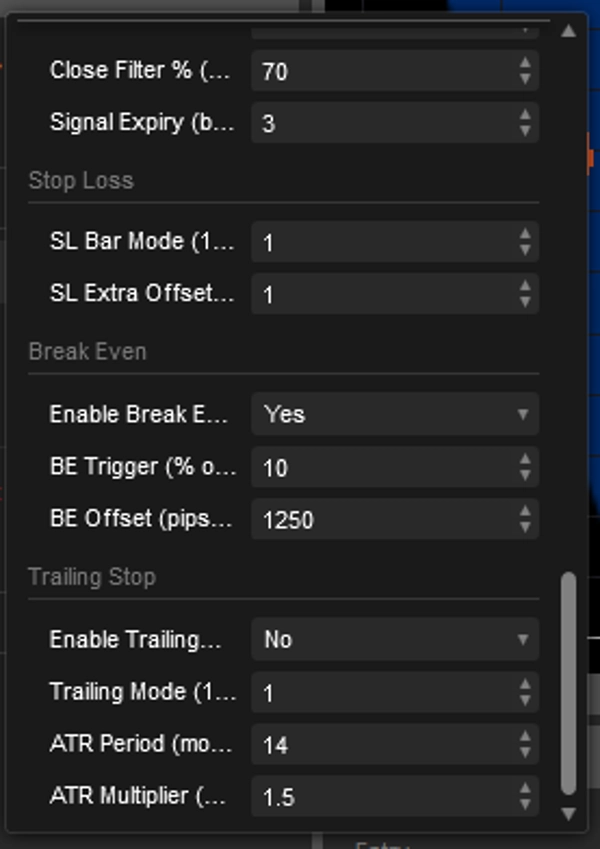
- Tỷ lệ % đóng cửa — Với tín hiệu tăng, đóng cửa phải nằm trong X% trên của phạm vi thanh. Với tín hiệu giảm, trong X% dưới. Ví dụ 70% nghĩa là đóng cửa phải nằm trong 30% trên (bull) hoặc 30% dưới (bear) của nến.
- Hết hạn tín hiệu — Chỉ áp dụng cho Chế độ 1. Nếu không có phá vỡ trong số thanh này, tín hiệu bị loại bỏ.
Dừng lỗ
- Chế độ SL theo thanh — Xác định khoảng cách SL đặt dưới/trên thanh tín hiệu. Chế độ 1: tại mức thấp/cao của thanh. Chế độ 2: 1× phạm vi vượt mức thấp/cao. Chế độ 3: 2× phạm vi, v.v. Chế độ cao hơn = SL rộng hơn.
- Bù thêm SL — Bộ đệm pip thêm vào mức SL tính toán, để tránh bị dừng lỗ ở các mức rõ ràng
⚠️ Khi SL/TP cố định BẬT, Chế độ SL theo thanh và Bù thêm bị bỏ qua.
Break Even
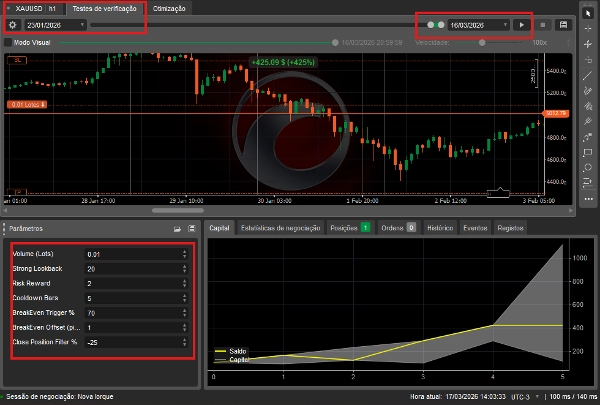
- Bật Break Even — Khi BẬT, một khi giá di chuyển một tỷ lệ phần trăm xác định về phía TP, SL được di chuyển về điểm vào (cộng thêm một khoảng nhỏ).
- Ngưỡng kích hoạt BE % — Tỷ lệ phần trăm khoảng cách từ điểm vào đến TP mà giá phải đi qua trước khi BE kích hoạt. Ví dụ 40% nghĩa là BE kích hoạt khi giá đi được 40% quãng đường đến TP.
- Bù BE — Số pip thêm vào giá vào lệnh cho SL mới, đảm bảo lợi nhuận tối thiểu thay vì hòa vốn tuyệt đối.
⚠️ Khi Break Even TẮT và Trailing cũng TẮT, vị trí chỉ được quản lý bởi SL và TP ban đầu — không có điều chỉnh động.
⚠️ Khi Trailing BẬT, nó chỉ kích hoạt sau khi Break Even kích hoạt. Nếu Break Even TẮT, Trailing bắt đầu ngay từ lúc vào lệnh.
Trailing Stop
- Bật Trailing Stop — Khi TẮT, bot dừng mọi di chuyển SL động sau Break Even. SL giữ cố định ở mức BE trong suốt giao dịch.
- Chế độ Trailing 1 (Mở thanh) — Sau mỗi thanh mới, SL được di chuyển đến mức mở thanh cao nhất (bán) hoặc thấp nhất (mua) kể từ lúc vào lệnh. Trailing mượt, theo bước.
- Chế độ Trailing 2 (ATR) — SL theo dõi động ở khoảng cách ATR × Hệ số nhân so với giá hiện tại. Thích ứng với biến động thị trường.
- Chu kỳ ATR / Hệ số nhân ATR — Chỉ dùng trong Chế độ 2. Hệ số nhân cao hơn = trailing rộng hơn, giảm rủi ro thoát sớm trên các công cụ biến động.
Tóm tắt
The bot supports configurable position sizing, fixed or dynamic stop loss and take profit levels, and risk-reward settings. It includes advanced position management features such as break-even adjustments and trailing stops with multiple modes, including ATR-based volatility trailing. A time filter restricts trading to specified UTC hours to manage market activity periods. Spread limits and cooldown periods help control trade frequency and execution quality.
StrongBar v1 operates primarily on hourly charts and supports market order types. It is designed for medium-frequency day trading with a focus on disciplined execution and risk management. Backtested on leveraged accounts, it aims to reduce noise and improve trade conviction through multi-layer technical confirmation.
Thảo luận
Đánh giá của khách hàng
5 | 50 % | |
4 | 50 % | |
3 | 0 % | |
2 | 0 % | |
1 | 0 % |