AlgoVisionCraft V3 (AVC) SuperTrend
cBot
Version 1.0, Feb 2025
Windows, Mac, Mobile, Web
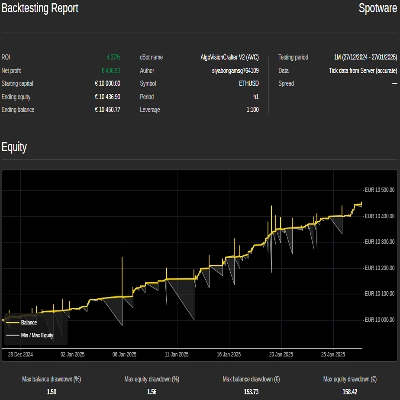
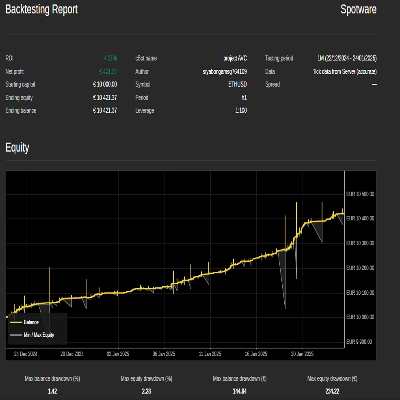
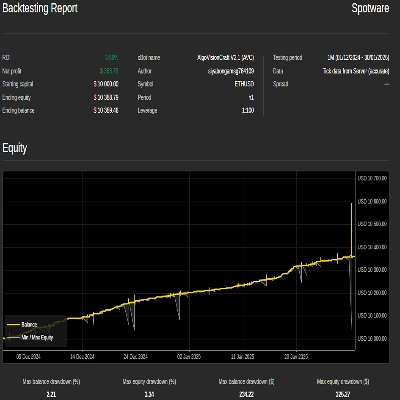
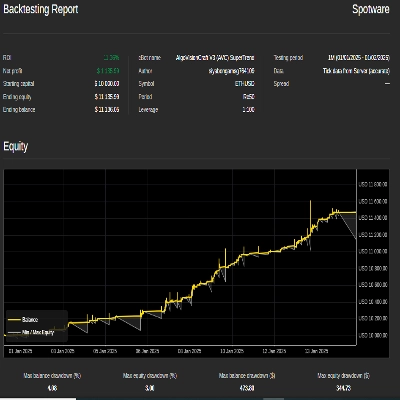
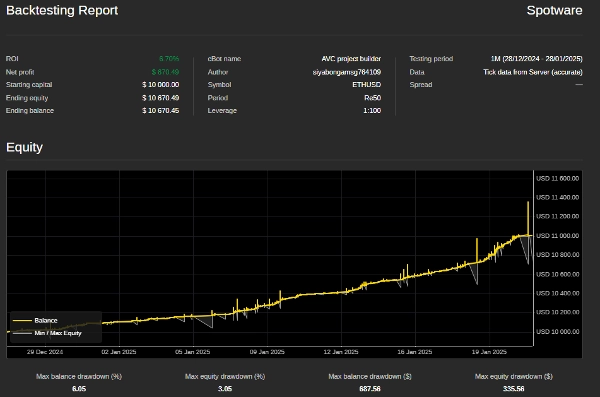
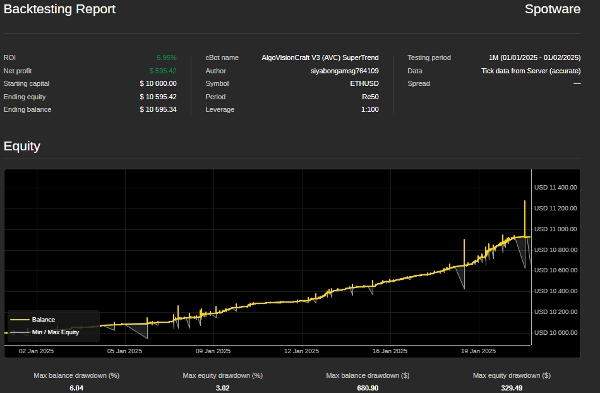
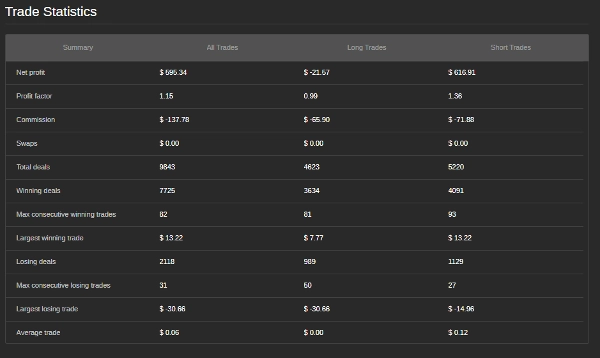
"AlgoVisionCraft V3 (AVC) SuperTrend" 업로드된 이미지"AlgoVisionCraft V3 (AVC) SuperTrend" 업로드된 이미지"AlgoVisionCraft V3 (AVC) SuperTrend" 업로드된 이미지"AlgoVisionCraft V3 (AVC) SuperTrend" 업로드된 이미지
가입일 27/01/2025
1
판매
4
무료 설치

Grid Trading Bot with Supertrend Indicator - User Guide

Welcome to the Grid Trading Bot with Supertrend Indicator! This bot is designed to automate grid trading strategies while incorporating the Supertrend indicator to filter trades based on market trends. Below is a detailed guide on how to set up and use the bot effectively.


Key Features:

  1. Grid Trading: The bot places buy and sell orders at predefined intervals (steps) to capitalize on market fluctuations.
  2. Supertrend Filter: The Supertrend indicator is used to ensure trades are only executed in the direction of the trend, reducing the risk of counter-trend trades.
  3. Dynamic Step Adjustment: The grid step size can adjust dynamically based on the number of open positions.
  4. Risk Management: Includes features like maximum drawdown protection and trailing drawdown to safeguard your account.
  5. Customizable Parameters: All settings, including grid steps, volume, and Supertrend parameters, can be customized to suit your trading style.


How to Use the Bot

  1. Installation:
    • Download the Bot: Ensure you have the .cAlgo file for the bot.
    • Open cTrader: Launch the cTrader platform and navigate to the Automate tab.
    • Add the Bot: Click on Import cBot and select the downloaded .cAlgo file.
    • Attach to Chart: Drag and drop the bot onto the chart of the trading pair you want to trade.


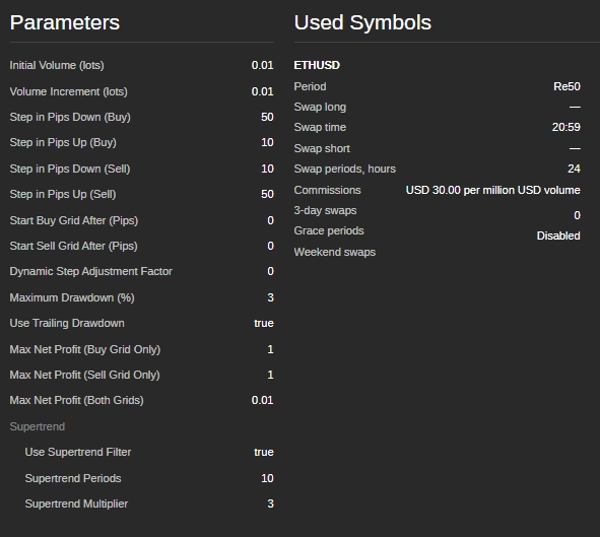
  1. Setting Up Parameters: Once the bot is attached to the chart, configure the following parameters in the Parameters tab.
    Volume Parameters:
    Grid Step Parameters:
    Grid Start Conditions:
    Supertrend Parameters:
    Risk Management:
    Max Net Profit Conditions:
    • Initial Volume (lots): The starting lot size for the first trade.
    • Volume Increment (lots): The amount by which the lot size increases for each subsequent trade.
    • Step in Pips Down (Buy): The distance in pips to place the next buy order below the previous one.
    • Step in Pips Up (Buy): The distance in pips to place the next buy order above the previous one.
    • Step in Pips Down (Sell): The distance in pips to place the next sell order below the previous one.
    • Step in Pips Up (Sell): The distance in pips to place the next sell order above the previous one.
    • Start Buy Grid After (Pips): The number of pips the price must move up from the initial price to start the buy grid.
    • Start Sell Grid After (Pips): The number of pips the price must move down from the initial price to start the sell grid.
    • Supertrend Periods: The number of periods used to calculate the Supertrend indicator.
    • Supertrend Multiplier: The multiplier used to calculate the Supertrend indicator.
    • Maximum Drawdown (%): The maximum allowed drawdown as a percentage of the account balance.
    • Use Trailing Drawdown: Enables trailing drawdown to adjust the maximum drawdown level as the account equity increases.
    • Max Net Profit (Buy Grid Only): The maximum net profit allowed for the buy grid before the bot closes all buy positions and restarts.
    • Max Net Profit (Sell Grid Only): The maximum net profit allowed for the sell grid before the bot closes all sell positions and restarts.
    • Max Net Profit (Both Grids): The maximum combined net profit allowed for both grids before the bot closes all positions and restarts.


  1. Starting the Bot:
    • Set Parameters: Adjust the parameters according to your trading strategy and risk tolerance.
    • Start the Bot: Click the Start button to activate the bot.
    • Monitor Performance: Keep an eye on the bot's performance and make adjustments to the parameters as needed.


  1. Stopping the Bot:
    • To stop the bot, click the Stop button in the cTrader platform.
    • The bot will close all open positions and stop trading.


Tips for Optimal Performance:

  1. Backtest First: Before running the bot on a live account, backtest it on historical data to ensure it performs well under different market conditions.
  2. Adjust Parameters: Fine-tune the grid steps, Supertrend parameters, and risk management settings to match your trading style and market conditions.
  3. Monitor Drawdown: Keep an eye on the maximum drawdown to ensure it stays within your risk tolerance.
  4. Use on Stable Pairs: The bot performs best on currency pairs with stable trends and low volatility.


Contact Information: If you have any questions, need assistance, or want to customize the bot further, feel free to reach out:


Disclaimer: This bot is provided as-is, and the developer is not responsible for any financial losses incurred while using it. Trading in financial markets involves risk, and you should only trade with money you can afford to lose. Always test the bot in a demo account before using it on a live account.

Avoiding trading during major news events is crucial because these periods are often marked by heightened volatility and unpredictable price movements. News trading can lead to erratic market behavior that deviates from typical trends, increasing the risk of losses. Similarly, trading in a ranging market—where prices move sideways without clear direction—can result in false breakouts and limited profit opportunities, making it difficult to implement a coherent strategy. Additionally, low volume days typically feature reduced liquidity, which can cause wider spreads and slippage, further complicating trade execution. By steering clear of news trading, ranging markets, and low volume periods, traders can focus on more stable market conditions that offer clearer trends and better execution, ultimately enhancing their overall trading performance.

0.0
리뷰: 0
고객 리뷰
이 상품에 대한 리뷰가 아직 없습니다. 이미 사용해 보셨나요? 다른 사람들에게 가장 먼저 소개해 주세요!
Grid
Forex
Supertrend

이 작성자의 상품 더 보기

cBot
Indices
Prop
Commodities
+1
AlgoVisionCrafter V2 (AVC)
Your Ultimate Trading Ally Unlock smarter trading with AlgoVisionCrafter V2 (AVC).
cBot
Grid
AlgoVisionCrafter(AVC)
AlgoVisionCrafter (AVC): Your Smart Trading Bot, AVC is a multi-level trading bot designed to help you trade smarter.
cBot
Grid
Indices
RSI
+1
AlgoVisionCraft V2.1 (AVC)
RSI Smart grid bot

좋아하실 만한 다른 항목

cBot
NAS100
Indices
Prop
+2
HFT Prop Firm Pass
Introducing the HFT cBOT - your ultimate tool for passing Prop Firm challenges with confidence and efficiency.
cBot
NAS100
NZDUSD
XAUUSD
+6
GALAXY Multi CROSS LIVE
cBot
Indices
RSI
NZDUSD
+6
AlgoZone Oscillogic DayTrader cBot
This is a highly tested Indicator based DayTrader cBot with all adjustable parameters.
cBot
USDJPY
777 - PropFirm PASS - Adjustable Enc cBOT
USD/JPY Specialist
cBot
Grid
RSI
XAUUSD
+2
Long Grid Remaining Candle Time
The best strategy you'll find on the market!
cBot
Forex
EURUSD
DMGEURUSDTrendGuard LIVE
cBot
RSI
ATR
Forex
+2
LimitOrderMeanReversal v1.7_noSourceCode
Limit-Reversion Scalper; Professional-grade. No limits. No catch. Just performance. Now available for retail traders
cBot
XAUUSD
Commodities
Forex
+1
Fx4U.XAUUSD.v2.6.10
XAUUSD Price Action Trading Bot for cTrader – Smart Gold EA with Risk Control, High Profits and High Precision Strategy
cBot
RSI
ATR
Signal
+1
SUPERTREND
The SuperTrend strategy is a powerful and effective tool for identifying trends and generating clear trading signals. Ho
cBot
XAUUSD
Commodities
Forex
PAIR OF GOLD SILVER STRIKE STOPPERS LIVE
PAIR OF GOLD SILVER STRIKE STOPPERS LIVE 14-Day Free Trial Included!
cBot
Grid
NAS100
Indices
+8
DCA Smart Trading
Stop gambling your capital. Switch to a truly sustainable "System" instead.
cBot
Crypto
BTCUSD
Bitcon-Volatily-grid Live
가입일 27/01/2025
1
판매
4
무료 설치