


Opis
PEŁNA WERSJA! https://ctrader.com/products/2705
OGRANICZENIA DEMO:
- Garść wybranych instrumentów
- 4 interwały czasowe (M1, M10, M30, H2)
- Limit 2 lat danych do testów wstecznych
- x4 równoczesne testy wsteczne
Aby uzyskać dostęp do pełnej wersji, proszę skorzystać z powyższego linku!
----------------
Dlaczego OmniSim?
Tradycyjne testy wsteczne w cTrader zużywają znaczne zasoby systemowe, generując wykresy kapitału i salda w czasie rzeczywistym, co obciąża komputer i ogranicza efektywność testowania. OmniSim usprawnia cały proces, bezpośrednio pobierając dane ticków z serwera i przeprowadzając lekkie, skoncentrowane testy wsteczne na wybranych instrumentach i interwałach czasowych bez wizualnego obciążenia, ale nie pozbawione ich.
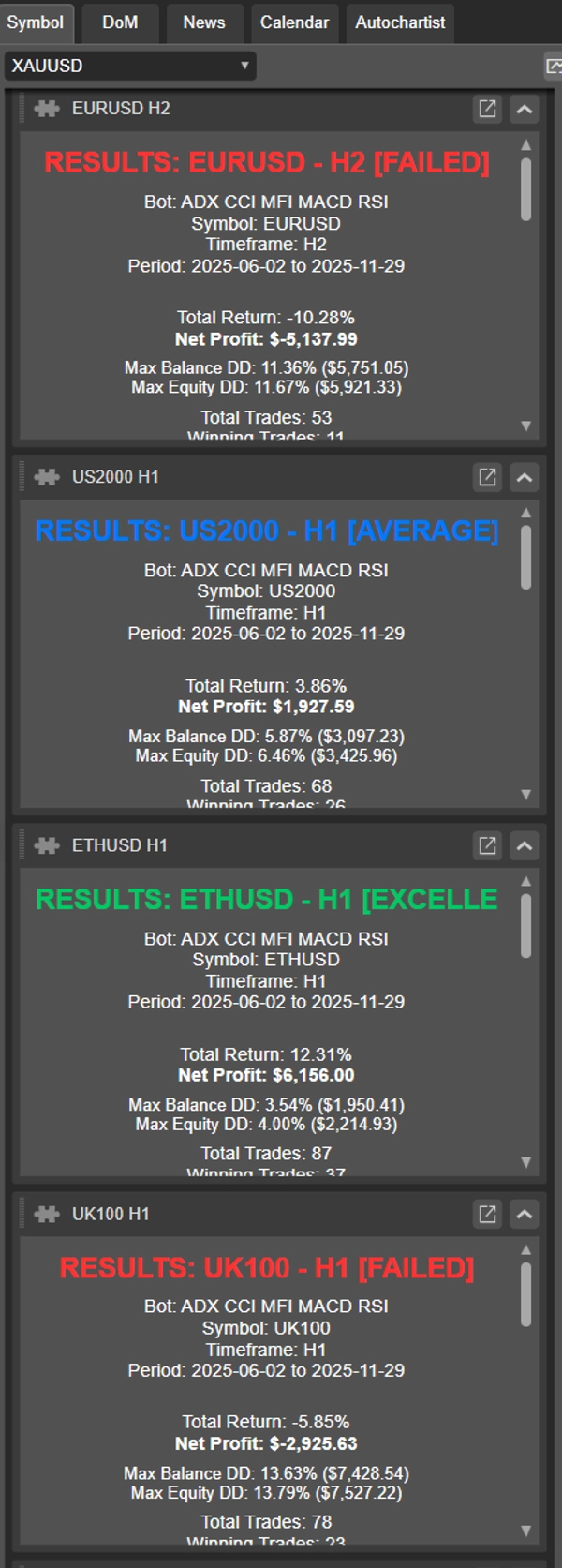
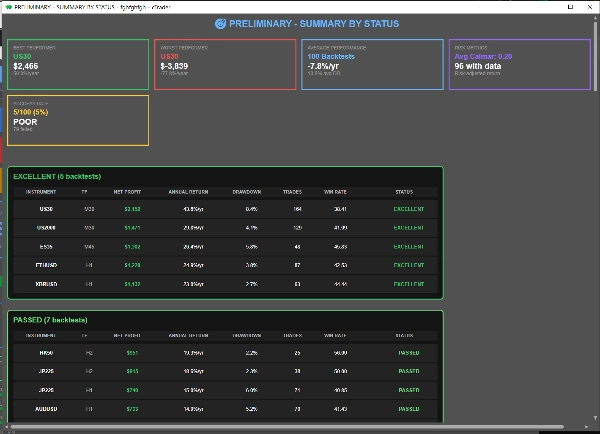
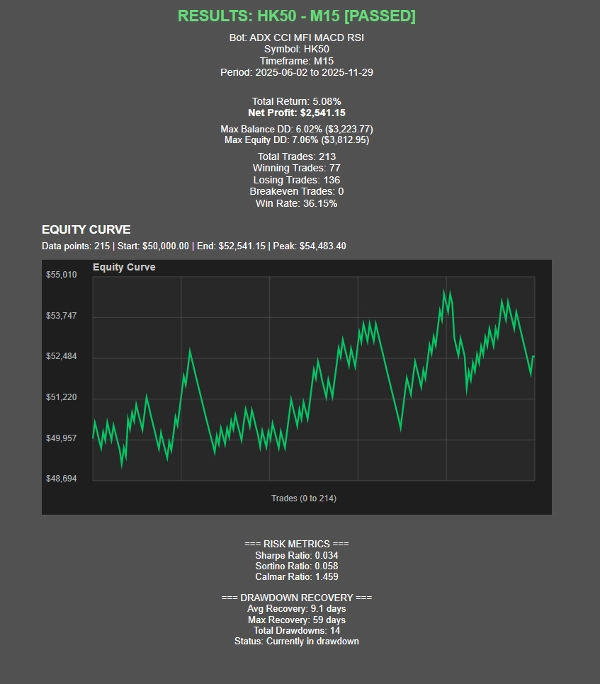
Po zakończeniu testów OmniSim automatycznie generuje indywidualne raporty dla każdego testu oraz kompleksowy raport podsumowujący, dając pełny przegląd wyników na pierwszy rzut oka.
Jak to działa?
Interfejs OmniSim został zaprojektowany z myślą o intuicyjności i prostocie.
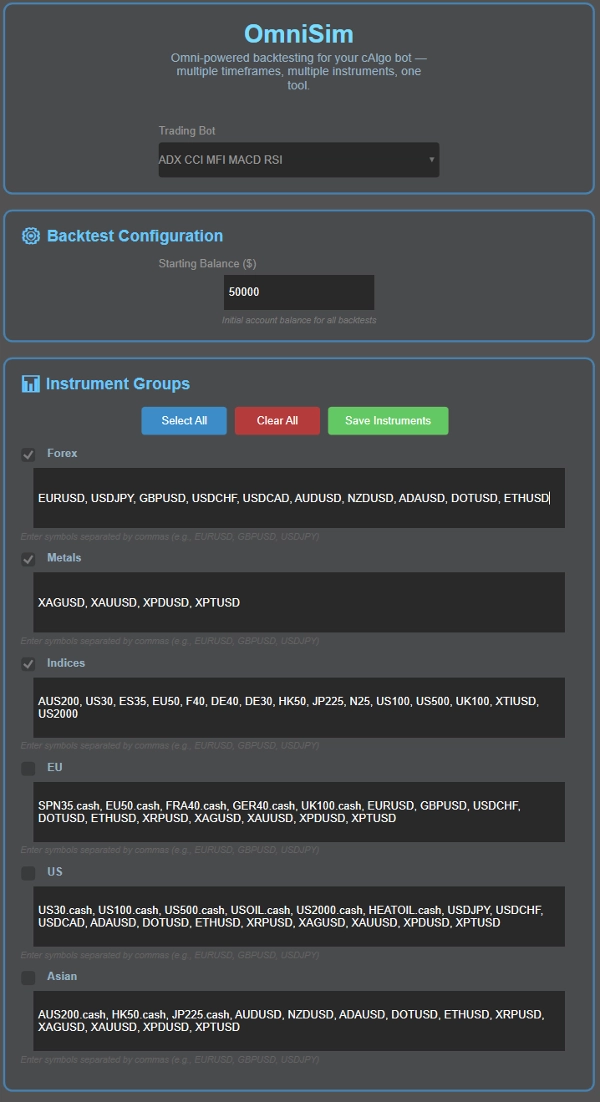
- Wybierz swojego bota: Omni automatycznie ładuje wszystkie zainstalowane boty i pokazuje je na liście rozwijanej u góry interfejsu
- Wybierz swój kapitał
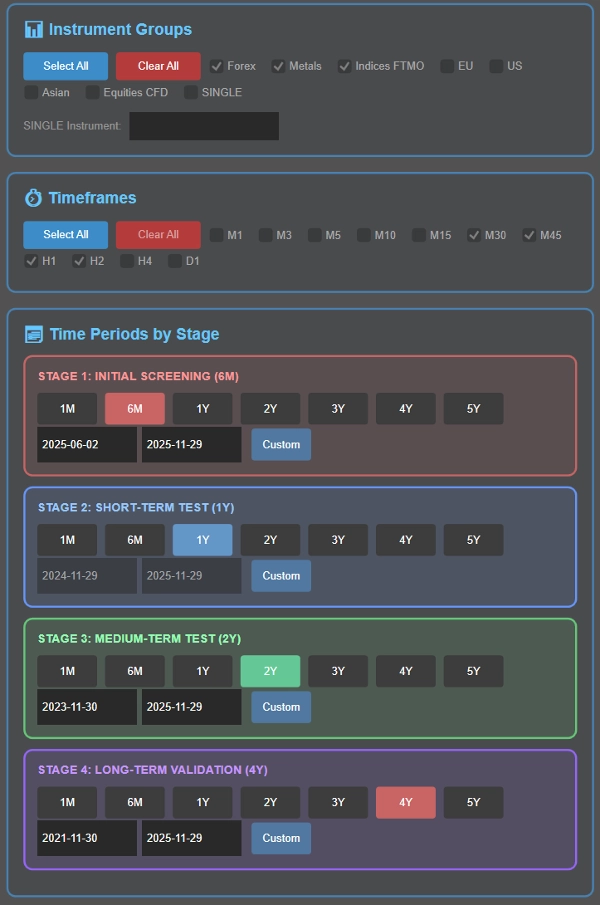
- Wybierz instrument(y): tutaj zobaczysz 5 grup (Forex, Metale, Indeksy, UE, USA, Azja), ich instrumenty są konfigurowalne dla Twojej wygody. Przed testem możesz wybrać grupę instrumentów, które chcesz testować
- Wybierz interwał(y) czasowe: wybierz, które interwały testować: M1, M3, M5, M10, M15, M30, M45, H1, H2, H4, D1
- Ustaw okresy testów wstecznych jako część inteligentnego procesu kaskadowego (opis poniżej) lub wybierz pojedynczy, konkretny okres, jeśli wolisz.
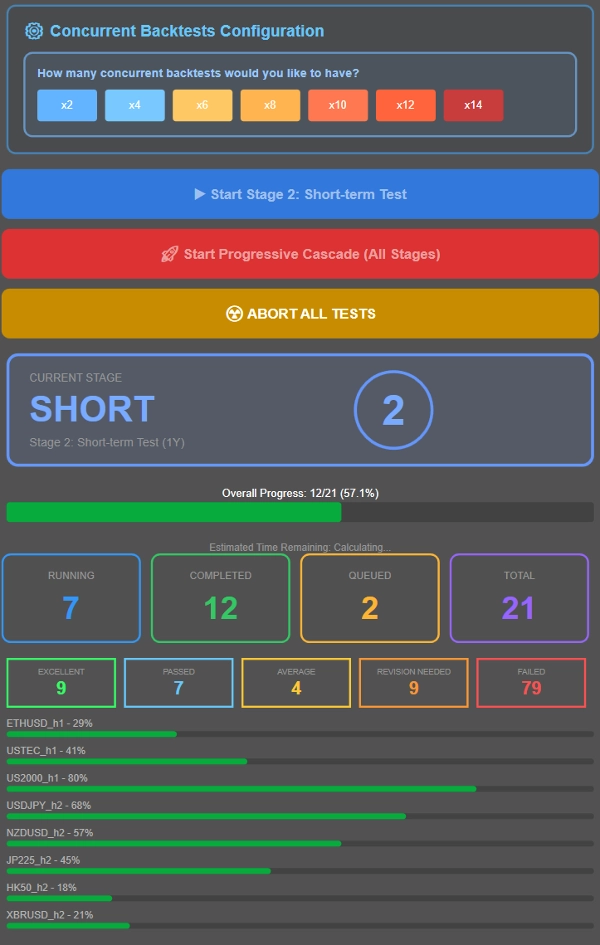
- Kontroluj, ile testów działa jednocześnie w zależności od specyfikacji systemu. Dla odniesienia, system z 16GB RAM i Ryzen 7 5800X3D bez problemu obsługuje 8 równoczesnych testów, a wydajność pozostaje płynna do 12-14 testów jednocześnie. Dostosuj do swojego sprzętu.
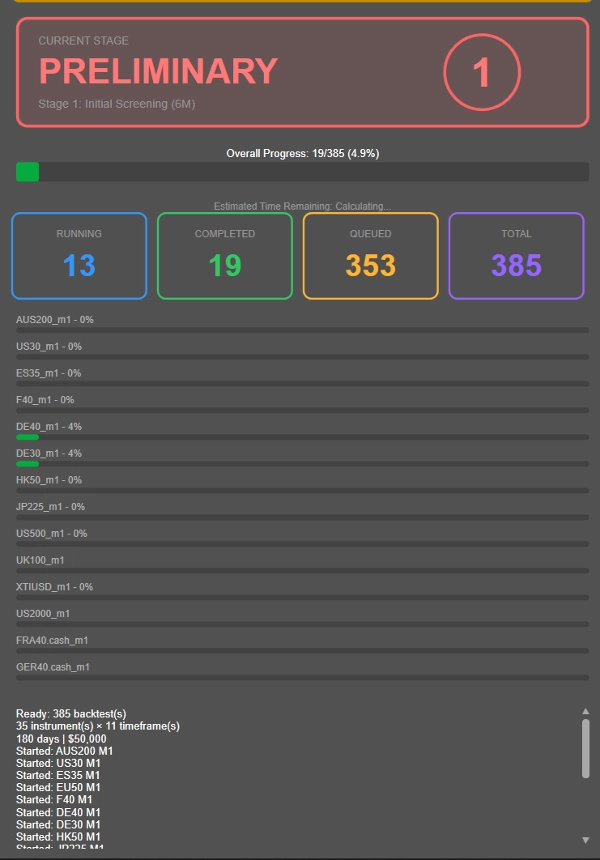
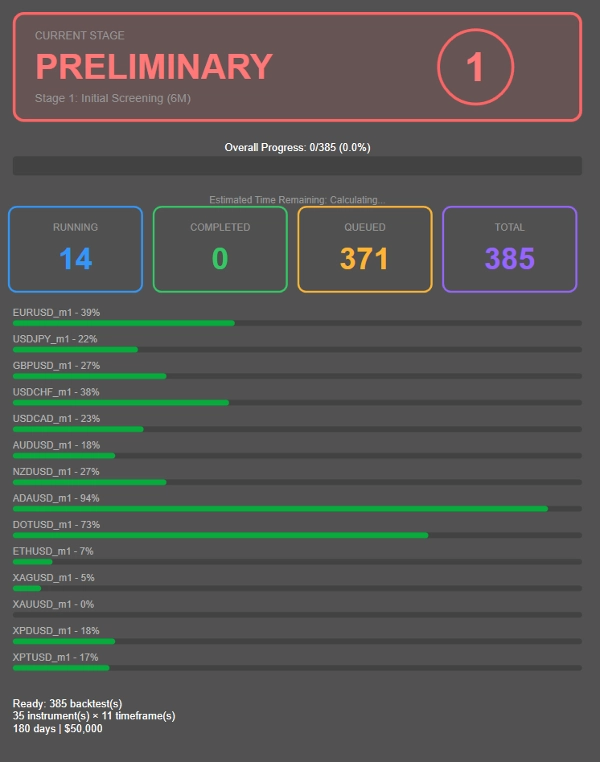
- Uruchom test kaskadowy (stopniowe filtrowanie przez wiele okresów) lub testuj wszystkie kombinacje dla jednego konkretnego okresu z domyślnymi parametrami cbot'a.
Czym jest proces testów kaskadowych?
Zamiast przeprowadzać długie, 4-letnie testy na każdej kombinacji instrument-interwał (w tym na nieopłacalnych), OmniSim stosuje metodologię progresywnego kaskadowania, która inteligentnie eliminuje słabe wyniki na wczesnym etapie:
- Etap 1: Wstępna selekcja 6-miesięczna
- Etap 2: Przetrwali przechodzą do testów 1-rocznych
- Etap 3: Konsekwentni wykonawcy przechodzą do walidacji 2-letniej
- Etap 4: Tylko najsilniejsze kombinacje przechodzą pełny 4-letni test
---------------
- Powyższe czasy trwania etapów zostały przeze mnie wybrane jako rozsądnie wygodne do testów wstecznych. Możesz dostosować czas trwania według własnego uznania, zamiast 6M → 1Y → 2Y → 4Y możesz wybrać 1M → 2Y → 4Y → 8Y! Całkowicie konfigurowalne.
---------------
To podejście znacznie redukuje marnowanie zasobów na nieopłacalne kombinacje, pozwalając skupić zasoby na strategiach, które faktycznie wykazują potencjał.
Chcesz przetestować wszystko na jednym okresie zamiast tego? Po prostu skonfiguruj wybrany interwał w Etapie 2 i uruchom wszystkie kombinacje dla tego konkretnego okresu, klikając niebieski przycisk.
Klasyfikacja wyników, może być dostosowana na życzenie po zakupie!
- DOSKONAŁY: ≤10% średni DD, ≥20% roczny zysk
- ZALICZONY: ≤10% średni DD, 10-20% roczny zysk
- ŚREDNI: ≤10% średni DD, 5-10% roczny zysk
- WYMAGA POPRAWY: 10-20% DD z >5% zysku LUB ≤5% DD z 0-5% zysku
- NIEZALICZONY: Wszystko inne
Ten plugin został zaprojektowany z kryteriami zaliczenia i niezaliczenia popularnych firm prop (10% dyskwalifikujący drawdown). W zależności od ryzyka na transakcję, może być trudno ocenić prawdziwą wydajność, stąd inne kategorie jak wymagające poprawy i średnie, wszystkie mieszczące się w rozsądnych metrykach wydajności. Nie zaliczony jest zarezerwowany dla miernych zwrotów, braku drawdown lub ogromnego drawdown.
Metryki wydajności:
- Wskaźnik Sharpe'a, wskaźnik Sortino, wskaźnik Calmar (w trakcie opracowania)
- Statystyki odzyskiwania po drawdown
- Wizualizacja krzywej kapitału
- Śledzenie postępu w czasie rzeczywistym z ETA
Prezentacja wyników
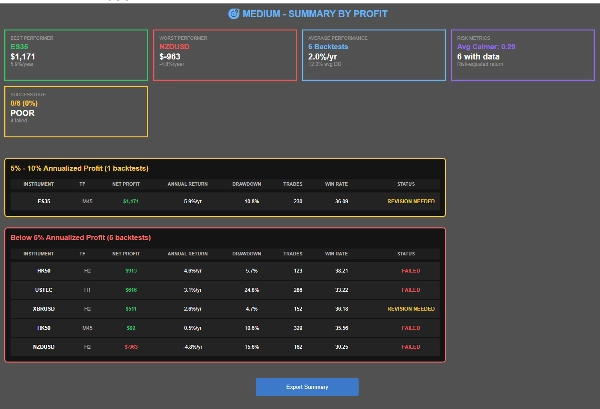
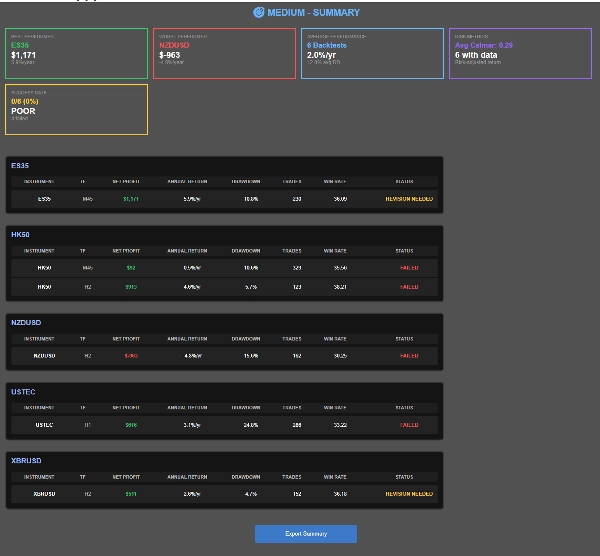
- Trzy widoki podsumowujące: według instrumentu, według statusu, według zysku
- Klikalne nawigacje wyników
- Funkcjonalność eksportu CSV
- Wizualne karty statusu i wskaźniki postępu
Podsumowanie
Opinie klientów
Dyskusja
Częste pytania
Więcej od tego autora





![Logo „Custom Timeframes [Iridio Capital]”](https://cdn.ctrader.com/image/webp/4d75a920-23c7-4fea-a7b5-594a9d067f2e_63286)





Cena