Opis
Isabelle to wyrafinowany w pełni i półautomatyczny asystent handlowy dla traderów, którzy chcą mieć to, co najlepsze z obu światów: potężną automatyzację oraz kontrolę na wykresie. Uruchom go w pełni automatycznie z inteligentnym timingiem, logiką siatki adaptującą się do zmienności, trybem odzyskiwania oraz wirtualnym zarządzaniem trailingiem zysku — lub przejmij stery dzięki intuicyjnym panelom, które pozwalają na pauzę, odzyskiwanie oraz ręczne otwieranie/zamykanie pozycji.
WAŻNE:
Domyślna konfiguracja parametrów jest zoptymalizowana dla EURUSD na interwale M15, zapewniając zrównoważoną demonstrację podstawowej logiki i zachowania Isabelle.
Jednakże, Isabelle jest w pełni kompatybilna ze wszystkimi parami walutowymi, towarami i indeksami.
Dla najlepszej wydajności parametry takie jak krok siatki, cel zysku, pauza na zmienność oraz ustawienia filtrów powinny być dostosowane do zmienności i charakterystyki handlowej symbolu.
Co nowego w wersji 6.0.0
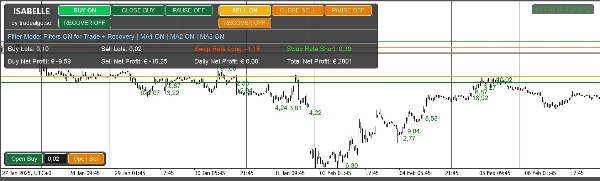
- Nowy Panel Główny z dodatkowymi analizami:
-
- Suma Lotów Po Stronach (Kupno/Sprzedaż)
- Aktualne Stawki Swap (długa/krótka) z kolorowaniem pozytywnym/negatywnym
- Rozszerzone odczyty zysków (Kupno, Sprzedaż, Dzienny, Całkowity)
- Nowe Filtry Transakcji
-
- Filtr Kierunku Center of Gravity (CoG) (opcjonalny)
- Filtr RSI z kontrolą interwału i progów (opcjonalny)
- Filtr Bollinger Bands (BB) z kontrolą interwału i progów (opcjonalny)
- Filtr MA1 z kontrolą interwału i progów (opcjonalny)
- Filtr MA2 z kontrolą interwału i progów (opcjonalny)
- Filtr MA3 z kontrolą interwału i progów (opcjonalny)
- Ogólne ulepszenia UX, płynniejsze aktualizacje wizualne na wykresie oraz optymalizacje wydajności.
Dlaczego traderzy wybierają Isabelle
- Elastyczna z założenia: wejścia Isabelle obejmują timing, odstępy siatki, dynamiczne pauzy, filtry, trailing, odzyskiwanie i UI — dzięki czemu możesz ją skonfigurować do większości stylów handlowych: siatka bezobsługowa, zdyscyplinowany mean-reversion, półmanualny skalping z pomocą automatyzacji lub zarządzanie sesją skoncentrowane na odzyskiwaniu.
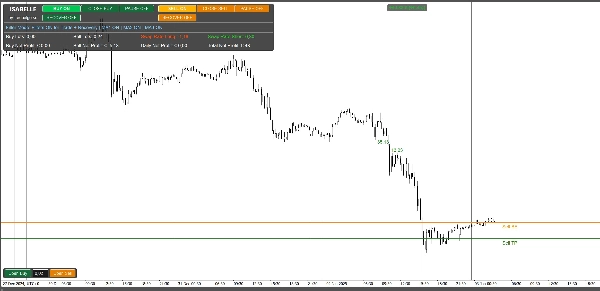
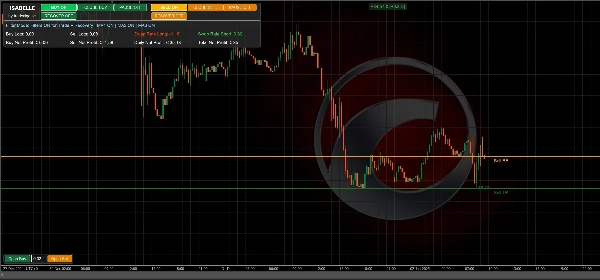
- Precyzyjne wizualizacje: Linie BE/TP/SL/trailing na wykresie oraz czytelne panele zysków pozwalają na szybkie zorientowanie się w ryzyku i postępach.
- Świadomość odzyskiwania: Przełącz tryb odzyskiwania lub automatycznie go aktywuj po przekroczeniu progu. Inteligentnie zmniejszaj cele zysku w trudnych fazach.
- Adaptacja do zmienności: Wygładzony silnik odchylenia standardowego dynamicznie wydłuża lub skraca pauzę między wejściami, aby lepiej dopasować się do aktualnych warunków rynkowych.
Podstawowe możliwości
- Handel siatkowy z konfigurowalnym krokiem, wzrostem wolumenu, maksymalną liczbą zleceń po stronie oraz opcjonalnym stałym SL.
- Dynamiczna pauza oparta na wygładzanej zmienności (okres StdDev + interwał) z ograniczeniami min/max.
- Tryb odzyskiwania z czterema zachowaniami celu: Bez zmian, Połowa, Podzielone na pozycje lub Break-Even.
- Wirtualny Take Profit / Trailing Profit:
-
- Stały TP (punkty od netto breakeven włącznie z prowizjami i swapem), lub
- Wirtualny trailing aktywujący się po osiągnięciu celu.
- Filtry i bezpieczeństwo:
-
- Filtr spreadu, okno handlu, opcjonalne CoG i RSI.
- Panele kontrolne na wykresie:
-
- Podsumowanie zysków (Kupno/Sprzedaż/Dzienny/Całkowity), loty po stronach, swap długi/krótki
- Ręczne przyciski KUP/SPRZEDAJ, przełączniki pauzy po stronach oraz przełączniki odzyskiwania.
- Nakładki wizualne:
-
- Automatyczne rysowanie BE, aktywacji TP, SL oraz (gdy aktywne) Trailing.
Uwaga demo: Demo ze sklepu działa tylko w trybie backtestu do oceny logiki i UI. Do testów na żywo lub forward potrzebna jest licencjonowana wersja.
Sugerowane scenariusze pracy
Siatka bezobsługowa:
Ustaw godziny handlu, odległość kroku, maksymalną liczbę zleceń, bazowy lot i mnożnik; włącz dynamiczną pauzę; pozostaw filtry wyłączone lub lekko nastawione.
Półmanualna kontrola:
Wyłącz zlecenia startowe, użyj ręcznych przycisków panelu do otwarcia początkowego kierunku(-ów), utrzymuj dostępność odzyskiwania i pozwól trailingowi/TP zarządzać wyjściami.
Sesja skoncentrowana na odzyskiwaniu:
Włącz Auto Recovery po N pozycjach, wybierz zmniejszone zachowanie celu i polegaj na wizualizacjach (linie BE/TP + panel) do nadzoru.
Przypomnienie o ryzyku
Isabelle to potężne narzędzie. Jeśli jest źle skonfigurowane lub używane z wysoką dźwignią, handel siatkowy może powodować duże obsunięcia lub katastrofalne straty. Zawsze testuj na demo, stosuj konserwatywne wielkości pozycji i rozważnie korzystaj z filtrów, kontroli timingowych oraz funkcji odzyskiwania.
Pełna referencja parametrów (v6.0.0)
Wszystkie poniższe parametry odzwierciedlają aktualne źródło i wartości domyślne.
Tożsamość / Licencjonowanie
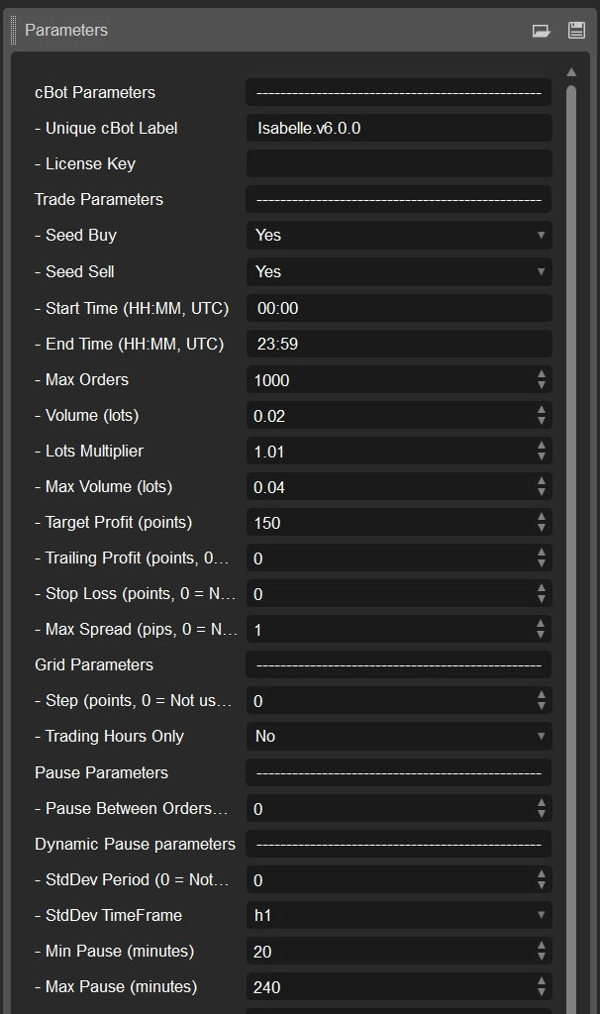
- Etykieta CBot (domyślnie: Isabelle.v6.0.0) — Identyfikator używany do grupowania wszystkich pozycji i historii dla tej instancji. Zmień, gdy uruchamiasz wiele kopii.
- Klucz licencyjny — Wymagany tylko dla licencjonowanych wersji (nie używany w demo ani pełnych testach).
Parametry handlu
- Zlecenie startowe Kupno (domyślnie: WŁ) — Automatycznie otwiera pierwszą pozycję KUPNA, gdy warunki handlu na to pozwalają.
- Zlecenie startowe Sprzedaż (domyślnie: WŁ) — Automatycznie otwiera pierwszą pozycję SPRZEDAŻY, gdy warunki handlu na to pozwalają.
- Czas rozpoczęcia (UTC) (domyślnie: 00:00) — Najwcześniejszy czas, w którym bot może otwierać nowe pozycje.
- Czas zakończenia (UTC) (domyślnie: 23:59) — Najpóźniejszy czas, w którym bot może otwierać nowe pozycje.
- Maksymalna liczba zleceń (domyślnie: 1000) — Maksymalna liczba otwartych pozycji po stronie (KUP lub SPRZEDAJ).
- Wolumen (loty) (domyślnie: 0.02) — Początkowy rozmiar lota dla pierwszej pozycji po każdej stronie.
- Mnożnik lotów (domyślnie: 1.01) — Współczynnik wzrostu dla każdego dodatkowego zlecenia siatki (1.0 = stały rozmiar).
- Maksymalny wolumen (loty) (domyślnie: 0.04) — Maksymalny dopuszczalny rozmiar lota dla pojedynczego zlecenia (po mnożniku).
- Cel zysku (punkty) (domyślnie: 150) — Odległość od ważonego breakevenu do aktywacji take-profit (10 punktów ≈ 1 pip na większości symboli).
- Trailing Profit (punkty) (domyślnie: 0) — Jeśli 0: zamknij na stałym TP. Jeśli >0: użyj wirtualnego trailing stop o tej wielkości po aktywacji TP.
- Stop Loss (punkty) (domyślnie: 0) — Opcjonalny stały SL od ważonego wejścia (0 = wyłączony).
- Maksymalny spread (pipsy) (domyślnie: 1.0) — Zapobiega nowym zleceniom rynkowym, gdy spread ≥ tej wartości (0 = wyłączony).
Parametry siatki
- Krok (punkty) (domyślnie: 0) — Minimalna odległość od ostatniego wejścia przed dodaniem kolejnego zlecenia siatki (0 = brak filtra odległości).
- Tylko godziny handlu (domyślnie: WYŁ) — Jeśli WŁ, zlecenia siatki i startowe występują tylko w oknie czasowym Start–Koniec.
Parametry pauzy
- Pauza między zleceniami (minuty) (domyślnie: 0) — Podstawowy czas odnowienia po stronie między zleceniami siatki; może być modyfikowany przez logikę dynamicznej pauzy.
Dynamiczna pauza (adaptacja do zmienności)
- Okres StdDev (domyślnie: 0) — Okres wstecz dla odchylenia standardowego używanego do adaptacji długości pauzy (0 = wyłączony).
- Interwał StdDev (domyślnie: Godzina) — Interwał czasowy dla próbkowania zmienności.
- Minimalna pauza (minuty) (domyślnie: 20) — Minimalna adaptacyjna pauza przy niskiej zmienności.
- Maksymalna pauza (minuty) (domyślnie: 240) — Maksymalna adaptacyjna pauza przy wysokiej zmienności.
Parametry filtrów (wszystkie opcjonalne)
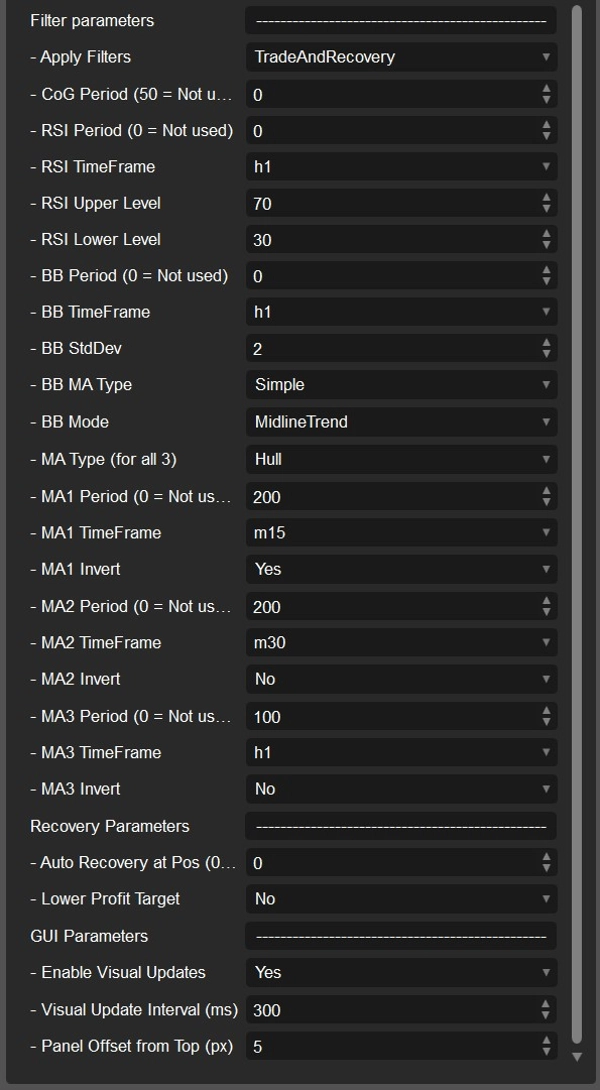
- Stosuj filtry (domyślnie: Auto + Recovery) — Kontroluje, kiedy stosowane są filtry (CoG, RSI, MA, BB). Ręczne zlecenia nigdy nie są filtrowane.
- Okres CoG (domyślnie: 0, 0 = wyłączony) — Wymaga, aby Center of Gravity (CoG) miał nachylenie zgodne z kierunkiem transakcji (Kupno = nachylenie w górę; Sprzedaż = nachylenie w dół).
Filtr RSI
- Okres RSI (domyślnie: 0, 0 = wyłączony) — Włącza filtrowanie oparte na RSI.
- Interwał RSI (domyślnie: Godzina) — Interwał używany do obliczeń RSI.
- Górny poziom RSI (domyślnie: 55) — Wejścia sprzedaży dozwolone tylko, jeśli RSI ≥ tego poziomu (gdy filtr aktywny).
- Dolny poziom RSI (domyślnie: 45) — Wejścia kupna dozwolone tylko, jeśli RSI ≤ tego poziomu (gdy filtr aktywny).
Filtr Bollinger Bands
- Okres BB (domyślnie: 0, 0 = wyłączony) — Okres filtra Bollinger Bands.
- Interwał BB (domyślnie: Godzina) — Interwał używany do obliczeń Bollinger Bands.
- Odchylenie standardowe BB (domyślnie: 2.0) — Współczynnik odchylenia standardowego dla szerokości pasma.
- Typ MA BB (domyślnie: Prosta) — Typ średniej ruchomej używany w Bollinger Bands.
- Tryb BB (domyślnie: MidlineTrend) — Tryb filtra określający, jak Bollinger Bands wpływają na kierunek transakcji.
Filtry trendu Multi-MA
- Typ MA (dla wszystkich) (domyślnie: Hull) — Typ średniej ruchomej stosowany do wszystkich trzech filtrów MA poniżej.
Filtr MA1
- Okres MA1 (domyślnie: 50) — Pierwszy okres średniej ruchomej (0 = wyłączony).
- Interwał MA1 (domyślnie: 15 minut) — Interwał dla MA1.
- Odwrócenie MA1 (domyślnie: Prawda) — Odwraca regułę MA1: KUP, jeśli cena ≤ MA1, SPRZEDAJ, jeśli cena ≥ MA1.
Filtr MA2
- Okres MA2 (domyślnie: 200) — Drugi okres średniej ruchomej (0 = wyłączony).
- Interwał MA2 (domyślnie: 30 minut) — Interwał dla MA2.
- Odwrócenie MA2 (domyślnie: Fałsz) — Odwraca regułę MA2: KUP, jeśli cena ≤ MA2, SPRZEDAJ, jeśli cena ≥ MA2.
Filtr MA3
- Okres MA3 (domyślnie: 100) — Trzeci okres średniej ruchomej (0 = wyłączony).
- Interwał MA3 (domyślnie: Godzina) — Interwał dla MA3.
- Odwrócenie MA3 (domyślnie: Fałsz) — Odwraca regułę MA3: KUP, jeśli cena ≤ MA3, SPRZEDAJ, jeśli cena ≥ MA3.
Parametry odzyskiwania
- Automatyczne odzyskiwanie przy liczbie pozycji (domyślnie: 0 = wyłączone) — Automatycznie włącza tryb odzyskiwania po N otwartych pozycjach po jednej stronie.
- Niższy cel zysku (domyślnie: Nie) — Definiuje, jak cel zysku jest dostosowywany podczas odzyskiwania:
-
- Nie — Zachowaj pełny cel bez zmian.
- Połowa — Użyj połowy TargetProfit.
- PodzieloneNaPozycje — Podziel TargetProfit przez liczbę otwartych pozycji (min. 1 punkt).
- BreakEven — Ustaw cel dokładnie na breakeven (cel = 0).
GUI / Wizualizacje
- Włącz aktualizacje wizualne (domyślnie: WŁ) — Rysuje linie BE, TP, SL i trailing z etykietami zysków na żywo. Wyłącz, aby przyspieszyć backtesty.
- Interwał aktualizacji wizualnej (ms) (domyślnie: 300) — Częstotliwość aktualizacji wizualnych (0 = aktualizuj przy każdym ticku).
- Przesunięcie panelu od góry (px) (domyślnie: 5) — Pionowe przesunięcie górnego panelu, aby uniknąć nakładania się wskaźników na wykresie.
Wizualizacje i panele
- Panel główny (lewy górny róg)
Zysk netto Kupno/Sprzedaż, Dzienny i Całkowity zysk netto, Loty Kupno/Sprzedaż, Stawka swap długa/krótka z intuicyjnym kolorowaniem. - Panel handlowy (lewy dolny róg)
Ręczne przyciski KUP/SPRZEDAJ, przełączniki pauzy po stronach, przełączniki odzyskiwania oraz na żywo informacje o statusie. - Nakładki na wykres
-
- Linia BE (netto prowizji i swapu)
- Linia aktywacji TP (od BE według TargetProfit)
- Opcjonalna linia SL (od ważonego wejścia)
- Wirtualne linie trailingu gdy trailing jest aktywny
Demo vs wersja licencjonowana
- Wersja demo: Tylko backtesting. Używaj jej do oceny logiki, UI i wydajności przy różnych konfiguracjach.
- Wersja licencjonowana: Wymagana do testów na żywo lub forward. Skontaktuj się z autorem w sprawie warunków licencji.
Pierwsze kroki (szybka instrukcja)
Domyślne parametry są zoptymalizowane dla EURUSD na interwale M15 — idealne do wstępnych testów i zapoznania się.
- Przetestuj swój symbol używając domyślnych ustawień z Seed Buy/Sell = WŁ.
-
- Zacznij od konserwatywnego wolumenu i rozsądnej maksymalnej liczby zleceń, aby kontrolować ekspozycję.
- Ustaw wartość kroku i włącz Dynamiczną pauzę z praktycznymi min/max pauzami, aby dostosować się do zmienności rynku.
- Dodaj filtry RSI i/lub CoG, jeśli chcesz wprowadzić kierunkowe nastawienie i ograniczyć nadmierny handel.
- Wybierz między stałym TP a wirtualnym trailingiem:
-
- Użyj Trailing Profit > 0, aby aktywować adaptacyjny tryb trailingu.
- Przemyślanie skonfiguruj zachowanie i progi odzyskiwania oraz przetestuj scenariusze najgorszych obsunięć, aby zrozumieć odporność siatki.
- Gdy wyniki będą stabilne, przeprowadź test forward na demo, używając wersji licencjonowanej, zanim zaczniesz handel na prawdziwe środki.
Podsumowanie
Traders can run Isabelle fully automated with smart timing controls or use on-chart panels for manual intervention, including pausing, recovery toggling, and manual order placement. Visual overlays display breakeven, take-profit activation, stop loss, and trailing profit lines, alongside live profit summaries and swap rate indicators.
The bot incorporates multiple optional trade filters such as Center of Gravity, RSI, Bollinger Bands, and three configurable moving averages to reduce overtrading and introduce directional bias. It supports fixed or virtual trailing take-profit modes and includes safety features like spread filters and trading time windows.
Default settings are optimized for EURUSD on the M15 timeframe, but Isabelle is compatible with all currency pairs, commodities, and indices. The demo version operates in backtesting mode only, while licensed builds enable live and forward testing.