คำอธิบาย
แผงจัดการตำแหน่งผู้จัดการการซื้อขาย เป็นโซลูชันการจัดการความเสี่ยงและตำแหน่งระดับสถาบันขั้นสูงที่ออกแบบมาสำหรับ cTrader ผู้ช่วยการซื้อขายที่ครอบคลุมนี้รวมการกำหนดขนาดตำแหน่งที่แม่นยำ การป้องกันความเสี่ยงหลายชั้น และแผงควบคุมที่ใช้งานง่ายเพื่อช่วยให้นักเทรดดำเนินการซื้อขายอย่างมีวินัยและปกป้องทุนของพวกเขา
🎯 คุณสมบัติหลัก
การจัดการความเสี่ยง
- ✅ การกำหนดขนาดตำแหน่งแบบไดนามิก
- ✅ การป้องกันการขาดทุนรายวัน
- ✅ ล็อกความเสี่ยงอย่างเข้มงวด
- ✅ การป้องกัน DCA
- ✅ ขีดจำกัดความเสี่ยงสูงสุด
การจัดการตำแหน่ง
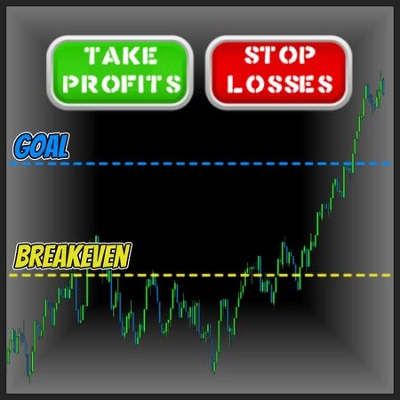
- ✅ ระบบทำกำไรหลายระดับ
- ✅ เบรกอีเวนต์อัตโนมัติ
- ✅ การหยุดตามหลัง
- ✅ ปิดบางส่วน
- ✅ แผนภูมิแบบโต้ตอบ - ลากเส้น SL/TP บนแผนภูมิได้โดยตรง
เครื่องมือการซื้อขาย
- ✅ การซื้อขายด้วยคลิกเดียว
- ✅ แผงควบคุมแบบภาพ - UI ที่สะอาดและเป็นมืออาชีพ
- ✅ การปิดฉุกเฉิน
ประเภทบัญชี
- ✅ ฟอเร็กซ์ (ทุกคู่)
- ✅ โลหะ (ทอง, เงิน)
- ✅ ดัชนี (US30, SPX500, ฯลฯ)
- ✅ สินค้าโภคภัณฑ์ (น้ำมัน, ฯลฯ)
- ✅ คริปโต (Bitcoin, Ethereum, ฯลฯ)
ความเข้ากันได้ของสัญลักษณ์
- ใช้งานได้กับ สัญลักษณ์ใดก็ได้ ที่มีอยู่ในโบรกเกอร์ของคุณ
- ตรวจจับขนาด pip/tick อัตโนมัติ
- รองรับ pip เศษส่วน (โบรกเกอร์ 5 หลัก)
- จัดการสเปรดที่เปลี่ยนแปลงได้
เวอร์ชัน: 1.0
อัปเดตล่าสุด: 2026
หมวดหมู่: การจัดการความเสี่ยง & การกำหนดขนาดตำแหน่ง
📖 วิธีใช้
1. การตั้งค่าเริ่มต้น
1. แนบบอทกับแผนภูมิ
2. เลือกธีม (มืด/สว่าง) และตำแหน่งแผงควบคุม (มุมบนซ้าย/ขวา)
3. ตั้งค่าระดับความเสี่ยงเริ่มต้นของคุณ (แนะนำ: 0.5-2% ต่อการซื้อขาย)
4. กำหนดค่า Stop Loss และ Take Profit เป็น pips
2. การตั้งค่าความเสี่ยง
- เปอร์เซ็นต์ความเสี่ยงเริ่มต้น: เปอร์เซ็นต์ของทุนในบัญชีที่เสี่ยงต่อการซื้อขายแต่ละครั้ง
- เปอร์เซ็นต์ความเสี่ยงสูงสุด: ความเสี่ยงรวมสูงสุดของตำแหน่งที่เปิดทั้งหมด
- ระยะห่าง Stop ขั้นต่ำ: ป้องกันการตั้งจุดหยุดที่ใกล้เกินไป
- ระยะห่างคำสั่งรอดำเนินการ: ระยะห่างในหน่วย pips สำหรับคำสั่ง Limit/Stop
3. การป้องกันการขาดทุนรายวัน
✓ เปิดใช้งานการป้องกันการขาดทุนรายวัน
✓ ตั้งค่าขีดจำกัดการขาดทุนรายวัน % (เช่น 2% = หยุดซื้อขายหลังขาดทุน 2% ต่อวัน)
→ บอทจะบล็อกการซื้อขายใหม่ทั้งหมดเมื่อถึงขีดจำกัด
→ การป้องกันยังคงอยู่แม้บอทจะถูกรีสตาร์ท
4. การล็อกความเสี่ยงอย่างเข้มงวด (เบรกเกอร์วงจร)
✓ จำนวนการขาดทุนติดต่อกันสูงสุด: หยุดหลังจากการซื้อขายที่ขาดทุน X ครั้งติดต่อกัน
✓ เปอร์เซ็นต์การลดลงสูงสุด: หยุดหากทุนลดลง X% จากจุดเริ่มต้นของเซสชัน
✓ จำนวนเงินลดลงสูงสุด: หยุดหากทุนลดลง $X จากจุดเริ่มต้นของเซสชัน
→ การซื้อขายถูกล็อกจนกว่าจะถึงเซสชันการซื้อขายถัดไป (เที่ยงคืนตามเวลาของเซิร์ฟเวอร์)
5. การตั้งค่าการทำกำไรหลายระดับ
TP1: ราคา + ปิด % (เช่น 50% ของตำแหน่ง) → ตัวเลือก: ย้าย BE ที่ TP1
TP2: ราคา + ปิด % (เช่น 25% ของตำแหน่ง) → ตัวเลือก: ย้ายจุดเข้า +1/+2 pips
TP3: ราคา + ปิด % (เช่น 25% ของตำแหน่ง) → ปิดขั้นสุดท้าย
→ รวมทั้งหมดต้องเท่ากับ 100%
6. การป้องกัน DCA (ต่อต้านมาร์ติงเกล)
✓ เปิดใช้งาน "จำกัดการเพิ่มล็อต DCA"
→ บล็อกการซื้อขายที่เพิ่มขนาดตำแหน่งเมื่อเทียบกับตำแหน่งที่มีอยู่
→ ป้องกันกลยุทธ์การเฉลี่ยลดที่อันตราย
→ รับประกันความเสี่ยงที่สม่ำเสมอต่อการซื้อขาย
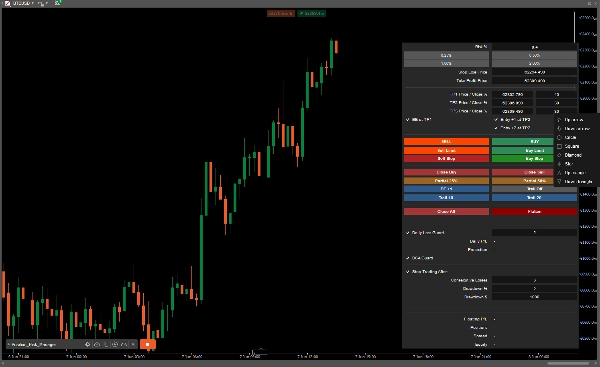
7. แผงควบคุมการดำเนินการซื้อขาย
คำสั่งตลาด:
- ปุ่มซื้อ/ขาย → ดำเนินการตลาดทันทีพร้อม SL/TP อัตโนมัติ
คำสั่งรอดำเนินการ:
- Buy Limit/Sell Limit → ต่ำกว่าหรือสูงกว่าราคาปัจจุบัน
- Buy Stop/Sell Stop → สูงกว่าหรือต่ำกว่าราคาปัจจุบัน
การดำเนินการด่วน:
- ปิดซื้อ/ขาย → ปิดตำแหน่งทั้งหมดของประเภทที่ระบุ
- ปิดทั้งหมด → ปิดตำแหน่งที่จัดการทั้งหมด
- ปิดฉุกเฉิน → ปิดทั้งหมด + ยกเลิกคำสั่งรอดำเนินการ
- ปิดบางส่วน 25%/50% → ลดขนาดตำแหน่ง
- BE +1 → ย้ายจุดหยุดทั้งหมดไปยังจุดเข้า + 1 pip
- Trail 10/20 → เปิดใช้งาน trailing stop (pips)
⚠️ หมายเหตุสำคัญ
ข้อจำกัดความเสี่ยง
- บอทนี้เป็น เครื่องมือจัดการความเสี่ยง ไม่ใช่เครื่องมือสร้างกลยุทธ์การซื้อขาย
- คุณรับผิดชอบต่อการตัดสินใจซื้อขายทั้งหมด
- ผลการดำเนินงานที่ผ่านมาไม่รับประกันผลลัพธ์ในอนาคต
- ทดสอบในบัญชีทดลองก่อนการซื้อขายจริงเสมอ
- อย่าเสี่ยงเกินกว่าที่คุณจะสามารถเสียได้
แนวทางปฏิบัติที่ดีที่สุด
- เริ่มต้นเล็กๆ: เริ่มต้นด้วย 0.25-0.5% ความเสี่ยงต่อการซื้อขาย
- ใช้ขีดจำกัดรายวัน: เปิดใช้งานการป้องกันการขาดทุนรายวันเสมอ (สูงสุด 2-3%)
- เปิดใช้งานการล็อกอย่างเข้มงวด: ป้องกันการซื้อขายแก้แค้นทางอารมณ์
- ตรวจสอบอย่างสม่ำเสมอ: ตรวจสอบสถิติแผงควบคุมและกำไร/ขาดทุนลอยตัว
- ทดสอบย้อนหลัง: ทดสอบกลยุทธ์ของคุณก่อนการใช้งานจริง
การแก้ไขปัญหา
- คำสั่งไม่ดำเนินการ? → ตรวจสอบว่าการป้องกันการขาดทุนรายวันหรือการล็อกความเสี่ยงอย่างเข้มงวดเปิดใช้งานอยู่หรือไม่
- ขนาดล็อตผิดพลาด? → ตรวจสอบการตั้งค่าเปอร์เซ็นต์ความเสี่ยงและระยะห่าง Stop ขั้นต่ำ
- DCA บล็อกคำสั่งซื้อขาย? → ปิดใช้งานการป้องกัน DCA หากการเพิ่มขนาดตำแหน่งเป็นเจตนา
สรุป
Key risk management features include dynamic position sizing, daily loss guard to halt trading after a set loss percentage, hard risk lock to stop trading after consecutive losses or drawdown limits, DCA protection to prevent increasing position sizes, and a maximum risk cap.
Position management capabilities offer a multi take-profit system with customizable partial closes, automatic break-even adjustments, trailing stops, and interactive charts allowing direct drag-and-drop of stop loss and take profit lines.
The trading panel supports one-click market and pending order execution (buy/sell, limit, stop), quick actions such as closing specific or all positions, emergency flattening, partial position reduction, break-even moves, and trailing stop activation.
Compatible with all symbols available from the broker, it supports Forex pairs, metals (Gold, Silver), indices (US30, SPX500), commodities (Oil), and cryptocurrencies (Bitcoin, Ethereum). It automatically detects pip/tick sizes, supports fractional pips, and handles variable spreads.
The bot emphasizes disciplined trading with configurable risk parameters, daily loss limits, and circuit breakers to protect capital and prevent overtrading. It is a risk management tool, not a trading strategy generator, and requires user-defined trading decisions.