Descrição
Alertas de Linha de Tendência
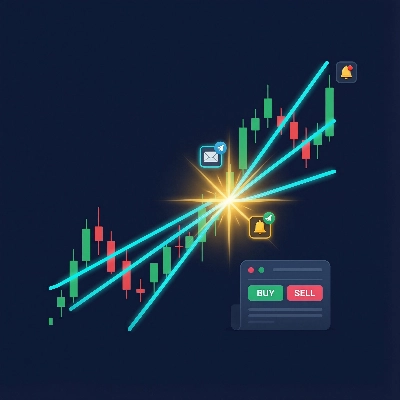
Um indicador que monitora linhas de tendência desenhadas à mão em gráficos de preços e dispara alertas multicanais — e opcionalmente realiza operações — quando o preço cruza uma linha de tendência.
O Que Ele Faz
Você desenha linhas de tendência no seu gráfico. O indicador as observa. Quando o preço cruza uma linha, ele:
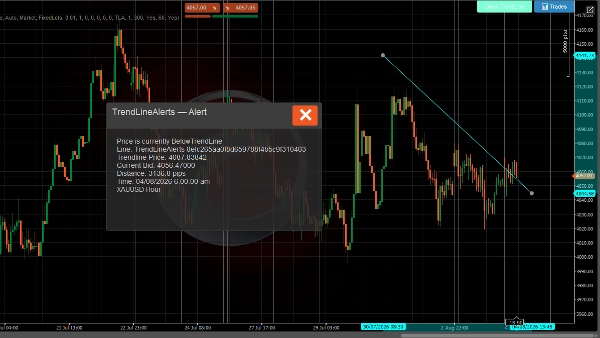
- Mostra um popup no gráfico com os detalhes do cruzamento
- Toca um som de notificação
- Envia um e-mail (opcional)
- Envia uma mensagem no Telegram via bot (opcional)
- Realiza uma operação (opcional — ordem de mercado, limite, stop ou stop-limit)
Sistema de Alerta
- Detecção de cruzamento de linha de tendência — dispara a cada tick quando o preço cruza acima ou abaixo de uma linha de tendência monitorada
- Mensagens ricas — inclui preço da linha de tendência, oferta atual, distância em pips, instrumento e período de tempo
- Limitação de taxa — tempo de espera configurável por linha de tendência evita alertas duplicados
- Histórico de alertas — últimos 500 alertas armazenados e visualizáveis no Painel de Operações
- Entrega multicanal — popup, som, e-mail e Telegram simultaneamente
Sistema de Negociação
Quando a negociação está ativada, um evento de cruzamento também pode realizar uma operação:
- Todos os tipos de ordens do C-Trader — mercado, limite de compra/venda, stop de compra/venda, stop-limit de compra/venda
- Direção automática — preço cruza para baixo → vender, cruza para cima → comprar (ou definir manualmente por linha)
- Stop loss e take profit — especificados em pips, convertidos automaticamente para níveis de preço
- Dois modos de volume — lotes fixos ou baseado em risco (% do saldo da conta)
- Substituições por linha de tendência — cada linha de tendência pode ter suas próprias configurações de negociação (direção, volume, SL / TP, tipo de ordem)
- Gerenciamento de negociações — máximo de negociações por linha, tempo de espera entre negociações, cancelamento automático de ordens pendentes quando uma linha de tendência é excluída
- Monitoramento do ciclo de vida da negociação — acompanha execuções, hits de SL/TP, rejeições e cancelamentos com notificações para cada evento
Interface do Usuário
Uma barra de ferramentas aparece no gráfico (posição configurável) com:
- Desenhar Linha de Tendência — coloca uma nova linha de tendência interativa no gráfico
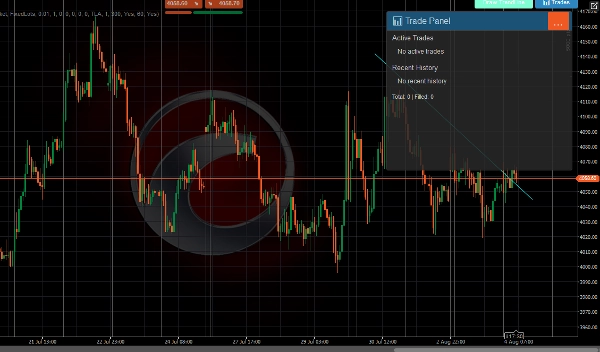
- 📊 Negociações — abre um painel mostrando negociações ativas, histórico recente e estatísticas
Notificações
Canal Descrição
Popup Diálogo no gráfico com cabeçalho colorido (verde = TP atingido, vermelho = SL/rejeição, azul = ordem realizada)
Som som de anúncio do cTrader
E-mail Enviado via sistema de e-mail integrado do cTrader
Telegram Enviado via API do Bot do Telegram para canais configurados
Todos os canais recebem o mesmo formato de mensagem rica incluindo instrumento, período, preço atual, detalhes da linha de tendência, e informações da negociação quando aplicável.
USO
Desenhando Linhas de Tendência
Usando o botão da barra de ferramentas
- Clique Desenhar Linha de Tendência na barra de ferramentas
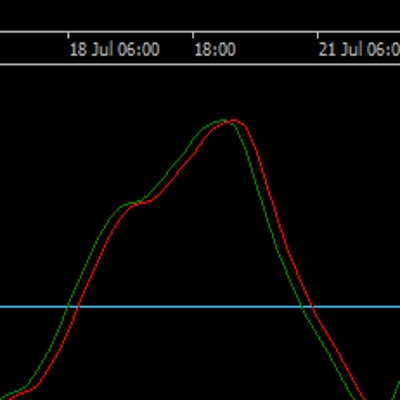
- Uma linha de tendência horizontal ciano aparece no gráfico
- Arraste as extremidades para posicioná-la no nível de preço desejado
- O indicador começa automaticamente a monitorá-la para cruzamentos
Desenhando manualmente
- Desenhe qualquer linha de tendência usando as ferramentas de desenho do cTrader
- Nomeie-a com o prefixo
TrendLineAlertsseguido por um espaço (ex.,TrendLineAlerts support1) - O indicador a reconhece e começa a monitorar
Configurando Alertas
Posicionamento do Botão
- Posicionamentos do Botão grupo → escolha em qual canto a barra de ferramentas aparece (TopoEsquerdo, TopoDireito, InferiorEsquerdo, InferiorDireito)
Notificações do Telegram
- Defina Usar Notificações do Telegram para
true - Digite sua Chave do Bot do Telegram (do @BotFather)
- Digite o Nome do Canal ou ID do Chat (deixe em branco para descobrir automaticamente pelas interações do bot)
Notificações por E-mail
- Defina Usar Notificações por E-mail para
true(padrão) - Digite seu Endereço de E-mail
- Os e-mails são enviados via sistema de notificações integrado do cTrader
Tempo de Espera do Alerta
- Tempo de Espera do Alerta (segundos) — tempo mínimo entre alertas duplicados para a mesma linha de tendência (padrão: 60s)
- Ativar Histórico de Alertas — armazena os últimos 500 alertas (padrão: true)
Configurando a Negociação
Ativar Negociação
- Defina Ativar Negociação para
true(padrão: false) - Configure os padrões globais abaixo
Tipo de Ordem
- Tipo de Ordem Padrão — qual tipo de ordem realizar no cruzamento:
-
Market— executa imediatamente ao preço atualLimit— coloca uma ordem limite pendente no preço da linha de tendência ± deslocamentoStop— coloca uma ordem stop pendente no preço da linha de tendência ± deslocamentoStopLimit— coloca uma ordem stop-limit pendente
Direção
- Direção Padrão:
-
Auto— preço cruza para baixo da linha → Vender, cruza para cima → ComprarBuy— sempre comprar no cruzamentoSell— sempre vender no cruzamento
Volume
- Modo de Volume:
-
FixedLots— usa o valor de Volume (lotes) diretamente (ex., 0.01)RiskPercent— calcula o tamanho do lote a partir do saldo da conta, % de risco e distância do stop loss
- Volume (lotes) — tamanho fixo do lote ao usar o modo FixedLots
- Percentual de Risco — porcentagem do saldo da conta a arriscar por operação (ex., 1.0 = 1%)
Stop Loss / Take Profit
- Stop Loss (pips) — distância da entrada em pips (0 = sem SL)
- Take Profit (pips) — distância da entrada em pips (0 = sem TP)
Configurações de Ordem Pendente
Relevante apenas para tipos de ordem Limit, Stop, e StopLimit:
- Deslocamento do Preço Limite (pips) — distância do preço da linha de tendência para ordens limite
- Deslocamento do Preço Stop (pips) — distância do preço da linha de tendência para ordens stop
- Expiração (minutos) — quando a ordem pendente expira (0 = Good-Til-Cancelled)
Gerenciamento de Negociações
- Etiqueta da Ordem — prefixo para etiquetas de posições (padrão:
TLA) - Máximo de Negociações Por Linha — máximo de negociações simultâneas por linha de tendência (padrão: 1)
- Tempo de Espera (segundos) — tempo mínimo entre negociações na mesma linha de tendência (padrão: 300)
Notificações de Resultado de Negociação
- Notificar Resultados de Negociação — envia alertas quando negociações são executadas, SL/TP atingidos ou rejeitadas (padrão: true)
Substituições por Linha de Tendência
Por padrão, todas as linhas de tendência usam as configurações globais de negociação acima.
Visualizando Negociações
Clique no 📊 Negociações na barra de ferramentas para abrir o Painel de Negociações:
- Negociações Ativas — mostra todas as posições abertas e ordens pendentes vinculadas às linhas de tendência
- Histórico Recente — últimas 5 negociações fechadas/canceladas/rejeitadas com ícones de status:
-
- 🛑 Stop Loss atingido
- 🎯 Take Profit atingido
- ❌ Rejeitado
- ⚠️ Cancelado
- Estatísticas — total de negociações e contagem de execuções
Ciclo de Vida da Linha de Tendência
Evento O Que Acontece
Linha desenhada/atualizada O indicador calcula o estado do preço, reseta o alerta para Pendente
Preço cruza a linha O alerta dispara (popup + som + e-mail + Telegram), operação realizada se ativada
Linha excluída Os dados de monitoramento são apagados, quaisquer ordens pendentes para essa linha são canceladas
Guia de Cores do Popup
Cor Significado
Cinza escuro Alerta de cruzamento de preço
Azul Ordem realizada
Verde (azulado) Negociação executada
Verde Take profit atingido
Vermelho Stop loss atingido ou negociação rejeitada
Amarelo Ordem cancelada
Negociar envolve riscos. Desempenho passado não garante resultados futuros.
Resumo
Key features include:
- Real-time detection of price crossing above or below tracked trend lines on every tick.
- Rich alert messages containing trend line price, current bid, distance in pips, instrument, and timeframe.
- Configurable alert cooldowns to prevent duplicate notifications.
- Storage and display of the last 500 alerts in a Trade Panel.
- Multi-channel alert delivery: popup, sound, email, and Telegram simultaneously.
When trading is enabled, the indicator supports all cTrader order types (market, limit, stop, stop-limit) with automatic direction setting based on price crossing (buy above, sell below) or manual configuration per trend line. It includes stop loss and take profit settings, two volume modes (fixed lots or risk-based), and per-trend line trade overrides. Trade management features include limits on concurrent trades per line, cooldowns between trades, and automatic cancellation of pending orders when a trend line is deleted. Trade lifecycle events such as fills, SL/TP hits, rejections, and cancellations generate notifications.
The user interface provides a configurable toolbar for drawing trend lines and accessing a Trade Panel that displays active trades, recent history, and statistics. Alerts use color-coded popups to indicate event types (e.g., order placed, trade filled, stop loss hit).