

Descrição
Usar Renko
Como Usar o Bot de Negociação em Grade
Este guia explica como usar o Bot de Negociação em Grade de forma eficaz. O bot automatiza a negociação em grade colocando ordens de compra e venda em intervalos de preço definidos, permitindo que os traders lucrem com os movimentos do mercado.
Passo 1: Configure os Parâmetros
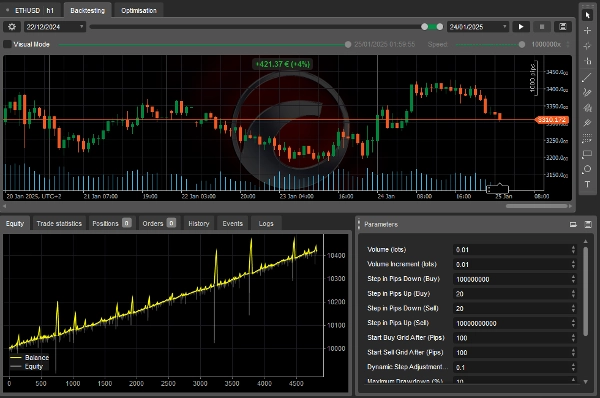
O bot permite que você personalize várias configurações para se adequar à sua estratégia de negociação. Abaixo estão os principais parâmetros:
Configurações de Volume
- Volume Inicial (lotes) – O tamanho inicial da negociação.
- Incremento de Volume (lotes) – A quantidade adicionada a cada nova negociação.
Configurações do Passo da Grade
- Passo em Pips para Baixo (Compra) – Distância abaixo da última ordem de compra para a próxima compra.
- Passo em Pips para Cima (Compra) – Distância acima da última ordem de compra para a próxima compra.
- Passo em Pips para Baixo (Venda) – Distância abaixo da última ordem de venda para a próxima venda.
- Passo em Pips para Cima (Venda) – Distância acima da última ordem de venda para a próxima venda.
Ativação da Grade
- Iniciar Grade de Compra Após (Pips) – O aumento de preço necessário para iniciar a grade de compra.
- Iniciar Grade de Venda Após (Pips) – A queda de preço necessária para iniciar a grade de venda.
Ajustes Dinâmicos
- Fator de Ajuste Dinâmico do Passo – Ajusta o tamanho do passo da grade com base no número de negociações abertas.
Gestão de Risco
- Máxima Perda (%) – A perda máxima como porcentagem do saldo da conta.
- Usar Perda Móvel – Se ativado, o bot acompanha o pico de patrimônio para ajustar os limites de perda.
Condições de Lucro
- Lucro Líquido Máximo (Apenas Grade de Compra) – O lucro máximo antes de fechar todas as posições de compra.
- Lucro Líquido Máximo (Apenas Grade de Venda) – O lucro máximo antes de fechar todas as posições de venda.
- Lucro Líquido Máximo (Ambas as Grades) – O lucro máximo permitido em ambas as grades.
Passo 2: Inicie o Bot
- Defina Suas Preferências – Ajuste as configurações com base no seu nível de risco e estratégia.
- Garanta Fundos Suficientes – Certifique-se de que sua conta de negociação tenha margem suficiente.
- Execute o Bot – Clique em "Iniciar" para ativar a negociação. O bot abrirá e gerenciará posições automaticamente.
Passo 3: Monitore o Bot
- Verifique as Negociações Abertas – O bot segue a estratégia de grade para entrar e sair das posições.
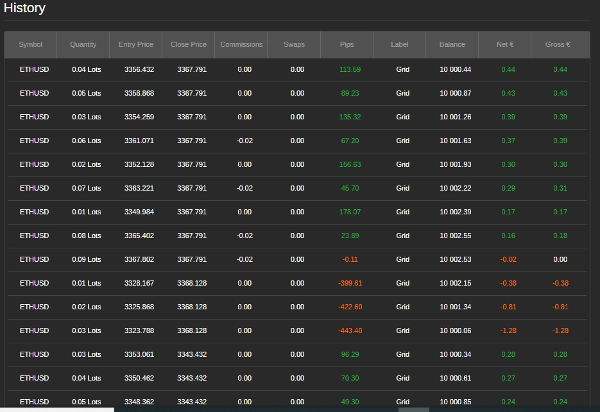
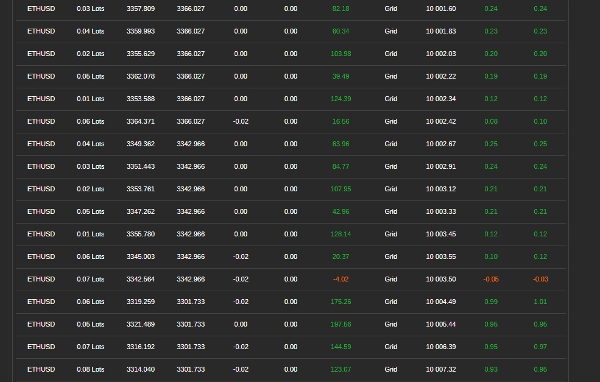
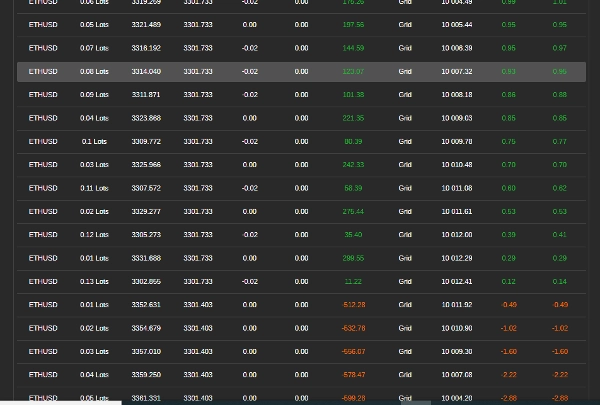
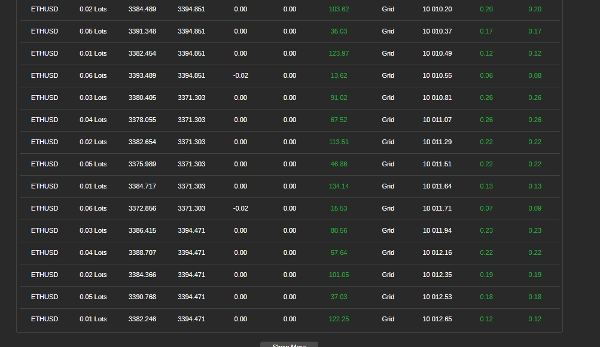
- Acompanhe o Desempenho – Revise lucro, perda máxima e histórico de negociações. O bot fechará negociações se os limites de lucro ou risco forem atingidos.
Passo 4: Pare ou Reinicie o Bot
- Parando o Bot – Clique em "Parar" para interromper a negociação e fechar todas as posições.
- Reiniciando o Bot – Se o bot parar por atingir seus limites, você pode reiniciá-lo manualmente.
Dicas para Melhores Resultados
- Comece Pequeno – Use um tamanho de negociação pequeno e distância de passo para testes.
- Ajuste as Configurações – Otimize os passos da grade, incrementos de volume e níveis de risco com base nas condições do mercado.
- Observe a Perda Máxima – Garanta que as perdas permaneçam dentro da sua tolerância ao risco.
Informações de Contato
Para suporte ou dúvidas:
- WhatsApp: +27 73 714 0490
- Email: siyabongamsg764109@gmail.com
Aviso de Negociação
Negociar envolve riscos e pode não ser adequado para todos os investidores. Não há garantia de lucros, e o desempenho passado não indica resultados futuros. Você é responsável por todas as decisões de negociação. Use este bot com cautela, realize testes históricos e negocie em uma conta demo antes de operar ao vivo. Procure aconselhamento financeiro profissional se necessário.
Seguindo estes passos, você pode usar o Bot de Negociação em Grade para automatizar sua estratégia de negociação. Sempre negocie com responsabilidade.
Evitar negociar durante grandes eventos de notícias é crucial porque esses períodos geralmente são marcados por alta volatilidade e movimentos de preços imprevisíveis. Negociar notícias pode levar a comportamentos erráticos do mercado que desviam das tendências típicas, aumentando o risco de perdas. Da mesma forma, negociar em um mercado lateral — onde os preços se movem horizontalmente sem direção clara — pode resultar em falsos rompimentos e oportunidades limitadas de lucro, dificultando a implementação de uma estratégia coerente. Além disso, dias de baixo volume geralmente apresentam liquidez reduzida, o que pode causar spreads mais amplos e slippage, complicando ainda mais a execução das negociações. Ao evitar negociações em notícias, mercados laterais e períodos de baixo volume, os traders podem focar em condições de mercado mais estáveis que oferecem tendências mais claras e melhor execução, aprimorando, em última análise, seu desempenho geral de negociação.
Resumo
Risk management features include setting a maximum drawdown percentage and an optional trailing drawdown that tracks peak equity to adjust limits. Profit conditions allow defining maximum net profit thresholds for buy grids, sell grids, or both combined, upon which the bot closes positions.
To operate, users configure settings according to their strategy and risk tolerance, ensure sufficient margin, and start the bot to automatically manage trades. Monitoring involves reviewing open trades, profits, drawdown, and trade history, with automatic closure of trades when limits are reached. The bot can be stopped to close all positions or restarted manually if stopped due to limit triggers.
Best practices include starting with small trade sizes and step distances, adjusting settings based on market conditions, and avoiding trading during major news events, ranging markets, or low volume periods to reduce volatility and execution risks.
Avaliações de clientes
5 | 25 % | |
4 | 25 % | |
3 | 50 % | |
2 | 0 % | |
1 | 0 % |
Conversa
Perguntas frequentes
Mais deste autor










Preço