
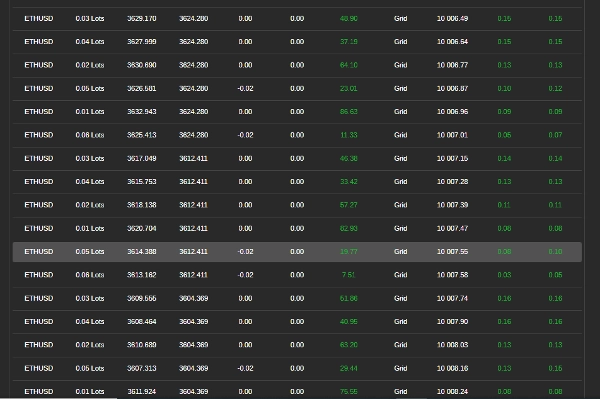
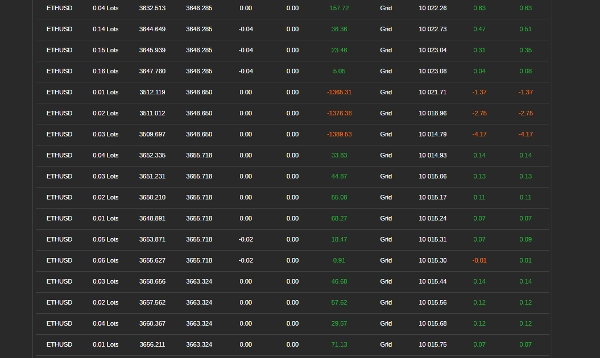
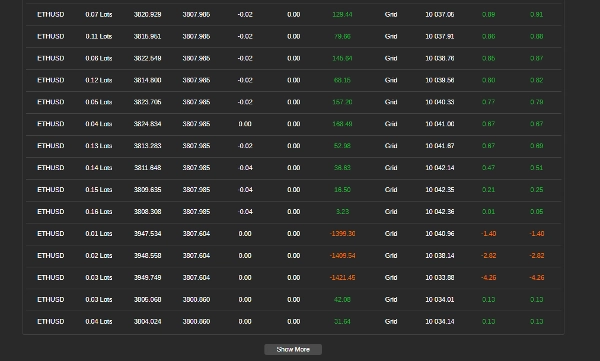

Description
Comment utiliser le bot de trading en grille avec RSI
Ce bot automatise le trading en grille en utilisant l'indice de force relative (RSI) pour guider les entrées et sorties de trades. Il gère les positions selon des règles prédéfinies afin de maximiser les profits tout en contrôlant les risques. Suivez ces étapes pour configurer, paramétrer et utiliser efficacement le bot.
Étape 1 : Configuration du bot
- Ajouter le bot à votre plateforme de trading
-
- Ouvrez votre plateforme de trading (par exemple, cTrader).
- Allez dans la section « Robots » et ajoutez le bot à votre graphique.
- Attacher le bot à une paire de trading
-
- Sélectionnez une paire de devises (par exemple, EUR/USD, GBP/USD) sur laquelle vous souhaitez que le bot trade.
- Assurez-vous que votre compte dispose de fonds suffisants
-
- Vérifiez que votre compte a un solde suffisant pour supporter les trades, car le trading en grille implique plusieurs positions ouvertes.
Étape 2 : Configuration des paramètres du bot
Le bot permet une personnalisation selon les conditions du marché et la tolérance au risque. Voici les principaux paramètres que vous pouvez ajuster :
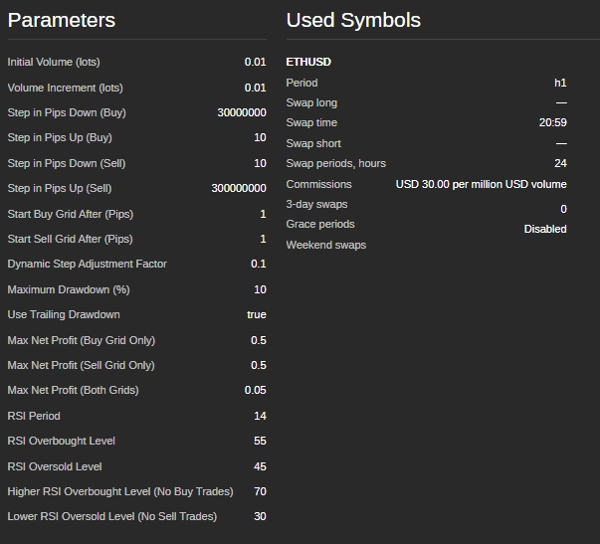
Paramètres du volume de trading
- Taille initiale du trade (lots) – La taille du premier trade dans la grille.
- Incrément de volume (lots) – L'augmentation de la taille du trade après chaque position.
Niveaux de la grille (espacement des trades)
- Pas d'achat (pips) – La distance entre les ordres d'achat consécutifs.
- Pas de vente (pips) – La distance entre les ordres de vente consécutifs.
- Début de la grille d'achat (pips) – Le mouvement de prix requis avant que les trades d'achat ne commencent.
- Début de la grille de vente (pips) – Le mouvement de prix requis avant que les trades de vente ne commencent.
Conditions de trading basées sur le RSI
- Période RSI – Le nombre de chandeliers utilisés pour calculer le RSI.
- Niveau de surachat – Si le RSI dépasse ce niveau, le marché est considéré comme suracheté (zone potentielle de vente).
- Niveau de survente – Si le RSI descend en dessous de ce niveau, le marché est considéré comme survendu (zone potentielle d'achat).
- Niveau RSI zone sans achat – Si le RSI est trop élevé, le bot évite d'acheter.
- Niveau RSI zone sans vente – Si le RSI est trop bas, le bot évite de vendre.
Fonctions de gestion des risques
- Drawdown maximal (%) – La perte maximale autorisée avant que le bot arrête de trader.
- Drawdown suiveur – Ajuste dynamiquement la limite de drawdown maximal à mesure que l'équité du compte augmente.
- Objectif de profit par grille – Le bot ferme tous les trades d'une grille une fois que le profit total atteint cette valeur.
Étape 3 : Lancer le bot
- Vérifier les paramètres
-
- Assurez-vous que tous les paramètres sont définis selon votre stratégie de gestion des risques.
- Démarrer le bot
-
- Cliquez sur le bouton « Démarrer » dans la plateforme.
- Le bot commencera à analyser le marché et à exécuter les trades automatiquement.
Étape 4 : Surveiller et gérer les trades
- Vérifier les journaux de trading
-
- Le bot fournit des mises à jour en temps réel sur ses actions dans la fenêtre de journal de la plateforme.
- Surveiller le drawdown du compte
-
- Suivez le solde de votre compte pour vous assurer que les pertes ne dépassent pas les limites acceptables.
- Revoir les profits et pertes
-
- Le bot ferme automatiquement les positions lorsque les objectifs de profit sont atteints.
Étape 5 : Arrêter le bot
- Arrêt manuel
-
- Si vous souhaitez arrêter le trading, cliquez sur le bouton « Arrêter ».
- Arrêt automatique
-
- Le bot s'arrête automatiquement si le drawdown maximal est atteint ou si le solde du compte devient trop faible pour ouvrir de nouveaux trades.
Conseils pour une meilleure performance
- Tester d'abord sur un compte démo – Avant d'utiliser de l'argent réel, testez le bot pour comprendre son comportement.
- Ajuster les paramètres selon les conditions du marché – Le bot fonctionne mieux dans des marchés latéraux ou légèrement tendance.
- Surveiller les actualités et événements du marché – Évitez d'exécuter le bot pendant les événements économiques majeurs ou les publications de nouvelles.
- Éviter les marchés à faible volume – Trader pendant les périodes de faible activité du marché peut entraîner une mauvaise exécution et un risque accru.
Paramètres d'exemple pour EUR/USD
- Taille initiale du trade : 0,01 lots
- Pas de trade : 20 pips
- Période RSI : 14
- Niveau RSI surachat : 70
- Niveau RSI survente : 30
- Drawdown maximal : 5%
- Objectif de profit par grille : 5 $
Besoin d'aide ?
Si vous rencontrez des problèmes ou avez des questions, contactez l'équipe de support du bot à siyabongamsg764109@gmail.com ou Whats App +2773 714 0490.
Éviter de trader pendant les événements majeurs d'actualité est crucial car ces périodes sont souvent marquées par une volatilité accrue et des mouvements de prix imprévisibles. Le trading d'actualité peut entraîner un comportement erratique du marché qui dévie des tendances habituelles, augmentant le risque de pertes. De même, trader dans un marché en range — où les prix évoluent latéralement sans direction claire — peut provoquer de faux cassures et des opportunités de profit limitées, rendant difficile la mise en œuvre d'une stratégie cohérente. De plus, les jours à faible volume présentent généralement une liquidité réduite, ce qui peut causer des écarts plus larges et du slippage, compliquant davantage l'exécution des trades. En évitant le trading d'actualité, les marchés en range et les périodes de faible volume, les traders peuvent se concentrer sur des conditions de marché plus stables offrant des tendances plus claires et une meilleure exécution, améliorant ainsi leurs performances globales de trading.
Résumé
Risk management features allow users to set maximum drawdown limits, trailing drawdown adjustments, and profit targets per grid, enabling the bot to stop trading automatically under specified loss conditions. The bot supports trading on currency pairs like EUR/USD and GBP/USD, with example settings including a 0.01 lot initial trade size, 20-pip trade steps, RSI period of 14, and a 5% max drawdown.
Users add the bot to their trading platform, attach it to a chosen trading pair, configure settings according to market conditions and risk tolerance, and start the bot to begin automated trading. The bot provides real-time trade logs and manages positions to close trades when profit targets are met. It is recommended to test the bot on a demo account and avoid trading during major news events, ranging markets, or low-volume periods for optimal performance.
Avis clients
5 | 100 % | |
4 | 0 % | |
3 | 0 % | |
2 | 0 % | |
1 | 0 % |
Discussion
Questions fréquentes
Plus de cet auteur










Prix