


Açıklama
Size => Pozisyon Yöneticisi ile tanıştırayım
- Hem Tüccarlar hem de Geliştiriciler için tümleşik Ticaret Yönetimi
Tüccarlar için => Kârları koruyun, Zararları sınırlandırın ve Yapılandırılabilir girdilerle disiplini uygulayın.
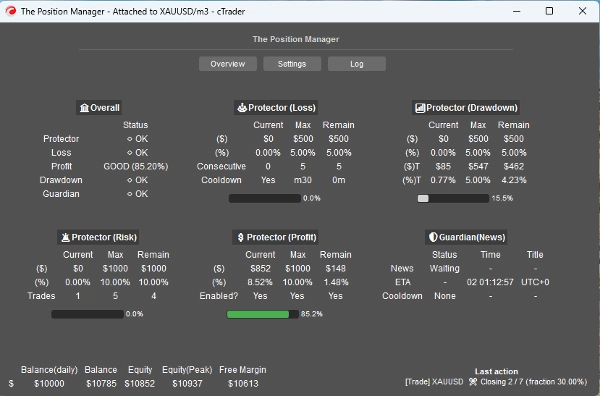
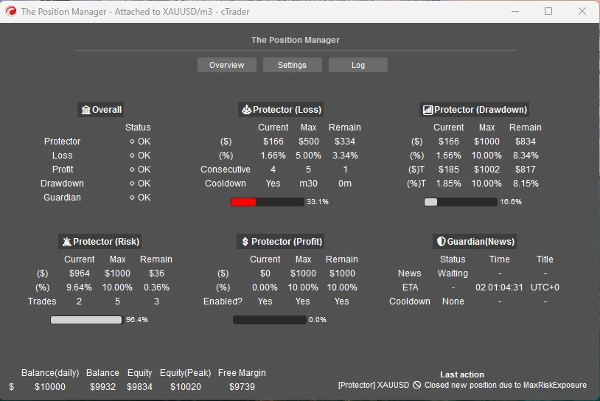
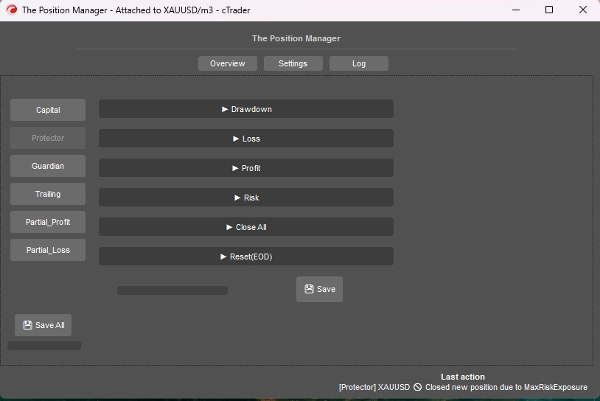
Pozisyon Yöneticisi adını haklı çıkaran 4 modüle sahiptir:
- Portföy Koruyucu
- Koruyucu Ticaret
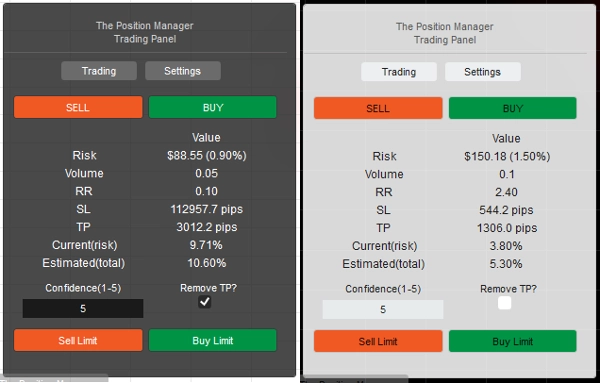
- Risk Yöneticisi (manuel/yarı otomatik ticaret için)
- Ticaret Yöneticisi (takip eden TP, kısmi TP/SL)
Her biri daha iyi yönetim için alt modüllere sahiptir.
Kullanım durumları:
- Masaüstü, Mobil ve Web'de ticaret yaparken portföy koruması + akıllı ölçeklendirme arayan Tüccarlar
-
- Ticaretinizi tamamen Masaüstü üzerinden yapıyorsanız, Başsız mod => KAPALI kullanın
- Ayrıca Mobil/Web üzerinden de ticaret yapıyorsanız, Başsız mod => AÇIK kullanın
- Sabit risk limitlerine sahip Prop-Tüccarlar
- Ticaret sinyallerini gerçek girişlere dönüştürmek isteyen Geliştiriciler
Nasıl kullanılır:
- İlk kullanım için şiddetle öneririm:
- "Pozisyon Yöneticisi" için sadece bir örnek oluşturun:
- Başsız Mod => KAPALI (UI modu)
- Örnek Modu => Her İkisi (Yönetici + Ticaret Paneli)
- Sonra davranışını öğrenin, tercihen geriye dönük testte(görsel mod) canlıya geçmeden önce.
Unutmayın => "Pozisyon Yöneticisi" kendi başına pozisyon açmaz:
- Var olanları yönetir!
- ayrıca hesap düzeyinde yönetim sağlar.
Küçük hesaplar için yüzdeleri artırabilirsiniz.
Büyük hesaplar için yüzdeleri azaltabilirsiniz.
Her durumda, girdileri hesap büyüklüğünüze göre uyarlayın.
Parametreler/davranış hakkında bilgi sahibi olduktan sonra, cTrader Cloud üzerinde çalıştırabilirsiniz, böylece Mobil/Web'de pozisyonları yönetebilirsiniz, sadece iki basit kuralı takip etmek gerekir:
- Başsız mod => AÇIK
- Ayrıca, sadece bir örnek "Pozisyon Yöneticisi" eklenmelidir:
-
- Aksi takdirde, birbirleriyle “çatışabilirler”, çünkü çoğu işlem sembol genelindedir.
- Aynı kural yerel çalıştırmada da geçerlidir.
Parametreleri ve beklenen davranışı her biri için açıklayayım:
Bazıları sezgisel olsa da, çok sayıda parametre var...
Lütfen her birini sabırla okuyun.
==== Pozisyon Yönetimi ====
- Başsız Mod? => Bu modda mevcut özellikler şunlardır:
-
- Portföy Koruyucu
-
- Tüm özellikler mevcuttur.
- Koruyucu Ticaret
-
- Haber filtresi Başsız Mod AÇIK ise devre dışı bırakılır.
- Takip Eden Kâr
-
- Herhangi bir sembol için, pozisyonların Take Profit olmamalıdır.
- Kısmi Kapatmalar
-
- Herhangi bir sembol için, pozisyonların Take Profit veya Stop Loss olması gerekir
=> Başsız KAPALI (UI modu)
- Örnek Modu:
-
- Yönetici => Sadece bir örnek eklenmelidir.
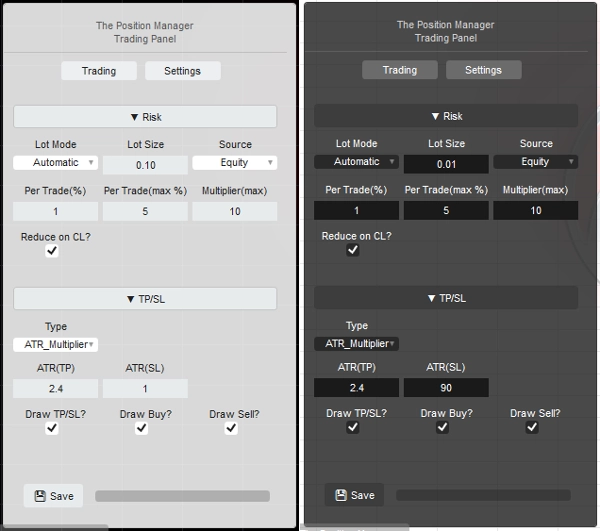
- Ticaret => Saf ticaret paneli (Risk Yöneticisi modülü), birden fazla örnek ekleyebilirsiniz.
- Her İkisi => Sadece bir örnek eklenmelidir:
-
- Yönetici Pencere olarak görüntülenecektir.
- Ticaret Grafikte görüntülenecektir.
- Panel Türü/Pozisyonu: Kendini Açıklayıcı
- Depolama Türü:
-
- Aynı ayarları her yeniden başlatmada kaydetmek/yüklemek için Broker kullanın.
- Her sembol konfigürasyonunu bir tür “risk profili” olarak kullanmak istiyorsanız Broker_Sembol kullanın.
=> Başsız KAPALI/AÇIK - Yerel
- Mesaj Moduna İzin Verilsin mi?
-
- Kendini Açıklayıcı
- [Ticaret, Her İkisi] Örnek Modu kullanılırken, panel ayarlarında “TP/SL => Tür” “Pips” olarak değiştirilmelidir, böylece TP/SL mesajla ayarlanabilir.
- Mesajla Ticaret İzin Verilsin mi?
-
- Mesajlarla pozisyon açılmasına izin verilir.
- Eğer Başsız AÇIK ise, Risk Yöneticisi yapılandırması mümkün değildir.
- Eğer Başsız KAPALI ise, [Ticaret, Her İkisi] Örnek Modu kullanılırken Risk Yöneticisi Modülü istediğiniz gibi yapılandırılabilir.
=> Başsız AÇIK / Hesap Genel
- Minimum Başabaş(%):
-
- Her pozisyon için, Başabaş mantığı Trailing/Kısmi Kâr modülleri tarafından uygulandığında, SL'nin doğrudan Giriş Fiyatına taşınması yerine (bu negatif PnL'ye yol açar).
- SL, Giriş Fiyatına x% ileriye taşınacaktır.
=> Başsız AÇIK / Koruyucu Zarar
- Zarar Modu:
-
- Günlük => Günün Bakiyesine Dayalı
- Takip => Zirve Sermayesine Dayalı
- Zarar Türü:
-
- Yüzde => Günlük Bakiye yüzdesi, dinamik büyüme için ideal.
- Sabit => Sabit miktar, katı kurallar için ideal
- Maksimum Zarar => % veya sabit (kendini açıklayıcı)
=> Başsız AÇIK / Koruyucu Zarar
- Zarar Kaynağı: => Şu anda sadece “Günün Bakiyesi” baz alınmaktadır.
-
- Sermaye Günlük Bakiyenin altına düşerse, tetiklenir/sayılır.
- Zarar Türü:
-
- Yüzde => Günlük Bakiye yüzdesi, dinamik büyüme için ideal.
- Sabit => Sabit miktar, katı kurallar için ideal
- Maksimum Günlük Zarar² => % veya sabit (kendini açıklayıcı)
- Ardışık Zarar(CL):
-
- Ardışık zarar olduğunda pozisyonların kapatılmasını etkinleştirir.
- Ardışık Sayım:
-
- Kendini Açıklayıcı
- Sıfırlama için Bekleme Süresi(CL):
-
- Sayımı sıfırlamak ve yeni pozisyonların açılmasına izin vermek için bekleme süresi.
=> Başsız AÇIK / Koruyucu Kâr
- Kâr Limiti Aktif Edilsin mi? => Kendini Açıklayıcı
-
- Maksimum Kâr ulaşıldığında, yeni pozisyonlar kapatılır.
- Kâr Kaynağı: => Her zaman Günlük Bakiye bazlıdır
- Kâr Türü:
-
- Yüzde => Günlük bakiye yüzdesi, dinamik büyüme için ideal.
- Sabit => Sabit miktar, katı kurallar için ideal
- Maksimum Kâr² => % veya sabit (kendini açıklayıcı)
=> Başsız AÇIK / Koruyucu Risk
- Toplam Maruziyet(%):
-
- Başabaşta olan pozisyonları da dikkate alır.
- Toplam Açık İşlemler:
-
- Toplam Sayı Toplam Açık İşlemler ile eşit olduğunda yeni pozisyonlar kapatılır.
=> Başsız AÇIK / Koruyucu Hepsini Kapat
- Günün sonunda kapatılsın mı? => Gün sonunda tüm pozisyonlar kapatılır
- Haftanın sonunda kapatılsın mı? => Haftanın sonunda (Cuma) tüm pozisyonlar kapatılır, referans olarak Gün Sonu saatleri kullanılır.
=> Başsız AÇIK / Koruyucu Sıfırlama(Gün Sonu)
- Sermaye zirve takibini ve varsa Hepsini Kapat mantığını sıfırlamak için saat.
- Sıfırlama (Saat) => 0s - 23s
- Sıfırlama (Dakika) => 0d – 59d
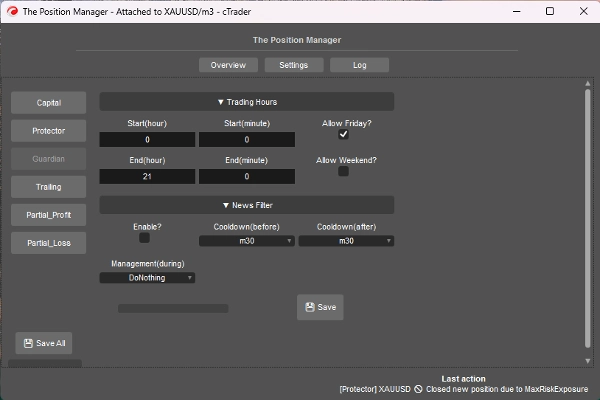
=> Başsız AÇIK / Koruyucu
- Ticaret Saatleri dışında veya İzin Verilen Gün dışında açılan pozisyonlar otomatik olarak kapatılır.
-
- Başlangıç/Bitiş (Saat) => 0s – 23s
- Başlangıç/Bitiş (Dakika) => 0d – 59d
- Cuma İzni? => Kendini Açıklayıcı
- Hafta Sonu İzni? (kripto) => Kendini Açıklayıcı
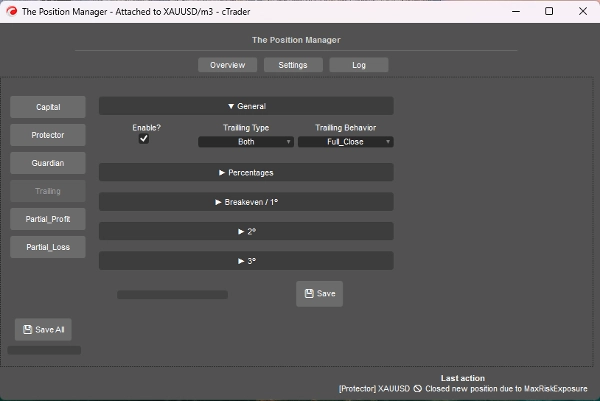
=> Başsız AÇIK / Takip Eden Kâr
- Sermaye Bazlı Take Profit'tir
- Aktif Edilsin mi?
-
- TP olmayan pozisyonlar için, trend takip pozisyonları için idealdir.
- => Tür:
-
- Yüzde => Saf sermaye %
- Zarar => Takip eden DD kavramına dayanır (Zirve Sermaye), fiyatın geri çekilme/çekilme terimleriyle düşünün.
- Her İkisi => Kısmi_Kapatma Davranışı varsayılan olarak etkinleştirilmiştir:
-
- Kısmi işlemler için yüzde türü.
- Tam çıkış için zarar türü.
- Davranış:
-
- Tam_Kapat:
-
- Hedef % sermaye ulaşıldığında, TP olmayan tüm pozisyonları kapatır.
- Ayrıca, hedef % sermayenin yarısına ulaşıldığında, SL Breakeven'e taşınır.
- Kısmi_Kapat:
-
- Kısmi kapatmaları etkinleştirir.
- Unutmayın => Pozisyon büyüklüğü (lot büyüklüğü) kısmi kapatma için çok küçükse, pozisyon tamamen kapatılır.
- Minimum Kâr(%):
-
- Takip eden mantığı etkinleştirmek için minimum kâr.
- => Tam Kapatma (%)
-
- Sadece “Tam_Kapat” Davranışı için.
- => [Her İkisi] Kapatma Zarar (%)
-
- Sadece “Her İkisi” Türü için.
- => [% sadece] Akıllı SL?"
-
- Sadece “Yüzde” Türü için.
- Takip eden SL kullanarak Drawdown türüne oldukça benzer, ancak daha tepkisel.
- Kısmi 1(%) / Kısmi 2(%)
-
- Kısmi işlemleri gerçekleştirmek için hedef % sermaye (Yüzde veya Her İkisi)
- Takip Türünün Yüzde mi yoksa Zarar mı olduğunu her zaman kontrol edin
- Kısmi 1(% sırası) / Kısmi 2(% sırası)
-
- Kendini Açıklayıcı
- => Kapat 3(%):
-
- TP olmayan pozisyonları tamamen kapatmak için hedef % sermaye.
- Sadece Yüzde veya Zarar Türleri için
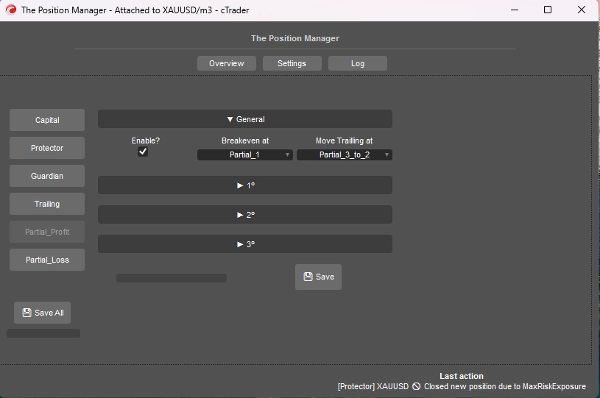
=> Başsız AÇIK / Kısmi Kâr
- Aktif Edilsin mi?
-
- TP olan pozisyonlar için, gün içi ticaret veya scalping pozisyonları için idealdir.
- Giriş Fiyatı 0% olacaktır
- Take Profit 100% olacaktır
- Kısmi Fiyatlar bu yaklaşıma göre hesaplanacaktır.
- Başabaşta:
-
- Kendini Açıklayıcı, seçilen Kısmi tetiklendiğinde SL'yi BE'ye taşı.
- => Takip Etme Noktası:
-
- Kendini Açıklayıcı, seçilen Kısmi tetiklendiğinde SL'yi önceki Kısmi Fiyatına taşı.
- Unutmayın => Kısmi 2. veya 3.'ün etkin olduğundan emin olun.
- Kısmi 1(%) /
Kısmi 2(%) /
Kısmi 3(%) -
- Giriş Fiyatı ile Take Profit arasındaki yüzdeler.
- => 2.'yi etkinleştir?
=> 3.'ü etkinleştir? -
- Kendini Açıklayıcı
- Kısmi 1(% sırası) /
Kısmi 2(% sırası) /
Kısmi 3(% sırası) -
- Kendini Açıklayıcı
=> Başsız AÇIK / Kısmi Zarar
- Aktif Edilsin mi?
-
- SL olan pozisyonlar için, yön değişebilecek kaybeden işlemlerin zararını sınırlamak için idealdir.
- Giriş Fiyatı 0% olacaktır
- Stop Loss 100% olacaktır
- Kısmi Fiyatlar bu yaklaşıma göre hesaplanacaktır.
- Kısmi 1(%) /
Kısmi 2(%) /
Kısmi 3(%) -
- Giriş Fiyatı ile Stop Loss arasındaki yüzdeler.
- => 2.'yi etkinleştir?
=> 3.'ü etkinleştir? -
- Kendini Açıklayıcı
- Kısmi 1(% sırası) /
Kısmi 2(% sırası) /
Kısmi 3(% sırası) -
- Kendini Açıklayıcı
====================================================
Geliştiriciler için => Herhangi bir strateji için Mesajlar/abonelikler vasıtasıyla tak ve çalıştır cTrader Algo.
- Yarı veya Tam otomatik sistemler için:
- Yarı: Emirler hala kendimiz tarafından açılır, ancak:
-
- SL ve TP Mesajlar/abonelikler tarafından ayarlanır.
- Tam: Emir sinyalleri Mesajlar/abonelikler aracılığıyla “Pozisyon Yöneticisi”ne gönderilir
-
- Bu yaklaşımda “Risk Yöneticisi” yapılandırması mevcut olmayabilir.
Oldukça basit, sinyali aşağıdaki sınıfı kullanarak göndermeniz yeterlidir:
public class TradeSignal
{
public string Symbol { get; set; }
public TradeType Direction { get; set; }
public double StopLossPips { get; set; }
public double? TakeProfitPips { get; set; } // null = TP olmadan
public string StrategyId { get; set; }
public double? EntryPrice { get; set; } // null = piyasa, aksi takdirde limit emri.
public DateTime Timestamp { get; set; }
public int Confidence { get; set; } // 1–5
}
Sonra:
Messages.Send("ThePositionManager", signal);
Kısa örnek:
TradeSignal signal = new()
{
Symbol = Symbol.Name,
Direction = TradeType.Buy,
StopLossPips = 1500,
TakeProfitPips = 3000,
StrategyId = "MyStrategy",
Confidence = 5
};
Messages.Send("ThePositionManager", signal);
Özet
Key features include four main modules: Portfolio Protector, Guardian Trading, Risk Manager (for manual or semi-automated trading), and Trade Manager (supporting trailing take profit and partial take profit/stop loss). The tool supports intelligent scaling and portfolio protection across Desktop, Mobile, and Web platforms, with a Headless mode option for managing positions remotely via cTrader Cloud.
For traders, it offers configurable risk controls such as daily and trailing drawdown limits, profit caps, exposure limits, and automated position closing based on trading hours or drawdown thresholds. Trailing profit and partial profit/loss management allow dynamic adjustment of stop loss and take profit levels to optimize trade exits.
Developers can integrate The Position Manager with automated strategies by sending trade signals via messages, enabling semi or fully automated order management with customizable stop loss and take profit settings.
The tool supports saving settings by broker or symbol, and includes detailed parameters for break-even management, risk exposure, and partial close orders, making it adaptable to various account sizes and trading styles.
Müşteri değerlendirmeleri
5 | 0 % | |
4 | 67 % | |
3 | 33 % | |
2 | 0 % | |
1 | 0 % |
Tartışma
SSS















Fiyat