Here is the consolidated and comprehensive User Manual, merging the general instructions with the specific versatility and safety updates.
🧱 Wall Profit Pro - User Manual
Visual Trade Manager for cTrader
1. Introduction
Wall Profit Pro is an advanced visual plugin designed to help you manage your open trades with precision. Unlike standard Take Profits, Wall Profit allows you to create multiple execution steps. For each step, you can secure profits (Partial Close) and protect your remaining position by moving the Stop Loss (Trailing Shield).
All of this is done visually directly on the chart or via a compact control panel.
🌍 Universal Compatibility
This bot is designed to work on ANY market available on cTrader, including:
- Forex (EURUSD, GBPJPY...)
- Synthetic Indices (Boom, Crash, Volatility...)
- Cryptocurrencies (BTC, ETH...)
- Metals & Commodities (Gold, Oil...)
2. Interface Overview
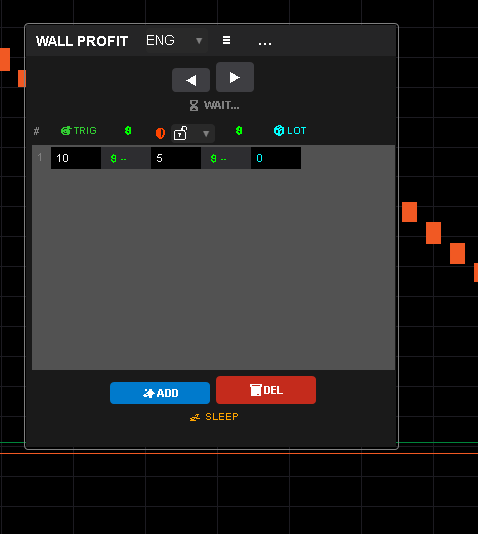
The Main Panel
The panel attaches to your chart and displays your active strategy steps.
- # (Step ID): The sequence number of the level.
- 🎯 TRIG (Trigger): The price distance (in Pips or %) where the logic activates.
- 💲 ($ Profit): The estimated monetary profit if the price reaches the Trigger.
- 🛡️ SHIELD (Protection): The new price level where your Stop Loss will move to once the Trigger is hit.
- 📦 LOTS (Partial): The volume to close at this level.
- Set to
0to only move the Stop Loss without closing volume. - Set a value (e.g.,
0.1,1.0) to perform a Partial Close.
- Set to
Control Buttons
- ✨ ADD: Adds a new management step.
- 🗑️ DEL: Removes the last added step.
- ≡ (Compact Mode): Toggles between Full View (shows money & inputs) and Slim View (minimalist).
- ⏬ / 🔼 (Minimize): Collapses the panel to save screen space.
- 📐 (Resize): Click the bottom-right corner to cycle through window widths (Small, Medium, Large).
- Language Menu: Select between ENG, POR, ESP, FRA, GER.
3. Input Precision & Safety
A. Flexible Number Range
Wall Profit Pro adapts to any trading style, from micro-scalping to long-term swing trading.
- High Precision: The inputs accept values as small as
0.01(for tight scalps or crypto). - Large Range: You can input large values like
1000or5000pips (for indices or long trends). - Example: You can set a Trigger at
5.5pips and a Shield at1000pips without issues.
B. Anti-Error Protection (Input Guard)
To prevent accidents during live trading, the input fields feature Smart Validation:
- No Letters Allowed: The fields automatically reject letters or special characters. If you try to type "10p", it will simply register "10".
- Crash Prevention: This ensures the bot never crashes due to invalid data types, keeping your account safe.
4. Key Features & How to Use
A. The "Shield" Logic (Trailing Stop)
The core concept of Wall Profit is the Shield.
- When the market price hits your 🎯 TRIG line...
- The bot automatically moves your actual Stop Loss to the 🛡️ SHIELD price.
- This "locks in" your trade, protecting you from reversals.
Tip: You can set multiple steps. For example, Step 1 moves SL to Breakeven, Step 2 moves SL into profit, etc.
B. Smart Link 🔗 (Ratio Manager)
Located in the header next to "SHIELD", the Smart Link dropdown allows you to lock a fixed Risk/Reward ratio.
- 🔓 (Unlocked): You can move Trigger and Shield lines independently.
- 1:1 / 1:2 / 1:3: The Shield will automatically calculate based on the Trigger.
- Example: If you select 1:2 and drag your Trigger to 20 pips, the Shield will automatically jump to 10 pips.
- % (Custom): Allows you to define a specific percentage (e.g., Shield is always 80% or 50% of the Trigger distance).
C. Visual Drag & Drop
You don't need to type numbers!
- Green Line (Solid): Represents the Trigger. Drag it up/down on the chart to set your target.
- Orange Line (Dotted): Represents the Shield. Drag it to set where your SL should go.
- Interactive Physics: The bot prevents logical errors. You cannot drag the Shield line above the Trigger line (for Buy trades). They will "collide" and push each other.
D. Partial Closes
To take money off the table:
- Go to the 📦 LOTS column.
- Enter the amount you want to close (e.g.,
0.05). - When the price hits the Trigger, the bot will close that specific amount and leave the rest running.
5. Setup Parameters (cAlgo)
When you start the bot, you can configure:
- Measurement Unit:
Pips: Inputs represent distance in pips (Standard).Percent: Inputs represent % of price movement (Advanced).
6. Troubleshooting & FAQ
Q: Does it work on Boom 1000 or Crash 300?
- A: Yes. The bot automatically detects the specific "Pip Size" and "Minimum Volume" of Synthetic Indices.
Q: The lines are not appearing on the chart.
- A: Ensure you have an open position for the current symbol. The bot enters "💤 SLEEP" mode if there are no active trades.
Q: My Partial Close didn't execute.
- A: Check the Log tab in cTrader.
Q: Can I type decimal numbers like 12.5?
- A: Yes. The system supports full decimal precision (e.g.,
0.01,12.5,150.0).
Q: I cannot drag the Orange Shield line.
- A: Check the Smart Link 🔗 menu. If you have selected
1:1,1:2, or%, the Shield line is locked to the Trigger. Select 🔓 to move them independently.
Q: There is empty space on the right side of the panel.
- A: Click the 📐 button in the bottom-right corner to cycle the panel width until it fits your preference.
⚠️ Disclaimer:
Trading involves risk. This software is an execution tool. Always test your settings in a Demo account before using real funds.

 (1).jpg)


.jpg)