
Description
Swing : MOTEUR DE CROISSANCE SILVER SPOT XAGUSD
Libérez la volatilité du marché de l'argent avec Master Yoda S1 Swing, un algorithme cTrader dédié conçu pour une croissance agressive du capital. En se concentrant exclusivement sur des configurations swing à haute probabilité, ce bot coupe à travers le bruit du scalping pour capturer les mouvements majeurs du marché.
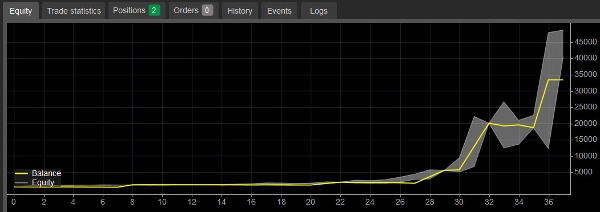
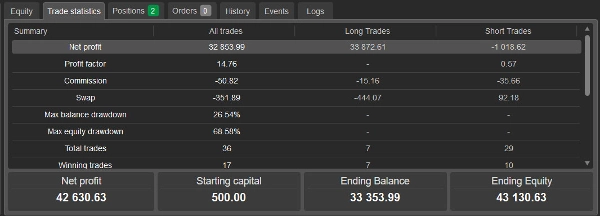
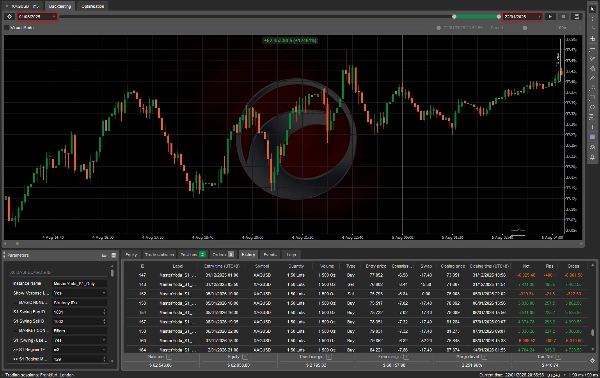
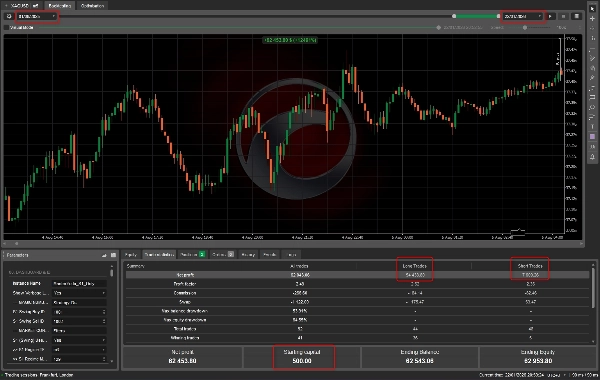
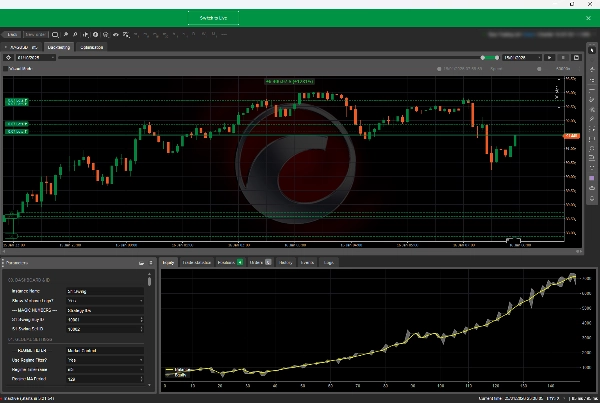
Vérification des performances du backtest (01/10/2025 – 12/01/2026) :
- Capital de départ : 500,00 $
- Profit net : 32 853,99 $ (Solde final : 33 353,99 $)
- Facteur de profit : 14,76 (Efficacité exceptionnellement élevée)
Philosophie principale : Le Master Yoda S1 ne trade pas pour le simple plaisir de trader. Il attend l'alignement sur plusieurs périodes — utilisant un « Filtre de Régime » propriétaire pour confirmer la direction de la tendance — avant d'exécuter une logique distincte d'achat ou de vente Swing. Avec un système hybride de gestion de l'argent, il capitalise agressivement les gains lors des séries gagnantes, transformant de petits comptes en capitaux importants.
À qui cela s'adresse-t-il ? Conçu pour le trader à haut risque et haute récompense. Si vous cherchez à faire croître agressivement un petit compte spéculatif et pouvez supporter une baisse significative (jusqu'à ~68 %) en quête de rendements supérieurs à 6 000 %, c'est votre outil.
3) Manuel & Instructions
Nom de la stratégie : Master Yoda S1 Swing Instrument : XAGUSD (Argent) Plateforme : cTrader
A. Installation & Configuration
- Graphique : Ouvrez un graphique XAGUSD.
- Période : Réglez la période du graphique sur M30 (Le bot utilise une logique multi-périodes interne, mais M30 est le rythme principal).
- Effet de levier : Un minimum de 1:500 est fortement recommandé pour soutenir la logique agressive de capitalisation à partir de 500 $.
B. Paramètres clés
- Mode de stratégie : Assurez-vous que
S1_Buy_ModeetS1_Sell_Modesont réglés surEnabled. - Gestion des risques :
-
- Mode de dimensionnement global : Par défaut, c'est
TieredByEquity. C'est ce qui est responsable de la croissance explosive. Il augmente la taille des lots à mesure que votre solde augmente. - Option conservatrice : Passez à
FixedLot(par exemple, 0,01) si vous souhaitez une croissance stable et à moindre risque.
- Mode de dimensionnement global : Par défaut, c'est
- Filtre de régime : Gardez
Regime_S1_Use_Filter=True. C'est la garde de sécurité qui empêche le bot d'acheter lors d'un krach ou de vendre lors d'un lancement en fusée.
C. Comprendre le comportement
- Faible fréquence : Ne paniquez pas si le bot ne trade pas pendant un jour ou deux. Il a trade seulement 36 fois en plus de 100 jours. Il filtre la qualité, pas la quantité.
- Drawdowns : Vous verrez des trades ouverts passer en équité négative (drawdown). La stratégie donne aux trades "de la marge de manœuvre" avec des Stop Loss larges, comptant sur le taux de réussite élevé et la récupération de tendance pour clôturer en profit.
- Long vs. Short : Le backtest montre que
les trades longssont la force motrice (taux de réussite de 100 %, profit de 33 k$).Les trades shortsagissent comme une couverture et un accumulateur de petits profits.
D. Avertissement sur les risques Ce cBot est réglé pour une croissance agressive.
- Recommandation : Retirez votre capital initial (500 $) une fois que le compte a doublé pour trader sans risque.
- Stop Loss : Le bot utilise un Stop Loss "dur" et un Stop Loss "suiveur". Ne désactivez jamais le paramètre Stop Loss.
[IMPORTANT] Explication des paramètres :
1. Tableau de bord & ID
- Nom de l'instance : Une étiquette textuelle pour cette configuration spécifique du bot (par exemple, "MasterYoda_S1_Only"). Utile si vous exécutez plusieurs bots.
- Afficher les logs détaillés ? : Si réglé sur
Yes(True), le bot imprimera des messages détaillés dans l'onglet "Log". Utile pour résoudre les problèmes. - ID Swing Buy / Sell S1 : Ce sont des "numéros magiques". Ce sont des codes ID uniques attachés à chaque trade pour que le bot sache quels trades appartiennent à la stratégie d'achat et lesquels à la stratégie de vente.
- S1 (Swing) Utiliser le régime ? : Un filtre maître. Si
Yes, le bot vérifie la tendance à long terme (Régime) avant de trader. - TF Régime S1 : La période pour le filtre de régime (par exemple,
m3ou 3 minutes). - Période & méthode MA Régime S1 : Les réglages de la moyenne mobile utilisée pour déterminer le régime (direction de la tendance).
2. Gestion principale de l'argent
- Mode de dimensionnement global : Décide comment la taille du trade est calculée.
-
- RiskPercent : Risque un pourcentage spécifique de votre solde de compte.
- FixedLot : Utilise une taille de lot fixe (par exemple, 0,01).
- TieredByEquity : Augmente la taille des lots à mesure que votre compte croît.
- Hybrid : Un mélange de méthodes.
- Seuil hybride ($) & exposant de puissance : Paramètres mathématiques avancés utilisés uniquement si vous sélectionnez le mode "Hybrid" pour lisser la croissance de la taille des lots.
- Risque % Achat/Vente S1 : Combien de votre solde de compte risquer sur un seul trade (par exemple, 1,0 % pour les achats, 0,15 % pour les ventes).
- Max Lot Achat/Vente S1 : La taille maximale absolue du trade que le bot est autorisé à ouvrir, indépendamment des autres réglages.
- Trades/jour Achat/Vente S1 : Une limite de sécurité. Le bot arrêtera de trader pour la journée s'il atteint ce nombre de trades.
3. S1 Swing (Logique d'achat)
- Activation achat S1 ? : Interrupteur principal pour activer ou désactiver la stratégie d'achat.
- Autoriser nouvel achat ? : Un interrupteur secondaire pour permettre spécifiquement l'ouverture de nouveaux trades d'achat.
- Période & méthode MA achat : Les réglages de la moyenne mobile utilisés pour trouver les signaux d'achat.
- Utiliser filtre RSI ? : Si
Yes, il utilise l'indicateur RSI (Relative Strength Index) pour éviter d'acheter lorsque le prix est trop élevé. -
- Période RSI / Niveau de blocage : Réglages pour le RSI. Si le RSI est au-dessus du "niveau de blocage" (par exemple, 75), il n'achètera pas.
- Utiliser tendance HTF ? : Si
Yes, il vérifie une période supérieure pour s'assurer que la grande tendance est haussière avant d'acheter. -
- Période HTF : Quelle période supérieure vérifier (par exemple,
m7).
- Période HTF : Quelle période supérieure vérifier (par exemple,
4. S1 Swing (Logique de vente)
- Activation vente S1 ? : Interrupteur principal pour activer ou désactiver la stratégie de vente.
- Autoriser nouvelle vente ? : Un interrupteur secondaire pour permettre l'ouverture de nouveaux trades de vente.
- Période EMA vente : La période de la moyenne mobile exponentielle utilisée pour les signaux de vente.
- Stoch OS vente : Utilise l'indicateur stochastique. Il recherche des conditions de "survente" (par exemple, en dessous de 25) pour déclencher ou filtrer les trades.
- Utiliser tendance HTF ? : Si
Yes, vérifie une période supérieure pour s'assurer que la grande tendance est baissière avant de vendre.
5. S1 Swing (Sortie & TSL)
- SL Achat/Vente S1 (pips) : La distance du "Stop Loss" en pips. C'est la perte maximale par trade si les choses tournent mal immédiatement.
- TP Achat/Vente S1 (pips) : La distance du "Take Profit" en pips. Le niveau de profit cible.
- Utiliser TSL Achat/Vente S1 ? : Si
Yes, active un Stop Loss suiveur. - Début TSL (pips) : Le stop suiveur ne s'active qu'après que le trade soit en profit de ce nombre de pips.
6. Paramètres cachés / avancés
Ces paramètres se trouvent dans le groupe "z_Hidden" et servent à l'ajustement fin.
Gestion des trades :
- Nombre max de trades ouverts : Limite le nombre de trades d'achat ou de vente pouvant être ouverts en même temps.
- Mode SL/TP : Choisit si le Stop Loss est un nombre fixe de pips (
FixedPips) ou dynamique basé sur la volatilité du marché (ATR). - Sortie opposée : Si
True, un trade d'achat se fermera automatiquement si un signal de vente apparaît (et vice versa).
Filtres temporels :
- Utiliser filtre de session : Si
True, les trades ne sont autorisés que pendant des heures spécifiques. - Début/fin de session : Les heures (en UTC) pendant lesquelles le trading est autorisé.
- Utiliser blocage de fermeture : Heures spécifiques de "blackout" où le trading est interdit (souvent utilisé pour éviter les ouvertures de marché particulièrement volatiles).
Indicateurs avancés :
- Stoch K, filtre EMA, période ATR : Nombres internes spécifiques pour les indicateurs utilisés dans la logique. En général, vous n'avez pas besoin de les toucher sauf pour optimiser.
- Confluence MA : Un filtre nécessitant que plusieurs moyennes mobiles soient d'accord avant de trader.
Stop suiveur avancé (TSL) :
- Méthode TSL : La méthode mathématique utilisée pour déplacer le stop loss (par exemple,
ChandelierExit,Percentage,ParabolicSAR). - Retirer TP sur TSL : Si
True, le Take Profit dur est retiré une fois que le Stop suiveur commence, laissant le trade courir aussi longtemps que possible. - Multiplicateur/Période ATR TSL : Réglages de sensibilité pour le TSL si le mode ATR est utilisé.
- Min/Max PSAR TSL : Réglages de sensibilité si le mode Parabolic SAR est utilisé.
Paramètres Grid / Martingale (échelonnés) :
- Équité de départ / étape par palier : Ajuste la taille des lots en fonction de l'argent sur le compte (par exemple, ajoutez 0,01 lot pour chaque 100 $ de profit).
- Perte consécutive max : Arrête la stratégie après un certain nombre de pertes consécutives.
- Perte max quotidienne % : Arrête la stratégie pour la journée si elle perd ce pourcentage du compte.
Note sur les risques & avertissement
⚠️ AVERTISSEMENT SUR LES RISQUES : Le trading sur le marché des changes (Forex) et des matières premières comme l'argent (XAGUSD) comporte un niveau de risque élevé et peut ne pas convenir à tous les investisseurs. Le degré élevé d'effet de levier peut jouer contre vous autant qu'en votre faveur.
AVERTISSEMENT : Les paramètres ci-dessus contrôlent un système de trading automatisé ; une mauvaise configuration peut entraîner des pertes financières importantes. Les performances passées d'un robot ne garantissent pas les résultats futurs. Testez toujours sur un compte démo avant d'utiliser de l'argent réel. Utilisez à vos risques et périls.
Résumé
Key features include configurable buy and sell strategies with filters such as RSI and stochastic indicators, adjustable stop loss and take profit levels, and optional trailing stop loss methods. It operates primarily on the M30 chart timeframe but incorporates higher timeframe trend checks for trade validation. Risk management settings allow users to select between tiered lot sizing for growth or fixed lot sizing for more conservative trading. The bot limits daily trades and open positions to control exposure.
Backtesting from October 2025 to January 2026 demonstrated a starting capital of $500 growing to over $33,000 with a profit factor of 14.76, highlighting high efficiency. The strategy involves significant drawdowns (up to ~68%) and is intended for high-risk, high-reward traders who can tolerate volatility in pursuit of substantial returns. Users are advised to maintain stop loss settings and consider withdrawing initial capital after doubling the account to reduce risk.
Avis clients
5 | 0 % | |
4 | 100 % | |
3 | 0 % | |
2 | 0 % | |
1 | 0 % |