present
注册即可在首次购物时获得 $50 优惠
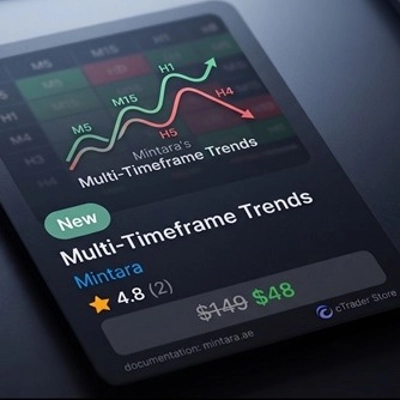
Trading product for Trends 桌面插件 Market Scanner, image 1
Trends
桌面插件
版本 1.0, May 2026
Windows 版、Mac 版
Trading product for Trends 桌面插件 Market Scanner, image 2
Trading product for Trends 桌面插件 Market Scanner, image 3
注册日期 23/03/2025

说明

https://mintara.ae/ctrader/plugin/MTF_Trends_Documentation.html
趋势热图

多重

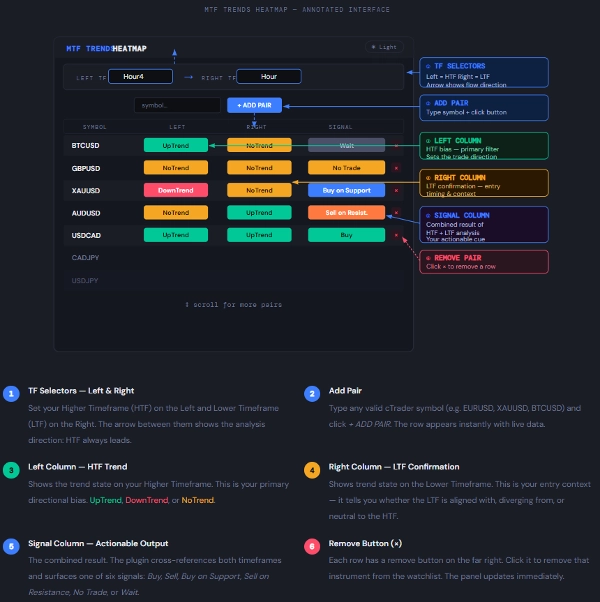
一个实时市场扫描器,同时评估两个用户选择的时间框架内的趋势方向——为您的观察列表中的每个工具提供一目了然的可操作信号。


它的功能

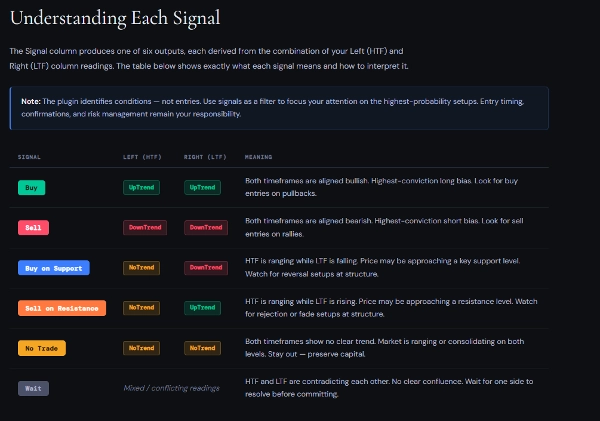
该 MTF Trends Heatmap 插件同时监控多个工具,并评估您选择的两个时间框架内的趋势状况。 左侧时间框架 是您的高时间框架(HTF),而 右侧时间框架 是您的低时间框架(LTF)。该插件比较两者并在最后一列生成一个 信号

您无需手动切换图表,即可获得多达任意数量工具的整合视图——颜色编码、实时更新、可滚动——全部在cTrader内的单一可调整大小面板中。

关键原则: 左侧时间框架(HTF)设定了 方向偏好。右侧时间框架(LTF)确认或否定该偏好。信号列告诉您应关注什么——由您决定何时采取行动。

推荐组合:
日内交易者 → 左:H4 / 右:H1 — H4上的偏好,H1上的入场时机
波段交易者 → 左:日线 / 右:H4 — 日线上的方向,H4上的设置
持仓交易者 → 左:周线 / 右:日线 — 周线上的宏观,日线上的触发

重要: 切勿将左侧时间框架设置得低于右侧时间框架。插件将左侧视为更高权威。交换它们会颠倒信号逻辑并产生误导性结果。


摘要

AI 摘要
The Trends plugin is a real-time market scanner designed for the cTrader platform. It evaluates trend direction simultaneously across two user-selected timeframes: a Higher Timeframe (HTF) on the left and a Lower Timeframe (LTF) on the right. By comparing these timeframes, the plugin generates a consolidated signal indicating trend alignment or divergence for each instrument in the user’s watchlist. This signal helps traders identify directional bias from the HTF and confirmation or contradiction from the LTF, aiding decision-making without manually switching charts. The interface is a color-coded, live-updating, scrollable heatmap panel that can display multiple instruments at once. Recommended timeframe combinations vary by trading style, such as H4/H1 for day trading, Daily/H4 for swing trading, and Weekly/Daily for position trading. The plugin requires the HTF to be set higher than the LTF to maintain correct signal logic. This tool supports efficient multi-instrument trend analysis by providing an at-a-glance view of market conditions across different timeframes.
插件配置
插件类别
图表 UX
数据访问
市场数据

客户评价

0.0
评价:0
客户评价
该产品尚无评价。已经试过了?抢先告诉其他人!

讨论

常见问答

Market Scanner
cTrader Store 提供的所有产品,包括交易机器人、指标和插件,均由第三方开发者提供,仅供信息参考和技术访问之用。cTrader Store 并非经纪商,不提供投资建议、个人推荐或任何未来业绩保证。

猜您喜欢

桌面插件
Trade Journal
AI Integration
+1
Turn your closed-trade history into an at-a-glance monthly calendar and a deep performance dashboard.
桌面插件
AI
ATR
+27
Apply Stop Loss and Take Profit to all positions and pending orders in one click.
桌面插件
AI
ATR
+27
Trade Analytics delivers advanced trading insights and heatmaps directly inside TradeWatch.
桌面插件
SMC
Grid
+5
The all-in-one trade management plugin that automates your risk, execution, and position management.
桌面插件
AI
ATR
+27
Turn your cTrader trade history into a visual performance dashboard to see trading patterns and strategy strength
桌面插件
ATR
Prop
+5
cTrader risk management plugin with daily & total drawdown limits, CBot control, and risk-based order execution.
桌面插件
Prop
Forex
+4
Professional risk management plugin with automatic lot calculation, chart panels, and R:R automation. Version 1.4.2.
桌面插件
Risk/Reward
Chart UI Tools
+3
Visual cTrader backtesting tool with trade drawing, risk sizing, stats, and automatic trade simulation.
桌面插件
Prop
Forex
+3
Visual calendar with daily PnL, trades, win rate, profit factor, and performance insights.
桌面插件
Forex
Crypto
+3
Build custom second and tick charts using adjustable bar sampling intervals.
桌面插件
Risk Reward management tools (风险回报管理工具)
桌面插件
Forex
Signal
+2
Adaptive Renko chart builder for precise, flexible trading - ideal for both scalping and trend analysis.
桌面插件
Prop
Forex
+5
Place professional OCO & OSO orders in cTrader — visually, instantly, and without execution mistakes.
桌面插件
Prop
Forex
+4
Visual monthly trading journal that displays your performance day-by-day in a calendar view.
桌面插件
Market Scanner
An 8-currency strength ranking, multi-TF heatmap & impulse tracker — read the real driver at a glance. Read-only.
桌面插件
Trade Journal
AI Integration
+1
#1 Trade Journal, PnL analytics, bot monitoring and strategy statistics.

价格

注册日期 23/03/2025