Superior Local Trade Copier
cBot
46 购买
版本 4.6, Oct 2026
Windows 版、Mac 版, Web
5.0
评价:8
说明
适用于cTrader的高级本地交易复制器
适用于Windows、Mac和VPS的高速多账户复制和风险引擎
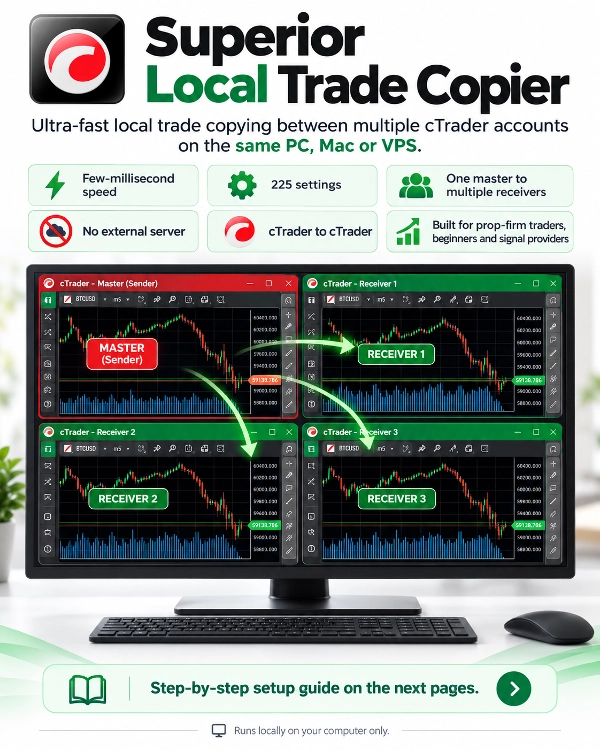
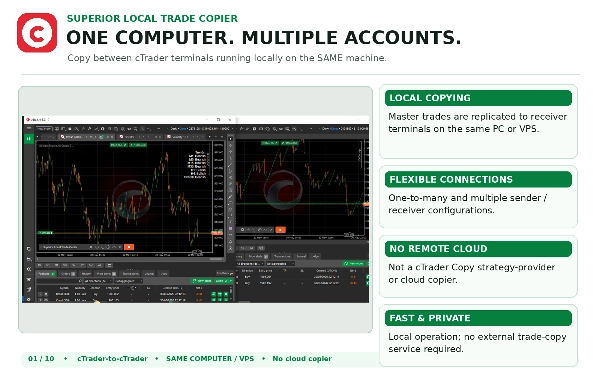
在同一台计算机或VPS上运行的多个cTrader账户之间无缝复制交易,执行速度达到亚毫秒级。
专为管理个人投资组合、通过资金管理挑战和多经纪商设置的交易者打造,Superior Local Trade Copier提供机构级的交易同步,确保数据完全私密并具备高级风险控制。通过简单的两步设置,几秒钟内即可开始复制,配备丰富的细粒度设置引擎,让您完全掌控风险、手数大小和账户保护。
注意:完整的逐步安装指南见讨论标签页。
主要功能一览
- 执行速度:亚毫秒级本地进程间内存传输。
- 完全数据隐私:100%本地运行,无任何外部云服务器。账户凭证、余额数据和交易历史绝不离开您的计算机。
- 账户拓扑结构:支持一对多、多对一和多对多复制配置。
- 账户兼容性:支持任意cTrader经纪商的真实账户与模拟账户之间无缝复制。
- 平台兼容性:原生运行于Windows、Mac和Windows VPS环境的cTrader桌面版。
- 只读账户复制:主账户可使用只读投资者密码登录。
- 极小系统占用:高效代码设计,即使管理数十个持仓,CPU和内存消耗也极低。
高级风险与仓位大小套件
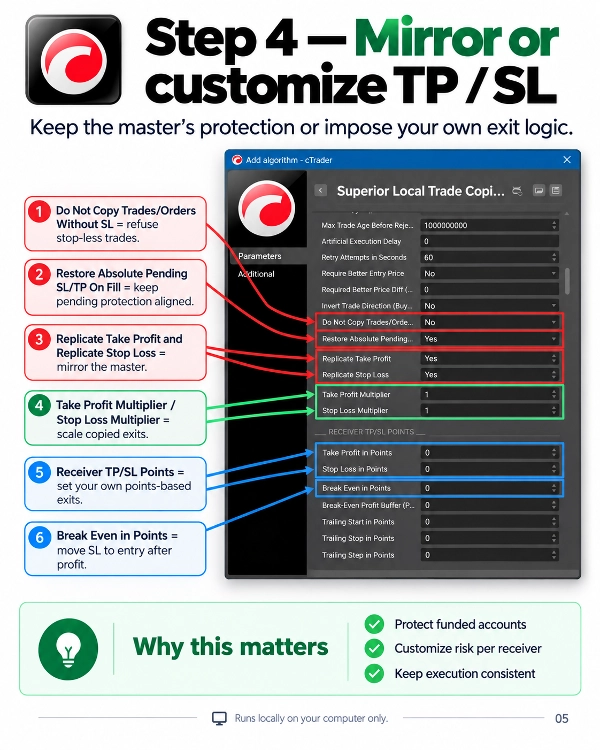
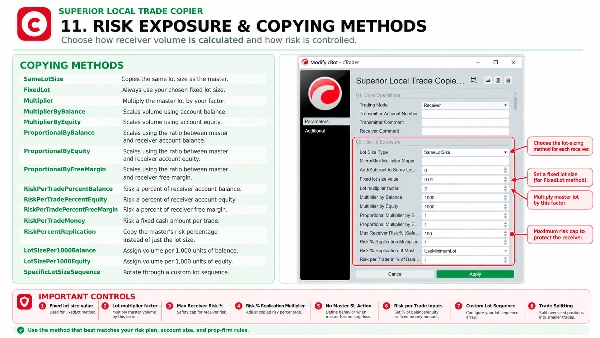
- 主账户风险百分比复制:根据止损距离、交易量和点值计算主账户每笔交易的风险百分比:风险金额 = 止损距离(点数)x 品种点值 x 交易量 主账户风险% = (风险金额 / 主账户余额)x 100 接收账户自动调整余额和账户货币差异,复制相同风险百分比。
- 可配置风险倍数:可放大或缩小主账户风险(例如,0.5倍表示半风险,2.0倍表示双倍风险),并设有接收账户风险百分比的安全上限。
- 无止损安全处理:当主账户交易无止损时的可配置安全行为(安全跳过交易或以最小手数执行,避免承担未计算风险)。
- 最小手数超限保护:当经纪商最小手数限制导致持仓风险超出设定阈值时,跳过该交易以保护小账户。
- 动态风险大小模式:支持余额风险百分比、净值风险百分比、可用保证金风险百分比或每笔交易固定现金金额。
- 比例余额与净值缩放:根据跟随账户与主账户之间的余额、净值或可用保证金比例动态调整仓位大小。
- 每千单位余额手数分配:为每1000单位余额或净值设置专用手数增量。
- 自定义手数序列与数组:按品种逐步使用用户定义的手数数组、固定手数、倍数或品种特定的交易量覆盖。
- 合约规格自动归一化:自动检测并归一化不同经纪商间的合约规格差异(例如标准手与迷你/微型手)。
- 动态恢复缩放:连续亏损或盈利时可选的手数倍增,带自动重置阈值。
- 交易量拆分:当交易量超过经纪商最大限制时,自动将超大持仓拆分为多个较小订单。
- 合成指数手数处理:当计算交易量低于经纪商最小值时,配置自动规则(强制最小手数或跳过交易)。
资金管理挑战与隐形保护
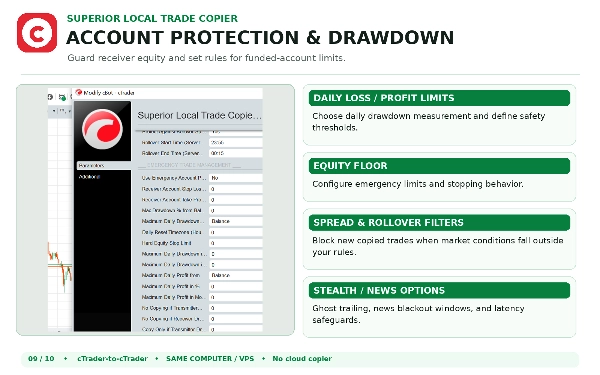
- 资金管理回撤基线:跟踪每日回撤,基于日初净值、日初余额或日内最高净值(高水位线),符合主要资金挑战规则如Apex、Topstep和MyFundedFX。
- 时区校准:调整每日重置时间以匹配您的资金管理服务器时区。
- 手数随机化:通过可配置百分比轻微调整复制手数,防止资金账户间完全相同的克隆大小,避免算法检测。
- 毫秒时间随机化:复制前引入随机微延迟,避免订单在各账户时间戳完全一致。
- 隐形追踪(隐形止损):在cBot内存中内部跟踪追踪止损,本地关闭交易,绝不向经纪商广播止损水平。包含灾难性服务器停止选项,防止断电或断网风险。
- 无止损交易保护:自动拒绝复制任何无止损的主账户交易。
订单生命周期与实时同步
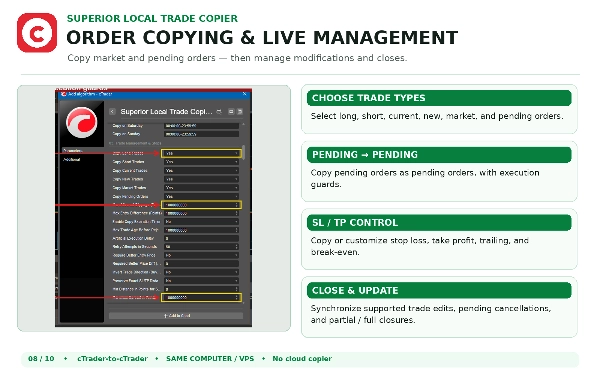
- 真正的挂单对挂单执行:严格复制买卖限价、止损和止损限价订单为挂单,避免过早转换为市价交易。
- 防止市价追单:若主账户挂单成交快于接收账户下单,跟随账户不会用延迟市价单追市。
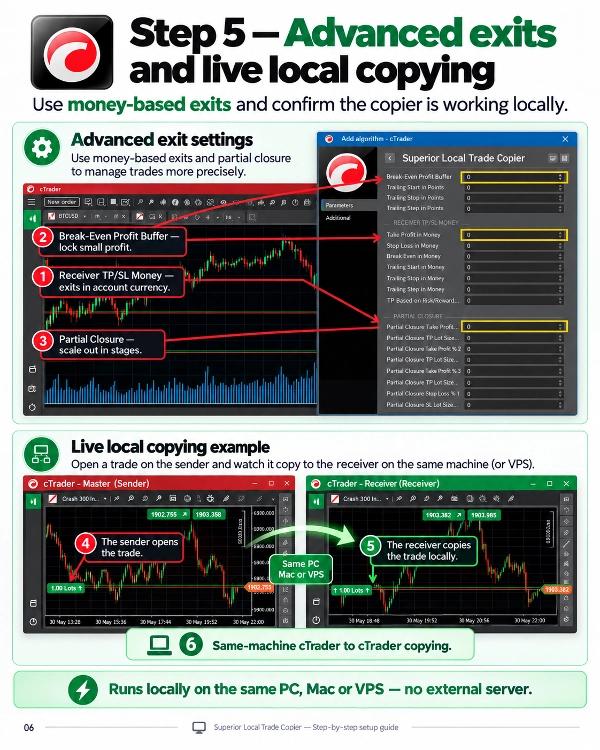
- 独立盈亏平衡计算:接收账户盈亏平衡触发基于自身实际成交价计算,不依赖主账户成交价。包含利润缓冲以锁定点差和佣金。
- 实时修改:实时镜像止损、止盈、入场价格和订单过期更新。
- 部分平仓同步:完美镜像账户间的部分平仓和多阶段减仓。
- 定时订单清理:每天定时自动删除未触发的挂单。
- 成交时恢复绝对止损:即使在快速市场滑点时,也能恢复挂单成交的精确价格水平。
- 本地状态重连:若cTrader或计算机重启,cBot自动重连已复制订单,避免重复开仓。
安全过滤器与经纪商兼容性
- 每日回撤与利润限制:达到每日利润目标或最大回撤阈值时自动暂停复制。
- 紧急净值底线:设定硬性美元限额,净值低于此值时清算所有复制持仓并停止复制。
- 隔夜点差尖峰保护:在经纪商午夜结算窗口冻结新复制执行,保护账户免受点差扩大影响。
- 重大新闻停牌:定义特定时间窗口,围绕高波动新闻发布暂停交易复制。
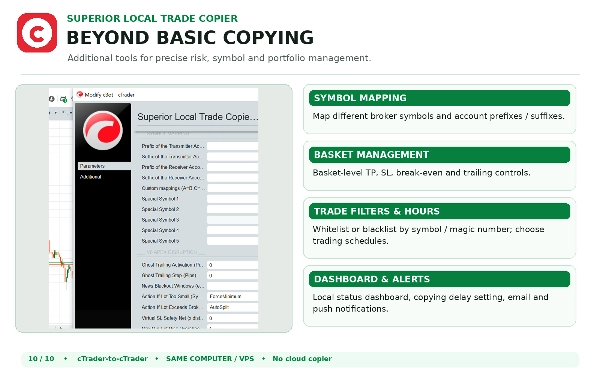
- 特殊品种映射:跨经纪商翻译自定义品种名称(例如,GOLD=XAUUSD,US30=DJ30),自动检测前缀和后缀。
- 全天候周末复制:专用开关支持周末全天候复制加密货币和Deriv合成指数。
- 反对冲与FIFO规则:内置美国/FIFO监管账户设置,防止同品种反向交易。
- 魔术数字白名单与黑名单:按特定EA魔术数字或手动交易过滤复制。
- 过期信号与最大延迟拒绝:网络延迟超过设定最大毫秒数时拒绝订单。
- 组合管理:管理投资组合范围内的止盈、止损、盈亏平衡和追踪止损,支持金额、百分比或平均点数。
- 图表内HUD与提醒:可拖动的视觉仪表盘,显示实时连接状态、发送账户余额和交易指标,支持邮件和推送通知。
简单两步设置
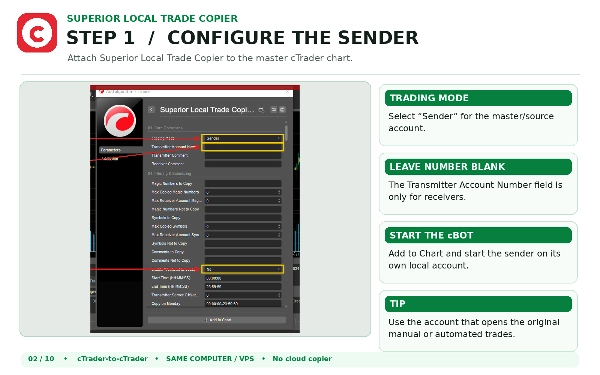
- 在您的主账户上:将cBot附加到任意图表,并将角色设置为发送端。
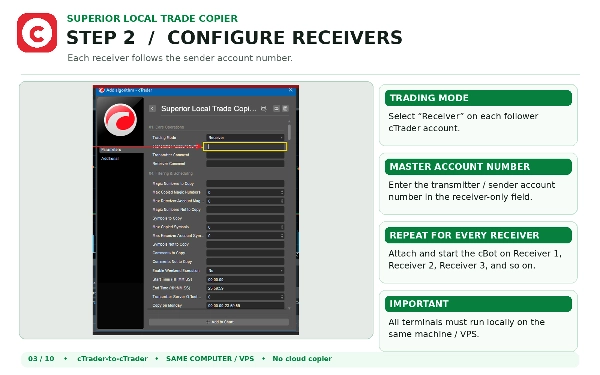
- 在您的跟随账户上:将cBot附加到任意图表,并将角色设置为接收端。
两端点击开始。复制器将在本地链接您的账户并立即开始复制。
重要说明与支持
- 仅限本地账户:Superior Local Trade Copier仅在同一台PC或VPS上运行的账户间复制。不复制来自cTrader Copy网页门户的云策略提供者。
- 设置指南:完整设置说明见讨论标签页。
- 支持与帮助:如需帮助或设置支持,请直接通过我们的 cTrader个人资料联系我们。
摘要
AI 摘要
Superior Local Trade Copier is a cTrader cBot utility designed to instantly copy positions and pending orders between multiple cTrader terminals on the same PC or VPS. It operates with ultra-low latency by using optimized binary file synchronization locally, eliminating external network dependencies and APIs.
The cBot can function as a Sender (transmitting trades) or Receiver (copying trades), enabling users to distribute strategies, manage multiple accounts, or scale portfolios efficiently. It supports all order types, including active market positions and pending orders (limits and stops).
Key features include multiple lot sizing modes—copy exact sender lot sizes, use fixed lot sizes, apply multipliers, or calculate dynamic risk based on account balance and stop-loss distance. Symbol mapping options allow compatibility across brokers with different instrument naming conventions through prefixes, suffixes, or custom mappings.
Integrated daily equity protection limits risk by stopping copying when daily loss thresholds (percentage or absolute value) are exceeded, with options to close all trades and cancel pending orders automatically. The equity protection resets daily at midnight GMT.
Setup involves installing the cBot on master and client terminals, configuring trading modes, file identifiers for communication, lot sizing, symbol mapping, and equity protection settings. This tool is recommended for VPS environments to ensure low-latency trade copying.
The cBot can function as a Sender (transmitting trades) or Receiver (copying trades), enabling users to distribute strategies, manage multiple accounts, or scale portfolios efficiently. It supports all order types, including active market positions and pending orders (limits and stops).
Key features include multiple lot sizing modes—copy exact sender lot sizes, use fixed lot sizes, apply multipliers, or calculate dynamic risk based on account balance and stop-loss distance. Symbol mapping options allow compatibility across brokers with different instrument naming conventions through prefixes, suffixes, or custom mappings.
Integrated daily equity protection limits risk by stopping copying when daily loss thresholds (percentage or absolute value) are exceeded, with options to close all trades and cancel pending orders automatically. The equity protection resets daily at midnight GMT.
Setup involves installing the cBot on master and client terminals, configuring trading modes, file identifiers for communication, lot sizing, symbol mapping, and equity protection settings. This tool is recommended for VPS environments to ensure low-latency trade copying.
交易概览
讨论
客户评价
5.0
评价:8
5 | 100 % | |
4 | 0 % | |
3 | 0 % | |
2 | 0 % | |
1 | 0 % |
客户评价
October 5, 2026
I purchased Superior Local Trade Copier to copy trades between two prop trading accounts. I initially had trouble with the setup, but the developer guided me step by step using screenshots, and I completed it in under 30 minutes.The support was very fast, kind, and reliable, and the copier is simple and easy to use. I highly recommend it. Thank you very much for your excellent support!
October 2, 2026
great seller, he helped me alot in fixing problems and very good copier, keep it up
September 7, 2026
Fantastic local trade copier cbot. It was just what I was looking for. Does everything I need and a whole load more. Very powerful and configurable. There is a very detailed manual to help get set up and the developer is a message away from giving excellent and prompt support. Highly recommended and great value.
August 27, 2026
The cTrader Local Trade Copier works amazingly well! It copies trades over to sub-accounts instantly with ultra-low latency. Setup took less than a few minutes, and it handles position management flawlessly. If you need a stable and fast copier for local execution across multiple accounts, this is definitely worth it. 10/10!
August 17, 2026
A highly configurable local cTrader trade copier with extensive risk management, filtering, symbol mapping, pending-order handling and prop-firm protection features. Its configuration depth is impressive and well supported by documentation, although initial multi-instance setup may require some learning.
August 10, 2026
Excellent trade copier and excellent support. The setup is straightforward, and the copier works very well. I had an issue with symbol mapping between two different brokers, and the developer responded very quickly and helped me solve it. Very professional and helpful support. Highly recommended!
July 18, 2026
Great Value for this CBot! I struggeld a bit to get it going, but the Support (on the Weekend☝️) was absolutely great. Very fast, very friendly and with real Knowledge (no AI-Sh..!). Thanks a lot 🙏 don’t hestitate to contact them, you will Save a lot of time 👌❤️🙏
June 27, 2026
⭐⭐⭐⭐⭐ Excellent trade copier with loads of useful features and a simple interface. It’s fast, reliable, and works exactly as expected. The WhatsApp support is outstanding—quick responses and clear step-by-step help. Unlike other trade copiers where I’ve waited days for support, this developer was always available. Easily one of the best, if not the best, trade copiers I’ve used. Highly recommended! ⭐⭐⭐⭐⭐
常见问答
Fixed Lot
Stop Loss (SL) Manager
Daily Loss Limit
VPS Recommended
Take Profit (TP) Manager
cTrader Store 提供的所有产品,包括交易机器人、指标和插件,均由第三方开发者提供,仅供信息参考和技术访问之用。cTrader Store 并非经纪商,不提供投资建议、个人推荐或任何未来业绩保证。