present
Зарегистрируйтесь и получите скидку $50 на первую покупку
Trading product for Keel Workspace Десктопный плагин No Overtrading Chart UI Tools, image 1
Keel Workspace
Десктопный плагин
Версия 1.0, Oct 2026
Windows, Mac
Trading product for Keel Workspace Десктопный плагин No Overtrading Chart UI Tools, image 2
Trading product for Keel Workspace Десктопный плагин No Overtrading Chart UI Tools, image 3
Trading product for Keel Workspace Десктопный плагин No Overtrading Chart UI Tools, image 4
Trading product for Keel Workspace Десктопный плагин No Overtrading Chart UI Tools, image 5
Trading product for Keel Workspace Десктопный плагин No Overtrading Chart UI Tools, image 6
Trading product for Keel Workspace Десктопный плагин No Overtrading Chart UI Tools, image 7
Trading product for Keel Workspace Десктопный плагин No Overtrading Chart UI Tools, image 8
Trading product for Keel Workspace Десктопный плагин No Overtrading Chart UI Tools, image 9
Trading product for Keel Workspace Десктопный плагин No Overtrading Chart UI Tools, image 10
Trading product for Keel Workspace Десктопный плагин No Overtrading Chart UI Tools, image 11
С 23/02/2025

Описание

Keel Workspace is a risk management plugin and trade journal for cTrader. Set entry, stop and take profit on the chart, and the lot size comes from the risk you choose (0.5%, 1%, 2%). Daily and weekly loss limits, trading hours, spread and news rules keep you inside your own plan. Then review and journal every trade in its own window.

Quick tour

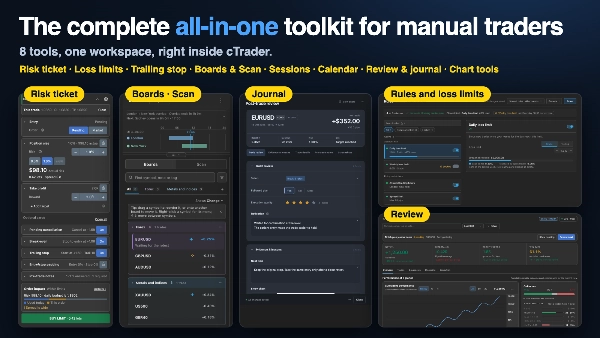
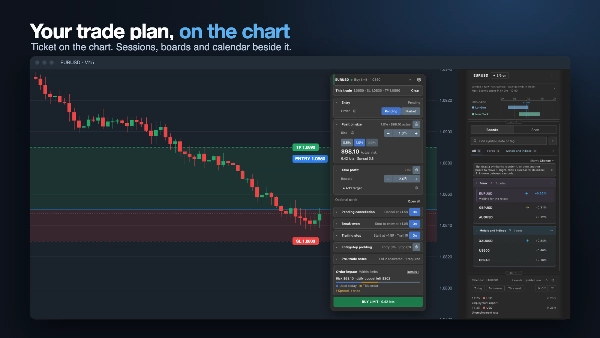
  1. Trade ticket on the chart: lot size from your risk, with the impact on your daily budget shown before you send.
  2. Rules: daily and weekly loss limits, trading hours, spread and news limits, with locks and presets.
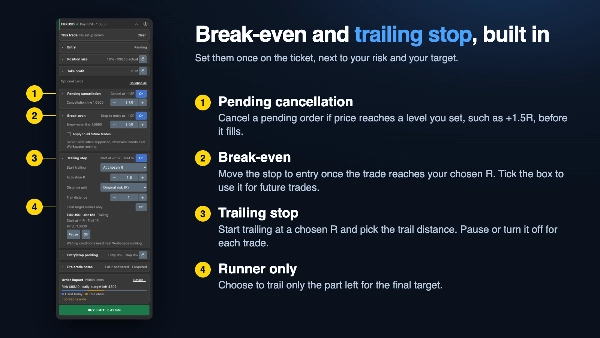
  3. Trade management: break-even, trailing stop and pending-order cancellation.
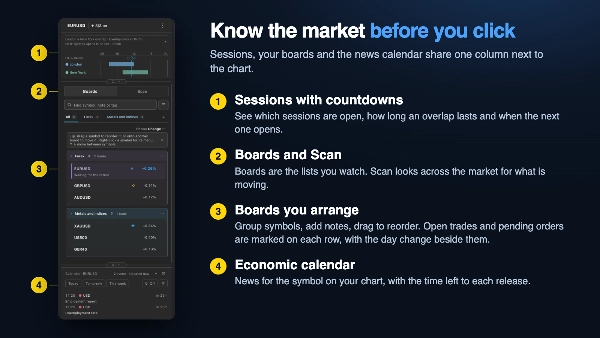
  4. Boards and Scan: the symbols you watch, and a scan of the market or of your own sets, with sessions and the economic calendar in one column.
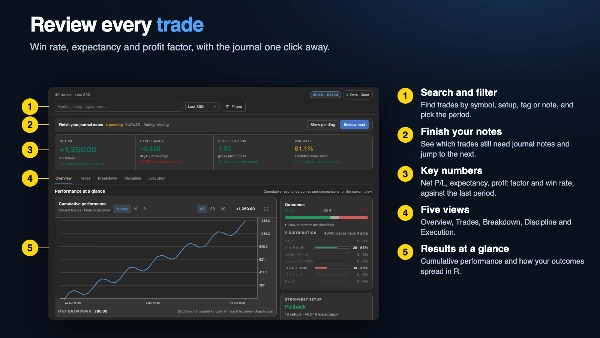
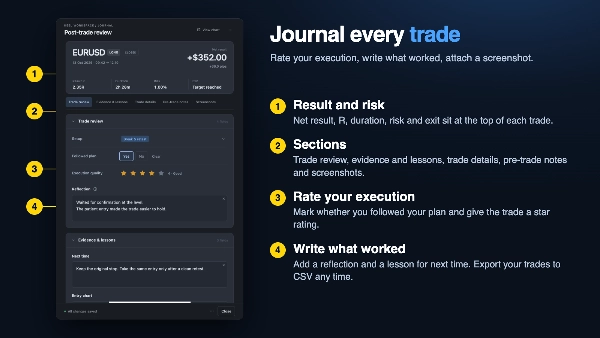
  5. Review and journal: win rate, expectancy, profit factor, notes, screenshots and CSV export.
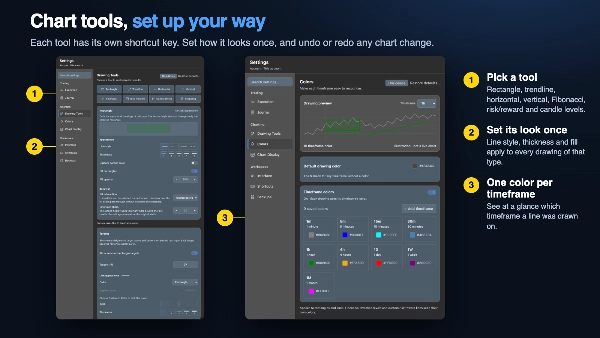
  6. Chart tools: rectangle, trendline, Fibonacci, horizontal and vertical lines and a risk/reward tool, each on one key, with undo and redo.

Trade ticket on the chart

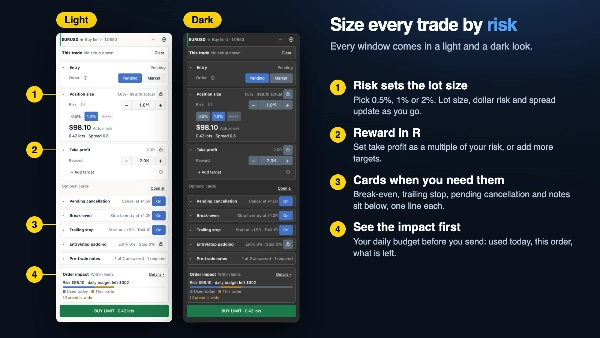
Set entry, stop and take profit, and the lot size comes from the risk you choose. The ticket shows what the order does to your daily budget before you send it. Break-even, trailing stop and pending-order cancellation are built in. You can also edit open trades and orders, with a review step before changes apply.

Rules that protect you

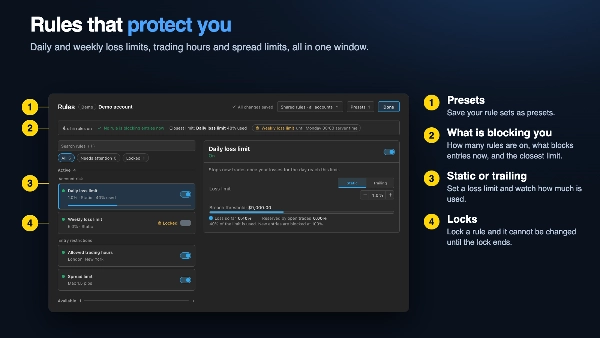
Set daily and weekly loss limits, allowed trading hours, spread limits and news restrictions. Lock a rule and it cannot be changed until the lock ends. Save your rule sets as presets.

Boards and Scan

  • Boards are the lists you watch. Group your symbols, add notes and tags, drag to reorder or move a symbol to another board, and search by symbol, note or tag. Open positions and pending orders are marked on each symbol, and you can show the day change, spread or price beside it. Smart boards fill themselves from rules you set.
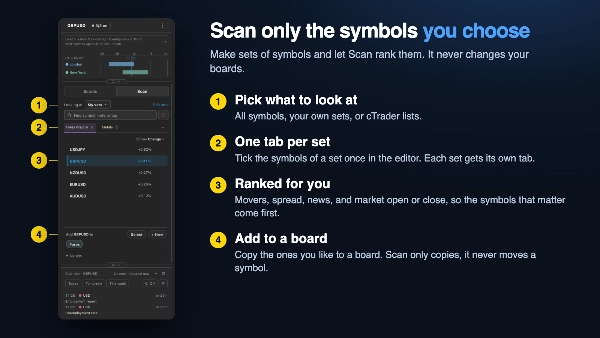
  • Scan looks at the market for you. Look at all symbols, cTrader's own lists, or your own sets: make a set once by ticking its symbols, and it gets its own tab. Scan ranks what is moving and shows spread, news, and market open or close.
  • Add the symbols you like to a board. Scan only copies; it never moves or changes anything on your boards.

Sessions and calendar

See the forex and stock market sessions with countdowns, and watch the economic calendar for the symbol on your chart, with the time left to each release. They sit in the same column as your boards.

Review and journal

Review your trades in their own window, with win rate, expectancy and profit factor. Rate each trade, add notes, an entry chart and screenshots, and export your trades to CSV.

Chart tools

Draw rectangles, trendlines, Fibonacci, horizontal and vertical lines and a risk/reward tool, each on its own shortcut key. Undo and redo chart changes, show your past trades on the chart, and set one color per timeframe.

Made to fit your setup

Light and dark looks, keyboard shortcuts, and backup, import and reset for all settings.

Who it is for

Manual traders on cTrader who want to size trades by risk, avoid breaking their own rules, and keep their review habit in one place.

Good to know

  • It never trades by itself. You place every order.
  • Rent it yearly and cancel any time, or buy it once.
  • Works with cTrader on Windows and Mac.
  • Only need the trade ticket and loss limits? Keel Trade Ticket and Risk Limits is the smaller edition. Do not run both on the same account: both enforce the same rules.

Trading involves risk. Past performance does not guarantee future results. Rules and limits help reduce mistakes but cannot prevent every loss. This is a tool, not financial advice.


Сводка

Профиль плагина
Категория плагина
Управление сделками
Доступ к данным
Рыночные данные
Позиции
Ордера
Аккаунт
История
График
Рабочие пространства
Поддерживаемые типы ордеров
Рыночный
Лимитный
Стоп
Стоп-лимит
Модель риска
Фиксированный процент риска
На основе волатильности
На основе текущих средств
Динамическая
Поддерживаемые инструменты управления риском
Стоп-лосс
Тейк-профит
Скользящий стоп-лосс
Безубыточность
Стоп-лосс на уровень средств
Дневные лимиты
Лимит просадки баланса
Фильтр по сессиям
Фильтр по спреду
Фильтр по новостям

Обсуждение

Отзывы покупателей

0.0
Отзывы: 0
Отзывы покупателей
У этого продукта еще нет отзывов. Уже попробовали его? Поделитесь впечатлениями!

Частые вопросы

No Overtrading
Chart UI Tools
Economic Calendar
TP Manager
Trade Journal
Trailing Stop Manager
Max Drawdown Guard
Продукты, доступные в cTrader Store, включая торговых ботов, индикаторы и плагины, предоставляются сторонними разработчиками и доступны исключительно в информационных и технических целях. cTrader Store не является брокером и не предоставляет инвестиционные консультации, персональные рекомендации или какие-либо гарантии будущей доходности.

Вам также может понравиться

Десктопный плагин
AI
ATR
+27
Trade Analytics delivers advanced trading insights and heatmaps directly inside TradeWatch.
Десктопный плагин
SMC
Grid
+5
The all-in-one trade management plugin that automates your risk, execution, and position management.
Десктопный плагин
Fixed Risk %
Risk/Reward
+5
⚡Built for traders who value cleaner execution, agile risk management and a smoother trading experience.
Десктопный плагин
Risk Reward management tools (风险回报管理工具)
Десктопный плагин
Prop
Forex
+4
Professional risk management plugin with automatic lot calculation, chart panels, and R:R automation. Version 1.4.2.
Десктопный плагин
SL Manager
Break Even
+5
Risk-based position sizing, multi-target take profits, automated trailing stops, and bulk exits directly on your chart.
Десктопный плагин
AI
ATR
+27
Turn your cTrader trade history into a visual performance dashboard to see trading patterns and strategy strength
Десктопный плагин
Prop
Forex
+3
Visual calendar with daily PnL, trades, win rate, profit factor, and performance insights.
Десктопный плагин
Break Even
Risk/Reward
+5
Trading panel: lot size from your risk, lines on the chart, and an order check against your daily and max loss.
Десктопный плагин
TP Manager
Prop Firm Fit
+5
Size trades by risk, stop at your daily loss limit, review every trade. Ticket, rules and journal in one cTrader panel.
Десктопный плагин
Forex
Crypto
+2
Get TradingView charts & heatmaps directly in cTrader!

Цена

С 23/02/2025