
説明
ボリュームプロファイルTPOバブル — The Quantによる
ボリュームプロファイルTPOバブルは、The Quantが作成したプレミアムcTraderインジケーターです。
参加したいですか?リンクはプロフィールにあります
━━━━━━━━━━━━━━━━━━━━━━
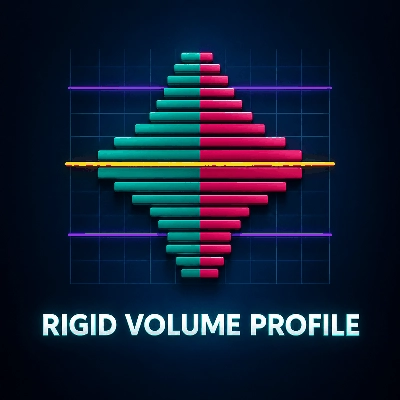
VOLUME PROFILE TPO BUBBLE
━━━━━━━━━━━━━━━━━━━━━━
ボリュームプロファイルTPOバブルは、cTraderのための完全なマーケットリーディングインジケーターです。
強力なマーケットリーディングツールを1つのクリーンなインジケーターにまとめています:
◆ ボリュームプロファイル
◆ バブルチャート
◆ TPO
◆ ロボット用のPOCブレイク&リテストシグナル
このツールは、ボリュームゾーンをより明確に読み取り、重要なPOCレベルを特定し、それらのレベルを手動または自動戦略の中で使用したいトレーダー向けに設計されています。
これは、cTrader向けに構築されており、視覚的分析とcBot自動化の両方を考慮しています。
━━━━━━━━━━━━━━━━━━━━━━
このインジケーターがすること
━━━━━━━━━━━━━━━━━━━━━━
マーケットアクティビティゾーン
ボリュームプロファイルTPOバブルは、市場が活発だったゾーンを特定するのに役立ちます。
これらのゾーンはPOC、またはコントロールポイントと呼ばれます。
POCは、活動が集中していた価格帯です。
価格がこのエリアに戻ってくると、ブレイク、リテスト、拒否、または反応が起こる可能性があります。
主な目的
目的は、市場を予測することではありません。
重要な市場ゾーンを見やすく、理解しやすく、戦略で使いやすくすることです。
━━━━━━━━━━━━━━━━━━━━━━
主な視覚モード
━━━━━━━━━━━━━━━━━━━━━━
◆ ボリュームプロファイル
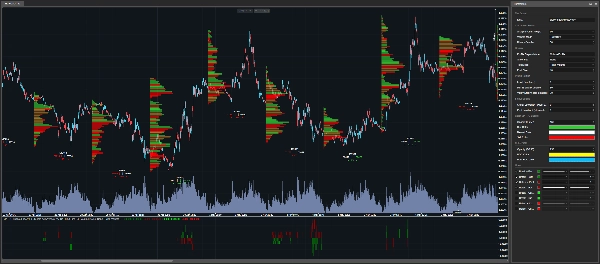
ボリュームプロファイルモードは、cTraderチャート上に水平のボリュームバーを直接表示します。
バーが大きいほど、選択された分析キャンドル中の価格ゾーンが重要だったことを示します。
このモードは、ボリューム分布の全体構造を見たいときに便利です。
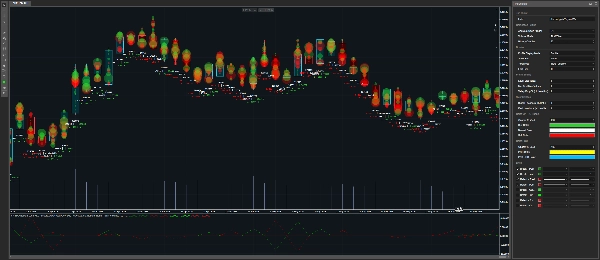
◆ バブルチャート
バブルチャートモードは、重要なボリュームゾーンをバブルとして表示します。
バブルが大きいほど、検出されたゾーンがより重要です。
このモードは、高速な視覚的読み取りのために作られています。
チャート上で最も重要なエリアを素早く見つけるのに役立ちます。
主にバブルチャートとしてインジケーターを使用したい場合は、Show POCをNoneに設定し、次の設定を調整できます:
• 最大ボリュームの最小%
• 谷の減少%
これらの設定は、表示するバブルの数を制御します。
値が低いほど、より多くのバブルが表示されます。
値が高いほど、最もクリーンなゾーンのみが保持されます。
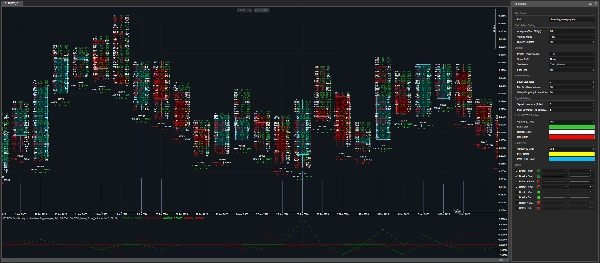
◆ TPO
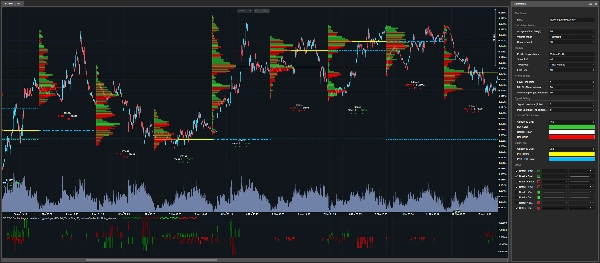
TPOモードは、キャンドル内で何が起こったかをより詳細に表示します。
以下を表示します:
• 買いボリューム
• 売りボリューム
• デルタ
• 価格レベルの活動
このモードは、ボリュームがどこにあったかだけでなく、ゾーンの内部構造を理解したいときに役立ちます。
━━━━━━━━━━━━━━━━━━━━━━
ティックとTickXSizeのロジック
━━━━━━━━━━━━━━━━━━━━━━
CFDボリュームコンテキスト
CFDでは、トレーダーは先物市場のような中央集権的な取引所のボリュームを受け取りません。
代わりに、ボリュームはブローカーのティックデータに基づいています。
このインジケーターは、2つのボリューム計算モードを提供します:
• Tick
• TickXSize
◆ Tick
各ティックは1単位としてカウントされます。
これはブローカーのティックフローの単純な読み取りです。
◆ TickXSize
ティックは価格変動の大きさによって重み付けされます。
価格を1ピップ動かすティックは、0.1ピップ動かすティックよりも重みが大きいです。
これにより、生のティック数だけでは明らかでない動きの影響が大きいゾーンを明らかにするのに役立ちます。
単純な違い
Tickはイベントをカウントします。
TickXSizeは動きの重み付きでイベントをカウントします。
━━━━━━━━━━━━━━━━━━━━━━
POC検出
━━━━━━━━━━━━━━━━━━━━━━
POCが検出される方法
インジケーターは、ボリュームのピークとフィルタリングロジックを使ってPOCゾーンを検出します。
ゾーンは、関連性があると見なされるために、十分に強くかつ十分に孤立している必要があります。
これにより、チャート上のすべての小さなノイズエリアの表示を避けることができます。
現在および過去のPOC
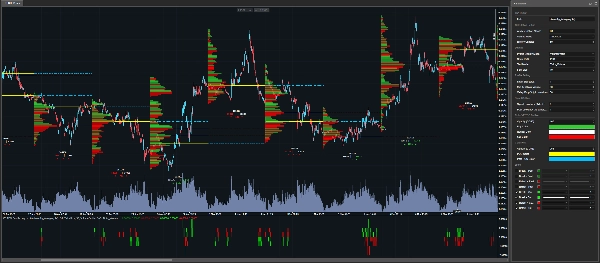
現在のPOCはチャート上に直接表示できます。
また、次の分析キャンドルに点線で延長することもできます。
過去のPOCも表示でき、トレーダーがまだ重要な可能性のある古いレベルを追跡できます。
━━━━━━━━━━━━━━━━━━━━━━
ロボット対応のブレイク&リテストシグナル
━━━━━━━━━━━━━━━━━━━━━━
視覚インジケーターと自動化ツール
ボリュームプロファイルTPOバブルは視覚的インジケーターだけではありません。
また、cBotやトレーディングロボット内で使用できる出力シリーズも公開します。
検出されるシグナルタイプ
インジケーターは以下を検出できます:
• 現在のPOCレベルのブレイク
• 現在のPOCレベルのリテスト
• 過去のPOCレベルのブレイク
• 過去のPOCレベルのリテスト
これにより、ロボットは価格が重要なボリュームゾーンと相互作用したときに検出できます。
━━━━━━━━━━━━━━━━━━━━━━
シグナルスコア
━━━━━━━━━━━━━━━━━━━━━━
スコアの意味
インジケーターはシグナルだけでなく、
またスコアを返します。
スコアは、ロボットにどのPOCゾーンが触れられ、破られ、またはリテストされたかを伝えます。
スコアロジック
ランキングは選択された分析キャンドルの始値に基づいています。
正のスコアは始値より上のPOCゾーンを表します。
負のスコアは始値より下のPOCゾーンを表します。
例
• +1 = 始値より上の最初のPOCゾーン
• -1 = 始値より下の最初のPOCゾーン
• +2 = 始値より上の2番目のPOCゾーン
• -3 = 始値より下の3番目のPOCゾーン
数字がゼロから離れるほど、ゾーンは始値から遠くなります。
自動化における重要性
これは自動化に役立ちます。なぜなら、ロボットはシグナルが発生しただけでなく、
シグナルがどこで発生したかも知るからです。
━━━━━━━━━━━━━━━━━━━━━━
パラメーター
━━━━━━━━━━━━━━━━━━━━━━
すべてのパラメーターはカテゴリ別に整理されているため、各設定が何を制御しているかをすぐに理解できます。
━━━━━━━━━━━━━━━━━━━━━━
計算設定
━━━━━━━━━━━━━━━━━━━━━━
◆ 分析タイムフレーム
• プロファイルを構築するために使用されるタイムフレームを選択します。
• このタイムフレームは、プロファイルの構築、POCの検出、シグナルスコアの整理の基礎となります。
例:
• 日足 = 1日ごとに1つのプロファイル
• H4 = 4時間ごとに1つのプロファイル
◆ ボリュームモード
• ティックボリュームの計算方法を選択します。
利用可能なモード:
• Tick = 1ティックは1単位
• TickXSize = ティックは価格変動の大きさで重み付けされる
Tickは単純なモードです。
TickXSizeは価格をより強く動かすティックにより重要性を与えます。
◆ 履歴キャンドル
• 選択された分析タイムフレームからチャート上に保持される過去のキャンドル数を定義します。
• 多くのキャンドルはより多くの履歴コンテキストを提供します。
• 少ないキャンドルはチャートを軽く保ちます。
• インジケーターは内部的に小さな追加マージンを保持し、POC、ブレイク、およびリテストが正しく計算されるようにします。
━━━━━━━━━━━━━━━━━━━━━━
表示設定
━━━━━━━━━━━━━━━━━━━━━━
◆ プロファイル表示モード
• チャートに表示される内容を選択します:
• なし
• ボリュームプロファイル
• バブル
• TPO
なしは自動化に便利で、チャートから描画を削除しながらインジケーターの出力を利用可能に保ちます。
これにより、トレーダーはクリーンなチャートを維持しつつ、ロボット内でシグナルを使用できます。
◆ POC表示
• 表示されるPOCレベルを制御します。
利用可能なオプション:
• なし = POCラインなし
• PoC = 現在のPOCレベル
• PoC過去 = 過去のPOCレベル
• すべて = 現在および過去のPOCレベル
現在のPOCは、次の分析キャンドルに点線で延長できます。
◆ テキストモード
• キャンドルの下に表示されるボリューム情報を制御します。
利用可能なオプション:
• なし = テキストなし
• ティックボリューム = ティックボリューム情報
• デルタパーセント = 不均衡をパーセントで表示
自動化のために、チャートをクリーンに保つためになしに設定できます。
◆ フォントサイズ
• 表示されるテキストのサイズを制御します。
• 読みやすさを向上させるためにサイズを大きくします。
• チャートが混雑している場合はサイズを小さくします。
━━━━━━━━━━━━━━━━━━━━━━
プロファイル設定
━━━━━━━━━━━━━━━━━━━━━━
◆ レベルサイズ
• 各価格レベルのサイズを制御します。
• 小さい値はより詳細を提供します。
• 大きい値はよりクリーンで軽いプロファイルを作成します。
• インジケーターには、チャートオブジェクトが多すぎるのを防ぐ安全機構が含まれています。
「レベルサイズを増やすことを推奨する」メッセージが表示された場合、それはインジケーターが不要な過負荷からチャートを保護していることを意味します。
その場合、安全な最小レベルが内部的にすでに適用されています。
◆ 最大ボリュームの最小%
• ゾーンの強さに基づいてフィルタリングします。
• インジケーターはまずキャンドル内で最も強いボリュームゾーンを見つけます。
• その後、選択された最大ゾーンのパーセンテージに達するゾーンのみを保持します。
例:
• 最大ボリュームの最小%が80%に設定されている場合、最高ボリュームゾーンの少なくとも80%のゾーンのみが選択されます。
値が低いほど、より多くのゾーンが表示されます。
値が高いほど、より少ないが強いゾーンが表示されます。
最大ボリュームの最小%はパワーフィルターです。
◆ 谷の減少%
• POCが明確に孤立しているかどうかをチェックします。
• POCは山の頂上のように考えます。
• それが本当のピークであることを確認するために、インジケーターは周囲のボリュームが十分に減少しているかをチェックします。
値が低いほど、より多くのゾーンを許容します。
値が高いほど、よりクリーンで分離されたゾーンのみを保持します。
谷の減少は孤立フィルターです。
━━━━━━━━━━━━━━━━━━━━━━
シグナル設定
━━━━━━━━━━━━━━━━━━━━━━
◆ シグナルの遡及期間
• 現在のブレイクおよびリテストシグナルに使用されるPOCを提供する閉じたキャンドルを選択します。
利用可能な値:
• 0 = 最後に閉じたキャンドル
• 1 = 最後に閉じたキャンドルの1つ前のキャンドル
• 2 = さらに前
これにより、トレーダーはより新しいまたは古いPOC参照に基づくシグナルをテストできます。
◆ 過去の遡及期間
• 過去のPOCレベルを構築するためにスキャンされる古いキャンドルの数を定義します。
• 値が高いほど、インジケーターはまだ重要な可能性のある古いPOCゾーンを検索できます。
━━━━━━━━━━━━━━━━━━━━━━
カラー設定
━━━━━━━━━━━━━━━━━━━━━━
◆ プロファイルカラー
これらの設定は視覚的プロファイルの色をカスタマイズします:
• 買い色
• 売り色
• 中立色
• プロファイルの不透明度
これらの設定は、ボリュームプロファイル、バブルチャート、およびTPO要素の外観を制御します。
◆ POCカラー
これらの設定は現在および過去のPOCレベルの色をカスタマイズします:
• POC色
• 過去のPOC色
• POCの不透明度
現在のPOCと過去のPOCで異なる色を使うことで、チャートが読みやすくなります。
━━━━━━━━━━━━━━━━━━━━━━
このインジケーターは誰のため?
━━━━━━━━━━━━━━━━━━━━━━
このインジケーターは以下の方々向けに設計されています:
◆ cTraderユーザー
◆ ボリュームプロファイルトレーダー
◆ TPOトレーダー
◆ バブルチャートユーザー
◆ POCトレーダー
◆ アルゴトレーダー
◆ cBot開発者
◆ 視覚ツールとロボット対応の出力を求めるトレーダー
◆ ボリュームゾーン周辺のブレイク&リテストロジックをテストしたいトレーダー
━━━━━━━━━━━━━━━━━━━━━━
重要な注意事項
━━━━━━━━━━━━━━━━━━━━━━
このインジケーターは魔法のボタンではありません。
市場を予測しません。
トレーダーが重要な市場ゾーンを特定し、価格反応を観察し、テスト、最適化、および自動化できる戦略を構築するのに役立ちます。
必ずライブで使用する前に戦略をテストしてください。
━━━━━━━━━━━━━━━━━━━━━━
THE QUANT
━━━━━━━━━━━━━━━━━━━━━━
The Quantは、以下に焦点を当てたトレーディングおよびアルゴトレーディングプロジェクトです:
◆ データ
◆ 自動化
◆ バックテスト
◆ 最適化
◆ 過剰適合防止
目標は、トレーダーがアイデアからテスト可能、構造化された、および自動化可能な戦略へと進むのを支援することです。
データを信じる人のためのThe Quant。
概要
Designed for both manual traders and algorithmic developers, it supports cBot automation by providing break and retest signals of current and past POC levels, along with scoring to indicate the relative position of these zones to the candle open price. This facilitates the creation and testing of volume-based trading strategies.
Volume calculation can be set to simple tick counts or weighted by price movement size (TickXSize), enhancing the detection of impactful volume zones, especially in CFD markets where volume data is broker-dependent. The indicator offers customizable display modes, filtering parameters for volume zone strength and isolation, and color settings for clarity.
Intended for cTrader users interested in volume profile, TPO, bubble chart visualization, and automated trading strategies, it aids in identifying significant volume zones and price reactions without predicting market direction.
カスタマーレビュー
5 | 100 % | |
4 | 0 % | |
3 | 0 % | |
2 | 0 % | |
1 | 0 % |