
Opis
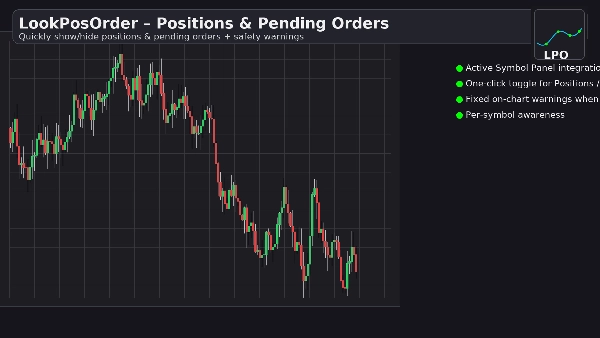
LookPosOrder pomaga uniknąć kosztownych niespodzianek, umożliwiając łatwe pokazywanie lub ukrywanie Pozycji oraz Oczekujących Zleceń—oraz wyraźnie ostrzega, gdy cokolwiek jest ukryte dla bieżącego symbolu.
Co robi
- Dodaje czysty blok kontrolny w Panelu Aktywnego Symbolu (ASP) z dwoma polami wyboru:
-
- Pozycje: widoczne / ukryte
- Oczekujące: widoczne / ukryte
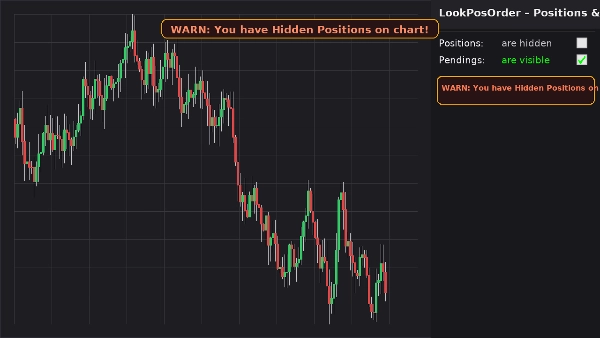
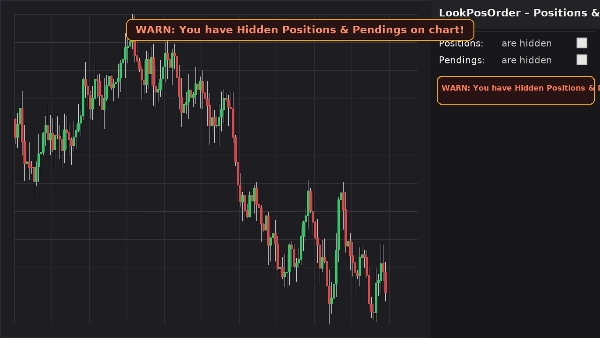
- Pokazuje stały baner ostrzegawczy na wykresie (nie przesuwa się podczas przesuwania/powiększania), jeśli istnieją ukryte elementy dla bieżącego symbolu.
- Odbija to samo ostrzeżenie w linii w bloku ASP.
- Zapamiętuje Twoje preferencje dla każdego symbolu.
Dlaczego traderzy to kochają
- Zapobiega błędom: nigdy nie zapomnij, że coś jest ukryte na Twoim wykresie.
- Szybkie przełączanie: zero szukania w menu wykresu.
- Świadomość na poziomie symbolu: ostrzega tylko, gdy bieżący symbol faktycznie ma ukryte elementy.
- Lekki i czysty: minimalny interfejs użytkownika, natychmiastowa reakcja.
Kluczowe funkcje
- Integracja z Panelem Aktywnego Symbolu
- Przełączniki jednym kliknięciem dla Pozycji oraz Oczekujących Zleceń
- Stały baner ostrzegawczy na wykresie, gdy istnieją ukryte elementy
- Ostrzeżenie w linii wewnątrz bloku ASP
- Świadomość na poziomie symbolu (filtruje pozycje/zlecenia do bieżącego symbolu)
- Trwałość ustawień (dla każdego symbolu)
- Działa wraz z natywnymi Ustawieniami Wyświetlania (automatyczna synchronizacja, jeśli zmienione z menu wykresu)
Wymagania
- cTrader 5.4.9 lub nowszy zalecany
- Platforma desktopowa
Instalacja
- Pobierz plik wtyczki.
- Otwórz cTrader → Automatyzacja → Wtyczki → Importuj.
- Włącz Wtyczkę LookPosOrder.
- Otwórz wykres, wybierz symbol i użyj bloku LookPosOrder w prawym ASP.
Jak używać
- Przełączaj Pozycje oraz Oczekujące za pomocą pól wyboru.
- Jeśli coś jest ukryte i istnieje dla bieżącego symbolu, zobaczysz ostrzeżenie:
-
- „OSTRZEŻENIE: Masz ukryte pozycje na wykresie!”
- „OSTRZEŻENIE: Masz ukryte oczekujące na wykresie!”
- „OSTRZEŻENIE: Masz ukryte pozycje i oczekujące na wykresie!”
FAQ
P: Czy wtyczka zmienia moje zlecenia lub pozycje?
O: Nie. Tylko przełącza widoczność wykresu za pomocą natywnych Ustawień Wyświetlania.
P: Czy będzie mnie ostrzegać dla innych symboli?
O: Nie. Ostrzeżenia pojawiają się tylko, gdy bieżący symbol ma ukryte elementy.
P: Co jeśli zmienię widoczność z menu wykresu?
O: Wtyczka automatycznie synchronizuje pola wyboru i ostrzeżenia.
P: Wpływ na wydajność?
O: Znikomy. To lekka nakładka UI i blok ASP.
Zwrot pieniędzy
- Zwroty: 14-dniowa gwarancja zwrotu pieniędzy, jeśli wtyczka nie działa zgodnie z opisem na Twojej konfiguracji.
Prywatność
Wtyczka nie zbiera ani nie przesyła danych osobowych. Wchodzi w interakcję tylko z lokalnym wykresem i interfejsem cTrader.
Podsumowanie
Dyskusja
Opinie klientów
5 | 100 % | |
4 | 0 % | |
3 | 0 % | |
2 | 0 % | |
1 | 0 % |