present
Registrieren Sie sich und erhalten Sie $50 Rabatt auf Ihren ersten Kauf
Trading product for LookPosOrderIndicator Indikator Signal Indices, image 1
LookPosOrderIndicator
Indikator
1 käufe
Version 1.0, Oct 2025
Windows, Mac
4.3
Bewertungen: 3
Trading product for LookPosOrderIndicator Indikator Signal Indices, image 2
Trading product for LookPosOrderIndicator Indikator Signal Indices, image 3
Trading product for LookPosOrderIndicator Indikator Signal Indices, image 4
1
Verkäufe

Beschreibung


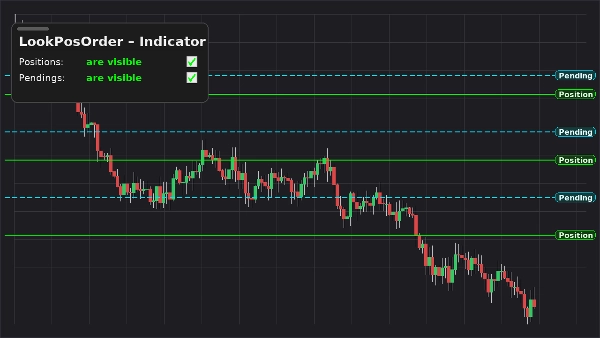
LookPosOrder (Indikator) hält Sie sicher und schnell: Es fügt Ihrem Chart ein schwebendes, verschiebbares Panel hinzu, um Positionen und ausstehende Aufträge anzuzeigen oder zu verbergen — und zeigt ein feststehendes, zentriertes Warnbanner oben an, sobald für das aktuelle Symbol versteckte Elemente vorhanden sind.

Was es tut

  • Panel im Chart mit zwei Umschaltern:
    • Positionen: sichtbar / verborgen
    • Ausstehende: sichtbar / verborgen
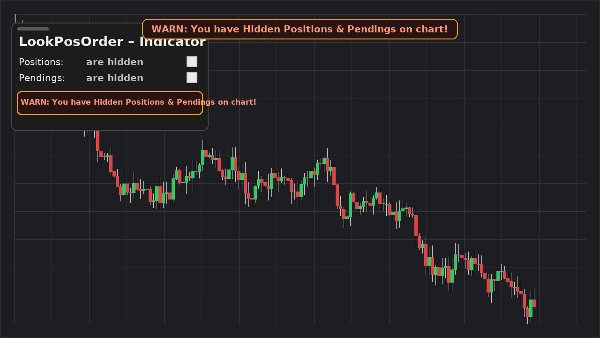
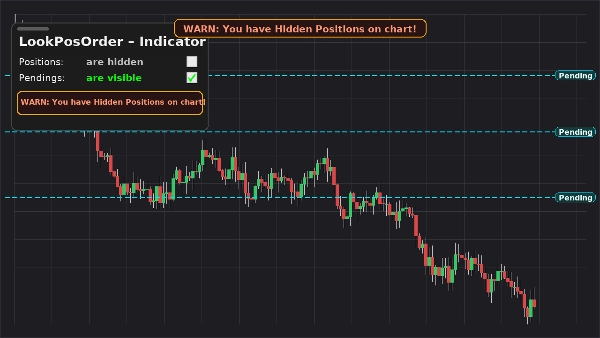
  • Feststehende Warnung im Chart (bewegt sich nicht beim Schwenken/Zoomen), wenn versteckte Elemente vorhanden sind.
  • Gleiche Inline-Warnung im Panel.
  • Symbolbezogenes Bewusstsein: warnt nur, wenn das aktive Symbol tatsächlich versteckte Elemente hat.
  • Erinnert sich an Ihre Präferenzen pro Symbol.

Warum Trader es lieben

  • Fehler vermeiden: vergessen Sie nicht, dass Sie Aufträge/Positionen verborgen haben.
  • Sofortiges Umschalten: kein langes Suchen in Chart-Menüs mehr.
  • Saubere Überlagerung: verschiebbar, kompakt und reaktionsschnell.

Hauptmerkmale

  • Verschiebbares Steuerpanel im Chart
  • Ein-Klick-Umschalter für Positionen und ausstehende Aufträge
  • Feststehendes Warnbanner, wenn versteckte Elemente vorhanden sind
  • Inline-Warnung im Panel
  • Symbolbezogenes Bewusstsein
  • Funktioniert zusammen mit den nativen Anzeigeeinstellungen (automatische Synchronisation bei Änderungen an anderer Stelle)

Anforderungen

  • cTrader 5.4.9 oder höher empfohlen
  • Desktop-Plattform

Installation

  1. Laden Sie die Indikator-Datei herunter.
  2. Öffnen Sie cTrader → Automatisieren → Indikatoren → Importieren.
  3. Fügen Sie LookPosOrder – Indikator Ihrem Chart (Overlay) hinzu.
  4. Ziehen Sie das Panel an die gewünschte Stelle; verwenden Sie die beiden Kontrollkästchen, um die Sichtbarkeit zu steuern.

Anwendung

  • Schalten Sie Positionen und Ausstehende über das schwebende Panel um.
  • Wenn etwas verborgen und für das aktuelle Symbol vorhanden ist, erscheinen Warnungen:
    • „WARNUNG: Sie haben verborgene Positionen im Chart!“
    • „WARNUNG: Sie haben verborgene ausstehende Aufträge im Chart!“
    • „WARNUNG: Sie haben verborgene Positionen & ausstehende Aufträge im Chart!“
  • Das Warnbanner ist fest oben zentriert. Verwenden Sie den Indikatorparameter „Y-Versatz Warntext“, um es bei Bedarf nach unten zu verschieben.

FAQ

F: Ändert es meine Aufträge/Positionen?
A: Nein. Es schaltet nur die Chart-Sichtbarkeit (native Anzeigeeinstellungen) um.

F: Warnt es mich für andere Symbole?
A: Nein. Warnungen erscheinen nur, wenn das aktuelle Symbol versteckte Elemente hat.

F: Was passiert, wenn ich die Sichtbarkeit über das Chart-Menü ändere?
A: Der Indikator synchronisiert das Panel und die Warnungen automatisch.

F: Leistungseinfluss?
A: Minimal—leichte Überlagerung und Überprüfungen pro Symbol.


Support & Rückerstattung

  • 14-tägige Geld-zurück-Garantie, falls es nicht wie beschrieben für Sie funktioniert.

Zusammenfassung

KI-Zusammenfassung
LookPosOrderIndicator is an on-chart tool for the cTrader desktop platform (version 5.4.9 or later) that provides a draggable control panel to toggle the visibility of open Positions and Pending Orders per trading symbol. It features two one-click toggles within a floating panel to show or hide these items directly on the chart. When any Positions or Pending Orders are hidden for the active symbol, a fixed warning banner appears at the top center of the chart, accompanied by inline warnings inside the panel, alerting the user to hidden items. The indicator remembers visibility preferences individually for each symbol and automatically syncs with native chart display settings if changed elsewhere. This lightweight overlay helps traders avoid overlooking hidden orders or positions by providing instant visual cues without modifying any orders or positions themselves. Installation involves importing the indicator into cTrader’s Automate section and adding it as an overlay on the chart, where the panel can be repositioned as needed. The indicator supports all symbols available in cTrader and integrates seamlessly with native display controls.
Indikatorprofil

Kundenbewertungen

4.3
Bewertungen: 3
5
33 %
4
67 %
3
0 %
2
0 %
1
0 %
Kundenbewertungen
October 15, 2025
It is easier to trust when it helps avoid forced entries. Wrong settings can feel safe.
October 15, 2025
October 5, 2025

Diskussion

Häufig gestellte Fragen (FAQ)

Signal
Indices
Commodities
GBPUSD
RSI
Bollinger
Fibonacci
Scalping
AI
XAUUSD
NAS100
MACD
BTCUSD
Forex
Breakout
EURUSD
NZDUSD
Martingale
ZigZag
Supertrend
Fair Value Gap
Crypto
Grid
Stocks
ATR
USDJPY
VWAP
Über den cTrader Store verfügbare Produkte, einschließlich Handelsbots, Indikatoren und Plugins, werden von externen Entwicklern bereitgestellt und nur zu Informations- und technischen Zugriffszwecken verfügbar gemacht. cTrader Store ist kein Broker und erbringt keine Anlageberatung, persönlichen Empfehlungen oder eine Garantie für zukünftige Performance.

Mehr von diesem Autor

Desktop-Plugin
ATR
RSI
+24
One-click toggle for Positions / Pending Orders on cTrader charts with fixed on-chart warnings and an ASP control panel

Das könnte Sie auch noch interessieren

Indikator
Channel
Imbalance
+2
Adaptive volatility channel based on moving average and standard deviation (σ).
Indikator
The Weekly Daily Levels indicator shows the OHLC, and mid-point prices for the previous day and week.
Indikator
AI
ATR
+27
Trade the Trend Flip. Control the Risk. 🎯📈”
Indikator
ATR
BTCUSD
+5
Trailing algo 📈 auto-tracks trends 🎯 adapts to volatility 🌟 precise moves 🛡️ retest signals 🚀 no lag, smart market
Indikator
Prop
Forex
+11
🧭 See when your market tends to move—by Month, Day-of-Week, or Hour-of-Day🧭
Indikator
MACD
Prop
+8
NTNPICLL is a tool to check the best trading hours for the assets and also includes the highest and lowest point
Indikator
Prop
Forex
+13
Unlock trading precision with QQE! Dual QQE indicators with a Bollinger Bands zero line provide clear buy/sell signals.
Indikator
ATR
RSI
+16
Highlight market consolidation zones instantly with this Inside Candle indicator — precise, clean, and powerful.
Indikator
ADX
ATR
+1
Indicador de Sinais Visuais para Spotcrude (WTI) ou SpotBrent com filtros de tendência, operacional de 10 e 15 minutos.
Indikator
Volume
Custom range volume profile between two draggable anchors. Auto source timeframe, Total/Up-Down/Delta, POC, Value Area.
Indikator
Auto Fibonacci Retracement Indicator for cTrader
Indikator
AI
SMC
+9
Identifies market trends (-10 to +10) using HMA with volume confirmation. Includes customizable alerts.
Indikator
BOS
MSS
+5
Your entire ICT session map, structure engine, and key levels — No manual work. One indicator. Every session!
Indikator
Forex
BTCUSD
+10
Enhance trading with TSI! Use the True Strength Index for clear insights into market momentum and trend strength.
Indikator
Prop
Forex
+14
Stochastic Momentum Index (SMI) for cTrader optional higher-timeframe source, and clear overbought/oversold levels.
Indikator
RSI
RSI on the main chart with 45/55 momentum levels, overbought/oversold levels, averaged RSI, and multi-timeframe support.
Indikator
Forex
BTCUSD
+11
Catch High-Probability Reversals with Precision Swing
Indikator
AI
Forex
+5
Dynamic, color‑coded candles reveal market shifts instantly—spot momentum and trend reversals at a glance

Preis

1
Verkäufe